
Selecteer taal

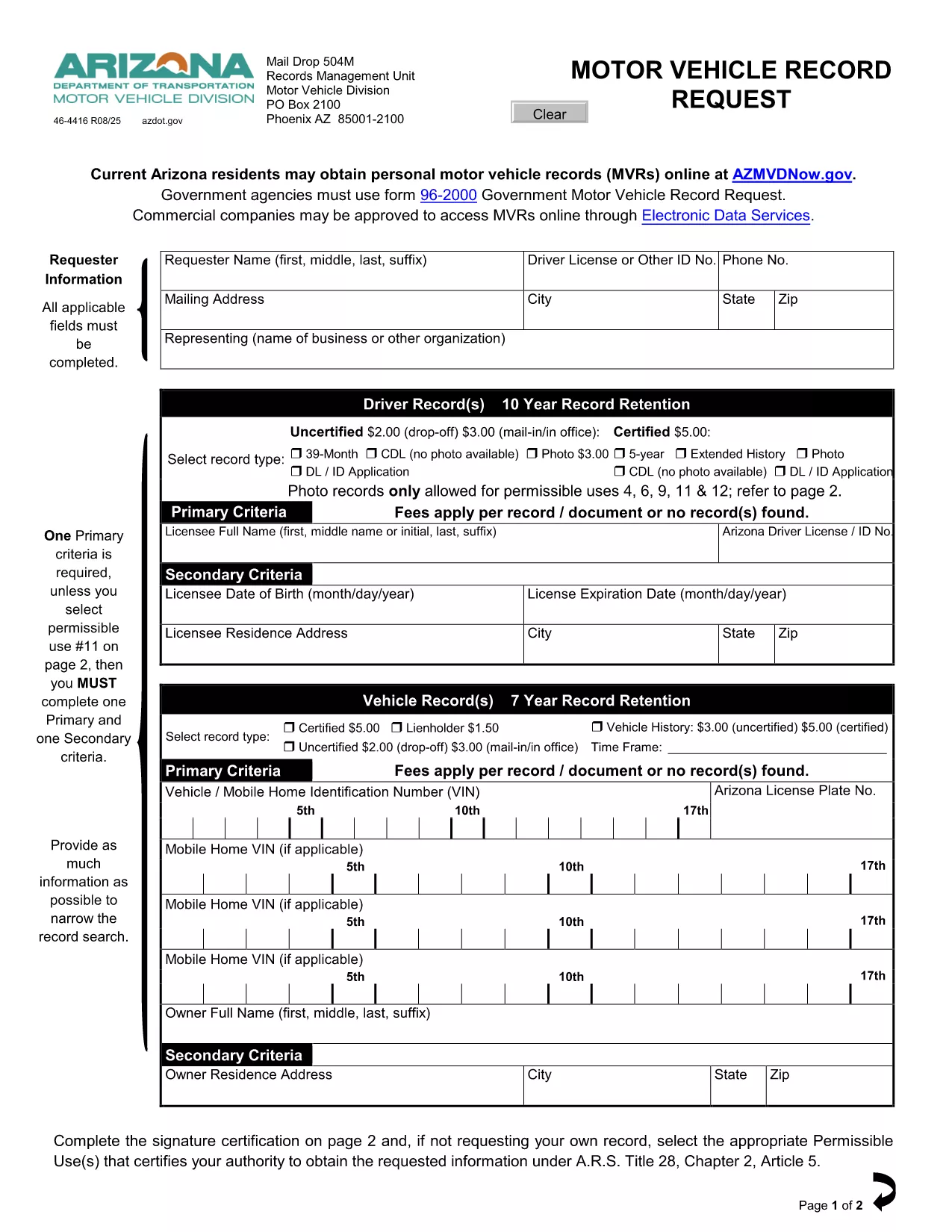
Driving Record Request Form – Fillable PDF

  1. Taal Engels
  2. Land VS
  3. Activiteit Driving Records
  4. Afdeling Department of Motor Vehicles
Driving Record Request Form – Fillable PDF

A driving record (also called a Motor Vehicle Record or MVR) is the official summary of a driver’s licensing history, traffic violations, suspensions, and accidents. Employers, insurance companies, and individuals often need a certified copy for background checks, insurance quotes, or personal review.

This page provides the exact fillable PDF used by many state motor vehicle departments. Instead of printing, signing, and mailing the paper form, you can complete it instantly in your browser with Formize’s PDF Filler app.

The form complies with the Federal Driver’s Privacy Protection Act (DPPA) and lists all permissible uses, ensuring your request is legally valid.

Below you’ll find step‑by‑step instructions, tips to avoid common errors, and answers to the most frequently asked questions about driving record requests.

FAQ
  • What is a permissible use for a driving record?

    Permissible uses include employment screening, insurance underwriting, court orders, and personal review. The form lists all approved purposes per DPPA.

  • Do I need a notarized signature?

    For most states, a notarized signature is required only for certified copies. The fillable PDF lets you add a digital signature; you can still mail the form for notarization if needed.

  • How long does it take to receive the record?

    Processing time varies by state—typically 5‑10 business days for mailed requests and 2‑3 days for electronic submissions where available.

  • Can I request a record for someone else?

    Only if you have a documented permissible use and the person’s written consent. The form includes a consent section you must complete.

  • Is there a fee for the request?

    Yes. Most states charge a small fee (e.g., $3 for an uncertified three‑year record, $5 for a certified five‑year record). Check the form’s fee schedule for exact amounts.

  • What if I make a mistake on the form?

    With Formize you can edit any field before saving. If you’ve already submitted a paper copy, you’ll need to request a new form or contact the DMV for corrections.

  • Do I need to provide my Social Security number?

    Only the last four digits are required for identity verification. The form explains exactly what information is mandatory.

HOE

Zo vult u driving record request gratis online in in 4 eenvoudige stappen:

  1. 1
    Click the Fill‑out Button
    On this page, click the bright “Fill out this form” button. The Formize PDF Filler app will open in a new tab.
  2. 2
    Wait for the Formize PDF Filler to Load
    The app loads the fillable PDF instantly. You’ll see all fields highlighted and ready for input.
  3. 3
    Enter Your Information
    Type directly into each field—name, driver’s license number, address, and the purpose of the request. The app validates dates and formats for you.
  4. 4
    Save, Print, or Submit
    When you’re done, click “Save PDF” to download a completed copy, or print it for mailing. No extra software or printer driver is required.
Formize PDF Filler-app
WAT BETREFT

driving record request-sjabloon

Met de traditionele set functies voor het bekijken en invullen van een PDF-document, gecombineerd met de voordelen van een webapplicatie en responsieve lay-out, kunt u driving record request binnen enkele minuten voltooien.

FUNCTIES

PDF-vuller

De eenvoudigste manier om online PDF-formulieren in te vullen

  • Vul snel driving record request in
    Op zoek naar een manier om driving record request snel online in te vullen? Met onze online gratis PDF-formulierinvuller weet u hoe u dit pdf-document in minder dan een minuut kunt bewerken en invullen.
  • Gebruiksvriendelijke online PDF-editor
    Ben je het beu om PDF-bestanden uit te printen zodat je ze kunt bewerken, voordat je ze opnieuw scant en terugstuurt? Bewerk PDF-documenten gratis online. Gebruik onze online pdf-editor om tijd en papier te besparen.
  • Geweldige tools, alle platforms
    Vraagt ​​u zich af hoe u driving record request op een Mac moet invullen, of misschien hoe u gratis een PDF-filler kunt gebruiken? Onze online pdf-tools werken op alle platformen.
  • Veilige bestandsopslag
    Voltooide "driving record request"-bestanden worden opgeslagen in een beveiligde database die wordt beheerd door Amazon Cloud hosting. U kunt uw bestanden op elk moment uit ons systeem verwijderen. Deze bestanden worden in ieder geval na 24 uur automatisch verwijderd.
  • Chat met {trefwoord}
    Chat met "driving record request" op Chatize, een gratis PDF-lezerassistent. Stel vragen en krijg antwoorden van "driving record request". Klik gewoon op de knop Chatten met document hierboven.

De vulsessie verwijderen

De geselecteerde vulsessie verwijderen? In dat geval gaat uw voortgang bij het invullen van het formulier verloren.

Bewerkingssessie verwijderen

De geselecteerde bewerkingssessie verwijderen? In dit geval gaat uw voortgang bij het maken en bewerken van het formulier verloren.