
Selecteer taal

DS-157 Supplemental Nonimmigrant Visa Application – Fillable PDF

  1. Taal Engels
  2. Land VS
  3. Afdeling Ministerie van Buitenlandse Zaken
  4. Activiteit Visa
DS-157 Supplemental Nonimmigrant Visa Application – Fillable PDF

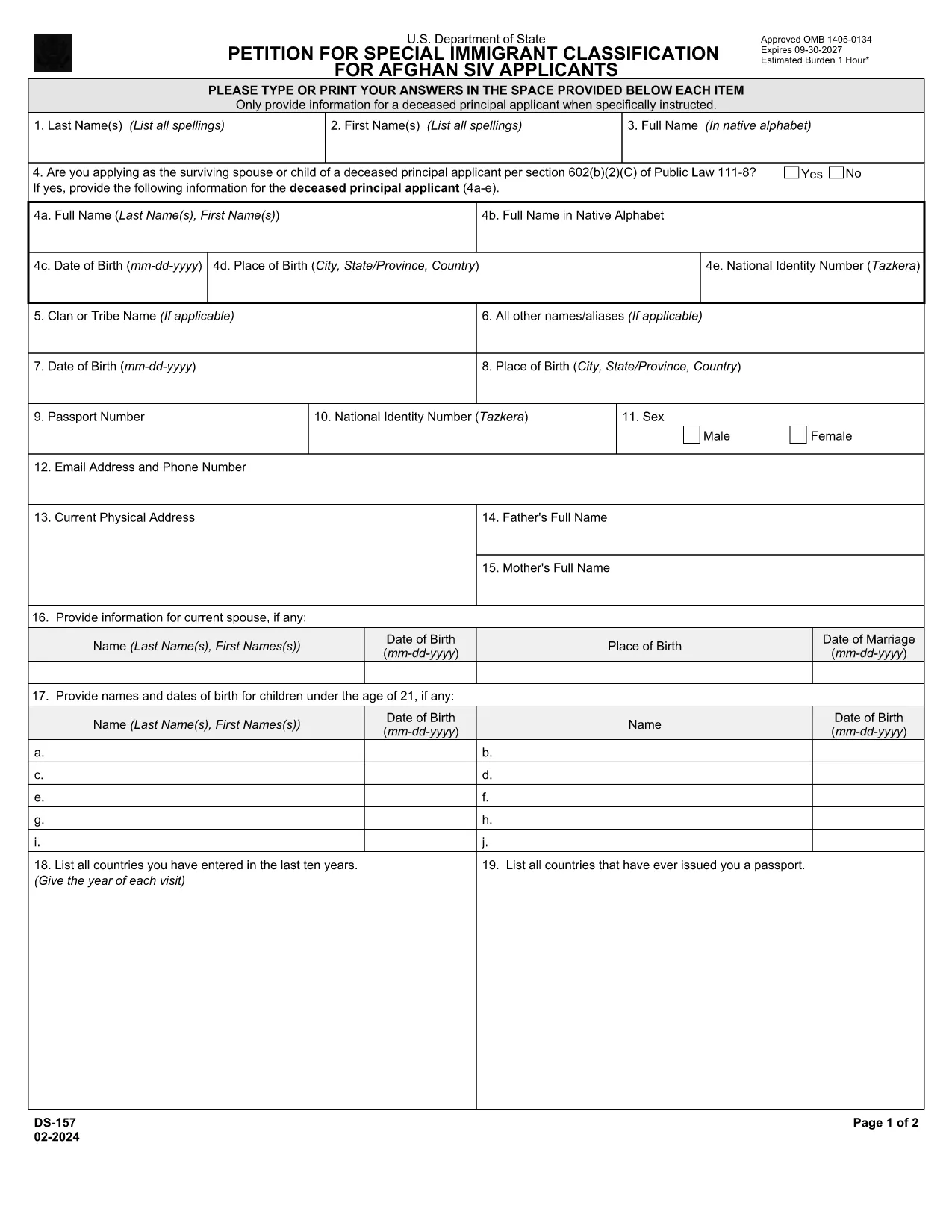
The DS-157 (Supplemental Nonimmigrant Visa Application) is required for certain male visa applicants, especially Afghan Special Immigrant Visa (SIV) candidates. It collects detailed personal, employment, and travel information that supports the main DS-160 application.

What is the DS-157 Form?

Issued by the U.S. Department of State, the DS-157 is a supplemental questionnaire that must be submitted with your visa packet. It is a fillable PDF that can be completed electronically, printed, signed, and attached to your visa interview documents.

How to Fill the DS-157 Online with Formize

Formize provides a secure, browser‑based PDF filler so you never need to download, print, or scan the form. Follow these steps:

  • Click the **"Fill out this form"** button on this page.
  • Wait a few seconds while the Formize PDF Filler app loads.
  • Enter your information in the highlighted fields. Use the tab key or click to move between sections.
  • When finished, click **"Save & Download"** to get a copy you can print or email.
  • Sign the form with your finger (touchscreen) or type your signature, then download the completed PDF.

Common Mistakes to Avoid

  • Leaving fields blank – every question must be answered, even if the answer is “None” or “N/A”.
  • Incorrect dates – double‑check birth dates, travel dates, and employment periods.
  • Illegible signatures – use the built‑in e‑signature tool for a clear, legal signature.
  • Mismatched information – ensure details match those on your DS‑160 and supporting documents.

Where to Submit the Completed Form

Print the filled DS-157, sign it in ink if you printed a hard copy, and attach it to your visa interview packet. Submit the package to the U.S. Embassy or Consulate handling your case. Some posts now accept the PDF electronically; verify the specific instructions on your appointment notice.

Download the Official PDF

For reference or offline use, you can download the official, government‑issued PDF directly from the Department of State:

Download DS-157 PDF

Using Formize’s online filler saves you time, reduces errors, and eliminates the need for a scanner.

FAQ
  • Who must complete the DS-157 form?

    All male non‑immigrant visa applicants between ages 16‑45, including Afghan SIV applicants, must submit a DS-157 in addition to the DS‑160.

  • Is the DS-157 form available in languages other than English?

    The official form is only provided in English. If you need translation assistance, you must provide an accurate English version for the U.S. Embassy.

  • Can I submit the DS-157 electronically?

    Some U.S. posts accept an electronic PDF, but most still require a printed, signed copy. Check the instructions on your appointment notice.

  • Do I need a notarized signature on the DS-157?

    No notarization is required. A regular signature (ink or e‑signature) is sufficient as long as it matches the signature on your other visa documents.

  • What happens if I make a mistake on the DS-157?

    Correct the error by crossing out the mistake neatly, writing the correct information, and initialing the change. If the mistake is extensive, download a fresh copy and refill the form.

  • How long is the DS-157 valid?

    The DS-157 is tied to a specific visa application. If your application is withdrawn or denied, you must obtain a new form for any future applications.

HOE

Zo vult u ds-157 gratis online in in 4 eenvoudige stappen:

  1. 1
    Open the Formize filler
    Click the "Fill out this form" button on the page. The Formize PDF Filler will open in a new tab.
  2. 2
    Enter your information
    Type directly into each highlighted field. Use the tab key or click to move to the next question.
  3. 3
    Add your signature
    Use the built‑in e‑signature tool to sign with your finger or mouse. The signature is legally binding.
  4. 4
    Save and download
    When all fields are complete, click "Save & Download" to get a copy of the filled PDF. Print it if a hard copy is required.
Formize PDF Filler-app
WAT BETREFT

Visa Formulieren

ds-157 is een van de Visa-formulieren die documenten zijn die worden gebruikt om een ​​visum aan te vragen om een ​​vreemd land binnen te komen. Een visum is een document waarmee een vreemdeling voor een bepaalde tijd een vreemd land kan binnenkomen, verblijven en soms kan werken. De exacte formulieren en vereisten voor het verkrijgen van een visum verschillen per land en type visum.

Visumformulieren vereisen doorgaans persoonlijke informatie zoals naam, geboortedatum en paspoortinformatie, evenals informatie over het doel en de duur van de reis, de beoogde bestemming en of de aanvrager eerder een visum is geweigerd of uit een land is gedeporteerd. De formulieren kunnen ook ondersteunende documenten vereisen, zoals een paspoort, foto's en een bewijs van financiële steun.

In de Verenigde Staten zijn de meest voorkomende visumformulieren de DS-160- en DS-260-formulieren. Het DS-160-formulier wordt gebruikt om een ​​niet-immigrantenvisum aan te vragen, terwijl het DS-260-formulier wordt gebruikt om een ​​immigrantenvisum aan te vragen. Deze formulieren vereisen gedetailleerde informatie over de persoonlijke en reisgeschiedenis van de aanvrager, evenals ondersteunende documentatie zoals een paspoort, reisroute en financiële gegevens.

Andere landen kunnen andere visumvormen en -vereisten hebben, maar het basisproces omvat meestal het invullen van een visumaanvraag, het verstrekken van ondersteunende documentatie en het bijwonen van een interview met een consulaire ambtenaar op een Amerikaanse ambassade of consulaat. Het is belangrijk op te merken dat het visumaanvraagproces complex en tijdrovend kan zijn, en het wordt aanbevolen dat personen die een visum zoeken een immigratieadvocaat of een andere gekwalificeerde professional raadplegen om ervoor te zorgen dat aan alle noodzakelijke formulieren en vereisten wordt voldaan.

FUNCTIES

PDF-vuller

De eenvoudigste manier om online PDF-formulieren in te vullen

  • Vul snel ds-157 in
    Op zoek naar een manier om ds-157 snel online in te vullen? Met onze online gratis PDF-formulierinvuller weet u hoe u dit pdf-document in minder dan een minuut kunt bewerken en invullen.
  • Gebruiksvriendelijke online PDF-editor
    Ben je het beu om PDF-bestanden uit te printen zodat je ze kunt bewerken, voordat je ze opnieuw scant en terugstuurt? Bewerk PDF-documenten gratis online. Gebruik onze online pdf-editor om tijd en papier te besparen.
  • Geweldige tools, alle platforms
    Vraagt ​​u zich af hoe u ds-157 op een Mac moet invullen, of misschien hoe u gratis een PDF-filler kunt gebruiken? Onze online pdf-tools werken op alle platformen.
  • Veilige bestandsopslag
    Voltooide "ds-157"-bestanden worden opgeslagen in een beveiligde database die wordt beheerd door Amazon Cloud hosting. U kunt uw bestanden op elk moment uit ons systeem verwijderen. Deze bestanden worden in ieder geval na 24 uur automatisch verwijderd.
  • Chat met {trefwoord}
    Chat met "ds-157" op Chatize, een gratis PDF-lezerassistent. Stel vragen en krijg antwoorden van "ds-157". Klik gewoon op de knop Chatten met document hierboven.

De vulsessie verwijderen

De geselecteerde vulsessie verwijderen? In dat geval gaat uw voortgang bij het invullen van het formulier verloren.

Bewerkingssessie verwijderen

De geselecteerde bewerkingssessie verwijderen? In dit geval gaat uw voortgang bij het maken en bewerken van het formulier verloren.