Selecteer taal

Driver Medical Evaluation Form (DS‑326) – Fillable PDF

  1. Land VS
  2. Taal Engels
  3. Activiteit Vehicle Licensing
  4. Afdeling DMV
Driver Medical Evaluation Form (DS‑326) – Fillable PDF

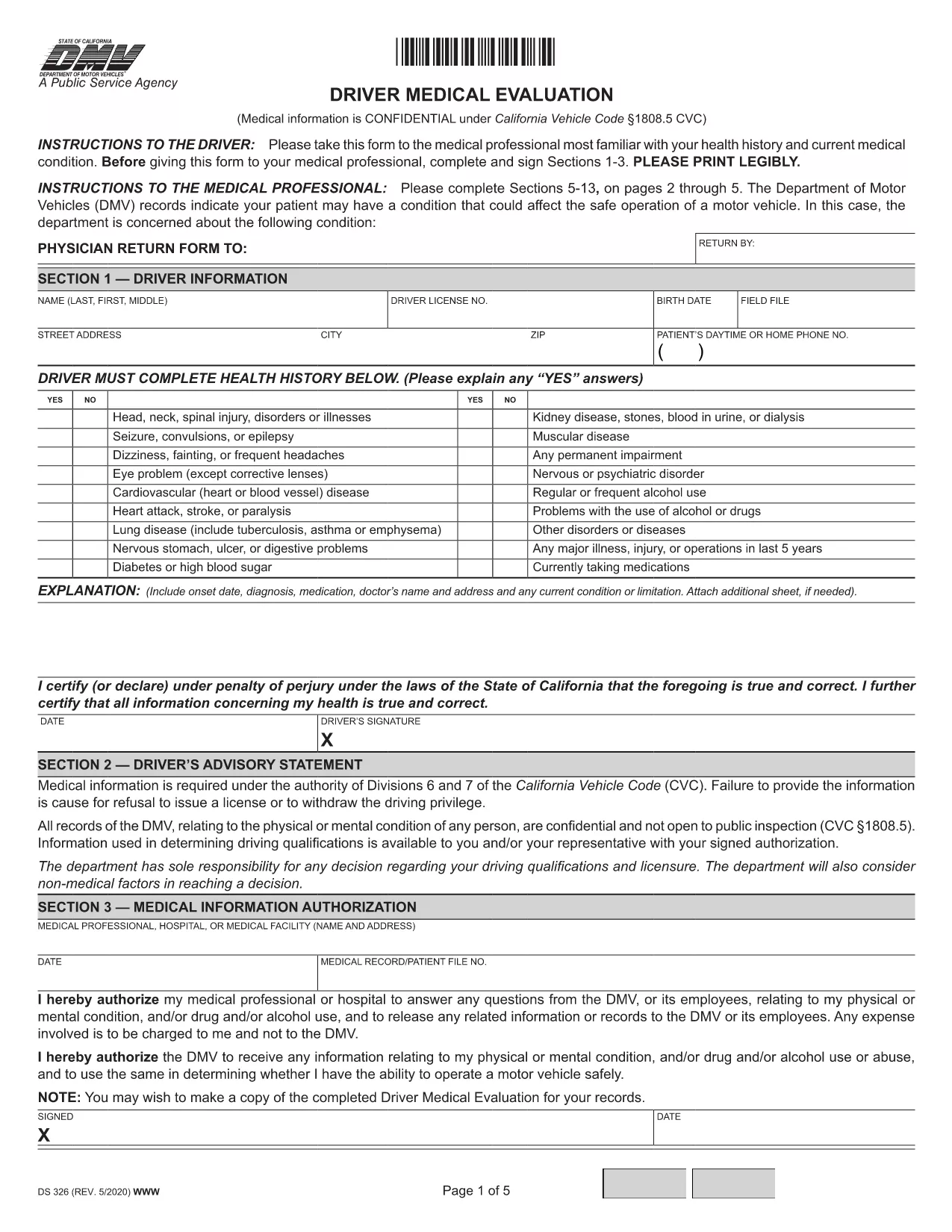
The Driver Medical Evaluation (form DS‑326) is required by the California Department of Motor Vehicles (DMV) for drivers who need to prove medical fitness for a license or permit. This fillable PDF lets you complete the health history, medical information authorization, and physician certification without printing or scanning.

What Is the Driver Medical Evaluation Form?

DS‑326 collects critical data about a driver’s vision, cardiovascular health, neurological conditions, and any medication that may affect safe operation of a vehicle. The DMV uses this information to decide whether to issue, renew, or restrict a driver’s license.

How to Complete the Fillable PDF Online

Instead of downloading the file and opening it in a PDF editor, simply click the "Fill out this form" button on this page. The Formize PDF Filler app will load in your browser, allowing you to type directly into each field, add signatures, and save your progress.

Common Mistakes to Avoid

  • Leaving the health‑history sections blank – every question must be answered, even if the answer is "None".
  • Forgetting the physician’s signature and license number – the form is invalid without a completed certification.
  • Submitting an outdated version – always use the latest DS‑326 PDF provided here.

Where to Submit the Completed Form

After you finish, you can download the completed PDF and mail it to your local DMV office, or upload it through the DMV’s online portal if you have an account. Keep a copy for your records.

Need more help? Review the FAQs below or follow the step‑by‑step guide in the "How to" section.

FAQ
  • Who needs to fill out DS‑326?

    Any driver applying for a commercial license, a medical waiver, or a license renewal where the DMV requires proof of medical fitness must complete DS‑326.

  • Can I fill out the form on a mobile device?

    Yes. The Formize PDF Filler works on smartphones and tablets, but using a larger screen makes data entry easier.

  • What if my physician refuses to sign?

    The DMV requires a qualified medical professional’s certification. If a physician declines, you must find another licensed provider who can evaluate your fitness.

  • How long is the DS‑326 valid?

    The evaluation is typically valid for one year from the date of the physician’s signature, unless the DMV issues a different validity period.

  • Do I need to attach supporting medical records?

    Attach any relevant test results or specialist reports that the physician references in the certification section.

  • Is there a fee to submit the form?

    There is no fee for the DS‑326 itself, but the DMV may charge processing fees for license issuance or renewal.

  • Can I save my progress and finish later?

    Yes. The Formize filler allows you to save a draft locally and reopen it later to complete the remaining fields.

  • What should I do if I make a mistake after submitting?

    Contact your local DMV office promptly. They may require a new, corrected DS‑326 or allow you to submit an amendment form.

HOE

Zo vult u driver medical evaluation gratis online in in 5 eenvoudige stappen:

  1. 1
    Click the Fill‑out Button
    Press the "Fill out this form" button on the page to launch the Formize PDF Filler.
  2. 2
    Wait for the Filler to Load
    The online filler loads in a few seconds; no download or installation is required.
  3. 3
    Enter All Required Information
    Complete each section—personal details, health history, and physician certification—using your keyboard.
  4. 4
    Add Your Signature
    Use the built‑in signature field to sign electronically; you can also type your name if allowed.
  5. 5
    Save or Submit the Form
    Download the finished PDF for mailing, or upload it directly to the DMV portal if you have an account.
Formize PDF Filler-app
WAT BETREFT

driver medical evaluation-sjabloon

Met de traditionele set functies voor het bekijken en invullen van een PDF-document, gecombineerd met de voordelen van een webapplicatie en responsieve lay-out, kunt u driver medical evaluation binnen enkele minuten voltooien.

FUNCTIES

PDF-vuller

De eenvoudigste manier om online PDF-formulieren in te vullen

  • Vul snel driver medical evaluation in
    Op zoek naar een manier om driver medical evaluation snel online in te vullen? Met onze online gratis PDF-formulierinvuller weet u hoe u dit pdf-document in minder dan een minuut kunt bewerken en invullen.
  • Gebruiksvriendelijke online PDF-editor
    Ben je het beu om PDF-bestanden uit te printen zodat je ze kunt bewerken, voordat je ze opnieuw scant en terugstuurt? Bewerk PDF-documenten gratis online. Gebruik onze online pdf-editor om tijd en papier te besparen.
  • Geweldige tools, alle platforms
    Vraagt ​​u zich af hoe u driver medical evaluation op een Mac moet invullen, of misschien hoe u gratis een PDF-filler kunt gebruiken? Onze online pdf-tools werken op alle platformen.
  • Veilige bestandsopslag
    Voltooide "driver medical evaluation"-bestanden worden opgeslagen in een beveiligde database die wordt beheerd door Amazon Cloud hosting. U kunt uw bestanden op elk moment uit ons systeem verwijderen. Deze bestanden worden in ieder geval na 24 uur automatisch verwijderd.
  • Chat met {trefwoord}
    Chat met "driver medical evaluation" op Chatize, een gratis PDF-lezerassistent. Stel vragen en krijg antwoorden van "driver medical evaluation". Klik gewoon op de knop Chatten met document hierboven.

De vulsessie verwijderen

De geselecteerde vulsessie verwijderen? In dat geval gaat uw voortgang bij het invullen van het formulier verloren.

Bewerkingssessie verwijderen

De geselecteerde bewerkingssessie verwijderen? In dit geval gaat uw voortgang bij het maken en bewerken van het formulier verloren.