
Selecteer taal

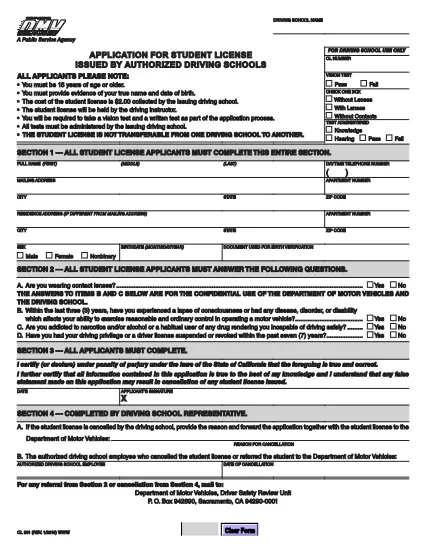
OL 801 Student License Application – Fillable PDF

  1. Taal Engels
  2. Land VS
  3. Activiteit Rijbewijs
  4. Staat Californië
OL 801 Student License Application – Fillable PDF

The OL 801 is the California Department of Motor Vehicles (DMV) application used by driving schools and students to obtain a learner’s permit or student driver license. This form must be completed accurately before you can start behind‑the‑wheel training.

Formize makes the process effortless. Instead of printing, scanning, or editing the PDF manually, simply click the Fill out this form button on this page. Our secure PDF filler loads the official DMV document, lets you type directly into each field, and saves a completed copy that you can print or email.

What Is the OL 801 Form?

The OL 801 collects essential information about the student driver, the driving school, and any required endorsements. California law requires a signed, completed form before a student can be issued a provisional license.

How to Complete the OL 801 Online

Follow the step‑by‑step guide below to finish the form in minutes:

  • Click the “Fill out this form” button.
  • Wait for the Formize PDF Filler app to load the official DMV PDF.
  • Enter the requested details – student name, address, school information, and signatures.
  • Review the completed form for accuracy.
  • Download, print, or email the filled PDF directly from the filler.

Common Mistakes to Avoid

  • Leaving any required field blank – the DMV will reject incomplete submissions.
  • Using an outdated version of the form – always use the latest PDF linked below.
  • Incorrectly entering the school’s license number – double‑check with your driving school.
  • Forgetting the student’s signature; an unsigned form is invalid.

Where to Submit Your Completed Form

After filling out the OL 801, you can submit it in one of three ways:

  1. Mail it to the DMV Driver Safety Review Unit, P.O. Box 942890, Sacramento, CA 94290‑0001.
  2. Bring a printed copy to your local DMV office.
  3. Upload a scanned copy through the California DMV online portal (if available).

Download the Official PDF

For reference or offline use, you can also download the original, unfilled PDF directly from the California DMV:

Official OL 801 PDF (2020 version)

FAQ
  • What is the purpose of the OL 801 form?

    The OL 801 is used by California driving schools to apply for a student driver license (learner’s permit) for their students. It verifies the student’s eligibility and records the school’s endorsement.

  • Do I need a printed copy to submit the form?

    Yes. The DMV requires a hard copy with original signatures. You can print the completed PDF from Formize after filling it out online.

  • Can I edit the PDF after I download it?

    Once you download the filled PDF, you can still edit it with any PDF editor, but the Formize filler already lets you complete all fields accurately before download.

  • Is the Formize filler free to use?

    Yes, filling out the OL 801 with Formize’s online PDF filler is completely free and does not require any software installation.

  • How often is the OL 801 form updated?

    The California DMV updates the form as needed. The version linked here (2020) is the current official version; always use the latest PDF from the DMV website.

  • What should I do if I make a mistake while filling out the form?

    If you notice an error before downloading, simply correct it in the Formize filler. If you’ve already printed it, you may need to start a new form or cross out the mistake and initial it, depending on DMV guidelines.

  • Where can I mail the completed OL 801?

    Mail the signed form to: Department of Motor Vehicles, Driver Safety Review Unit, P. O. Box 942890, Sacramento, CA 94290‑0001.

  • Do I need any additional documents with the OL 801?

    Typically you’ll need a copy of the student’s ID, proof of residency, and the driving school’s certification. Check the DMV checklist for your specific situation.

HOE

Zo vult u OL 801 gratis online in in 4 eenvoudige stappen:

  1. 1
    Click the Fill‑out Button
    Press the “Fill out this form” button on this page to launch the Formize PDF Filler.
  2. 2
    Wait for the Filler to Load
    The app loads the official OL 801 PDF in a secure viewer. This takes only a few seconds.
  3. 3
    Enter All Required Information
    Type directly into each field – student details, school information, and signatures. Use the tab key to move quickly between fields.
  4. 4
    Save, Print, or Email
    When you’re finished, click “Save”. You can download the completed PDF, print it for a hard copy, or email it straight to the DMV.
Formize PDF Filler-app
WAT BETREFT

Aanvraagformulieren rijbewijs

In de meeste landen is het hebben van een rijbewijs verplicht voordat je de weg op mag. Het behalen van een rijbewijs is een belangrijke mijlpaal voor iedereen die auto wil rijden.

OL 801 is een van de formulieren voor het aanvragen van een rijbewijs. Dit zijn documenten die worden gebruikt om informatie te verzamelen van mensen die een rijbewijs willen aanvragen. Het bevat meestal velden voor de naam van de aanvrager, geboortedatum, ID-nummer, contactgegevens, evenals de geschiedenis en ervaring van hun rijbewijs.

FUNCTIES

PDF-vuller

De eenvoudigste manier om online PDF-formulieren in te vullen

  • Vul snel OL 801 in
    Op zoek naar een manier om OL 801 snel online in te vullen? Met onze online gratis PDF-formulierinvuller weet u hoe u dit pdf-document in minder dan een minuut kunt bewerken en invullen.
  • Gebruiksvriendelijke online PDF-editor
    Ben je het beu om PDF-bestanden uit te printen zodat je ze kunt bewerken, voordat je ze opnieuw scant en terugstuurt? Bewerk PDF-documenten gratis online. Gebruik onze online pdf-editor om tijd en papier te besparen.
  • Geweldige tools, alle platforms
    Vraagt ​​u zich af hoe u OL 801 op een Mac moet invullen, of misschien hoe u gratis een PDF-filler kunt gebruiken? Onze online pdf-tools werken op alle platformen.
  • Veilige bestandsopslag
    Voltooide "OL 801"-bestanden worden opgeslagen in een beveiligde database die wordt beheerd door Amazon Cloud hosting. U kunt uw bestanden op elk moment uit ons systeem verwijderen. Deze bestanden worden in ieder geval na 24 uur automatisch verwijderd.
  • Chat met {trefwoord}
    Chat met "OL 801" op Chatize, een gratis PDF-lezerassistent. Stel vragen en krijg antwoorden van "OL 801". Klik gewoon op de knop Chatten met document hierboven.

De vulsessie verwijderen

De geselecteerde vulsessie verwijderen? In dat geval gaat uw voortgang bij het invullen van het formulier verloren.

Bewerkingssessie verwijderen

De geselecteerde bewerkingssessie verwijderen? In dit geval gaat uw voortgang bij het maken en bewerken van het formulier verloren.