
Selecteer taal

Missouri Form 4201 – Assignment of Securities (Fillable PDF)

  1. Taal Engels
  2. Land VS
  3. Activiteit Rijbewijs
  4. Staat Missouri
Missouri Form 4201 – Assignment of Securities (Fillable PDF)

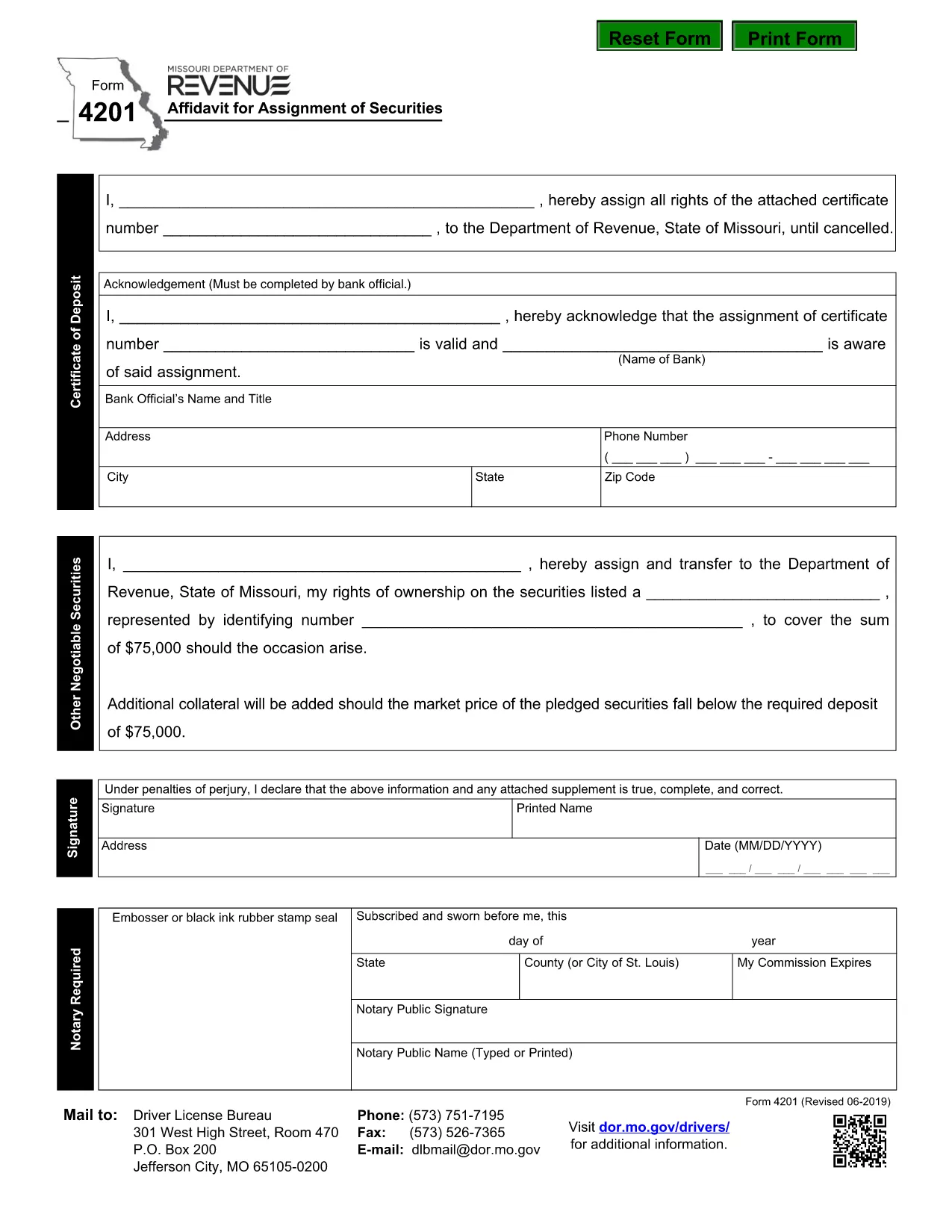
Form 4201 is the Missouri Department of Revenue’s official Affidavit for Assignment of Securities. This fillable PDF lets you complete the form online, save a copy, and submit it without printing.

What Is Form 4201?

Form 4201 records the transfer of securities (such as stocks, bonds, or other financial instruments) from one party to another for tax purposes. The Missouri Department of Revenue uses it to verify the assignment and ensure proper reporting.

Who Needs to File Form 4201?

  • Individuals or entities assigning securities that are subject to Missouri tax.
  • Trustees, executors, or legal representatives handling a transfer.
  • Businesses that need to document a securities assignment on their state tax return.

How to Complete the Fillable PDF

Instead of downloading the PDF and opening a separate editor, simply click the "Fill out this form" button on this page. The Formize PDF Filler app will load directly in your browser.

  1. Click Fill out this form.
  2. Wait a few seconds for the Formize PDF Filler to appear.
  3. Enter the required information in each highlighted field.
  4. Use the built‑in validation to check for missing or incorrect entries.
  5. When finished, click Download Completed PDF or Submit as instructed.

Common Mistakes & Tips

  • Missing signatures: The form requires a signature from the assignor; the filler lets you type a digital signature.
  • Incorrect dates: Use the format MM/DD/YYYY.
  • Wrong security description: Provide the full legal name and identification number.
  • Double‑check the “Assignment Amount” field for accuracy before saving.

Where to Submit the Completed Form

After saving the completed PDF, mail or fax it to the Missouri Department of Revenue address shown on the form, or upload it through the department’s online portal if you have an account.

Need help? Review the instructions on the form itself or contact the Missouri Department of Revenue directly.

FAQ
  • What is the purpose of Missouri Form 4201?

    Form 4201 documents the assignment of securities for tax reporting. It ensures the Missouri Department of Revenue records the transfer correctly.

  • Who is required to file Form 4201?

    Anyone assigning securities that are subject to Missouri tax—individuals, trusts, executors, or businesses—must file this form.

  • Can I file Form 4201 electronically?

    Yes. Use the Formize fillable PDF to complete the form online, then download and upload it through the Missouri Department of Revenue’s electronic portal.

  • Is a handwritten signature still needed?

    A digital signature entered in the fillable PDF is accepted. If you print the form, you must sign it manually.

  • What happens if I make a mistake on the form?

    Correct the error in the Formize filler before downloading. If you submit a printed copy with errors, you may need to file an amended form.

  • Where do I send the completed Form 4201?

    Mail or fax the completed PDF to the address listed on the form, or upload it via the Missouri Department of Revenue’s online portal.

HOE

Zo vult u Form 4201 gratis online in in 5 eenvoudige stappen:

  1. 1
    Open the Fillable Form
    Click the "Fill out this form" button on the page. The Formize PDF Filler will open in a new browser window.
  2. 2
    Load the Form
    Wait a few seconds while the fillable PDF loads. All fields will be highlighted for easy entry.
  3. 3
    Enter Your Information
    Type the required data into each field. Use the built‑in validation to correct any errors.
  4. 4
    Review & Save
    Check the completed form for accuracy, then click "Download Completed PDF" to save a copy or "Submit" to send it directly.
  5. 5
    Submit or Print
    Print and mail the form, fax it, or upload it through the Missouri Department of Revenue portal as instructed.
Formize PDF Filler-app
WAT BETREFT

Aanvraagformulieren rijbewijs

Form 4201 is een van de rijbewijsformulieren. Dit zijn documenten die worden gebruikt bij het verkrijgen of verlengen van een rijbewijs. Dit is een officieel door de overheid uitgegeven document waarmee personen een motorvoertuig op de openbare weg mogen besturen. Deze formulieren kunnen variëren afhankelijk van het rechtsgebied, maar omvatten over het algemeen het volgende:

Aanvraagformulier: dit formulier wordt gebruikt om een ​​rijbewijs aan te vragen en vraagt ​​doorgaans om persoonlijke gegevens zoals naam, adres, geboortedatum en burgerservicenummer.

Identificatiedocumentatie: Naast het aanvraagformulier moeten individuen doorgaans specifieke identificatiedocumenten overleggen om hun identiteit, verblijfplaats en legale aanwezigheid in het land te bewijzen. Dit kan onder meer een geldig paspoort, een geboorteakte, een socialezekerheidskaart of een ander door de overheid uitgegeven identiteitsbewijs zijn.

Bewijs van ingezetenschap: in veel rechtsgebieden moeten aanvragers een bewijs van ingezetenschap overleggen, zoals een energierekening, huurovereenkomst of bankafschrift, om hun adres te verifiëren.

Medisch keuringsformulier: In sommige rechtsgebieden is mogelijk een medisch onderzoek vereist om ervoor te zorgen dat de aanvrager voldoet aan de noodzakelijke fysieke en mentale vereisten voor veilig rijden. Normaal gesproken vult een medische professional dit formulier in.

Voltooiingsformulier voor chauffeursopleiding: voor beginnende chauffeurs kan het voltooien van een chauffeursopleiding vereist zijn. Voor het aanvragen van een rijbewijs is vaak een formulier of certificaat nodig waaruit blijkt dat de aanvraag succesvol is afgerond.

Visietestformulier: Een visietest wordt gewoonlijk uitgevoerd tijdens het aanvraagproces voor een rijbewijs. Een oogzorgprofessional of bevoegd personeel beoordeelt de gezichtsscherpte van de aanvrager en vult het vereiste formulier in.

Deze formulieren zijn doorgaans verkrijgbaar bij het plaatselijke Department of Motor Vehicles (DMV) of een gelijkwaardige overheidsinstantie die verantwoordelijk is voor rijbewijzen. Het is belangrijk om de specifieke vereisten en formulieren te controleren die van toepassing zijn op uw rechtsgebied, aangezien deze kunnen variëren.

FUNCTIES

PDF-vuller

De eenvoudigste manier om online PDF-formulieren in te vullen

  • Vul snel Form 4201 in
    Op zoek naar een manier om Form 4201 snel online in te vullen? Met onze online gratis PDF-formulierinvuller weet u hoe u dit pdf-document in minder dan een minuut kunt bewerken en invullen.
  • Gebruiksvriendelijke online PDF-editor
    Ben je het beu om PDF-bestanden uit te printen zodat je ze kunt bewerken, voordat je ze opnieuw scant en terugstuurt? Bewerk PDF-documenten gratis online. Gebruik onze online pdf-editor om tijd en papier te besparen.
  • Geweldige tools, alle platforms
    Vraagt ​​u zich af hoe u Form 4201 op een Mac moet invullen, of misschien hoe u gratis een PDF-filler kunt gebruiken? Onze online pdf-tools werken op alle platformen.
  • Veilige bestandsopslag
    Voltooide "Form 4201"-bestanden worden opgeslagen in een beveiligde database die wordt beheerd door Amazon Cloud hosting. U kunt uw bestanden op elk moment uit ons systeem verwijderen. Deze bestanden worden in ieder geval na 24 uur automatisch verwijderd.
  • Chat met {trefwoord}
    Chat met "Form 4201" op Chatize, een gratis PDF-lezerassistent. Stel vragen en krijg antwoorden van "Form 4201". Klik gewoon op de knop Chatten met document hierboven.

De vulsessie verwijderen

De geselecteerde vulsessie verwijderen? In dat geval gaat uw voortgang bij het invullen van het formulier verloren.

Bewerkingssessie verwijderen

De geselecteerde bewerkingssessie verwijderen? In dit geval gaat uw voortgang bij het maken en bewerken van het formulier verloren.