
Selecteer taal

Form 5285 – Skills Test Failure (Behind‑the‑Wheel) Fillable PDF

  1. Taal Engels
  2. Land VS
  3. Activiteit Rijbewijs
  4. Staat Missouri
Form 5285 – Skills Test Failure (Behind‑the‑Wheel) Fillable PDF

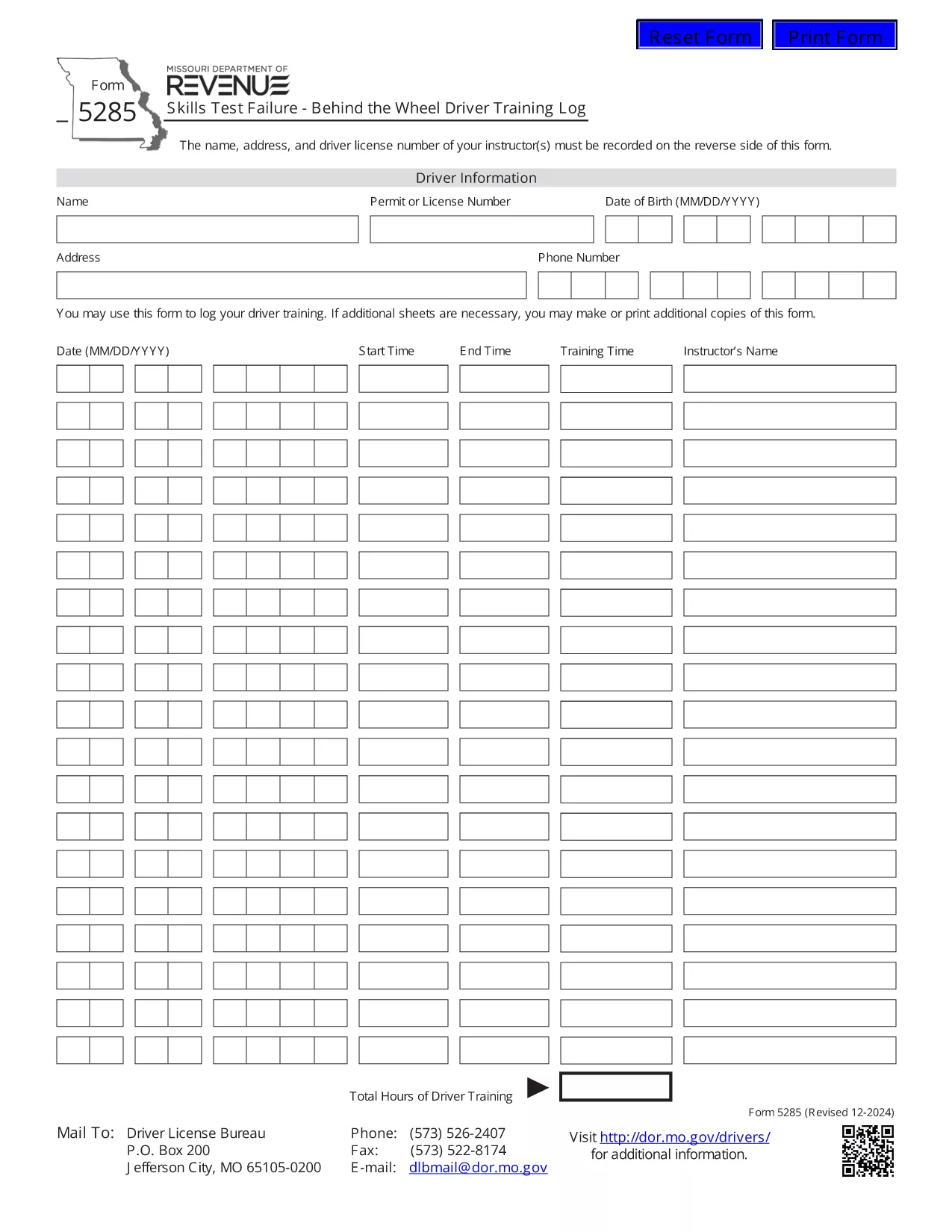
Form 5285 is the official Missouri Skills Test Failure – Behind the Wheel Driver Training Log. Instructors use this form to record a driver’s failure during a behind‑the‑wheel skills test, including instructor details, driver information, and the specific skills that were not met.

What Is Form 5285?

This form is required by the Missouri Department of Revenue – Driver Licensing Division. It captures:

  • Instructor name, address, and license number
  • Driver’s personal details
  • Date and location of the test
  • Specific skills that were failed
  • Signature of the instructor

How to Fill Out Form 5285 Online

Instead of printing, printing, and scanning, you can complete the form directly in your browser using Formize’s fillable PDF technology:

  1. Click the "Fill out this form" button on this page.
  2. Wait a few seconds while the Formize PDF Filler app loads the PDF.
  3. Enter the required information in each field. The form is fully interactive – just type or select from drop‑down menus.
  4. When you’re done, click Save to store a copy in your browser or download a completed PDF.
  5. Print the completed document if a hard copy is needed for submission.

Common Mistakes to Avoid

  • Leaving required fields blank: The PDF will highlight missing information before you can save.
  • Incorrect instructor license number: Double‑check the number on the instructor’s license.
  • Using the wrong date format: Missouri requires MM/DD/YYYY.
  • Submitting an unsigned form: The instructor’s signature is mandatory.

Where to Submit the Completed Form

After you have saved the filled form, submit it to the nearest Missouri Department of Revenue driver licensing office or mail it to the address listed on the form’s instructions. Some offices also accept electronic submissions via email – call your local office to confirm.

Download the Official PDF

If you prefer the original PDF for offline use, you can download it directly from the Missouri Department of Revenue:

Download Form 5285 (PDF)

FAQ
  • What is the purpose of Form 5285?

    Form 5285 records a driver’s failure on a behind‑the‑wheel skills test. It provides the Missouri Department of Revenue with details needed to issue a retest or take corrective action.

  • Can I fill out Form 5285 on a mobile device?

    Yes. The Formize fillable PDF works on smartphones and tablets. Just tap the "Fill out this form" button and complete the fields using your device’s keyboard.

  • Do I need to print the form after filling it online?

    Only if your local licensing office requires a hard copy. Many offices now accept a saved PDF sent by email or uploaded through their portal.

  • Is there a fee to use the Formize PDF Filler?

    No. Formize provides free, secure filling of Missouri state forms, including Form 5285.

  • What should I do if I make a mistake after saving?

    Open the saved PDF again with the Formize filler, edit the incorrect fields, and re‑save. The filler preserves all previously entered data.

  • Where can I find the official instructions for Form 5285?

    The official instructions are included on the last page of the PDF you download from the Missouri Department of Revenue website.

HOE

Zo vult u Form 5285 gratis online in in 4 eenvoudige stappen:

  1. 1
    Open the Fillable Form
    Click the "Fill out this form" button on the page. The Formize PDF Filler loads the Form 5285 directly in your browser.
  2. 2
    Enter the Required Information
    Type the instructor’s name, address, license number, driver details, test date, and failed skill items into the highlighted fields.
  3. 3
    Review and Save
    Use the built‑in validation to ensure all required fields are completed, then click "Save" to store a copy or download the completed PDF.
  4. 4
    Print or Submit Electronically
    Print the saved PDF for a hard‑copy submission, or follow your local office’s instructions for electronic delivery.
Formize PDF Filler-app
WAT BETREFT

Aanvraagformulieren rijbewijs

In de meeste landen is het hebben van een rijbewijs verplicht voordat je de weg op mag. Het behalen van een rijbewijs is een belangrijke mijlpaal voor iedereen die auto wil rijden.

Form 5285 is een van de formulieren voor het aanvragen van een rijbewijs. Dit zijn documenten die worden gebruikt om informatie te verzamelen van mensen die een rijbewijs willen aanvragen. Het bevat meestal velden voor de naam van de aanvrager, geboortedatum, ID-nummer, contactgegevens, evenals de geschiedenis en ervaring van hun rijbewijs.

FUNCTIES

PDF-vuller

De eenvoudigste manier om online PDF-formulieren in te vullen

  • Vul snel Form 5285 in
    Op zoek naar een manier om Form 5285 snel online in te vullen? Met onze online gratis PDF-formulierinvuller weet u hoe u dit pdf-document in minder dan een minuut kunt bewerken en invullen.
  • Gebruiksvriendelijke online PDF-editor
    Ben je het beu om PDF-bestanden uit te printen zodat je ze kunt bewerken, voordat je ze opnieuw scant en terugstuurt? Bewerk PDF-documenten gratis online. Gebruik onze online pdf-editor om tijd en papier te besparen.
  • Geweldige tools, alle platforms
    Vraagt ​​u zich af hoe u Form 5285 op een Mac moet invullen, of misschien hoe u gratis een PDF-filler kunt gebruiken? Onze online pdf-tools werken op alle platformen.
  • Veilige bestandsopslag
    Voltooide "Form 5285"-bestanden worden opgeslagen in een beveiligde database die wordt beheerd door Amazon Cloud hosting. U kunt uw bestanden op elk moment uit ons systeem verwijderen. Deze bestanden worden in ieder geval na 24 uur automatisch verwijderd.
  • Chat met {trefwoord}
    Chat met "Form 5285" op Chatize, een gratis PDF-lezerassistent. Stel vragen en krijg antwoorden van "Form 5285". Klik gewoon op de knop Chatten met document hierboven.

De vulsessie verwijderen

De geselecteerde vulsessie verwijderen? In dat geval gaat uw voortgang bij het invullen van het formulier verloren.

Bewerkingssessie verwijderen

De geselecteerde bewerkingssessie verwijderen? In dit geval gaat uw voortgang bij het maken en bewerken van het formulier verloren.