
Selecteer taal

DS-871 Driver Notification to Employer (Fillable PDF)

  1. Taal Engels
  2. Land VS
  3. Activiteit Rijbewijs
  4. Staat New York
DS-871 Driver Notification to Employer (Fillable PDF)

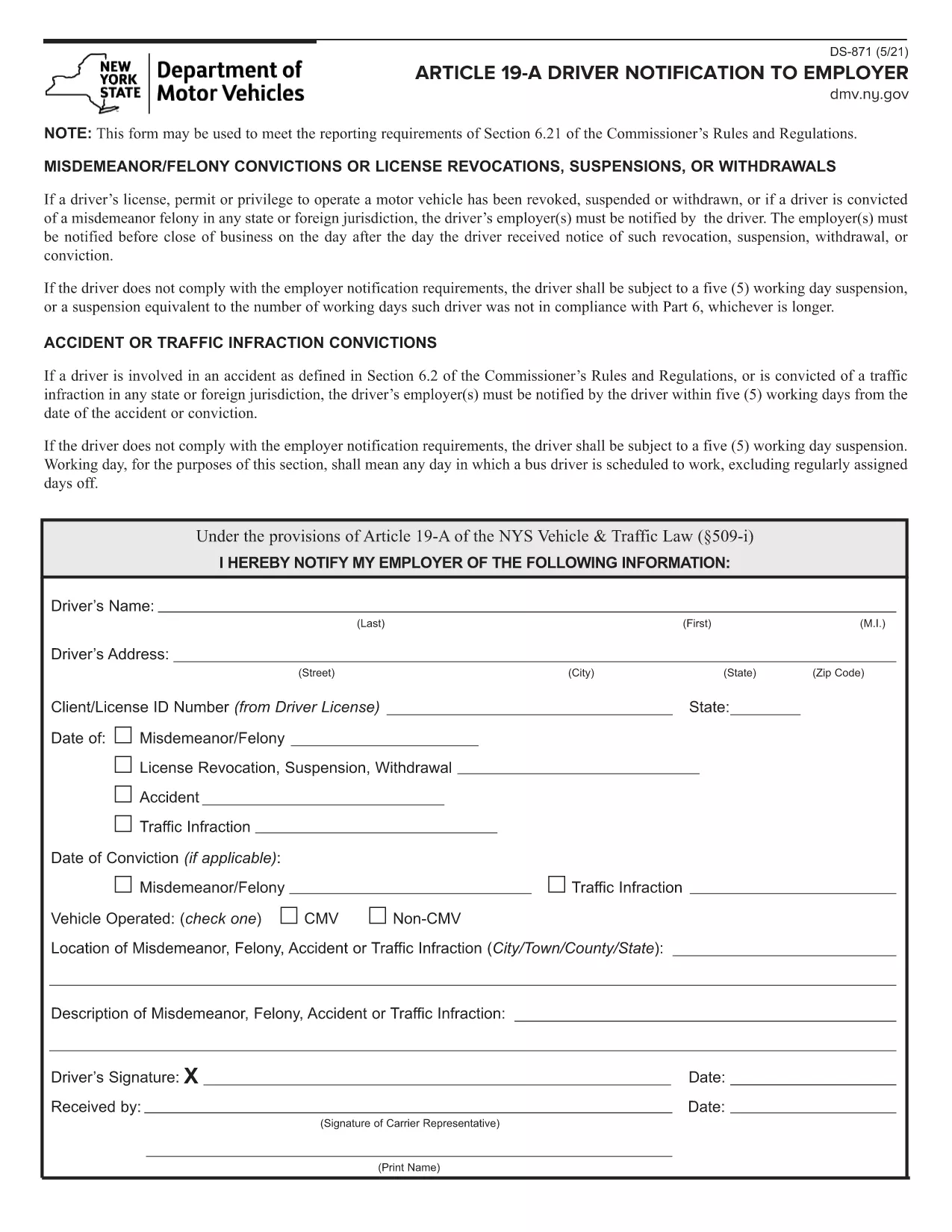
The DS-871 is the New York State Department of Motor Vehicles (DMV) form used by drivers to notify their employer of a suspension, revocation, or restriction under Article 19‑A. Employers need this documentation to stay compliant with state regulations.

This page offers a fillable PDF version of the DS-871, so you can complete the form directly in your browser without printing, scanning, or using a separate PDF editor. The Formize PDF Filler loads instantly, preserves your data, and lets you download a clean, signed copy ready for submission.

Below you’ll find a quick overview of the form, step‑by‑step instructions for filling it out online, common pitfalls to watch for, and guidance on where to send the finished document.

FAQ
  • What is the purpose of Form DS‑871?

    DS‑871 satisfies the New York DMV’s requirement that drivers notify their employer of any license suspension, revocation, or restriction under Article 19‑A.

  • Do I need a printer to use the fillable PDF?

    No. The form is fully editable online via the Formize PDF Filler. You only need to print a copy if your employer specifically requests a hard copy.

  • Can I save my progress and finish later?

    Yes. The Formize app lets you download a draft PDF that retains your entered data, so you can reopen it later and continue editing.

  • Is an electronic signature accepted?

    Most New York DMV employers accept an electronic signature created with the Formize signature tool. Check with your HR department if a wet‑ink signature is required.

  • Where should I send the completed DS‑871?

    Send the completed form to your employer’s HR or safety department. Keep a copy for your records in case the DMV requests proof of notification.

  • What if I make a mistake after submitting?

    Download a new copy of the fillable PDF, correct the error, and resend the updated version. The DMV does not require a specific form revision number.

  • Is there a filing fee for DS‑871?

    No. The DS‑871 is a free notification form; there is no charge to download or submit it.

  • Do I need to attach additional documents?

    Only attach supporting documents if your employer requests proof of the suspension (e.g., a copy of the DMV notice).

HOE

Zo vult u DS-871 gratis online in in 4 eenvoudige stappen:

  1. 1
    Open the Fillable Form
    Click the **Fill out this form** button on this page. The Formize PDF Filler app will load the DS‑871 PDF directly in your browser.
  2. 2
    Enter Your Information
    Type your name, license number, employer details, and the reason for the notification into the highlighted fields. All data is saved automatically as you type.
  3. 3
    Review and Sign
    Check each field for accuracy. Use the built‑in signature tool to add your electronic signature if required.
  4. 4
    Download or Email
    When you’re satisfied, click **Download PDF** to save a copy or **Email PDF** to send it straight to your employer.
Formize PDF Filler-app
WAT BETREFT

Aanvraagformulieren rijbewijs

In de meeste landen is het hebben van een rijbewijs verplicht voordat je de weg op mag. Het behalen van een rijbewijs is een belangrijke mijlpaal voor iedereen die auto wil rijden.

DS-871 is een van de formulieren voor het aanvragen van een rijbewijs. Dit zijn documenten die worden gebruikt om informatie te verzamelen van mensen die een rijbewijs willen aanvragen. Het bevat meestal velden voor de naam van de aanvrager, geboortedatum, ID-nummer, contactgegevens, evenals de geschiedenis en ervaring van hun rijbewijs.

FUNCTIES

PDF-vuller

De eenvoudigste manier om online PDF-formulieren in te vullen

  • Vul snel DS-871 in
    Op zoek naar een manier om DS-871 snel online in te vullen? Met onze online gratis PDF-formulierinvuller weet u hoe u dit pdf-document in minder dan een minuut kunt bewerken en invullen.
  • Gebruiksvriendelijke online PDF-editor
    Ben je het beu om PDF-bestanden uit te printen zodat je ze kunt bewerken, voordat je ze opnieuw scant en terugstuurt? Bewerk PDF-documenten gratis online. Gebruik onze online pdf-editor om tijd en papier te besparen.
  • Geweldige tools, alle platforms
    Vraagt ​​u zich af hoe u DS-871 op een Mac moet invullen, of misschien hoe u gratis een PDF-filler kunt gebruiken? Onze online pdf-tools werken op alle platformen.
  • Veilige bestandsopslag
    Voltooide "DS-871"-bestanden worden opgeslagen in een beveiligde database die wordt beheerd door Amazon Cloud hosting. U kunt uw bestanden op elk moment uit ons systeem verwijderen. Deze bestanden worden in ieder geval na 24 uur automatisch verwijderd.
  • Chat met {trefwoord}
    Chat met "DS-871" op Chatize, een gratis PDF-lezerassistent. Stel vragen en krijg antwoorden van "DS-871". Klik gewoon op de knop Chatten met document hierboven.

De vulsessie verwijderen

De geselecteerde vulsessie verwijderen? In dat geval gaat uw voortgang bij het invullen van het formulier verloren.

Bewerkingssessie verwijderen

De geselecteerde bewerkingssessie verwijderen? In dit geval gaat uw voortgang bij het maken en bewerken van het formulier verloren.