
Selecteer taal

NY DMV MV-TEENS Fillable PDF – Teen Driver Notification Enrollment

  1. Taal Engels
  2. Land VS
  3. Activiteit Rijbewijs
  4. Staat New York
NY DMV MV-TEENS Fillable PDF – Teen Driver Notification Enrollment

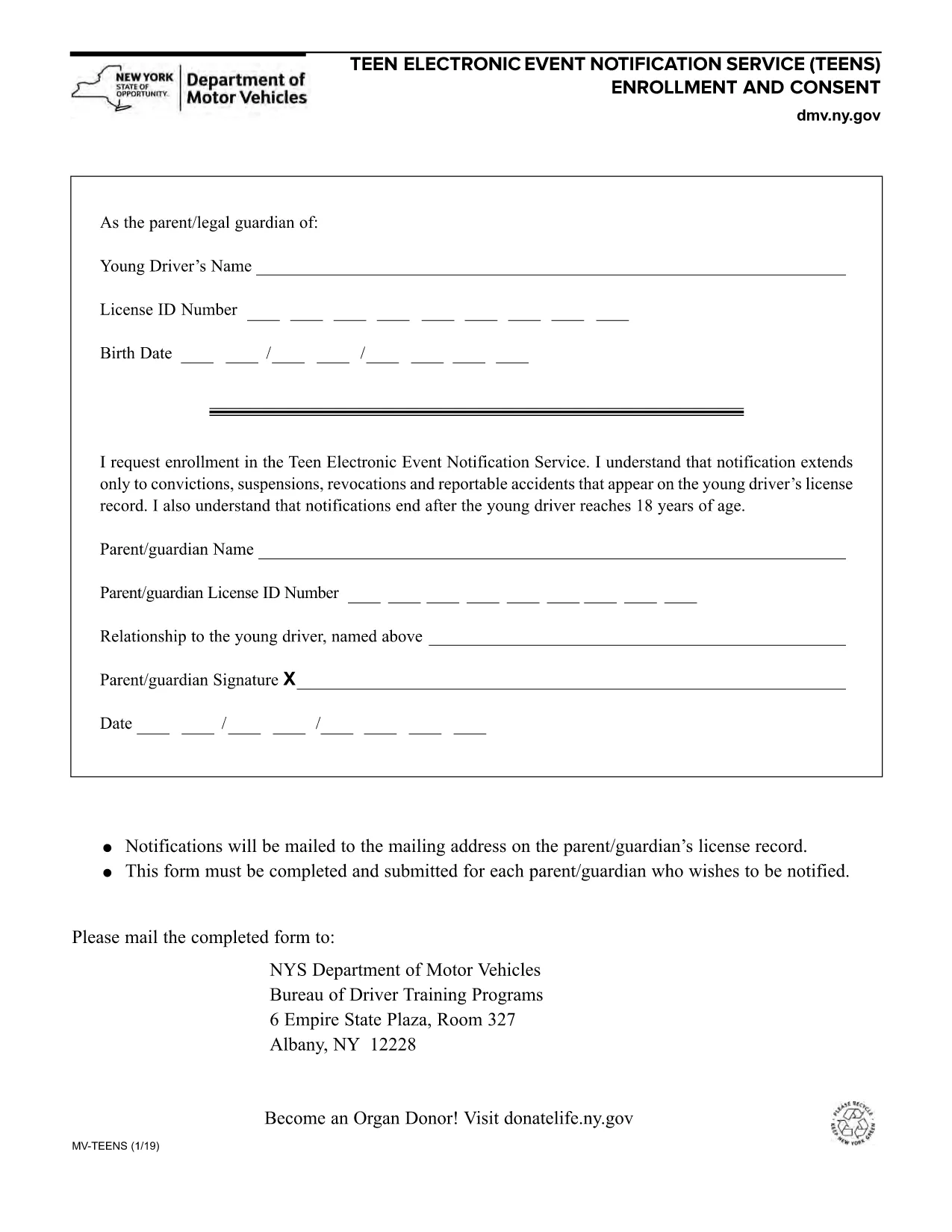
The MV-TEENS form is the official New York Department of Motor Vehicles (DMV) application for the Teen Electronic Event Notification Service. By enrolling, parents or legal guardians receive electronic alerts for convictions, suspensions, revocations, and reportable accidents that appear on a teen driver’s license record until the driver turns 18.

This fillable PDF is hosted on Formize, allowing you to complete the entire form directly in your browser—no printer, scanner, or PDF editor required. Simply click the “Fill out this form” button, let the Formize PDF Filler load, and start entering the required information.

Below you’ll find step‑by‑step instructions, tips to avoid common errors, and answers to the most frequently asked questions about the MV-TEENS form.

FAQ
  • Who can enroll in the MV-TEENS service?

    A parent or legal guardian of a driver under 18 years old can enroll on the teen’s behalf.

  • Is there a fee to submit the MV-TEENS form?

    No. The MV-TEENS enrollment is free of charge.

  • What types of notifications will I receive?

    You will receive electronic alerts for convictions, suspensions, revocations, and reportable accidents recorded on the teen’s license.

  • How long does the enrollment stay active?

    Notifications stop automatically when the teen driver reaches 18 years of age.

  • Can I edit the form after I’ve submitted it?

    Once submitted, you must complete a new MV-TEENS form to make changes.

  • Do I need a New York State driver’s license to use this form?

    Yes, the form is only for drivers licensed in New York State.

  • What if I don’t have internet access to fill the form online?

    You can download the PDF, print it, fill it out by hand, and mail it to the address listed on the form.

  • How will I receive the notifications?

    Notifications are sent via email to the address you provide on the form.

HOE

Zo vult u MV-TEENS gratis online in in 5 eenvoudige stappen:

  1. 1
    Open the Fillable Form
    Click the “Fill out this form” button on the page. The Formize PDF Filler app will load in a new window.
  2. 2
    Enter Required Information
    Complete each field: driver’s name, date of birth, license number, parent/guardian contact details, and consent statements.
  3. 3
    Review for Accuracy
    Use the built‑in preview to double‑check all entries. Correct any mistakes before proceeding.
  4. 4
    Submit or Save
    When finished, click “Submit” to generate a completed PDF you can download, email, or print. You may also choose “Save” to keep an editable copy.
  5. 5
    Confirmation
    A confirmation screen will appear with a reference number. Keep this number for future correspondence with the NY DMV.
Formize PDF Filler-app
WAT BETREFT

Aanvraagformulieren rijbewijs

In de meeste landen is het hebben van een rijbewijs verplicht voordat je de weg op mag. Het behalen van een rijbewijs is een belangrijke mijlpaal voor iedereen die auto wil rijden.

MV-TEENS is een van de formulieren voor het aanvragen van een rijbewijs. Dit zijn documenten die worden gebruikt om informatie te verzamelen van mensen die een rijbewijs willen aanvragen. Het bevat meestal velden voor de naam van de aanvrager, geboortedatum, ID-nummer, contactgegevens, evenals de geschiedenis en ervaring van hun rijbewijs.

FUNCTIES

PDF-vuller

De eenvoudigste manier om online PDF-formulieren in te vullen

  • Vul snel MV-TEENS in
    Op zoek naar een manier om MV-TEENS snel online in te vullen? Met onze online gratis PDF-formulierinvuller weet u hoe u dit pdf-document in minder dan een minuut kunt bewerken en invullen.
  • Gebruiksvriendelijke online PDF-editor
    Ben je het beu om PDF-bestanden uit te printen zodat je ze kunt bewerken, voordat je ze opnieuw scant en terugstuurt? Bewerk PDF-documenten gratis online. Gebruik onze online pdf-editor om tijd en papier te besparen.
  • Geweldige tools, alle platforms
    Vraagt ​​u zich af hoe u MV-TEENS op een Mac moet invullen, of misschien hoe u gratis een PDF-filler kunt gebruiken? Onze online pdf-tools werken op alle platformen.
  • Veilige bestandsopslag
    Voltooide "MV-TEENS"-bestanden worden opgeslagen in een beveiligde database die wordt beheerd door Amazon Cloud hosting. U kunt uw bestanden op elk moment uit ons systeem verwijderen. Deze bestanden worden in ieder geval na 24 uur automatisch verwijderd.
  • Chat met {trefwoord}
    Chat met "MV-TEENS" op Chatize, een gratis PDF-lezerassistent. Stel vragen en krijg antwoorden van "MV-TEENS". Klik gewoon op de knop Chatten met document hierboven.

De vulsessie verwijderen

De geselecteerde vulsessie verwijderen? In dat geval gaat uw voortgang bij het invullen van het formulier verloren.

Bewerkingssessie verwijderen

De geselecteerde bewerkingssessie verwijderen? In dit geval gaat uw voortgang bij het maken en bewerken van het formulier verloren.