
Selecteer taal

DL-135 – Pennsylvania Request for Vehicle Information (Fillable PDF)

  1. Taal Engels
  2. Land VS
  3. Activiteit Rijbewijs
  4. Staat Pennsylvania
DL-135 – Pennsylvania Request for Vehicle Information (Fillable PDF)

What Is the DL-135 Form?

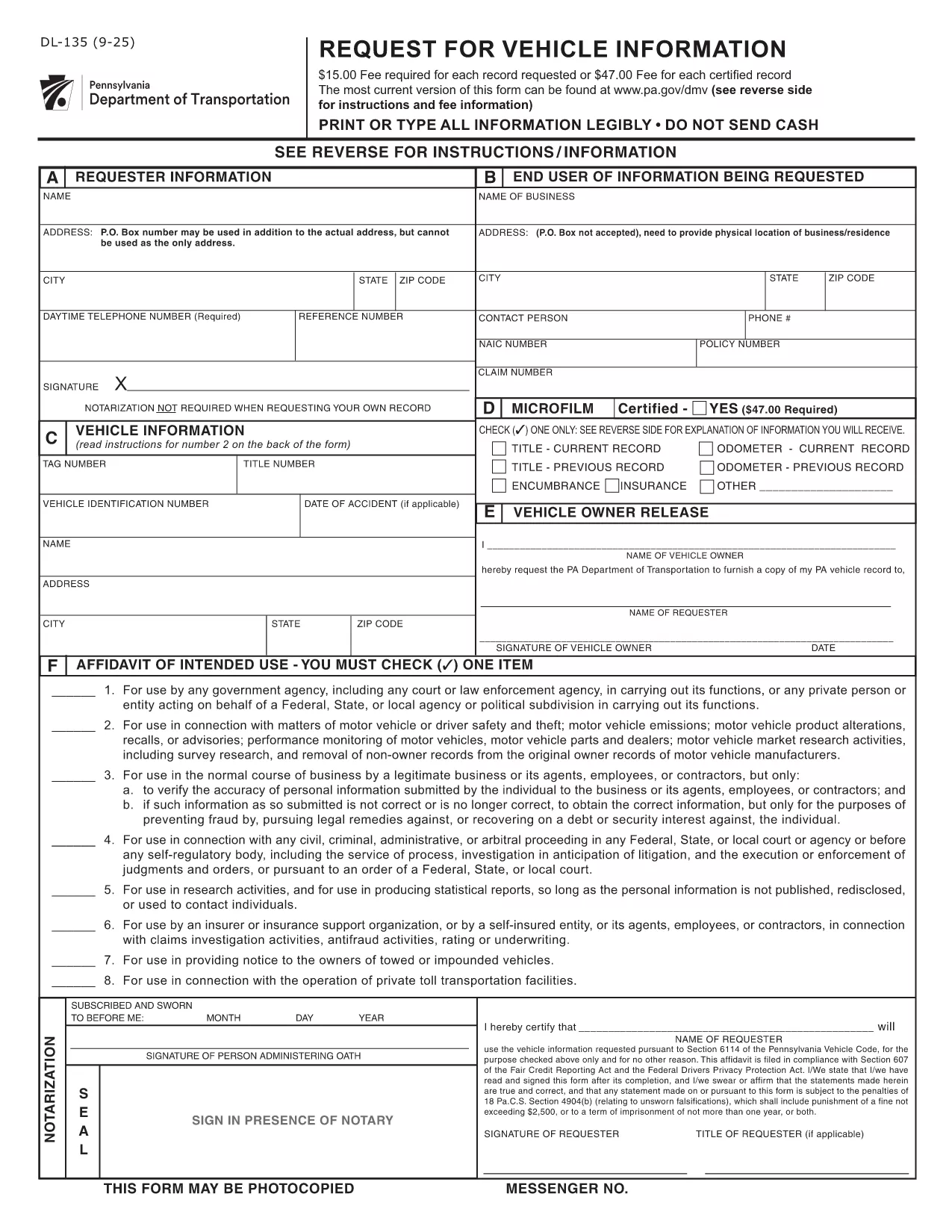
The DL‑135, also known as the “Request for Vehicle Information” form, is issued by the Pennsylvania Department of Transportation (PennDOT). It allows individuals, businesses, and law‑enforcement agencies to request detailed records about a vehicle registered in Pennsylvania, such as ownership history, title status, and lien information.

Why Use a Fillable PDF with Formize?

Formize turns the static DL‑135 PDF into an interactive, fillable document that you can complete directly in your browser. No Adobe Acrobat or other PDF editor is required. Your data is saved automatically, and you can download a completed copy for printing or e‑submission.

Step‑by‑Step Guide to Complete DL‑135

Follow these simple steps to finish your request in minutes:

  1. Click the “Fill out this form” button on the page.
  2. Wait for the Formize PDF Filler app to load (usually a few seconds).
  3. Enter the required information: vehicle VIN or plate number, your name, address, and the purpose of the request.
  4. Review the entered data for accuracy.
  5. Click “Submit” to generate a completed PDF you can download or print.

Common Mistakes to Avoid

  • Leaving fields blank: The PennDOT system rejects incomplete requests.
  • Incorrect VIN or plate number: Double‑check the characters; a single typo can delay the search.
  • Using the wrong purpose code: Choose the option that best matches your need (e.g., “Legal/Insurance” vs. “Personal Inquiry”).

Where to Submit Your Request

After completing the form, you can either:

  • Print the filled PDF and mail it to the PennDOT Vehicle Information Services Center.
  • Submit the PDF electronically through the PennDOT online portal if you have an account.

For the most up‑to‑date submission address, refer to the official PennDOT website.

FAQ
  • What information do I need to fill out DL‑135?

    You’ll need the vehicle’s VIN or license plate number, your full name, mailing address, and the reason you’re requesting the records.

  • Can I submit the DL‑135 form electronically?

    Yes. After completing the fillable PDF, you can upload it to the PennDOT online portal if you have an account, or email it to the designated address.

  • Is there a fee to request vehicle information with DL‑135?

    PennDOT may charge a processing fee depending on the type of request. Check the latest fee schedule on the PennDOT website.

  • How long does it take to receive the vehicle information?

    Processing time varies, but most standard requests are fulfilled within 5‑10 business days after PennDOT receives the completed form.

  • Can I use the DL‑135 form for out‑of‑state vehicles?

    The DL‑135 is specific to Pennsylvania‑registered vehicles. For out‑of‑state requests, contact the corresponding state’s DMV.

  • What should I do if I make a mistake on the form?

    Simply edit the field in the fillable PDF before submitting. If you have already submitted, you’ll need to complete a new form with the correct information.

  • Do I need a signature on the DL‑135?

    Yes. The form requires a handwritten signature. After downloading the completed PDF, print it, sign, and then mail or upload as instructed.

HOE

Zo vult u DL-135 gratis online in in 3 eenvoudige stappen:

  1. 1
    Open the Fillable Form
    Click the “Fill out this form” button on the page. The Formize PDF Filler will open in a new tab.
  2. 2
    Enter Your Information
    Type the required details (VIN, name, address, purpose) into the interactive fields. The app saves your entries automatically.
  3. 3
    Review and Download
    Check all fields for accuracy, then click “Submit” to generate a completed PDF. Download it for printing or email submission.
Formize PDF Filler-app
WAT BETREFT

Aanvraagformulieren rijbewijs

In de meeste landen is het hebben van een rijbewijs verplicht voordat je de weg op mag. Het behalen van een rijbewijs is een belangrijke mijlpaal voor iedereen die auto wil rijden.

DL-135 is een van de formulieren voor het aanvragen van een rijbewijs. Dit zijn documenten die worden gebruikt om informatie te verzamelen van mensen die een rijbewijs willen aanvragen. Het bevat meestal velden voor de naam van de aanvrager, geboortedatum, ID-nummer, contactgegevens, evenals de geschiedenis en ervaring van hun rijbewijs.

FUNCTIES

PDF-vuller

De eenvoudigste manier om online PDF-formulieren in te vullen

  • Vul snel DL-135 in
    Op zoek naar een manier om DL-135 snel online in te vullen? Met onze online gratis PDF-formulierinvuller weet u hoe u dit pdf-document in minder dan een minuut kunt bewerken en invullen.
  • Gebruiksvriendelijke online PDF-editor
    Ben je het beu om PDF-bestanden uit te printen zodat je ze kunt bewerken, voordat je ze opnieuw scant en terugstuurt? Bewerk PDF-documenten gratis online. Gebruik onze online pdf-editor om tijd en papier te besparen.
  • Geweldige tools, alle platforms
    Vraagt ​​u zich af hoe u DL-135 op een Mac moet invullen, of misschien hoe u gratis een PDF-filler kunt gebruiken? Onze online pdf-tools werken op alle platformen.
  • Veilige bestandsopslag
    Voltooide "DL-135"-bestanden worden opgeslagen in een beveiligde database die wordt beheerd door Amazon Cloud hosting. U kunt uw bestanden op elk moment uit ons systeem verwijderen. Deze bestanden worden in ieder geval na 24 uur automatisch verwijderd.
  • Chat met {trefwoord}
    Chat met "DL-135" op Chatize, een gratis PDF-lezerassistent. Stel vragen en krijg antwoorden van "DL-135". Klik gewoon op de knop Chatten met document hierboven.

De vulsessie verwijderen

De geselecteerde vulsessie verwijderen? In dat geval gaat uw voortgang bij het invullen van het formulier verloren.

Bewerkingssessie verwijderen

De geselecteerde bewerkingssessie verwijderen? In dit geval gaat uw voortgang bij het maken en bewerken van het formulier verloren.