
Selecteer taal

DL-503 – Pennsylvania Driver Information Request Form (Fillable PDF)

  1. Taal Engels
  2. Land VS
  3. Activiteit Rijbewijs
  4. Staat Pennsylvania
DL-503 – Pennsylvania Driver Information Request Form (Fillable PDF)

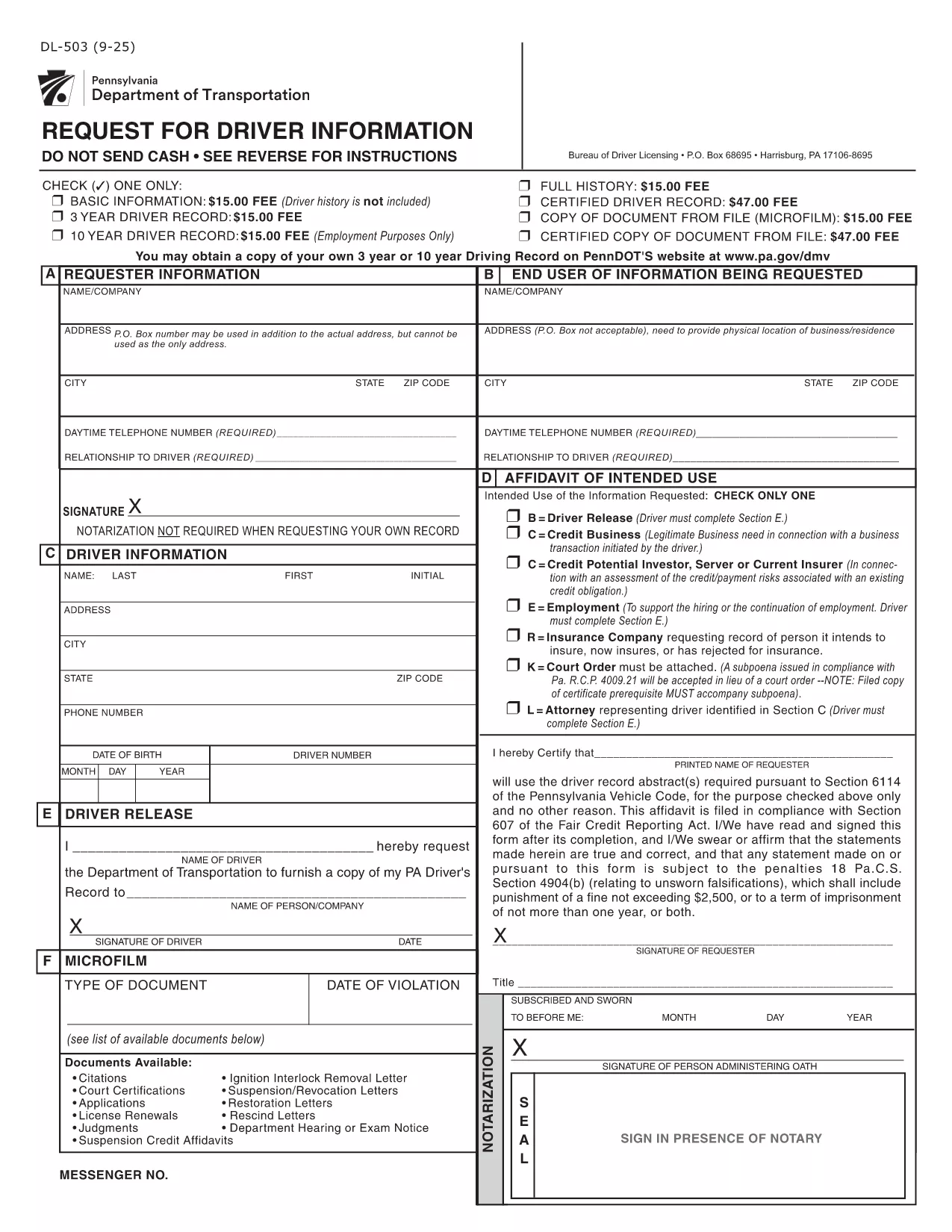
The DL-503 is the official Pennsylvania Department of Transportation (PennDOT) form used to request driver record information. Whether you need your own driving history or an authorized record for an employee, this fillable PDF lets you submit a request quickly and securely.

What Is the DL-503 Form?

The DL-503 collects basic identifying details, the purpose of the request, and the signature of the requester. It is commonly used by employers, insurance companies, and individuals who need a Motor Vehicle Record (MVR) for verification.

How to Complete the DL-503 Online

Instead of downloading, printing, and scanning, you can fill the form directly in your browser using Formize’s PDF Filler app. Follow the simple steps below.

Common Mistakes to Avoid

  • Leaving Section E unsigned when required – the driver’s signature is mandatory if any of the checkboxes in Section D are selected.
  • Providing an incorrect ZIP code – PennDOT will reject the request if the address does not match the driver’s records.
  • Omitting the purpose code – PennDOT requires a clear reason (e.g., employment, insurance) for the record request.

Where to Submit the Completed Form

After you finish filling out the DL-503, print the completed PDF and mail it to:

Bureau of Driver Licensing
P.O. Box 68695
Harrisburg, PA 17106‑8695

Alternatively, you may submit a scanned copy via fax if your organization has an established PennDOT fax line.

Frequently Used Keywords

Keywords such as "DL-503", "Pennsylvania driver record request", and "fillable PDF" help you find the right form quickly. Use them when searching online or when naming your saved file.

FAQ
  • Can I submit the DL-503 electronically?

    PennDOT currently requires a printed and signed copy. The online filler only speeds up data entry; you still need to mail the final form.

  • Do I need a notary for my own record request?

    No. For personal requests, notarization is not required. Only third‑party requests may need additional verification.

  • How long does it take to receive the driver record?

    Processing typically takes 7‑10 business days after PennDOT receives the completed and signed form.

  • What fees are associated with the DL-503 request?

    PennDOT charges a nominal fee per request (check the latest schedule on the PennDOT website). Payment details are included on the form.

  • Can I request records for multiple drivers on one form?

    Each driver requires a separate DL-503. Submit one form per individual to avoid processing delays.

  • What should I do if I make a mistake on the form?

    Correct the error by striking through the mistake, initialing the change, and re‑signing the affected sections before mailing.

  • Is the Formize filler compatible with mobile devices?

    Yes, the filler works on most modern smartphones and tablets, but printing the final document is recommended for a clean submission.

HOE

Zo vult u DL-503 gratis online in in 3 eenvoudige stappen:

  1. 1
    Click the Fill‑out Button
    On this page, click the bright “Fill out this form” button. The Formize PDF Filler app will open in a new tab.
  2. 2
    Wait for the PDF Filler to Load
    The app loads the DL-503 PDF automatically. No download or extra software is required.
  3. 3
    Complete and Submit
    Enter all required information, sign electronically if allowed, then print and mail the form as instructed.
Formize PDF Filler-app
WAT BETREFT

Aanvraagformulieren rijbewijs

In de meeste landen is het hebben van een rijbewijs verplicht voordat je de weg op mag. Het behalen van een rijbewijs is een belangrijke mijlpaal voor iedereen die auto wil rijden.

DL-503 is een van de formulieren voor het aanvragen van een rijbewijs. Dit zijn documenten die worden gebruikt om informatie te verzamelen van mensen die een rijbewijs willen aanvragen. Het bevat meestal velden voor de naam van de aanvrager, geboortedatum, ID-nummer, contactgegevens, evenals de geschiedenis en ervaring van hun rijbewijs.

FUNCTIES

PDF-vuller

De eenvoudigste manier om online PDF-formulieren in te vullen

  • Vul snel DL-503 in
    Op zoek naar een manier om DL-503 snel online in te vullen? Met onze online gratis PDF-formulierinvuller weet u hoe u dit pdf-document in minder dan een minuut kunt bewerken en invullen.
  • Gebruiksvriendelijke online PDF-editor
    Ben je het beu om PDF-bestanden uit te printen zodat je ze kunt bewerken, voordat je ze opnieuw scant en terugstuurt? Bewerk PDF-documenten gratis online. Gebruik onze online pdf-editor om tijd en papier te besparen.
  • Geweldige tools, alle platforms
    Vraagt ​​u zich af hoe u DL-503 op een Mac moet invullen, of misschien hoe u gratis een PDF-filler kunt gebruiken? Onze online pdf-tools werken op alle platformen.
  • Veilige bestandsopslag
    Voltooide "DL-503"-bestanden worden opgeslagen in een beveiligde database die wordt beheerd door Amazon Cloud hosting. U kunt uw bestanden op elk moment uit ons systeem verwijderen. Deze bestanden worden in ieder geval na 24 uur automatisch verwijderd.
  • Chat met {trefwoord}
    Chat met "DL-503" op Chatize, een gratis PDF-lezerassistent. Stel vragen en krijg antwoorden van "DL-503". Klik gewoon op de knop Chatten met document hierboven.

De vulsessie verwijderen

De geselecteerde vulsessie verwijderen? In dat geval gaat uw voortgang bij het invullen van het formulier verloren.

Bewerkingssessie verwijderen

De geselecteerde bewerkingssessie verwijderen? In dit geval gaat uw voortgang bij het maken en bewerken van het formulier verloren.