Selecteer taal

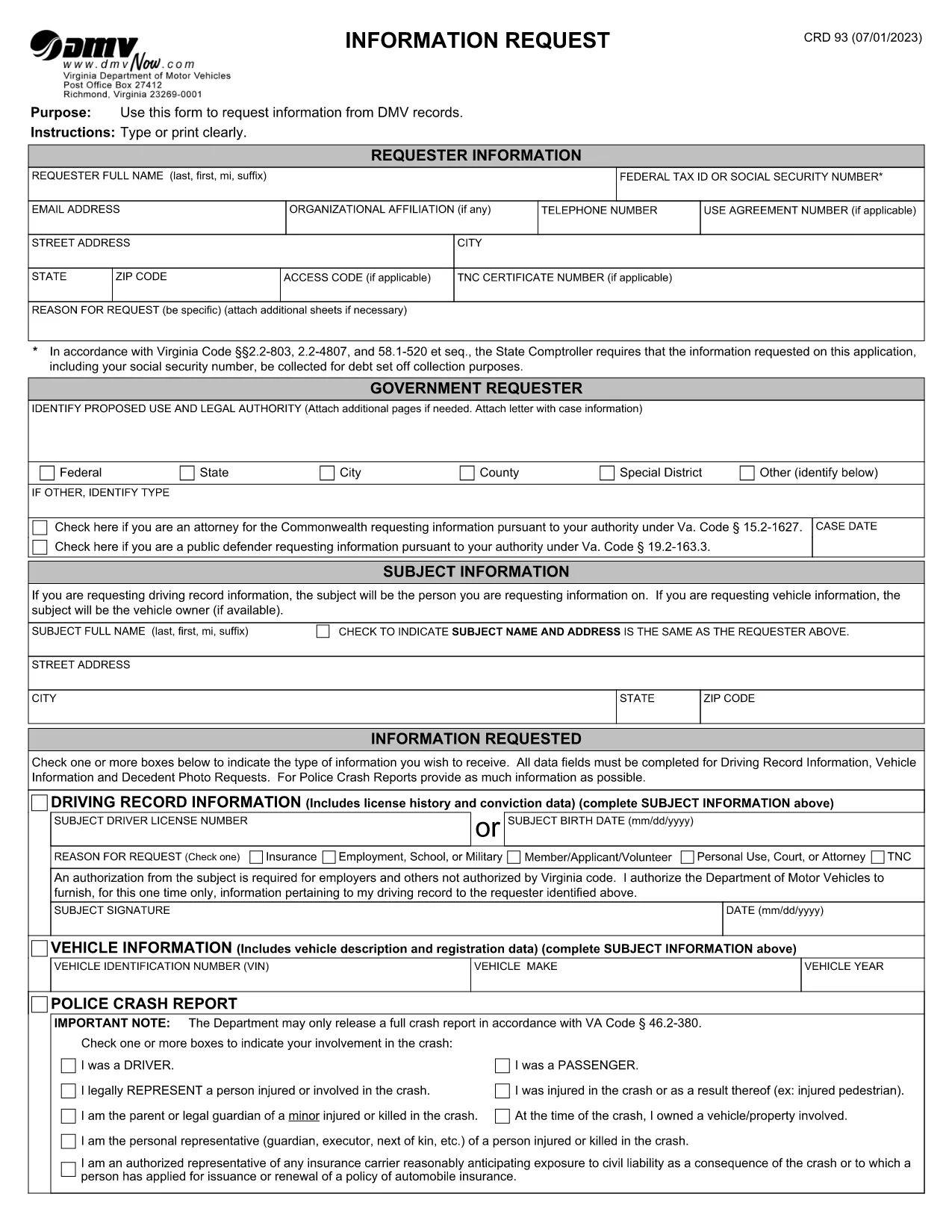
Virginia DMV CRD 93 Information Request Form (Fillable PDF)

  1. Land VS
  2. Taal Engels
  3. Activiteit Rijbewijs
  4. Staat Virginia
Virginia DMV CRD 93 Information Request Form (Fillable PDF)

The CRD 93 is Virginia’s official Information Request form used to obtain driving records, vehicle data, crash reports, and other DMV‑maintained information. Traditionally you would print, fill, sign, and mail the form, but with Formize you can complete the same document entirely online – faster, error‑free, and fully fillable PDF ready.

What Is the CRD 93 Form?

Issued by the Virginia Department of Motor Vehicles (DMV), the CRD 93 allows individuals, businesses, and law‑enforcement agencies to request specific records such as:

  • Driver’s license history
  • Vehicle registration details
  • Police crash reports
  • Decedent photographs and other special‑request items

Because the form contains sensitive personal data, the DMV requires a clear statement of purpose and, in many cases, a fee.

How to Complete the CRD 93 Online with Formize

Instead of downloading, printing, and scanning, simply click the “Fill out this form” button below. Formize will load the official PDF into its secure PDF Filler app, letting you type, sign, and save directly in your browser.

Common Mistakes to Avoid

  • Leaving required fields blank: The DMV will reject incomplete requests.
  • Incorrect identification numbers: Double‑check Social Security or Tax ID numbers.
  • Vague reason for request: Provide a specific, lawful purpose (e.g., “court‑ordered driver‑record review”).
  • Missing signatures: Use the electronic signature tool; a handwritten signature on a printed copy is no longer required.

Where to Submit Your Request

After completing the form, download the signed PDF and mail it to:

Virginia Department of Motor Vehicles
Information Request Division
P.O. Box 27412
Richmond, VA 23269‑7412

Include any required fees (check or money order) as instructed on the last page of the form.

Download the Official Fillable PDF

Ready to start? Click the button below to open the official CRD 93 PDF in Formize’s filler.

Fill out this form

FAQ
  • What is the purpose of the CRD 93 form?

    The CRD 93 is used to request specific DMV records in Virginia, such as driver histories, vehicle registrations, crash reports, and decedent photos.

  • Can I submit the CRD 93 electronically?

    Virginia DMV still requires a mailed PDF with any applicable fees, but you can complete the form electronically using Formize and then print or email the PDF to yourself for mailing.

  • Do I need a Virginia address to use this form?

    No. The form can be used by anyone who has a lawful reason to request the records, regardless of residency, as long as the request complies with Virginia law.

  • How long does it take to receive the requested records?

    Processing times vary. Standard requests typically take 10‑15 business days after the DMV receives your completed form and payment.

  • What fees are associated with a CRD 93 request?

    Fees depend on the type of record requested (e.g., driver history, crash report). The fee schedule is listed on the last page of the form.

  • Is a handwritten signature still required?

    No. An electronic signature created in the Formize PDF Filler satisfies the DMV’s signature requirement.

  • Can I request records for someone else?

    Yes, but you must provide a valid reason, proof of authority (e.g., power of attorney), and the subject’s identifying information.

  • What should I do if I make a mistake on the form?

    Because the PDF is fillable, you can edit any field before saving. If you’ve already downloaded the PDF, simply open it again in Formize, correct the error, and re‑save.

HOE

Zo vult u CRD 93 gratis online in in 5 eenvoudige stappen:

  1. 1
    Open the Fillable Form
    Click the “Fill out this form” button above. The official CRD 93 PDF loads instantly in Formize’s secure PDF Filler.
  2. 2
    Enter Your Information
    Type your name, Tax ID or Social Security Number, address, and detailed reason for the request directly into the fields.
  3. 3
    Add Subject Details
    Provide the driver’s license number, vehicle VIN, or other identifiers for the record you are requesting.
  4. 4
    Sign Electronically
    Use the built‑in signature tool to add a digital signature. No printer or scanner needed.
  5. 5
    Save and Submit
    Download the completed PDF, attach the required fee, and mail it to the Virginia DMV address shown on the form.
Formize PDF Filler-app
WAT BETREFT

Aanvraagformulieren rijbewijs

CRD 93 is een van de rijbewijsformulieren. Dit zijn documenten die worden gebruikt om een ​​rijbewijs aan te vragen of om verschillende diensten met betrekking tot rijbewijzen aan te vragen. Deze formulieren worden doorgaans verstrekt door de afdeling of instantie die verantwoordelijk is voor de afgifte van rijbewijzen in een specifiek rechtsgebied, zoals het Department of Motor Vehicles (DMV) in de Verenigde Staten.

Veel voorkomende rijbewijsformulieren zijn onder meer:

Aanvraag rijbewijs: Dit formulier wordt gebruikt om een ​​nieuw rijbewijs aan te vragen of een bestaand rijbewijs te verlengen. Meestal zijn hiervoor persoonlijke gegevens nodig, zoals naam, adres, geboortedatum en burgerservicenummer.

Identificatiedocumenten: sommige rechtsgebieden vereisen specifieke identificatiedocumenten om de identiteit en het ingezetenschap van de aanvrager te verifiëren. Dit kunnen formulieren zijn zoals een geboorteakte, paspoort of socialezekerheidskaart.

Visusonderzoek: Voor veel rijbewijsaanvragen is een formulier voor gezichtsonderzoek vereist, waarbij een bevoegde medische professional of oogzorgspecialist verklaart dat de aanvrager voldoet aan de minimale zichtvereisten voor autorijden.

Formulieren voor rijopleiding: In sommige gevallen moeten personen mogelijk een bewijs overleggen dat ze een rijopleiding hebben gevolgd, zoals een certificaat voor voltooiing van de rijopleiding of een formulier dat is ondertekend door een instructeur.

Medische evaluatie: Voor bepaalde medische aandoeningen kunnen aanvullende formulieren nodig zijn die door een beroepsbeoefenaar in de gezondheidszorg moeten worden ingevuld. Deze formulieren verifiëren de fysieke en mentale geschiktheid van de aanvrager om te rijden.

Adreswijzigingsformulier: als een rijbewijshouder naar een nieuw adres verhuist, moet hij mogelijk een adreswijzigingsformulier invullen om de rijbewijsgegevens bij te werken.

Rijbewijsformulieren kunnen worden verkregen bij het plaatselijke DMV-kantoor of worden gedownload van hun website. Om een ​​soepel aanvraag- of serviceproces te garanderen, is het belangrijk om de vereiste formulieren zorgvuldig in te vullen en samen met eventuele ondersteunende documenten in te dienen.

FUNCTIES

PDF-vuller

De eenvoudigste manier om online PDF-formulieren in te vullen

  • Vul snel CRD 93 in
    Op zoek naar een manier om CRD 93 snel online in te vullen? Met onze online gratis PDF-formulierinvuller weet u hoe u dit pdf-document in minder dan een minuut kunt bewerken en invullen.
  • Gebruiksvriendelijke online PDF-editor
    Ben je het beu om PDF-bestanden uit te printen zodat je ze kunt bewerken, voordat je ze opnieuw scant en terugstuurt? Bewerk PDF-documenten gratis online. Gebruik onze online pdf-editor om tijd en papier te besparen.
  • Geweldige tools, alle platforms
    Vraagt ​​u zich af hoe u CRD 93 op een Mac moet invullen, of misschien hoe u gratis een PDF-filler kunt gebruiken? Onze online pdf-tools werken op alle platformen.
  • Veilige bestandsopslag
    Voltooide "CRD 93"-bestanden worden opgeslagen in een beveiligde database die wordt beheerd door Amazon Cloud hosting. U kunt uw bestanden op elk moment uit ons systeem verwijderen. Deze bestanden worden in ieder geval na 24 uur automatisch verwijderd.
  • Chat met {trefwoord}
    Chat met "CRD 93" op Chatize, een gratis PDF-lezerassistent. Stel vragen en krijg antwoorden van "CRD 93". Klik gewoon op de knop Chatten met document hierboven.

De vulsessie verwijderen

De geselecteerde vulsessie verwijderen? In dat geval gaat uw voortgang bij het invullen van het formulier verloren.

Bewerkingssessie verwijderen

De geselecteerde bewerkingssessie verwijderen? In dit geval gaat uw voortgang bij het maken en bewerken van het formulier verloren.