
Selecteer taal

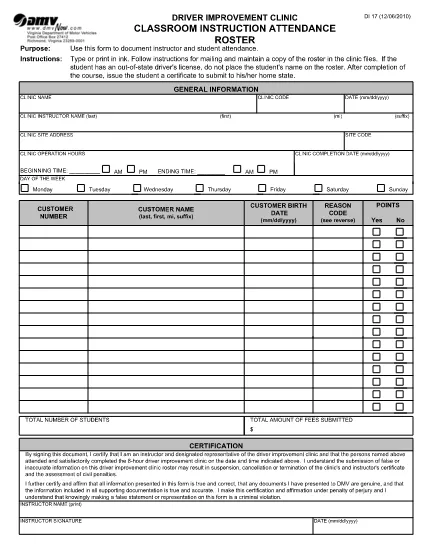
DI-17 Classroom Instruction Attendance Roster (Fillable PDF)

  1. Land VS
  2. Taal Engels
  3. Activiteit Rijbewijs
  4. Staat Virginia
DI-17 Classroom Instruction Attendance Roster (Fillable PDF)

The DI-17 is the Virginia Department of Motor Vehicles (DMV) form used to record attendance for classroom driver‑education instruction. Schools, driving instructors, and training programs must submit this roster within 24 hours of completing a class.

What Is the DI-17 Form?

DI-17 captures essential details such as the instructor’s name, student information, dates of instruction, and the specific curriculum covered. It ensures compliance with Virginia DMV regulations and helps verify that learners have met the required training hours before taking the road‑skills test.

How to Complete the DI-17 Online

With Formize’s fillable PDF technology you can complete the DI‑17 directly in your browser—no extra software needed. Follow the simple steps below:

  • Click the Fill out this form button on this page.
  • Wait for the Formize PDF Filler app to load (usually a few seconds).
  • Enter all required fields exactly as they appear on the original paper form.
  • Use the Save button to store a copy on your device or in the cloud.
  • When finished, click Download to get the completed PDF ready for submission.

Common Errors to Avoid

Even a small mistake can delay processing. Keep these tips in mind:

  • Incorrect dates: Verify the class date matches the DMV’s calendar.
  • Missing signatures: Both the instructor and each student must sign.
  • Illegible handwriting: The fillable fields ensure clear, legible text.
  • Wrong form version: Use the latest DI‑17 PDF provided by the Virginia DMV (the link below is always up‑to‑date).

Submit Your Completed DI-17

After saving the filled PDF, upload it to the Virginia DMV Extranet portal or email it according to your organization’s instructions. The DMV requires receipt within 24 hours of the class.

Why Use Formize Fillable PDF

Formize turns static PDFs into interactive, web‑based forms. Benefits include:

  • Instant access: No downloads or installations.
  • Data accuracy: Built‑in validation reduces entry errors.
  • Secure storage: Your completed form is saved locally or to cloud storage of your choice.
  • Compliance‑ready: The PDF matches the official DMV layout exactly.

Ready to start? Click the button below and fill out the DI‑17 in seconds.

FAQ
  • What is the purpose of the DI‑17 form?

    The DI‑17 records attendance for classroom driver‑education instruction and verifies that students have completed the required training before taking the road‑skills test.

  • Can I fill out the DI‑17 on a mobile device?

    Yes. Formize’s fillable PDF works on smartphones and tablets with any modern browser.

  • Do I need Adobe Acrobat to complete the DI‑17?

    No. The Formize PDF Filler runs entirely in the browser, eliminating the need for separate PDF editors.

  • How soon must the DI‑17 be submitted after a class?

    Virginia DMV requires the completed DI‑17 to be submitted within 24 hours of the class date.

  • What if I make a mistake after saving the form?

    Open the saved PDF again in the Formize filler, correct the error, and re‑save before submitting.

  • Is the DI‑17 form free to download?

    Yes. The official DI‑17 PDF is provided by the Virginia DMV at no cost.

  • Do I need a DMV account to use the fillable version?

    No. You can fill out and download the PDF without a DMV login; however, submission through the Extranet may require an authorized account.

  • Can I print the completed DI‑17 after filling it online?

    Absolutely. After saving, you can print the PDF for your records or to submit a hard copy if required.

HOE

Zo vult u DI-17 gratis online in in 5 eenvoudige stappen:

  1. 1
    Click the Fill‑out Button
    On this page, press the “Fill out this form” button to launch the Formize PDF Filler.
  2. 2
    Wait for the Filler to Load
    The web app loads the DI‑17 PDF in a few seconds. No download or installation is required.
  3. 3
    Enter Required Information
    Complete each fillable field with accurate data—dates, instructor name, student details, and signatures.
  4. 4
    Review and Save
    Double‑check all entries, then click Save to store a copy on your device or cloud storage.
  5. 5
    Download or Submit
    Download the finished PDF and upload it to the Virginia DMV Extranet portal, or follow your organization’s submission guidelines.
Formize PDF Filler-app
WAT BETREFT

Aanvraagformulieren rijbewijs

DI-17 is een van de rijbewijsformulieren. Dit zijn documenten die worden gebruikt bij het verkrijgen of verlengen van een rijbewijs. Dit is een officieel door de overheid uitgegeven document waarmee personen een motorvoertuig op de openbare weg mogen besturen. Deze formulieren kunnen variëren afhankelijk van het rechtsgebied, maar omvatten over het algemeen het volgende:

Aanvraagformulier: dit formulier wordt gebruikt om een ​​rijbewijs aan te vragen en vraagt ​​doorgaans om persoonlijke gegevens zoals naam, adres, geboortedatum en burgerservicenummer.

Identificatiedocumentatie: Naast het aanvraagformulier moeten individuen doorgaans specifieke identificatiedocumenten overleggen om hun identiteit, verblijfplaats en legale aanwezigheid in het land te bewijzen. Dit kan onder meer een geldig paspoort, een geboorteakte, een socialezekerheidskaart of een ander door de overheid uitgegeven identiteitsbewijs zijn.

Bewijs van ingezetenschap: in veel rechtsgebieden moeten aanvragers een bewijs van ingezetenschap overleggen, zoals een energierekening, huurovereenkomst of bankafschrift, om hun adres te verifiëren.

Medisch keuringsformulier: In sommige rechtsgebieden is mogelijk een medisch onderzoek vereist om ervoor te zorgen dat de aanvrager voldoet aan de noodzakelijke fysieke en mentale vereisten voor veilig rijden. Normaal gesproken vult een medische professional dit formulier in.

Voltooiingsformulier voor chauffeursopleiding: voor beginnende chauffeurs kan het voltooien van een chauffeursopleiding vereist zijn. Voor het aanvragen van een rijbewijs is vaak een formulier of certificaat nodig waaruit blijkt dat de aanvraag succesvol is afgerond.

Visietestformulier: Een visietest wordt gewoonlijk uitgevoerd tijdens het aanvraagproces voor een rijbewijs. Een oogzorgprofessional of bevoegd personeel beoordeelt de gezichtsscherpte van de aanvrager en vult het vereiste formulier in.

Deze formulieren zijn doorgaans verkrijgbaar bij het plaatselijke Department of Motor Vehicles (DMV) of een gelijkwaardige overheidsinstantie die verantwoordelijk is voor rijbewijzen. Het is belangrijk om de specifieke vereisten en formulieren te controleren die van toepassing zijn op uw rechtsgebied, aangezien deze kunnen variëren.

FUNCTIES

PDF-vuller

De eenvoudigste manier om online PDF-formulieren in te vullen

  • Vul snel DI-17 in
    Op zoek naar een manier om DI-17 snel online in te vullen? Met onze online gratis PDF-formulierinvuller weet u hoe u dit pdf-document in minder dan een minuut kunt bewerken en invullen.
  • Gebruiksvriendelijke online PDF-editor
    Ben je het beu om PDF-bestanden uit te printen zodat je ze kunt bewerken, voordat je ze opnieuw scant en terugstuurt? Bewerk PDF-documenten gratis online. Gebruik onze online pdf-editor om tijd en papier te besparen.
  • Geweldige tools, alle platforms
    Vraagt ​​u zich af hoe u DI-17 op een Mac moet invullen, of misschien hoe u gratis een PDF-filler kunt gebruiken? Onze online pdf-tools werken op alle platformen.
  • Veilige bestandsopslag
    Voltooide "DI-17"-bestanden worden opgeslagen in een beveiligde database die wordt beheerd door Amazon Cloud hosting. U kunt uw bestanden op elk moment uit ons systeem verwijderen. Deze bestanden worden in ieder geval na 24 uur automatisch verwijderd.
  • Chat met {trefwoord}
    Chat met "DI-17" op Chatize, een gratis PDF-lezerassistent. Stel vragen en krijg antwoorden van "DI-17". Klik gewoon op de knop Chatten met document hierboven.

De vulsessie verwijderen

De geselecteerde vulsessie verwijderen? In dat geval gaat uw voortgang bij het invullen van het formulier verloren.

Bewerkingssessie verwijderen

De geselecteerde bewerkingssessie verwijderen? In dit geval gaat uw voortgang bij het maken en bewerken van het formulier verloren.