
Selecteer taal

DL-56 National Driver Register File Check (Fillable PDF)

  1. Land VS
  2. Taal Engels
  3. Activiteit Rijbewijs
  4. Staat Virginia
DL-56 National Driver Register File Check (Fillable PDF)

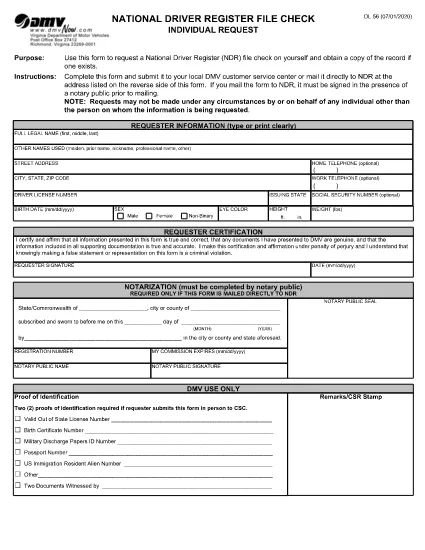
The DL-56 is the official request form used to obtain a file check from the National Driver Register (NDR). This government‑issued form lets you verify whether your driving record contains any cancellations, suspensions, or revocations that could affect licensing, employment, or insurance.

What Is the DL-56 Form?

The DL‑56 form is a simple, one‑page PDF that collects basic personal information (name, address, driver’s license number) and a notarized signature. Once submitted, the NDR returns a copy of any existing file entries associated with your driver’s license.

Who Needs a DL-56 File Check?

  • Job applicants whose position requires a clean driving record.
  • Individuals applying for a commercial driver’s license or occupational license.
  • Insurance companies assessing risk.
  • Drivers who have had a license suspended, revoked, or cancelled and need to confirm the status.

How to Complete the DL-56 Form Online

Instead of downloading the PDF and editing it in a separate editor, simply click the "Fill out this form" button on the page. The Formize PDF Filler app will load, allowing you to fill, sign, and save the document directly in your browser.

Common Mistakes to Avoid

  • Missing notarization: The NDR requires a notarized signature for mailed submissions.
  • Incorrect driver’s license number: Double‑check the number to prevent delays.
  • Leaving blank fields: Even optional fields should be marked "N/A" if not applicable.

Submit Your Request & What Happens Next

After completing the form, you can either:

  1. Download the completed PDF, have it notarized, and mail it to the address listed on the form.
  2. Save the PDF, upload it through the DMV’s online portal (if available), and follow any additional electronic submission instructions.

The NDR will process your request within 10‑15 business days and send the file check results to the address you provided.

FAQ
  • What does the DL-56 form request?

    It requests a file check from the National Driver Register to see if any adverse actions (cancellation, suspension, revocation) are recorded against your driver’s license.

  • Do I need a notary for the DL-56 form?

    Yes, if you are submitting the form by mail. The notarized signature verifies your identity for the NDR.

  • How long does it take to receive the file check?

    The NDR typically processes requests within 10‑15 business days and mails the results to the address you provide.

  • Can I submit the DL-56 form electronically?

    Many states accept a digitally completed form that you later notarize and mail. Check your state DMV’s website for any fully online options.

  • Is there a fee to request a DL-56 file check?

    The federal NDR service is free. However, some states may charge a processing fee for handling the request.

  • What if my name has changed since my license was issued?

    Enter your current legal name and include any supporting documentation (e.g., marriage certificate) that explains the name change.

HOE

Zo vult u DL-56 form gratis online in in 5 eenvoudige stappen:

  1. 1
    Open the Fillable Form
    Click the "Fill out this form" button on this page. The Formize PDF Filler will load instantly in your browser.
  2. 2
    Enter Your Personal Information
    Complete all required fields: full legal name, mailing address, driver’s license number, and date of birth.
  3. 3
    Attach Supporting Documents
    If the form requests additional proof (e.g., identification), upload the files using the attachment field.
  4. 4
    Sign Electronically
    Use the built‑in e‑signature tool to sign the form. Remember, a notarized signature is required for mailed submissions.
  5. 5
    Save and Submit
    Download the completed PDF, have it notarized if you plan to mail it, or follow any online submission instructions provided by your state DMV.
Formize PDF Filler-app
WAT BETREFT

Aanvraagformulieren rijbewijs

In de meeste landen is het hebben van een rijbewijs verplicht voordat je de weg op mag. Het behalen van een rijbewijs is een belangrijke mijlpaal voor iedereen die auto wil rijden.

DL-56 form is een van de formulieren voor het aanvragen van een rijbewijs. Dit zijn documenten die worden gebruikt om informatie te verzamelen van mensen die een rijbewijs willen aanvragen. Het bevat meestal velden voor de naam van de aanvrager, geboortedatum, ID-nummer, contactgegevens, evenals de geschiedenis en ervaring van hun rijbewijs.

FUNCTIES

PDF-vuller

De eenvoudigste manier om online PDF-formulieren in te vullen

  • Vul snel DL-56 form in
    Op zoek naar een manier om DL-56 form snel online in te vullen? Met onze online gratis PDF-formulierinvuller weet u hoe u dit pdf-document in minder dan een minuut kunt bewerken en invullen.
  • Gebruiksvriendelijke online PDF-editor
    Ben je het beu om PDF-bestanden uit te printen zodat je ze kunt bewerken, voordat je ze opnieuw scant en terugstuurt? Bewerk PDF-documenten gratis online. Gebruik onze online pdf-editor om tijd en papier te besparen.
  • Geweldige tools, alle platforms
    Vraagt ​​u zich af hoe u DL-56 form op een Mac moet invullen, of misschien hoe u gratis een PDF-filler kunt gebruiken? Onze online pdf-tools werken op alle platformen.
  • Veilige bestandsopslag
    Voltooide "DL-56 form"-bestanden worden opgeslagen in een beveiligde database die wordt beheerd door Amazon Cloud hosting. U kunt uw bestanden op elk moment uit ons systeem verwijderen. Deze bestanden worden in ieder geval na 24 uur automatisch verwijderd.
  • Chat met {trefwoord}
    Chat met "DL-56 form" op Chatize, een gratis PDF-lezerassistent. Stel vragen en krijg antwoorden van "DL-56 form". Klik gewoon op de knop Chatten met document hierboven.

De vulsessie verwijderen

De geselecteerde vulsessie verwijderen? In dat geval gaat uw voortgang bij het invullen van het formulier verloren.

Bewerkingssessie verwijderen

De geselecteerde bewerkingssessie verwijderen? In dit geval gaat uw voortgang bij het maken en bewerken van het formulier verloren.