Selecteer taal

Virginia DMV DTS-22 Surety Bond Affidavit (Fillable PDF)

  1. Land VS
  2. Taal Engels
  3. Activiteit Rijbewijs
  4. Staat Virginia
Virginia DMV DTS-22 Surety Bond Affidavit (Fillable PDF)

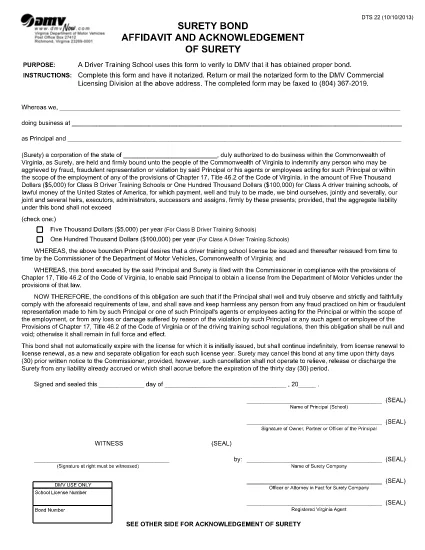
The DTS-22 is the Virginia Department of Motor Vehicles (DMV) Surety Bond Affidavit required by driver training schools and commercial licensing applicants. This form proves that the applicant has obtained the proper bond before operating a school or commercial vehicle program.

Our fillable PDF version lets you complete the entire affidavit directly in your browser—no printing, scanning, or manual data entry required. Once completed, you can download, print, and mail or fax the notarized form to the DMV Commercial Licensing Division.

What Is the DTS-22 Form?

The DTS-22 collects information about the applicant, the surety company, and the bond amount. It must be signed, notarized, and submitted with supporting documentation. Failure to provide a correctly completed form can delay licensing approval.

How to Fill Out the DTS-22 Online

Using the Formize PDF Filler, you can fill out every field, add dates, and insert your electronic signature. The tool validates required fields in real time, reducing errors before you print.

Common Mistakes to Avoid

  • Leaving any required field blank (the filler will highlight these).
  • Using a handwritten signature before notarization—sign only after the notary witnesses your signature.
  • Submitting the form on double‑sided paper; the DMV requires single‑sided printing.
  • Forgetting to include the bond number and surety company’s contact details.

Where to Submit the Completed Form

After notarizing, mail or fax the form to the DMV Commercial Licensing Division at the address listed on the form. You can also drop it off at any Virginia DMV office that handles commercial licensing.

Ready to start? Click the button below to launch the fillable PDF in the Formize PDF Filler app.

FAQ
  • What is the purpose of the DTS-22 form?

    The DTS-22 certifies that a driver training school or commercial licensing applicant has secured a surety bond, a prerequisite for DMV approval.

  • Can I submit the DTS-22 electronically?

    No. The DMV requires a notarized hard copy. You can fill it out online, then print, notarize, and mail or fax the document.

  • Do I need a notary for the DTS-22?

    Yes. The applicant’s signature must be notarized before the form is submitted to the DMV.

  • What bond amount is required?

    The required bond amount varies by the type of training program. Refer to the instructions on the form or contact your surety provider for details.

  • How long does it take for the DMV to process the DTS-22?

    Processing time depends on the completeness of your submission. A correctly completed and notarized form is usually processed within 5‑7 business days.

  • Can I use a PDF editor instead of Formize?

    You can, but Formize’s fillable PDF ensures field validation and reduces errors. Using a standard PDF editor may miss required fields.

  • Where do I send the completed DTS-22?

    Mail or fax the notarized form to the DMV Commercial Licensing Division at the address printed on the form. Check the DMV website for the latest contact details.

HOE

Zo vult u DTS-22 form gratis online in in 5 eenvoudige stappen:

  1. 1
    Open the Fillable Form
    Click the "Fill out this form" button on the page. The Formize PDF Filler will open in a new tab.
  2. 2
    Load the Formize PDF Filler
    Wait a few seconds while the PDF Filler app loads the DTS-22 document.
  3. 3
    Complete All Required Fields
    Enter your information, bond details, and surety company data. Required fields are highlighted in real time.
  4. 4
    Add Your Signature
    Use the built‑in signature tool to place your electronic signature. Do not sign until a notary is present.
  5. 5
    Download or Print
    When finished, click "Download" to save the completed PDF, then print it for notarization and submission.
Formize PDF Filler-app
WAT BETREFT

Aanvraagformulieren rijbewijs

In de meeste landen is het hebben van een rijbewijs verplicht voordat je de weg op mag. Het behalen van een rijbewijs is een belangrijke mijlpaal voor iedereen die auto wil rijden.

DTS-22 form is een van de formulieren voor het aanvragen van een rijbewijs. Dit zijn documenten die worden gebruikt om informatie te verzamelen van mensen die een rijbewijs willen aanvragen. Het bevat meestal velden voor de naam van de aanvrager, geboortedatum, ID-nummer, contactgegevens, evenals de geschiedenis en ervaring van hun rijbewijs.

FUNCTIES

PDF-vuller

De eenvoudigste manier om online PDF-formulieren in te vullen

  • Vul snel DTS-22 form in
    Op zoek naar een manier om DTS-22 form snel online in te vullen? Met onze online gratis PDF-formulierinvuller weet u hoe u dit pdf-document in minder dan een minuut kunt bewerken en invullen.
  • Gebruiksvriendelijke online PDF-editor
    Ben je het beu om PDF-bestanden uit te printen zodat je ze kunt bewerken, voordat je ze opnieuw scant en terugstuurt? Bewerk PDF-documenten gratis online. Gebruik onze online pdf-editor om tijd en papier te besparen.
  • Geweldige tools, alle platforms
    Vraagt ​​u zich af hoe u DTS-22 form op een Mac moet invullen, of misschien hoe u gratis een PDF-filler kunt gebruiken? Onze online pdf-tools werken op alle platformen.
  • Veilige bestandsopslag
    Voltooide "DTS-22 form"-bestanden worden opgeslagen in een beveiligde database die wordt beheerd door Amazon Cloud hosting. U kunt uw bestanden op elk moment uit ons systeem verwijderen. Deze bestanden worden in ieder geval na 24 uur automatisch verwijderd.
  • Chat met {trefwoord}
    Chat met "DTS-22 form" op Chatize, een gratis PDF-lezerassistent. Stel vragen en krijg antwoorden van "DTS-22 form". Klik gewoon op de knop Chatten met document hierboven.

De vulsessie verwijderen

De geselecteerde vulsessie verwijderen? In dat geval gaat uw voortgang bij het invullen van het formulier verloren.

Bewerkingssessie verwijderen

De geselecteerde bewerkingssessie verwijderen? In dit geval gaat uw voortgang bij het maken en bewerken van het formulier verloren.