
Selecteer taal

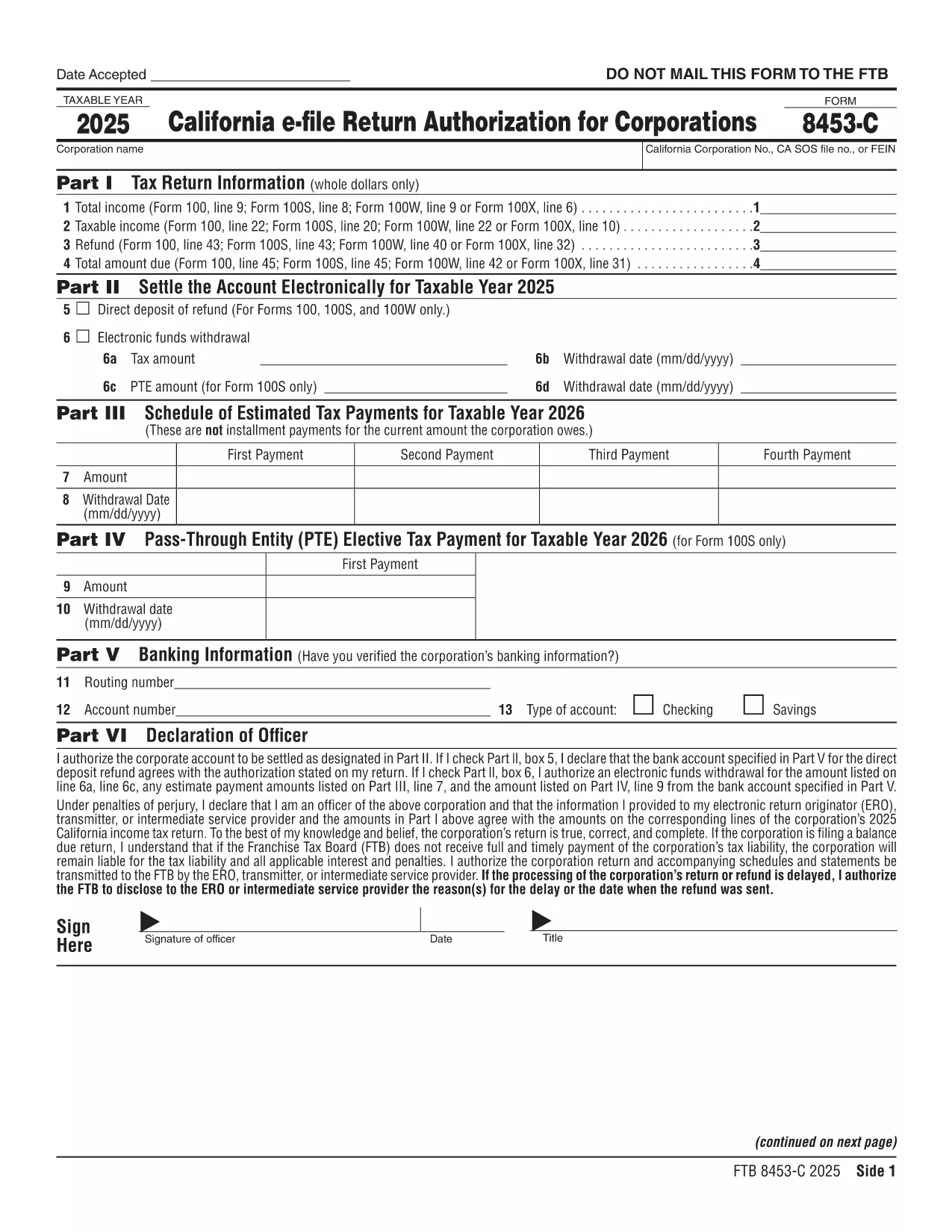
Fillable Form 8453-C – California Corporate e‑File Authorization

  1. Land VS
  2. Taal Engels
  3. Activiteit Belastingen
  4. Afdeling FTB
Fillable Form 8453-C – California Corporate e‑File Authorization

Form 8453‑C is the California Franchise Tax Board’s electronic filing authorization for corporations. It confirms that an authorized officer has reviewed and approved the e‑filed corporate tax return. Using a fillable PDF eliminates the need to print, sign, and mail a paper copy.

What Is Form 8453‑C?

This form is required for any corporation that files a California tax return electronically. It serves as the electronic signature and authorizes the state to accept the return. The form must be retained by the preparer for three years in case the FTB requests it.

How to Fill Out Form 8453‑C Online

Our Formize fillable PDF makes the process simple:

  • Click the "Fill out this form" button on this page.
  • Wait a few seconds while the Formize PDF Filler app loads.
  • Enter the corporation’s name, EIN, tax year, and other required details.
  • Provide the authorized officer’s signature using the built‑in e‑signature field.
  • Save the completed PDF directly to your device or cloud storage.

Common Mistakes to Avoid

  • Leaving the signature blank – the form is invalid without an electronic signature.
  • Mismatching dates – the date on the form must match the filing date in the CAELF screen.
  • Incorrect EIN or tax year – double‑check these numbers against the corporate return.

Where to Submit the Signed Form

Form 8453‑C is not mailed. The preparer retains the original PDF for three years and must make it available if the California Franchise Tax Board requests it. The electronic signature is accepted automatically when you file the return through approved tax‑software.

FAQs About Form 8453‑C

Answers to the most common questions are listed below. If you need more detail, consult the FTB publication 1345.

FAQ
  • Do I need to mail Form 8453‑C after I file electronically?

    No. The form is retained electronically by the preparer. It is only required to be available for audit purposes.

  • Can I use a handwritten signature on the PDF?

    Yes, you can upload an image of a handwritten signature or use the e‑signature field provided by the Formize filler.

  • How long must I keep the signed Form 8453‑C?

    The California Franchise Tax Board requires you to keep the original signed form for at least three years.

  • What if the officer’s name changes after signing?

    You must submit a new Form 8453‑C reflecting the current authorized officer’s name and signature.

  • Is Form 8453‑C required for all California corporate returns?

    Yes, any corporation filing a California tax return electronically must attach a completed Form 8453‑C.

  • Can I fill out Form 8453‑C on a mobile device?

    The Formize fillable PDF works on most modern smartphones and tablets. Use a browser that supports PDF editing.

HOE

Zo vult u Form 8453-C gratis online in in 5 eenvoudige stappen:

  1. 1
    Open the Fillable Form
    Click the "Fill out this form" button on the page. The Formize PDF Filler app will open in a new tab.
  2. 2
    Enter Required Information
    Complete all fields – corporation name, EIN, tax year, and officer details – exactly as they appear on the tax return.
  3. 3
    Add an Electronic Signature
    Use the built‑in signature box to draw or type the authorized officer’s signature. The date will auto‑populate.
  4. 4
    Save and Store
    Click "Save" to download the completed PDF. Keep the file for at least three years in case the FTB requests it.
  5. 5
    Submit Your Return
    File your corporate tax return through your e‑file software. The attached Form 8453‑C is automatically recognized.
Formize PDF Filler-app
WAT BETREFT

Belasting formulieren

Form 8453-C is een van de belastingformulieren die worden gebruikt om inkomsten, inhoudingen en belastingplicht aan de relevante belastingdienst te rapporteren. Deze formulieren vormen een essentieel onderdeel van het belastingaangifteproces en worden gebruikt om ervoor te zorgen dat individuen en bedrijven de belastingwetten naleven en hun belastingverplichtingen nauwkeurig berekenen.

De specifieke vereiste belastingformulieren kunnen variëren, afhankelijk van factoren zoals de indieningsstatus van een individu, bronnen van inkomsten en de belastingwetten van het land. Hier volgen echter enkele veelvoorkomende belastingformulieren:

Individuele inkomstenbelastingformulieren: deze formulieren, zoals de 1040-serie in de Verenigde Staten, worden gebruikt door individuen om hun inkomen te rapporteren, aftrekposten en tegoeden te claimen en hun belastingschuld te berekenen.

Belastingformulieren voor bedrijven: bedrijven, waaronder eenmanszaken, partnerschappen, vennootschappen en zelfstandigen, moeten mogelijk verschillende formulieren indienen om hun inkomsten, uitgaven en verschuldigde belastingen aan te geven. Voorbeelden zijn onder meer Schedule C (winst of verlies uit zaken) en formulier 1120 (aangifte Amerikaanse vennootschapsbelasting).

Arbeidsbelastingformulieren: Werkgevers zijn verplicht om de lonen van werknemers te rapporteren en loonbelastingen in te houden en af ​​te dragen. Voor dit doel worden formulieren gebruikt zoals W-2 (loon- en belastingaangifte) en 941 (werkgevers driemaandelijkse federale belastingaangifte).

Beleggings- en pensioenrekeningformulieren: deze formulieren worden gebruikt om beleggingsinkomsten, vermogenswinsten en -verliezen te rapporteren, evenals bijdragen en uitkeringen van pensioenrekeningen. Voorbeelden zijn onder meer het formulier 1099-DIV (dividenden en uitkeringen) en Formulier 5498 (IRA-bijdrage-informatie).

Formulieren van successie- en schenkingsbelasting: wanneer een persoon overlijdt of aanzienlijke schenkingen doet, zijn er specifieke formulieren zoals Formulier 706 a> (belastingaangifte over nalatenschappen (en overdracht van generaties in de Verenigde Staten)) en formulier 709 (belastingaangifte in de Verenigde Staten (en overdracht van generaties)) Overdracht overslaan) Belastingaangifte) worden gebruikt om eventuele toepasselijke successierechten of schenkingsrechten te rapporteren en te berekenen.

Het is belangrijk op te merken dat belastingwetten en -formulieren in de loop van de tijd kunnen veranderen. Particulieren en bedrijven moeten daarom de relevante belastingdienst raadplegen of professioneel belastingadvies inwinnen om ervoor te zorgen dat aan de huidige vereisten wordt voldaan.

FUNCTIES

PDF-vuller

De eenvoudigste manier om online PDF-formulieren in te vullen

  • Vul snel Form 8453-C in
    Op zoek naar een manier om Form 8453-C snel online in te vullen? Met onze online gratis PDF-formulierinvuller weet u hoe u dit pdf-document in minder dan een minuut kunt bewerken en invullen.
  • Gebruiksvriendelijke online PDF-editor
    Ben je het beu om PDF-bestanden uit te printen zodat je ze kunt bewerken, voordat je ze opnieuw scant en terugstuurt? Bewerk PDF-documenten gratis online. Gebruik onze online pdf-editor om tijd en papier te besparen.
  • Geweldige tools, alle platforms
    Vraagt ​​u zich af hoe u Form 8453-C op een Mac moet invullen, of misschien hoe u gratis een PDF-filler kunt gebruiken? Onze online pdf-tools werken op alle platformen.
  • Veilige bestandsopslag
    Voltooide "Form 8453-C"-bestanden worden opgeslagen in een beveiligde database die wordt beheerd door Amazon Cloud hosting. U kunt uw bestanden op elk moment uit ons systeem verwijderen. Deze bestanden worden in ieder geval na 24 uur automatisch verwijderd.
  • Chat met {trefwoord}
    Chat met "Form 8453-C" op Chatize, een gratis PDF-lezerassistent. Stel vragen en krijg antwoorden van "Form 8453-C". Klik gewoon op de knop Chatten met document hierboven.

De vulsessie verwijderen

De geselecteerde vulsessie verwijderen? In dat geval gaat uw voortgang bij het invullen van het formulier verloren.

Bewerkingssessie verwijderen

De geselecteerde bewerkingssessie verwijderen? In dit geval gaat uw voortgang bij het maken en bewerken van het formulier verloren.