
Selecteer taal

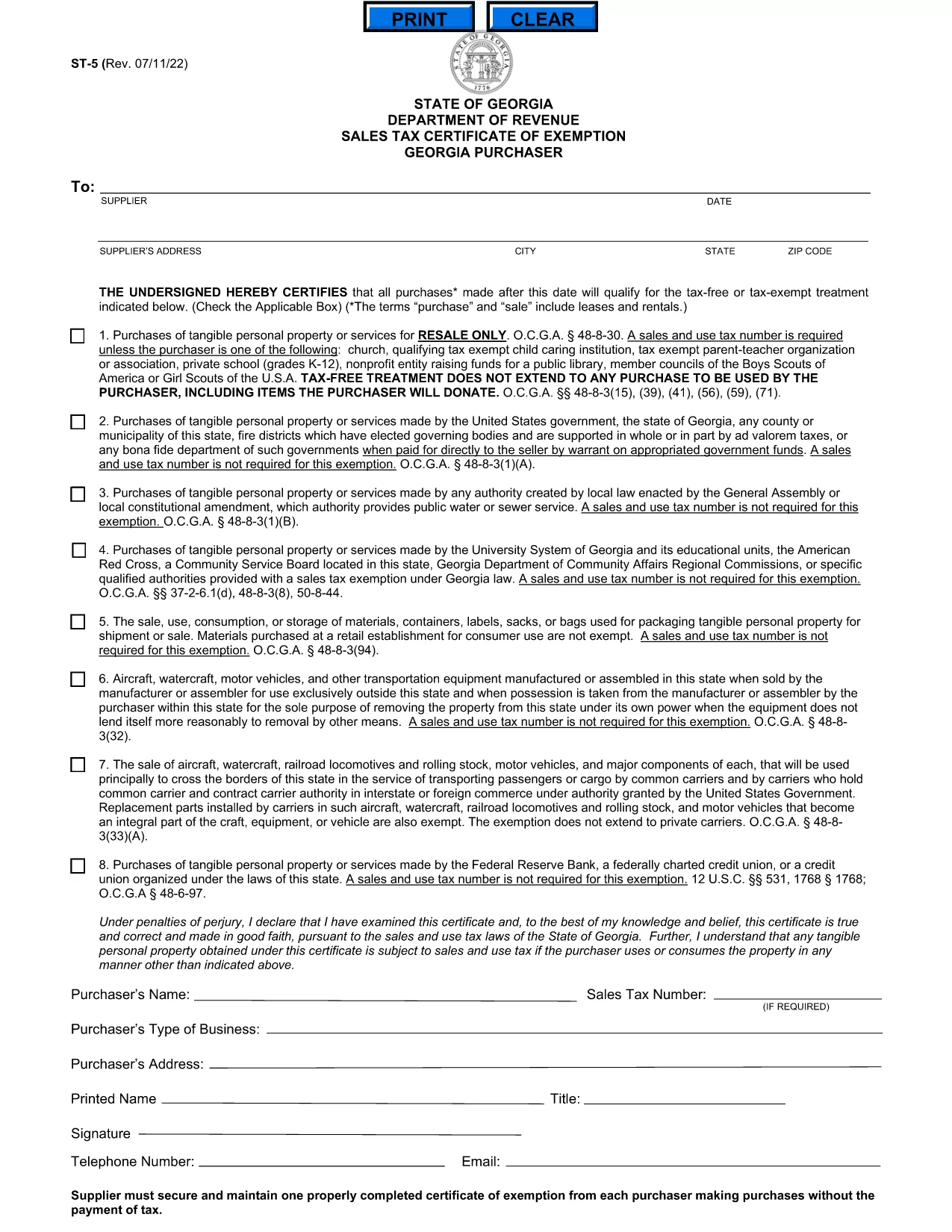
Georgia ST-5 Sales Tax Certificate of Exemption (Fillable PDF)

  1. Land VS
  2. Taal Engels
  3. Afdeling Georgia Department of Revenue
  4. Activiteit Belastingen
Georgia ST-5 Sales Tax Certificate of Exemption (Fillable PDF)

What Is the ST-5 Form?

The ST-5 Sales Tax Certificate of Exemption is issued by the Georgia Department of Revenue. It allows qualifying businesses and organizations to purchase taxable goods without paying state sales tax, provided the items are used for exempt purposes.

How to Complete the ST-5 Online

Instead of downloading a static PDF and editing it with a third‑party editor, simply click the "Fill out this form" button on this page. The Formize PDF Filler app will load instantly, letting you type, select, and sign directly in your browser.

Step‑by‑Step Fillable PDF Guide

Follow these quick steps to submit a correct ST‑5:

  1. Click Fill out this form and wait for the Formize PDF Filler to appear.
  2. Enter your business name, Georgia tax ID, and contact information in the header section.
  3. Choose the exemption category that matches your purchase (e.g., manufacturing, resale, nonprofit).
  4. Provide details of the vendor, purchase date, and total amount.
  5. Read the certification statements, then type your name and the date, and click Sign using your mouse or finger.
  6. When all fields are filled, click Save & Download to get a completed PDF copy for your records.

Common Mistakes to Avoid

  • Leaving the "Exemption Code" blank – the code must match the category listed in the Georgia Tax Code.
  • Using an outdated tax ID – verify your Georgia Sales Tax Permit number before submitting.
  • Incorrect dates – the purchase date must be within the current tax year.
  • Missing signatures – both the purchaser and vendor must sign; unsigned forms are rejected.

Where to Submit the Completed Form

After saving the completed PDF, you can:

  • Email it to taxdept@gadoe.gov with a brief request for exemption verification.
  • Upload it through the Georgia Department of Revenue’s online portal under "Certificates of Exemption".
  • Print and hand‑deliver it to the vendor at the point of sale.

Retain a copy for your records in case of an audit.

FAQ
  • Who can use the Georgia ST‑5 certificate?

    Any Georgia-registered business, nonprofit, or government entity that qualifies for a sales‑tax exemption under state law can use the ST‑5.

  • Do I need a Georgia sales tax permit to complete the ST‑5?

    Yes. You must have a valid Georgia Sales Tax Permit (state tax ID) to claim an exemption on purchases.

  • Can I submit the ST‑5 electronically?

    Absolutely. After filling the form with Formize, you can email the PDF to the Department of Revenue or upload it through the online portal.

  • How long is an ST‑5 certificate valid?

    The certificate is valid for the calendar year in which it is issued. You must obtain a new ST‑5 each year.

  • What if I make a mistake after submitting?

    Contact the Georgia Department of Revenue promptly. You may need to submit a corrected ST‑5 or an amendment form.

  • Is there a fee to download the ST‑5 form?

    No. The fillable PDF is free to download and complete using the Formize PDF Filler.

HOE

Zo vult u ST-5 form gratis online in in 4 eenvoudige stappen:

  1. 1
    Open the Fillable Form
    Click the "Fill out this form" button on the page. The Formize PDF Filler will load in your browser.
  2. 2
    Enter Required Information
    Type your business details, exemption code, vendor information, and purchase amount into the highlighted fields.
  3. 3
    Sign and Date
    Use your mouse or finger to sign the certification sections, then add the current date.
  4. 4
    Save or Download
    When all fields are complete, click "Save & Download" to get a copy of the finished ST‑5 form.
Formize PDF Filler-app
WAT BETREFT

Belasting formulieren

ST-5 form is een van de belastingformulieren die documenten zijn die worden gebruikt om informatie met betrekking tot belastingen aan de relevante belastingdienst te rapporteren. Er zijn verschillende soorten belastingformulieren, waaronder federale, staats- en lokale belastingformulieren, die kunnen variëren afhankelijk van de omstandigheden en locatie van de belastingbetaler.

FUNCTIES

PDF-vuller

De eenvoudigste manier om online PDF-formulieren in te vullen

  • Vul snel ST-5 form in
    Op zoek naar een manier om ST-5 form snel online in te vullen? Met onze online gratis PDF-formulierinvuller weet u hoe u dit pdf-document in minder dan een minuut kunt bewerken en invullen.
  • Gebruiksvriendelijke online PDF-editor
    Ben je het beu om PDF-bestanden uit te printen zodat je ze kunt bewerken, voordat je ze opnieuw scant en terugstuurt? Bewerk PDF-documenten gratis online. Gebruik onze online pdf-editor om tijd en papier te besparen.
  • Geweldige tools, alle platforms
    Vraagt ​​u zich af hoe u ST-5 form op een Mac moet invullen, of misschien hoe u gratis een PDF-filler kunt gebruiken? Onze online pdf-tools werken op alle platformen.
  • Veilige bestandsopslag
    Voltooide "ST-5 form"-bestanden worden opgeslagen in een beveiligde database die wordt beheerd door Amazon Cloud hosting. U kunt uw bestanden op elk moment uit ons systeem verwijderen. Deze bestanden worden in ieder geval na 24 uur automatisch verwijderd.
  • Chat met {trefwoord}
    Chat met "ST-5 form" op Chatize, een gratis PDF-lezerassistent. Stel vragen en krijg antwoorden van "ST-5 form". Klik gewoon op de knop Chatten met document hierboven.

De vulsessie verwijderen

De geselecteerde vulsessie verwijderen? In dat geval gaat uw voortgang bij het invullen van het formulier verloren.

Bewerkingssessie verwijderen

De geselecteerde bewerkingssessie verwijderen? In dit geval gaat uw voortgang bij het maken en bewerken van het formulier verloren.