
Selecteer taal

Disability Plate – Second Set Questionnaire (MVR‑37) Fillable PDF

  1. Taal Engels
  2. Land VS
  3. Activiteit Voertuig registratie
  4. Afdeling Motor Vehicle Department
Disability Plate – Second Set Questionnaire (MVR‑37) Fillable PDF

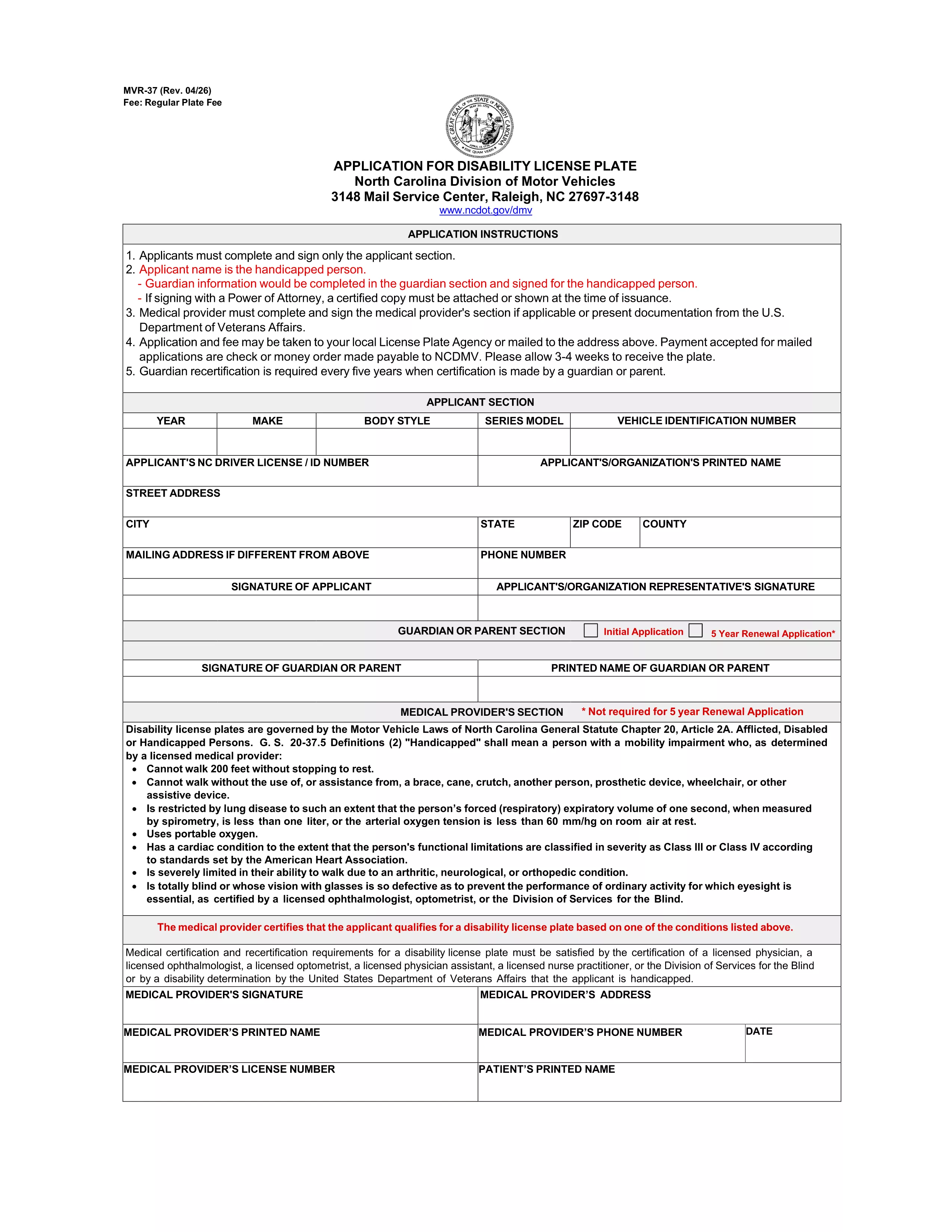
If you already have a set of disability license plates and need a replacement or an additional set, North Carolina requires the MVR‑37 – the Disability Plate Second Set Questionnaire. This official PDF form collects the medical and vehicle information needed to issue a second set of plates with the International Symbol of Access.

Unlike a paper‑only application, Formize lets you open the PDF directly in your browser, fill every field, and submit it electronically. No printing, scanning, or PDF editor downloads are required.

What Is the Disability Plate – Second Set Questionnaire?

The MVR‑37 is a two‑page questionnaire used by the North Carolina Division of Motor Vehicles (DMV). It asks for:

  • Applicant’s personal details and disability verification
  • Physician’s certification and signature
  • Vehicle information (VIN, registration, current plate numbers)
  • Reason for requesting a second set (lost, damaged, additional vehicle, etc.)

Submitting a complete, accurate MVR‑37 speeds up the issuance of your new plates.

How to Complete the MVR‑37 Form with Formize PDF Filler

Follow these simple steps to fill out the questionnaire online:

  1. Click the "Fill out this form" button on this page.
  2. Wait a few seconds while the Formize PDF Filler app loads the MVR‑37 document.
  3. Enter your information in each highlighted field. The app automatically saves your progress.
  4. When you reach the physician’s section, have the doctor sign electronically or upload a scanned signature.
  5. Review the entire form, then click "Submit" to download the completed PDF.

You can now email the PDF to the DMV or bring a printed copy to your local office.

Common Mistakes to Avoid When Applying for a Second Set

  • Missing physician signature: The form is rejected without a valid signature or notarization.
  • Incorrect VIN or plate numbers: Double‑check the vehicle identification number and current plate numbers.
  • Leaving optional fields blank: Even optional sections help the DMV verify eligibility.
  • Outdated contact information: Ensure phone numbers and email addresses are current for follow‑up.

Where to Submit Your Completed Questionnaire

After downloading the filled PDF, you have two options:

  • Mail: Send the form to North Carolina Division of Motor Vehicles, Mail Service Center, Raleigh, NC 27697‑3148.
  • In‑person: Bring the printed form to any NC DMV office. Bring a valid ID and proof of vehicle registration.

Processing usually takes 7‑10 business days.

Frequently Asked Questions

Below are the most common queries about the second‑set questionnaire.

FAQ
  • Do I need a new physician certification for a second set of plates?

    Yes. The MVR‑37 requires a current physician’s signature confirming that your disability still meets eligibility criteria.

  • Can I use the same form for a replacement plate?

    The MVR‑37 is specifically for a second set or additional plates. For a lost or damaged single set, use the standard replacement form (MVR‑37R).

  • Is there a fee for a second set of disability plates?

    North Carolina charges a nominal fee for the additional set, usually $5‑$10, payable at the DMV when you submit the form.

  • How long does the DMV take to process the questionnaire?

    Processing typically takes 7‑10 business days after the DMV receives a complete and signed form.

  • Can I submit the form electronically?

    The DMV still requires a printed copy with original signatures. However, you can email the completed PDF to request a review before mailing.

  • What if I lose the second set after it’s issued?

    You must submit a new MVR‑37 questionnaire and pay the applicable fee for another replacement.

  • Do I need to provide proof of vehicle ownership?

    Yes. Include a copy of your current vehicle registration and the VIN on the form.

  • Is the MVR‑37 fillable on mobile devices?

    Formize’s PDF filler works on most smartphones and tablets, allowing you to complete the form on the go.

HOE

Zo vult u disability plate questionnaire gratis online in in 4 eenvoudige stappen:

  1. 1
    Open the Form
    Click the "Fill out this form" button on this page. The Formize PDF Filler app will load the MVR‑37 questionnaire directly in your browser.
  2. 2
    Enter Your Information
    Type your personal, medical, and vehicle details into each highlighted field. The app auto‑saves as you go.
  3. 3
    Add Physician Signature
    Upload a scanned signature or have the doctor sign electronically in the designated section.
  4. 4
    Review and Submit
    Double‑check all entries, then click "Submit" to download the completed PDF ready for mailing or in‑person delivery.
Formize PDF Filler-app
WAT BETREFT

Voertuigregistratieformulieren

Als u een motorvoertuig, aanhangwagen of boot bezit of leaset, moet u aan bepaalde verplichtingen voldoen om uw voertuig wettelijk geregistreerd en veilig te houden.

disability plate questionnaire is een van de voertuigregistratieformulieren die documenten zijn die worden gebruikt om een ​​motorvoertuig te registreren bij de relevante staats- of provinciale autoriteit. Deze formulieren zijn meestal vereist wanneer een persoon een nieuw of gebruikt voertuig koopt of wanneer hij met een voertuig naar een nieuwe staat of provincie verhuist.

De exacte vereisten en formulieren die nodig zijn voor voertuigregistratie kunnen per locatie verschillen, maar over het algemeen omvat het proces het verstrekken van informatie over het voertuig, de eigenaar en eventuele pandrechten op het voertuig.

Zodra de registratieformulieren en vergoedingen zijn ingediend, zal de staat of provinciale autoriteit een kentekenbewijs of kentekenplaat afgeven aan de eigenaar van het voertuig. Met deze registratie mag het voertuig legaal worden gebruikt op de openbare weg en snelwegen.

FUNCTIES

PDF-vuller

De eenvoudigste manier om online PDF-formulieren in te vullen

  • Vul snel disability plate questionnaire in
    Op zoek naar een manier om disability plate questionnaire snel online in te vullen? Met onze online gratis PDF-formulierinvuller weet u hoe u dit pdf-document in minder dan een minuut kunt bewerken en invullen.
  • Gebruiksvriendelijke online PDF-editor
    Ben je het beu om PDF-bestanden uit te printen zodat je ze kunt bewerken, voordat je ze opnieuw scant en terugstuurt? Bewerk PDF-documenten gratis online. Gebruik onze online pdf-editor om tijd en papier te besparen.
  • Geweldige tools, alle platforms
    Vraagt ​​u zich af hoe u disability plate questionnaire op een Mac moet invullen, of misschien hoe u gratis een PDF-filler kunt gebruiken? Onze online pdf-tools werken op alle platformen.
  • Veilige bestandsopslag
    Voltooide "disability plate questionnaire"-bestanden worden opgeslagen in een beveiligde database die wordt beheerd door Amazon Cloud hosting. U kunt uw bestanden op elk moment uit ons systeem verwijderen. Deze bestanden worden in ieder geval na 24 uur automatisch verwijderd.
  • Chat met {trefwoord}
    Chat met "disability plate questionnaire" op Chatize, een gratis PDF-lezerassistent. Stel vragen en krijg antwoorden van "disability plate questionnaire". Klik gewoon op de knop Chatten met document hierboven.

De vulsessie verwijderen

De geselecteerde vulsessie verwijderen? In dat geval gaat uw voortgang bij het invullen van het formulier verloren.

Bewerkingssessie verwijderen

De geselecteerde bewerkingssessie verwijderen? In dit geval gaat uw voortgang bij het maken en bewerken van het formulier verloren.