
Selecteer taal

FE-6 Claim for Death Benefits – Fillable PDF Form

  1. Taal Engels
  2. Land VS
  3. Afdeling Bureau Personeelszaken
  4. Sector Federale Werknemers Groepslijn Verzekeringsformulieren
FE-6 Claim for Death Benefits – Fillable PDF Form

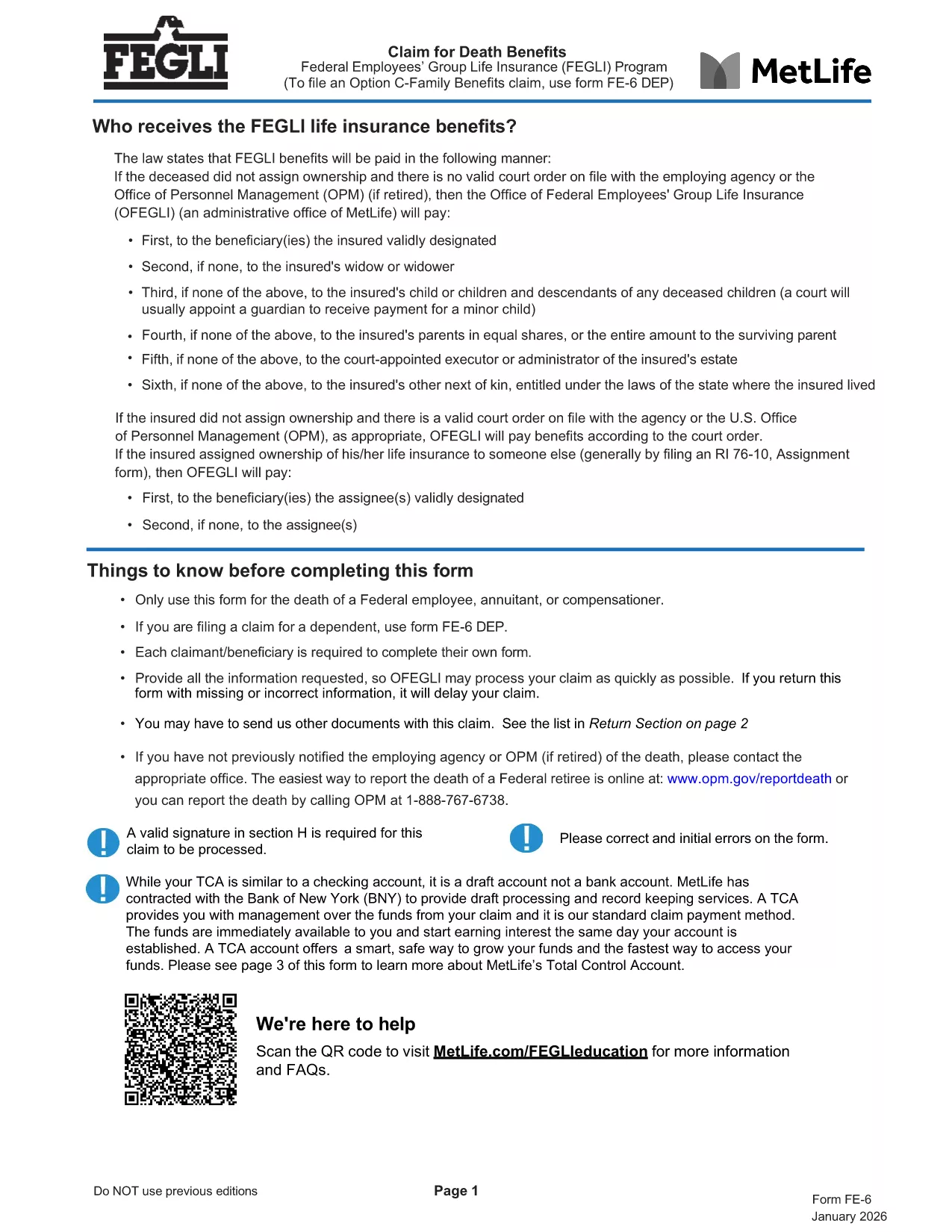
The FE-6 Claim for Death Benefits is the official form used by the Office of Personnel Management (OPM) to request Federal Employees Group Life Insurance (FEGLI) benefits after the death of a federal employee, annuitant, or compensation recipient. With Formize you can open the fillable PDF directly in your browser, fill it out, and save a completed copy without installing any software.

What Is the FE-6 Form?

The FE-6 collects essential information about the deceased, the claimant, and the type of benefit being requested. It is required for:

  • Life‑insurance death benefits for a federal employee or annuitant.
  • Beneficiary designations and payment options (e.g., Total Control Account).
  • Claims for eligible dependents (use FE‑6 DEP for dependents).

How to Complete the FE-6 Online with Formize

Instead of downloading the PDF and opening a separate editor, simply click the **"Fill out this form"** button below. The Formize PDF Filler app loads the fillable document in seconds, letting you type directly into each field.

  1. Click the button – the form opens in a secure, browser‑based editor.
  2. Enter the required data – follow the on‑screen prompts for each section (deceased information, claimant details, beneficiary choices, etc.).
  3. Attach supporting documents – upload a certified copy of the death certificate and any other required paperwork.
  4. Save and download the completed PDF to your computer.
  5. Print or email the file to the address listed in the final section of the form.

Common Mistakes to Avoid

  • Leaving any required field blank – OPM will reject incomplete claims.
  • Using an uncertified death certificate – the document must bear an official stamp or signature.
  • Submitting the wrong version – ensure you are using the current FE-6 (2026 revision).
  • Not signing the form – a handwritten or electronic signature is mandatory.

Where to Send Your Completed Claim

After you have saved the filled PDF, mail it with the certified death certificate to:

Office of Federal Employees Group Life Insurance
P.O. Box 6080
Scranton, PA 18505‑6080
(For overnight delivery: OFEGLI 10 Ed Preate Drive, Moosic, PA 18507)

If you are a federal employee filing on behalf of a dependent, send the completed FE‑6 DEP to the same address or to your employing agency.

FAQ
  • Who can use the FE-6 form?

    The FE-6 is for the estate of a deceased federal employee, annuitant, or compensation recipient. Dependents use the separate FE‑6 DEP form.

  • Do I need a certified death certificate?

    Yes. OPM requires a certified copy with an official stamp or signature. Uncertified copies will cause a delay or rejection.

  • Can I fill out the FE-6 on a mobile device?

    The Formize PDF Filler works on most modern smartphones and tablets. For best results, use a larger screen or a desktop browser.

  • How long does OPM take to process the claim?

    Processing typically takes 30‑45 days after receipt of a complete, signed claim and certified death certificate.

  • What if I make a mistake after submitting?

    Contact the Office of Federal Employees Group Life Insurance at 1‑800‑633‑4542. They can advise whether a corrected form must be resubmitted.

  • Is there a filing fee for the FE-6?

    No. Filing the FE-6 claim is free of charge.

  • Can I submit the claim electronically?

    OPM currently requires a mailed hard copy with the certified death certificate. The PDF can be filled electronically, but the final submission is by mail.

HOE

Zo vult u FE-6 form gratis online in in 5 eenvoudige stappen:

  1. 1
    Open the FE-6 Form
    Click the "Fill out this form" button on the page. The Formize PDF Filler loads the official FE-6 PDF directly in your browser.
  2. 2
    Enter Required Information
    Complete each section—deceased’s details, claimant information, and beneficiary selections—exactly as instructed.
  3. 3
    Upload Supporting Documents
    Add a certified copy of the death certificate and any other required files using the upload field.
  4. 4
    Save and Download
    When all fields are filled, click "Save" to download the completed PDF to your device.
  5. 5
    Submit the Claim
    Print (or email) the saved form and mail it with the death certificate to the OPM address shown in the form.
Formize PDF Filler-app
WAT BETREFT

Formulieren voor Office of Personnel Management (OPM).

FE-6 form is een van de officiële formulieren die worden gebruikt door het United States Office of Personnel Management, een onafhankelijk agentschap van de federale overheid dat verantwoordelijk is voor het beheer van het ambtenarenpersoneel en de federale personeelsbeloningen. De OPM stelt beleid en regelgeving vast met betrekking tot federale werkgelegenheid, beheert verschillende personeelsprogramma's en levert diensten aan federale werknemers, gepensioneerden en sollicitanten.

Hier zijn enkele voorbeelden van formulieren voor Office of Personnel Management:

Standaardformulier 86 (SF-86) : Dit formulier wordt gebruikt voor het antecedentenonderzoek van personen die een veiligheidsmachtiging aanvragen. Het verzamelt uitgebreide persoonlijke, werkgelegenheids-, opleidings- en financiële informatie, evenals details over buitenlandse contacten en activiteiten.

Standaardformulier 2809 (SF-2809) : Dit formulier wordt gebruikt om u in te schrijven voor het Federal Employees Health Benefits (FEHB)-programma, dat ziektekostenverzekeringsdekking biedt aan federale werknemers, gepensioneerden en hun in aanmerking komende familieleden.

Standaardformulier 2817 (SF-2817): dit formulier wordt gebruikt voor het aanvragen van voortzetting van de dekking onder het Federal Employees Dental and Vision Insurance Program (FEDVIP) na pensionering of scheiding uit de federale dienst.

Standaardformulier 3107 (SF-3107) : Dit formulier wordt gebruikt voor het aanvragen van pensioenuitkeringen onder het Civil Service Retirement System (CSRS).

Standaardformulier 2801 (SF-2801) : Dit formulier wordt gebruikt voor het aanvragen van pensioenuitkeringen onder het Federal Employees Retirement System (FERS).

Standaardformulier 15 (SF-15) : Dit formulier wordt gebruikt om de voorkeur van een veteraan in een federale baan aan te vragen. Het wordt ingediend door veteranen of hun in aanmerking komende familieleden die op zoek zijn naar werkgelegenheid bij de federale overheid.

Deze voorbeelden vertegenwoordigen enkele veel voorkomende OPM-formulieren die worden gebruikt in de context van federale werkgelegenheid en personeelsbeloningen. De OPM heeft echter een reeks andere vormen die verband houden met verschillende personeelsprogramma's, pensioenen, verzekeringen en andere aspecten van federale werkgelegenheid. De specifieke vereiste formulieren kunnen variëren afhankelijk van de aard van de transactie, het programma of het beoogde voordeel. Het is raadzaam om de officiële website van het Amerikaanse Office of Personnel Management (www.opm.gov) te raadplegen of advies in te winnen bij de OPM of relevant HR-personeel om nauwkeurige en actuele informatie te verkrijgen. actuele informatie over de specifieke OPM-formulieren die relevant zijn voor uw federale arbeids- of uitkeringsgerelateerde behoeften.

FUNCTIES

PDF-vuller

De eenvoudigste manier om online PDF-formulieren in te vullen

  • Vul snel FE-6 form in
    Op zoek naar een manier om FE-6 form snel online in te vullen? Met onze online gratis PDF-formulierinvuller weet u hoe u dit pdf-document in minder dan een minuut kunt bewerken en invullen.
  • Gebruiksvriendelijke online PDF-editor
    Ben je het beu om PDF-bestanden uit te printen zodat je ze kunt bewerken, voordat je ze opnieuw scant en terugstuurt? Bewerk PDF-documenten gratis online. Gebruik onze online pdf-editor om tijd en papier te besparen.
  • Geweldige tools, alle platforms
    Vraagt ​​u zich af hoe u FE-6 form op een Mac moet invullen, of misschien hoe u gratis een PDF-filler kunt gebruiken? Onze online pdf-tools werken op alle platformen.
  • Veilige bestandsopslag
    Voltooide "FE-6 form"-bestanden worden opgeslagen in een beveiligde database die wordt beheerd door Amazon Cloud hosting. U kunt uw bestanden op elk moment uit ons systeem verwijderen. Deze bestanden worden in ieder geval na 24 uur automatisch verwijderd.
  • Chat met {trefwoord}
    Chat met "FE-6 form" op Chatize, een gratis PDF-lezerassistent. Stel vragen en krijg antwoorden van "FE-6 form". Klik gewoon op de knop Chatten met document hierboven.

De vulsessie verwijderen

De geselecteerde vulsessie verwijderen? In dat geval gaat uw voortgang bij het invullen van het formulier verloren.

Bewerkingssessie verwijderen

De geselecteerde bewerkingssessie verwijderen? In dit geval gaat uw voortgang bij het maken en bewerken van het formulier verloren.