
Selecteer taal

RI‑20‑120 Fillable PDF Form – Download & Complete Online

  1. Land VS
  2. Taal Engels
  3. Afdeling Bureau Personeelszaken
  4. Sector Pensioen- en verzekeringsformulieren
RI‑20‑120 Fillable PDF Form – Download & Complete Online

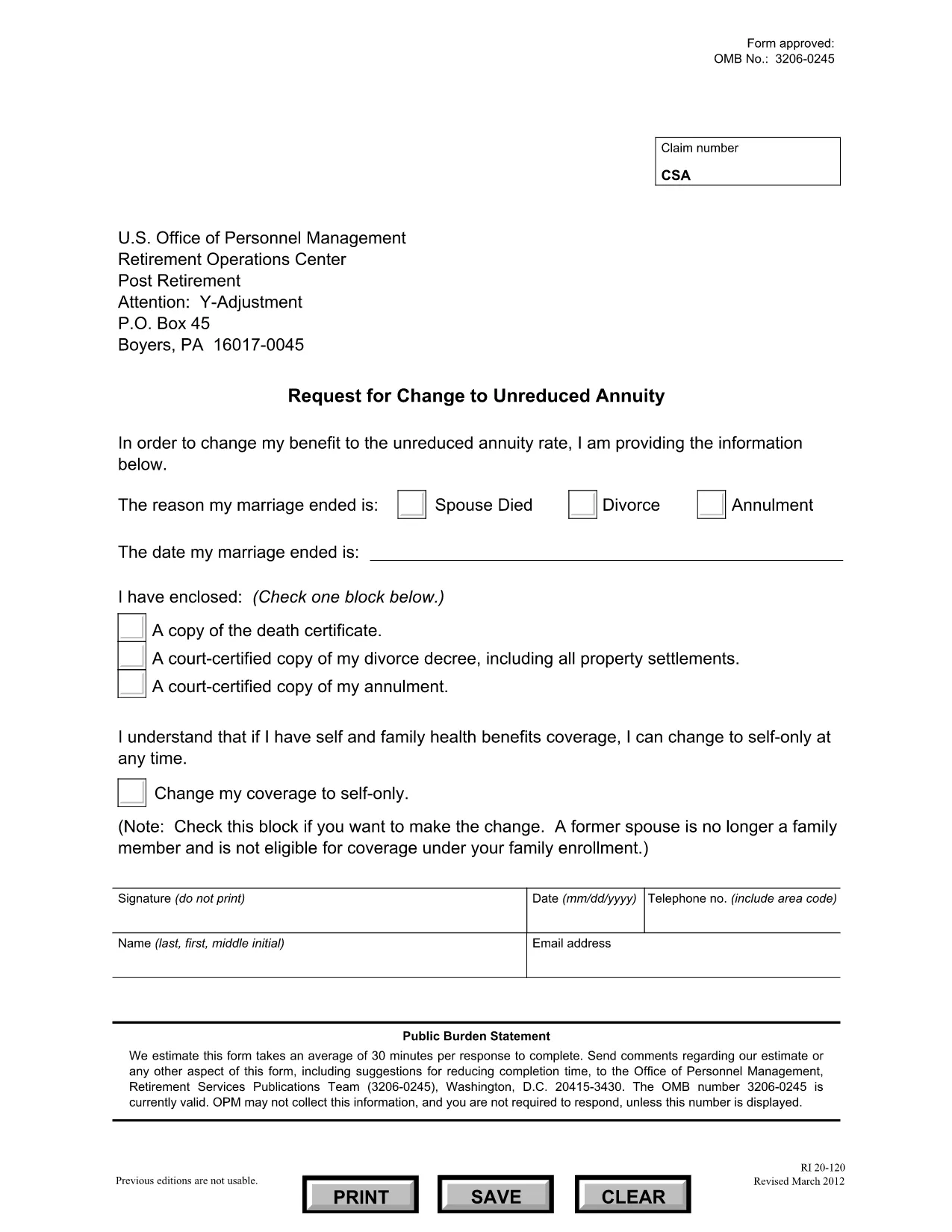
The RI‑20‑120 is an official Office of Personnel Management (OPM) form used for retirement‑related requests. Whether you need to change an unreduced annuity or update personal information, the fillable PDF version lets you complete the form quickly and accurately.

What Is the RI‑20‑120 Form?

This form is part of OPM’s retirement services publications. It collects details about your retirement benefits, annuity calculations, and any requested changes. The PDF is designed to be filled out electronically, saving you time compared to printing and handwriting.

How to Fill Out RI‑20‑120 Using Formize

Instead of downloading the file and opening a separate PDF editor, simply click the "Fill out this form" button on this page. The Formize PDF Filler app will load the RI‑20‑120 form directly in your browser.

  • Step 1: Click the button and wait for the Formize loader.
  • Step 2: Fill each field with the required information.
  • Step 3: Use the built‑in validation to catch errors before moving on.
  • Step 4: Review the completed form, add an electronic signature if needed, and submit.

Common Mistakes & Tips

To avoid delays, double‑check the following:

  • All dates are entered in MM/DD/YYYY format.
  • Social Security numbers contain nine digits without dashes.
  • Contact information matches your OPM records.
  • Attach any required supporting documents before submitting.

Where to Submit the Completed Form

After you finish, you can either download a copy for your records or submit the form directly through the Formize platform. OPM’s Retirement Services Publications Team will receive the electronic submission and process your request.

Need more help? Review the FAQs below or consult the official OPM guidance linked on the form.

FAQ
  • What is the purpose of the RI‑20‑120 form?

    The RI‑20‑120 is used to request changes to unreduced annuity amounts or to update personal information related to your federal retirement benefits.

  • Do I need to print the PDF to fill it out?

    No. With Formize you can fill out the RI‑20‑120 entirely online, then submit or download the completed form electronically.

  • Can I save my progress and return later?

    Yes. The Formize app allows you to save a draft. Use the "Save" button, then return with the same link to continue.

  • What supporting documents are required?

    Typically you must attach a copy of your retirement notice, a recent pay statement, and any legal documents that affect your annuity.

  • How long does OPM take to process the form?

    Processing times vary, but most requests are reviewed within 30 days after receipt of a complete, error‑free submission.

  • Is the Formize service free?

    Yes. Formize provides a free, secure platform for filling out and submitting government PDFs like the RI‑20‑120.

  • What if I make a mistake after submitting?

    Contact OPM’s Retirement Services Publications Team directly. They can advise whether a corrected form needs to be resubmitted.

  • Can I sign the form electronically?

    Formize includes an electronic signature field that complies with federal e‑signature standards.

HOE

Zo vult u RI-20-120 gratis online in in 5 eenvoudige stappen:

  1. 1
    Click the Fill‑out Button
    On this page, click the "Fill out this form" button. The Formize PDF Filler will open the RI‑20‑120 form in a new window.
  2. 2
    Wait for the Formize Loader
    Allow a few seconds for the app to load the fillable fields. A progress bar will indicate when the form is ready.
  3. 3
    Complete Each Section
    Enter your information exactly as it appears on your OPM records. Use the navigation tabs to move between sections.
  4. 4
    Validate and Review
    The built‑in validator will highlight missing or incorrectly formatted entries. Correct any issues before proceeding.
  5. 5
    Submit or Download
    When all fields are complete, click "Submit" to send the form to OPM, or click "Download" to save a copy for your records.
Formize PDF Filler-app
WAT BETREFT

Formulieren voor Office of Personnel Management (OPM).

RI-20-120 is een van de officiële formulieren die worden gebruikt door het United States Office of Personnel Management, een onafhankelijk agentschap van de federale overheid dat verantwoordelijk is voor het beheer van het ambtenarenpersoneel en de federale personeelsbeloningen. De OPM stelt beleid en regelgeving vast met betrekking tot federale werkgelegenheid, beheert verschillende personeelsprogramma's en levert diensten aan federale werknemers, gepensioneerden en sollicitanten.

Hier zijn enkele voorbeelden van formulieren voor Office of Personnel Management:

Standaardformulier 86 (SF-86) : Dit formulier wordt gebruikt voor het antecedentenonderzoek van personen die een veiligheidsmachtiging aanvragen. Het verzamelt uitgebreide persoonlijke, werkgelegenheids-, opleidings- en financiële informatie, evenals details over buitenlandse contacten en activiteiten.

Standaardformulier 2809 (SF-2809) : Dit formulier wordt gebruikt om u in te schrijven voor het Federal Employees Health Benefits (FEHB)-programma, dat ziektekostenverzekeringsdekking biedt aan federale werknemers, gepensioneerden en hun in aanmerking komende familieleden.

Standaardformulier 2817 (SF-2817): dit formulier wordt gebruikt voor het aanvragen van voortzetting van de dekking onder het Federal Employees Dental and Vision Insurance Program (FEDVIP) na pensionering of scheiding uit de federale dienst.

Standaardformulier 3107 (SF-3107) : Dit formulier wordt gebruikt voor het aanvragen van pensioenuitkeringen onder het Civil Service Retirement System (CSRS).

Standaardformulier 2801 (SF-2801) : Dit formulier wordt gebruikt voor het aanvragen van pensioenuitkeringen onder het Federal Employees Retirement System (FERS).

Standaardformulier 15 (SF-15) : Dit formulier wordt gebruikt om de voorkeur van een veteraan in een federale baan aan te vragen. Het wordt ingediend door veteranen of hun in aanmerking komende familieleden die op zoek zijn naar werkgelegenheid bij de federale overheid.

Deze voorbeelden vertegenwoordigen enkele veel voorkomende OPM-formulieren die worden gebruikt in de context van federale werkgelegenheid en personeelsbeloningen. De OPM heeft echter een reeks andere vormen die verband houden met verschillende personeelsprogramma's, pensioenen, verzekeringen en andere aspecten van federale werkgelegenheid. De specifieke vereiste formulieren kunnen variëren afhankelijk van de aard van de transactie, het programma of het beoogde voordeel. Het is raadzaam om de officiële website van het Amerikaanse Office of Personnel Management (www.opm.gov) te raadplegen of advies in te winnen bij de OPM of relevant HR-personeel om nauwkeurige en actuele informatie te verkrijgen. actuele informatie over de specifieke OPM-formulieren die relevant zijn voor uw federale arbeids- of uitkeringsgerelateerde behoeften.

FUNCTIES

PDF-vuller

De eenvoudigste manier om online PDF-formulieren in te vullen

  • Vul snel RI-20-120 in
    Op zoek naar een manier om RI-20-120 snel online in te vullen? Met onze online gratis PDF-formulierinvuller weet u hoe u dit pdf-document in minder dan een minuut kunt bewerken en invullen.
  • Gebruiksvriendelijke online PDF-editor
    Ben je het beu om PDF-bestanden uit te printen zodat je ze kunt bewerken, voordat je ze opnieuw scant en terugstuurt? Bewerk PDF-documenten gratis online. Gebruik onze online pdf-editor om tijd en papier te besparen.
  • Geweldige tools, alle platforms
    Vraagt ​​u zich af hoe u RI-20-120 op een Mac moet invullen, of misschien hoe u gratis een PDF-filler kunt gebruiken? Onze online pdf-tools werken op alle platformen.
  • Veilige bestandsopslag
    Voltooide "RI-20-120"-bestanden worden opgeslagen in een beveiligde database die wordt beheerd door Amazon Cloud hosting. U kunt uw bestanden op elk moment uit ons systeem verwijderen. Deze bestanden worden in ieder geval na 24 uur automatisch verwijderd.
  • Chat met {trefwoord}
    Chat met "RI-20-120" op Chatize, een gratis PDF-lezerassistent. Stel vragen en krijg antwoorden van "RI-20-120". Klik gewoon op de knop Chatten met document hierboven.

De vulsessie verwijderen

De geselecteerde vulsessie verwijderen? In dat geval gaat uw voortgang bij het invullen van het formulier verloren.

Bewerkingssessie verwijderen

De geselecteerde bewerkingssessie verwijderen? In dit geval gaat uw voortgang bij het maken en bewerken van het formulier verloren.