
Selecteer taal

SF 3107PR Payroll Provider Checklist – Fillable PDF

  1. Taal Engels
  2. Land VS
  3. Afdeling Bureau Personeelszaken
  4. Sector Standaard Formulieren
SF 3107PR Payroll Provider Checklist – Fillable PDF

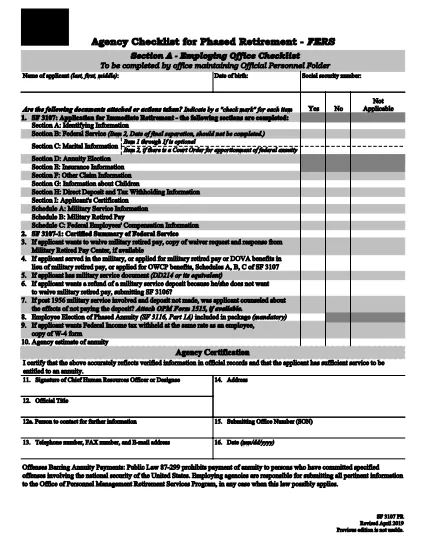
The SF 3107PR is the official Payroll Provider Checklist for Phased Retirement – FERS used by federal agencies to verify that all payroll actions are correctly processed when an employee retires early under the Federal Employees Retirement System (FERS). This form must be completed by the payroll office and signed by the employee’s agency before the retirement becomes effective.

What Is the SF 3107PR Form?

SF 3107PR (Form 3107PR) is published by the Office of Personnel Management (OPM). It contains sections for:

  • Employee identification and retirement date
  • Payroll provider verification
  • Check of final salary, leave balances, and deductions
  • Signatures from the employee, payroll officer, and agency head

How to Complete the SF 3107PR Online

Instead of printing, filling, and scanning the PDF, you can complete the form directly in your browser using Formize’s built‑in PDF filler. Follow the simple steps below.

Common Mistakes to Avoid

Even with a fillable PDF, errors can slip through. Keep these tips in mind:

  • Wrong retirement date: Verify the date matches the employee’s approved phased‑retirement request.
  • Missing signatures: All required signatures must be captured before submission.
  • Incorrect payroll codes: Double‑check the payroll provider and cost‑center numbers.
  • Unfilled optional fields: If a field is marked “N/A,” type “N/A” rather than leaving it blank.

Where to Submit the Completed Checklist

After the form is filled and signed, the payroll office should forward the PDF to the OPM Retirement Services Program and retain a copy in the employee’s official personnel file.

Need the original PDF? Click the button below to open the fillable version instantly.

FAQ
  • What is the purpose of SF 3107PR?

    SF 3107PR is used by federal agencies to confirm that payroll actions are correctly set up for an employee who is retiring early under the phased‑retirement option of FERS.

  • Can I fill out SF 3107PR on a mobile device?

    Yes. The Formize PDF filler works on most modern smartphones and tablets, allowing you to complete the form anywhere with an internet connection.

  • Do I need a PDF reader to use the fillable form?

    No. The form is fully interactive within the browser; you only need a web browser that supports JavaScript.

  • How many signatures are required on SF 3107PR?

    Three signatures are required: the employee, the payroll officer, and an authorized agency official.

  • What should I do if I make a mistake after saving?

    Open the saved PDF again in the Formize filler, correct the error, and re‑save. The form retains all previously entered data.

  • Is the fillable PDF version the same as the paper version?

    Yes. The electronic version contains the exact same fields and wording as the printable PDF published by OPM.

  • Where do I submit the completed SF 3107PR?

    Submit the final PDF to your agency’s payroll office and forward a copy to the OPM Retirement Services Program as instructed in agency policy.

HOE

Zo vult u SF 3107PR gratis online in in 5 eenvoudige stappen:

  1. 1
    Click the Fill‑out Button
    On this page, click the "Fill out this form" button. The Formize PDF Filler app will open in a new tab.
  2. 2
    Wait for the Filler to Load
    The fillable version of SF 3107PR loads automatically. No download or extra software is required.
  3. 3
    Enter All Required Information
    Complete each field, using drop‑downs and check‑boxes where provided. Type "N/A" for any non‑applicable items.
  4. 4
    Add Signatures
    Use the built‑in signature tool to capture electronic signatures from the employee and payroll officer.
  5. 5
    Save or Email the Completed Form
    When finished, click "Save" to download a copy or "Email" to send the PDF directly to your agency’s retirement office.
Formize PDF Filler-app
WAT BETREFT

Formulieren voor Office of Personnel Management (OPM).

SF 3107PR is een van de officiële formulieren die worden gebruikt door het United States Office of Personnel Management, een onafhankelijk agentschap van de federale overheid dat verantwoordelijk is voor het beheer van het ambtenarenpersoneel en de federale personeelsbeloningen. De OPM stelt beleid en regelgeving vast met betrekking tot federale werkgelegenheid, beheert verschillende personeelsprogramma's en levert diensten aan federale werknemers, gepensioneerden en sollicitanten.

Hier zijn enkele voorbeelden van formulieren voor Office of Personnel Management:

Standaardformulier 86 (SF-86) : Dit formulier wordt gebruikt voor het antecedentenonderzoek van personen die een veiligheidsmachtiging aanvragen. Het verzamelt uitgebreide persoonlijke, werkgelegenheids-, opleidings- en financiële informatie, evenals details over buitenlandse contacten en activiteiten.

Standaardformulier 2809 (SF-2809) : Dit formulier wordt gebruikt om u in te schrijven voor het Federal Employees Health Benefits (FEHB)-programma, dat ziektekostenverzekeringsdekking biedt aan federale werknemers, gepensioneerden en hun in aanmerking komende familieleden.

Standaardformulier 2817 (SF-2817): dit formulier wordt gebruikt voor het aanvragen van voortzetting van de dekking onder het Federal Employees Dental and Vision Insurance Program (FEDVIP) na pensionering of scheiding uit de federale dienst.

Standaardformulier 3107 (SF-3107) : Dit formulier wordt gebruikt voor het aanvragen van pensioenuitkeringen onder het Civil Service Retirement System (CSRS).

Standaardformulier 2801 (SF-2801) : Dit formulier wordt gebruikt voor het aanvragen van pensioenuitkeringen onder het Federal Employees Retirement System (FERS).

Standaardformulier 15 (SF-15) : Dit formulier wordt gebruikt om de voorkeur van een veteraan in een federale baan aan te vragen. Het wordt ingediend door veteranen of hun in aanmerking komende familieleden die op zoek zijn naar werkgelegenheid bij de federale overheid.

Deze voorbeelden vertegenwoordigen enkele veel voorkomende OPM-formulieren die worden gebruikt in de context van federale werkgelegenheid en personeelsbeloningen. De OPM heeft echter een reeks andere vormen die verband houden met verschillende personeelsprogramma's, pensioenen, verzekeringen en andere aspecten van federale werkgelegenheid. De specifieke vereiste formulieren kunnen variëren afhankelijk van de aard van de transactie, het programma of het beoogde voordeel. Het is raadzaam om de officiële website van het Amerikaanse Office of Personnel Management (www.opm.gov) te raadplegen of advies in te winnen bij de OPM of relevant HR-personeel om nauwkeurige en actuele informatie te verkrijgen. actuele informatie over de specifieke OPM-formulieren die relevant zijn voor uw federale arbeids- of uitkeringsgerelateerde behoeften.

FUNCTIES

PDF-vuller

De eenvoudigste manier om online PDF-formulieren in te vullen

  • Vul snel SF 3107PR in
    Op zoek naar een manier om SF 3107PR snel online in te vullen? Met onze online gratis PDF-formulierinvuller weet u hoe u dit pdf-document in minder dan een minuut kunt bewerken en invullen.
  • Gebruiksvriendelijke online PDF-editor
    Ben je het beu om PDF-bestanden uit te printen zodat je ze kunt bewerken, voordat je ze opnieuw scant en terugstuurt? Bewerk PDF-documenten gratis online. Gebruik onze online pdf-editor om tijd en papier te besparen.
  • Geweldige tools, alle platforms
    Vraagt ​​u zich af hoe u SF 3107PR op een Mac moet invullen, of misschien hoe u gratis een PDF-filler kunt gebruiken? Onze online pdf-tools werken op alle platformen.
  • Veilige bestandsopslag
    Voltooide "SF 3107PR"-bestanden worden opgeslagen in een beveiligde database die wordt beheerd door Amazon Cloud hosting. U kunt uw bestanden op elk moment uit ons systeem verwijderen. Deze bestanden worden in ieder geval na 24 uur automatisch verwijderd.
  • Chat met {trefwoord}
    Chat met "SF 3107PR" op Chatize, een gratis PDF-lezerassistent. Stel vragen en krijg antwoorden van "SF 3107PR". Klik gewoon op de knop Chatten met document hierboven.

De vulsessie verwijderen

De geselecteerde vulsessie verwijderen? In dat geval gaat uw voortgang bij het invullen van het formulier verloren.

Bewerkingssessie verwijderen

De geselecteerde bewerkingssessie verwijderen? In dit geval gaat uw voortgang bij het maken en bewerken van het formulier verloren.