
Selecteer taal

DS-11 U.S. Passport Application – Fillable PDF

  1. Taal Engels
  2. Land VS
  3. Activiteit Paspoort
DS-11 U.S. Passport Application – Fillable PDF

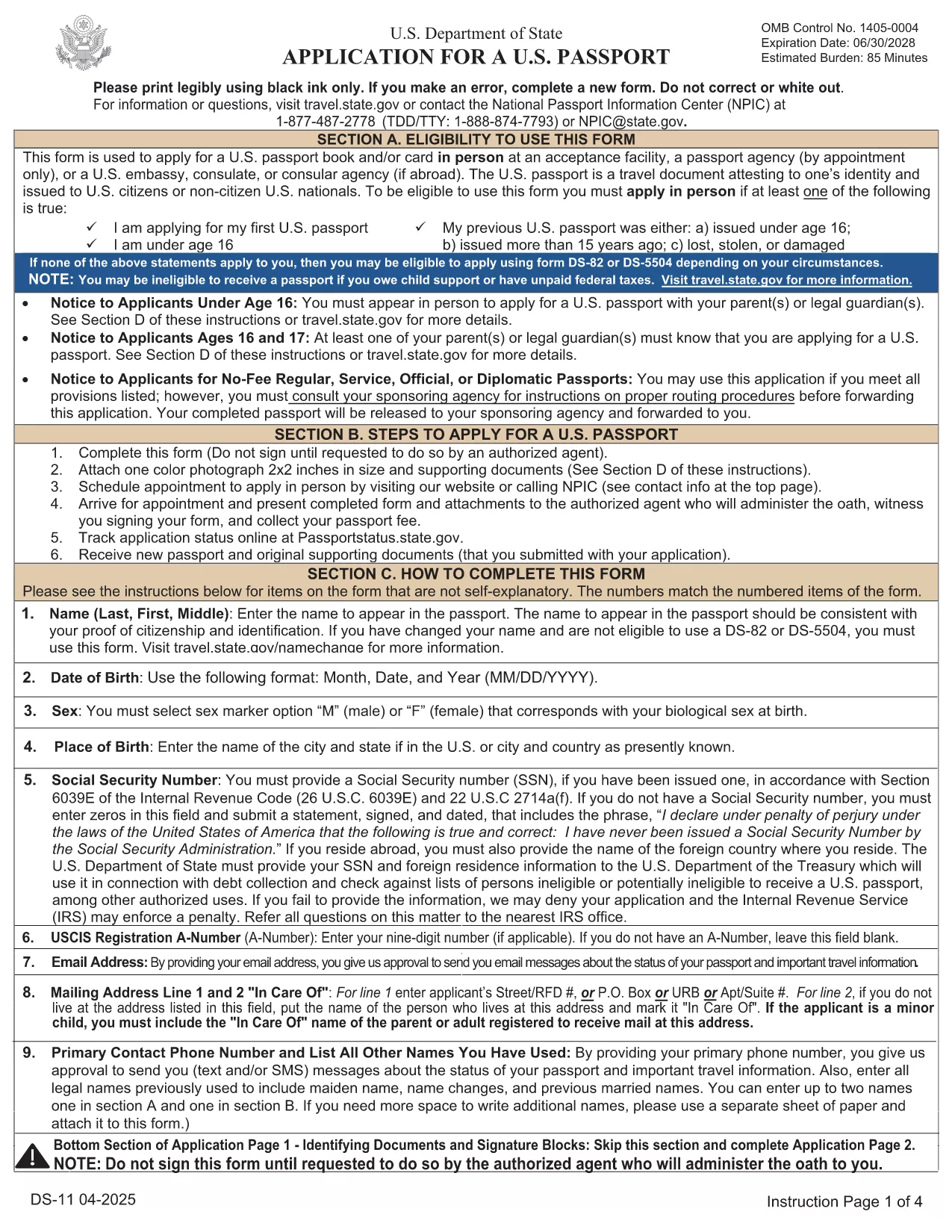
The DS-11 is the official application for first‑time U.S. passports, passports for minors, and replacement of lost or damaged passports. Using Formize’s built‑in PDF filler, you can complete the form online, avoid manual errors, and print a clean, one‑sided copy ready for submission.

What Is the DS-11 Form?

DS-11 is issued by the U.S. Department of State. It collects personal information, citizenship proof, and travel details. You must present the unsigned, completed form at a passport acceptance facility along with supporting documents.

How to Complete the DS-11 with Formize

Follow these simple steps to fill the form directly in your browser—no PDF editor required.

  • Click “Fill out this form” on the page.
  • Wait a few seconds while the Formize PDF Filler loads the official DS-11.
  • Enter your information in each field using the on‑screen keyboard.
  • Use the navigation arrows to move between pages.
  • When finished, click Print to produce a one‑sided copy.

Common Mistakes to Avoid

  • Using colored ink – print in black ink only.
  • Leaving any required box empty – the filler will highlight missing fields.
  • Signing the form before you reach the acceptance facility – sign only on the printed copy.
  • Altering a printed form by hand – any corrections require a new form.

Where to Submit Your Completed Form

Take the printed, unsigned DS-11, your proof of citizenship, a government‑issued photo ID, and a passport‑size photo to any passport acceptance facility (post offices, libraries, or designated clerks). If you need expedited service, schedule an appointment at a regional passport agency.

Download the Official Fillable PDF

For offline use, you can download the original PDF from the U.S. Department of State. The online filler provides the same official form, but the download link is included for reference.

Download DS-11 PDF (official)

FAQ
  • Who must use the DS-11 form?

    First‑time applicants, minors under 16, and anyone replacing a lost, stolen, or damaged passport that is more than 5 years old must use DS‑11.

  • Can I submit a signed DS-11 online?

    No. The DS‑11 must be presented unsigned to a passport acceptance agent, who will witness your signature.

  • Do I need a passport photo?

    Yes. Provide one recent, 2×2 inch color photo that meets State Department requirements.

  • How long does processing take?

    Standard processing is 4‑6 weeks after the acceptance facility receives your application. Expedited service reduces this to 2‑3 weeks.

  • Is the Formize filler free?

    Formize offers a free online filler for the DS‑11. No download or software installation is required.

  • What documents accompany the DS‑11?

    You need proof of U.S. citizenship (birth certificate or naturalization certificate), a government‑issued photo ID, a passport‑size photo, and the applicable fee.

  • Can I correct errors after printing?

    If you discover an error, you must fill out a new DS‑11. Hand‑written corrections are not accepted.

HOE

Zo vult u DS-11 gratis online in in 5 eenvoudige stappen:

  1. 1
    Open the Formizer Fillable DS-11
    Click the “Fill out this form” button on the page. The Formize PDF Filler will load the official DS-11 automatically.
  2. 2
    Enter Your Information
    Use the on‑screen fields to type your name, date of birth, address, and other required details. The filler validates each entry.
  3. 3
    Review and Print
    After completing all pages, click the Print button. Print a single‑sided copy on white paper using black ink.
  4. 4
    Sign at the Acceptance Facility
    Do NOT sign the printed form until you are in front of a passport acceptance agent.
  5. 5
    Submit Your Package
    Take the printed DS-11, your supporting documents, and payment to the nearest passport acceptance facility.
Formize PDF Filler-app
WAT BETREFT

Paspoort Formulieren

DS-11 is een van de paspoortformulieren die documenten zijn die worden gebruikt om een ​​paspoort aan te vragen. Dit is een reisdocument dat de identiteit en nationaliteit van de houder bevestigt en hem in staat stelt internationaal te reizen. Paspoortformulieren kunnen variëren afhankelijk van het land dat het paspoort afgeeft, maar ze bevatten over het algemeen persoonlijke informatie over de aanvrager, zoals naam, geboortedatum en geboorteplaats, evenals informatie over de ouders van de aanvrager en eventuele eerdere paspoorten of reisdocumenten .

In de Verenigde Staten zijn de twee meest voorkomende paspoortformulieren de DS-11 en DS-82. Het DS-11-formulier wordt gebruikt voor nieuwe aanvragers, minderjarigen of personen die niet in aanmerking komen voor het gebruik van het DS-82-formulier. Het DS-82-formulier wordt gebruikt voor paspoortverlengingen per post voor in aanmerking komende aanvragers. Beide formulieren vereisen dat de aanvrager persoonlijke informatie en ondersteunende documentatie verstrekt, zoals een pasfoto en een bewijs van burgerschap.

Andere landen kunnen andere paspoortvormen en -vereisten hebben, maar het basisproces omvat meestal het invullen van een paspoortaanvraag, het verstrekken van ondersteunende documentatie en het bijwonen van een interview met een paspoortfunctionaris in een overheidsfaciliteit of ambassade. Het is belangrijk op te merken dat het aanvraagproces voor een paspoort enkele weken of zelfs maanden kan duren, dus het wordt aanbevolen om ruim voor een geplande reis een aanvraag in te dienen.

FUNCTIES

PDF-vuller

De eenvoudigste manier om online PDF-formulieren in te vullen

  • Vul snel DS-11 in
    Op zoek naar een manier om DS-11 snel online in te vullen? Met onze online gratis PDF-formulierinvuller weet u hoe u dit pdf-document in minder dan een minuut kunt bewerken en invullen.
  • Gebruiksvriendelijke online PDF-editor
    Ben je het beu om PDF-bestanden uit te printen zodat je ze kunt bewerken, voordat je ze opnieuw scant en terugstuurt? Bewerk PDF-documenten gratis online. Gebruik onze online pdf-editor om tijd en papier te besparen.
  • Geweldige tools, alle platforms
    Vraagt ​​u zich af hoe u DS-11 op een Mac moet invullen, of misschien hoe u gratis een PDF-filler kunt gebruiken? Onze online pdf-tools werken op alle platformen.
  • Veilige bestandsopslag
    Voltooide "DS-11"-bestanden worden opgeslagen in een beveiligde database die wordt beheerd door Amazon Cloud hosting. U kunt uw bestanden op elk moment uit ons systeem verwijderen. Deze bestanden worden in ieder geval na 24 uur automatisch verwijderd.
  • Chat met {trefwoord}
    Chat met "DS-11" op Chatize, een gratis PDF-lezerassistent. Stel vragen en krijg antwoorden van "DS-11". Klik gewoon op de knop Chatten met document hierboven.

De vulsessie verwijderen

De geselecteerde vulsessie verwijderen? In dat geval gaat uw voortgang bij het invullen van het formulier verloren.

Bewerkingssessie verwijderen

De geselecteerde bewerkingssessie verwijderen? In dit geval gaat uw voortgang bij het maken en bewerken van het formulier verloren.