
Selecteer taal

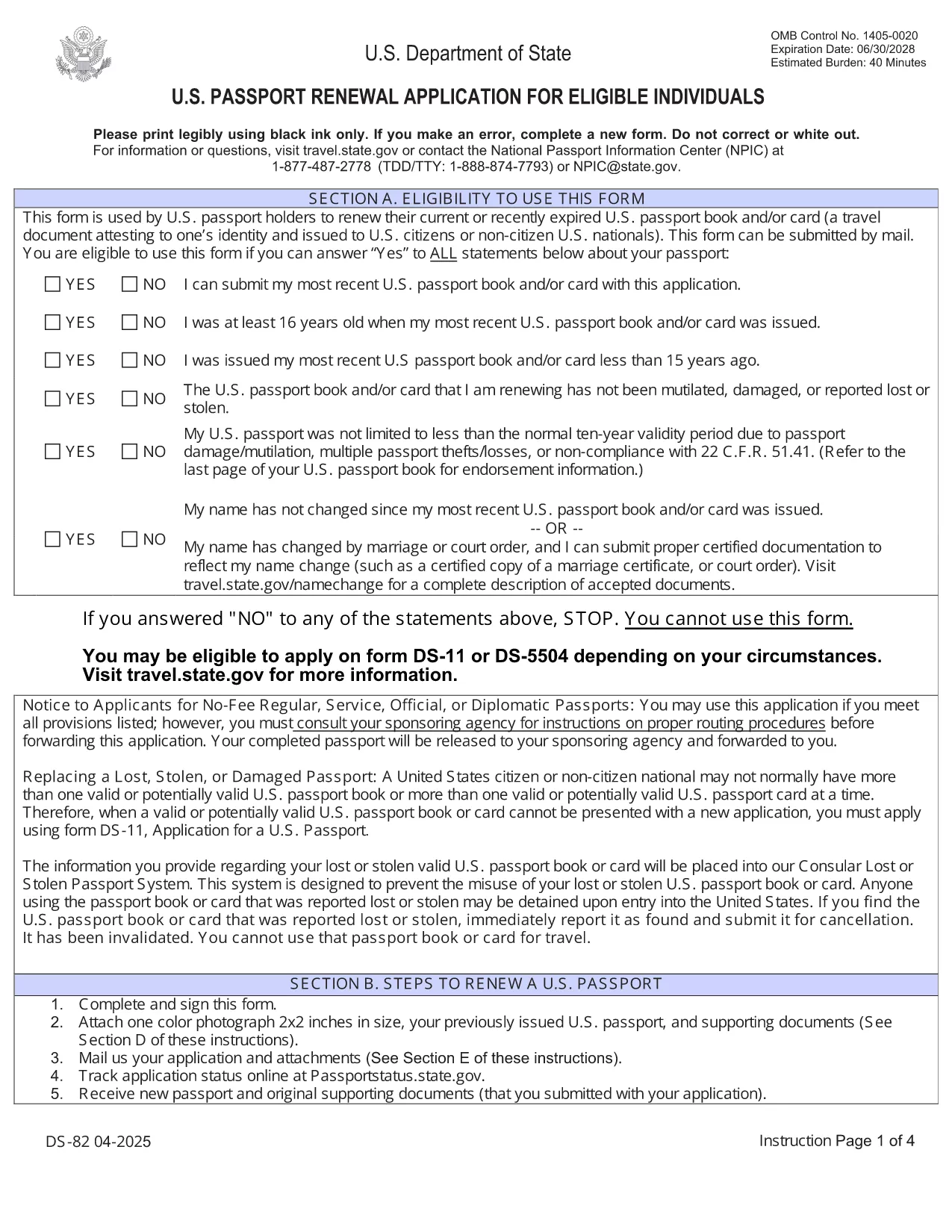
U.S. Passport Renewal Application (Form DS‑82) – Fillable PDF

  1. Taal Engels
  2. Land VS
  3. Activiteit Paspoort
U.S. Passport Renewal Application (Form DS‑82) – Fillable PDF

Need to renew your U.S. passport quickly and without errors? The DS‑82 is the official application for eligible individuals. Our fillable PDF, powered by the Formize PDF Filler, lets you complete the form directly in your browser, save a copy, and print it ready for submission.

Why Use the Fillable DS‑82 Form

  • Instant online editing: No need to print, write, scan, or fax.
  • Auto‑validation: Formize checks required fields and formatting as you type.
  • Secure storage: Save a digital copy for future reference.
  • Time‑saving: Complete the entire application in minutes.

How to Complete the DS‑82 Online with Formize

Just click the "Fill out this form" button below and wait for the Formize PDF Filler app to load. The interface mirrors the official DS‑82 layout, so you’ll know exactly where each piece of information belongs.

Common Mistakes to Avoid

  • Leaving the Middle Name field blank when you have one – it must match your current legal name.
  • Submitting an expired passport photo (must be taken within the last 6 months).
  • Forgetting to sign the form – an unsigned DS‑82 is rejected.
  • Using a non‑U.S. mailing address without a proper explanation.

Where to Submit Your Renewal

After completing and printing the form, mail it with your current passport, a new passport photo, and the renewal fee to the address listed on the U.S. Department of State website. If you’re using a passport acceptance facility, bring the printed form and supporting documents.

Frequently Asked Questions

Explore the most common questions below. If you need more help, the State Department’s official site has detailed guidance.

FAQ
  • Who can use the DS‑82 form?

    U.S. citizens with a passport that is still valid or expired less than 5 years ago, and who can submit the same name and personal data as on the current passport.

  • Can I renew my passport if my name changed?

    Yes, but you must also submit a legal name‑change document (marriage certificate, court order, etc.) along with the DS‑82.

  • How long does the renewal process take?

    Standard processing is about 8‑11 weeks. Expedited service (for an additional fee) reduces the time to 5‑7 weeks.

  • Do I need to bring my old passport?

    Yes. Your current passport must be submitted with the DS‑82; it will be returned to you after processing.

  • What photo requirements apply?

    The photo must be 2×2 inches, taken within the last 6 months, on a plain white background, and show a full‑face view.

  • Is the Formize filler secure?

    Yes. Formize uses HTTPS encryption and does not store any personal data after you download or print the completed PDF.

HOE

Zo vult u DS-82 gratis online in in 5 eenvoudige stappen:

  1. 1
    Open the Fillable Form
    Click the "Fill out this form" button on the page. The Formize PDF Filler will open in a new tab.
  2. 2
    Wait for the Filler to Load
    Allow a few seconds for the app to initialize. You’ll see the DS‑82 layout with editable fields.
  3. 3
    Enter Your Information
    Fill in each field exactly as it appears on your current passport and supporting documents. Required fields are marked with an asterisk.
  4. 4
    Review and Validate
    Use the built‑in validation to check for missing or incorrectly formatted entries. Correct any highlighted issues.
  5. 5
    Save, Print, and Submit
    Save a digital copy, then print the completed form. Mail it with your passport, photo, and fee to the address provided by the U.S. Department of State.
Formize PDF Filler-app
WAT BETREFT

Paspoort Formulieren

DS-82 is een van de paspoortformulieren die documenten zijn die worden gebruikt om een ​​paspoort aan te vragen. Dit is een reisdocument dat de identiteit en nationaliteit van de houder bevestigt en hem in staat stelt internationaal te reizen. Paspoortformulieren kunnen variëren afhankelijk van het land dat het paspoort afgeeft, maar ze bevatten over het algemeen persoonlijke informatie over de aanvrager, zoals naam, geboortedatum en geboorteplaats, evenals informatie over de ouders van de aanvrager en eventuele eerdere paspoorten of reisdocumenten .

In de Verenigde Staten zijn de twee meest voorkomende paspoortformulieren de DS-11 en DS-82. Het DS-11-formulier wordt gebruikt voor nieuwe aanvragers, minderjarigen of personen die niet in aanmerking komen voor het gebruik van het DS-82-formulier. Het DS-82-formulier wordt gebruikt voor paspoortverlengingen per post voor in aanmerking komende aanvragers. Beide formulieren vereisen dat de aanvrager persoonlijke informatie en ondersteunende documentatie verstrekt, zoals een pasfoto en een bewijs van burgerschap.

Andere landen kunnen andere paspoortvormen en -vereisten hebben, maar het basisproces omvat meestal het invullen van een paspoortaanvraag, het verstrekken van ondersteunende documentatie en het bijwonen van een interview met een paspoortfunctionaris in een overheidsfaciliteit of ambassade. Het is belangrijk op te merken dat het aanvraagproces voor een paspoort enkele weken of zelfs maanden kan duren, dus het wordt aanbevolen om ruim voor een geplande reis een aanvraag in te dienen.

FUNCTIES

PDF-vuller

De eenvoudigste manier om online PDF-formulieren in te vullen

  • Vul snel DS-82 in
    Op zoek naar een manier om DS-82 snel online in te vullen? Met onze online gratis PDF-formulierinvuller weet u hoe u dit pdf-document in minder dan een minuut kunt bewerken en invullen.
  • Gebruiksvriendelijke online PDF-editor
    Ben je het beu om PDF-bestanden uit te printen zodat je ze kunt bewerken, voordat je ze opnieuw scant en terugstuurt? Bewerk PDF-documenten gratis online. Gebruik onze online pdf-editor om tijd en papier te besparen.
  • Geweldige tools, alle platforms
    Vraagt ​​u zich af hoe u DS-82 op een Mac moet invullen, of misschien hoe u gratis een PDF-filler kunt gebruiken? Onze online pdf-tools werken op alle platformen.
  • Veilige bestandsopslag
    Voltooide "DS-82"-bestanden worden opgeslagen in een beveiligde database die wordt beheerd door Amazon Cloud hosting. U kunt uw bestanden op elk moment uit ons systeem verwijderen. Deze bestanden worden in ieder geval na 24 uur automatisch verwijderd.
  • Chat met {trefwoord}
    Chat met "DS-82" op Chatize, een gratis PDF-lezerassistent. Stel vragen en krijg antwoorden van "DS-82". Klik gewoon op de knop Chatten met document hierboven.

De vulsessie verwijderen

De geselecteerde vulsessie verwijderen? In dat geval gaat uw voortgang bij het invullen van het formulier verloren.

Bewerkingssessie verwijderen

De geselecteerde bewerkingssessie verwijderen? In dit geval gaat uw voortgang bij het maken en bewerken van het formulier verloren.