
Selecteer taal

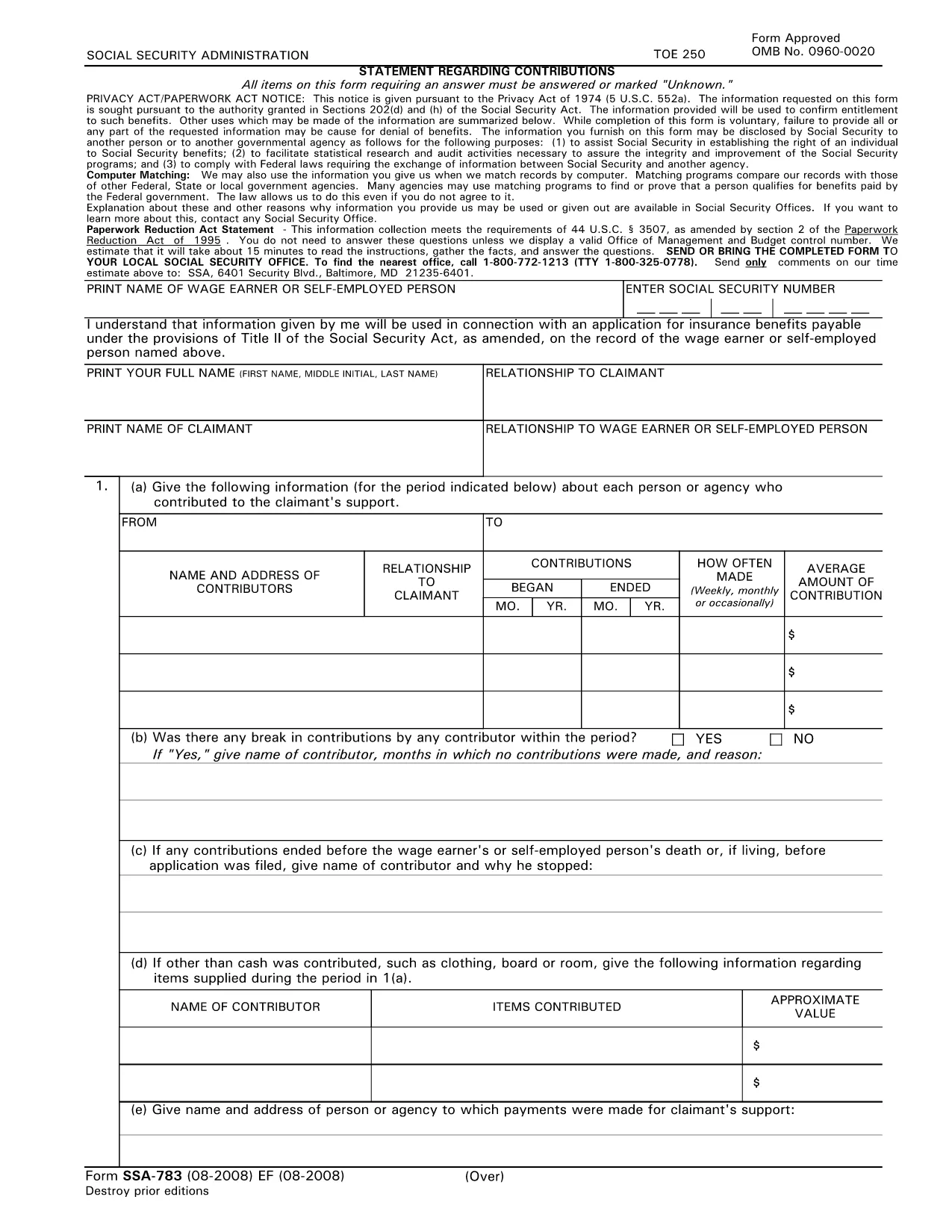
SSA‑783 Statement Regarding Contributions – Fillable PDF Form

  1. Taal Engels
  2. Land VS
  3. Activiteit Sociale zekerheid
Vul dit formulier in
SSA‑783 Statement Regarding Contributions – Fillable PDF Form

The SSA‑783 Statement Regarding Contributions is the official Social Security Administration (SSA) form used to report contributions made to a claimant’s support. Whether you’re a wage earner, self‑employed person, or an agency, completing this form accurately is essential for establishing benefit eligibility.

What Is the SSA‑783 Form?

SSA‑783 collects detailed information about each contributor, the amount contributed, and the frequency of payments. The data helps the SSA verify entitlement to benefits under Title II of the Social Security Act.

How to Fill Out the SSA‑783 Form Online

With Formize you can complete the SSA‑783 without printing or using a separate PDF editor. Follow these simple steps:

  • Click the "Fill out this form" button on the page.
  • Wait a few seconds while the Formize PDF Filler app loads.
  • Enter your information directly into the fillable fields.
  • Review each section for accuracy, then click Submit to download the completed PDF.

Common Mistakes to Avoid

  • Leaving fields blank: Incomplete forms are rejected.
  • Incorrect dates or amounts: Double‑check contribution periods and dollar figures.
  • Illegible handwriting: Using a digital fillable PDF eliminates this issue.
  • Missing signatures: The form requires the signer’s name and signature at the end.

Where to Submit the Completed Form

After you download the finished SSA‑783 PDF, mail it to your local Social Security office or bring it in person. You can locate the nearest office by calling 1‑800‑772‑1213 (TTY 1‑800‑325‑0778).

Why Use Formize’s Fillable PDF

Formize provides a secure, browser‑based PDF filler that:

  • Eliminates the need for third‑party PDF editors.
  • Auto‑saves your progress so you can return later.
  • Ensures the final document meets SSA formatting requirements.

Ready to start? Click the button below and complete your SSA‑783 in minutes.

Fill out this form

FAQ
  • Who must file the SSA‑783 form?

    Anyone who has received contributions toward a claimant’s support—such as a wage earner, self‑employed individual, or agency—must file SSA‑783 to document those payments.

  • Is the SSA‑783 form free to download?

    Yes. Formize provides a free, downloadable fillable PDF of the SSA‑783 form.

  • Can I save my progress and finish later?

    Yes. The Formize PDF Filler automatically saves your entries, allowing you to return and complete the form at any time.

  • How long does it usually take to complete?

    Most users finish the SSA‑783 in 10‑15 minutes, depending on the number of contributors listed.

  • What should I do if I make a mistake?

    Simply correct the field in the fillable PDF before downloading the final version. If you’ve already submitted, contact your local SSA office for guidance.

  • Where do I send the completed SSA‑783?

    Mail the completed form to your local Social Security office or bring it in person. Use the SSA office locator at 1‑800‑772‑1213 for the nearest address.

  • Can I submit the SSA‑783 electronically?

    The SSA currently requires a hard‑copy submission. After filling it out online, print the PDF and send it by mail.

  • Do I need a special PDF editor?

    No. Formize’s browser‑based filler handles everything—no additional software is required.

  • Is my personal information safe?

    Formize uses SSL encryption to protect all data entered into the fillable PDF. Your information is not stored on our servers after you download the completed form.

  • What if I don’t have all the contribution details?

    Provide as much accurate information as possible. If you’re missing data, note “unknown” in the appropriate fields and explain the gap in the comments section.

HOE

Zo vult u SSA-783 gratis online in in 5 eenvoudige stappen:

  1. 1
    Click the Fill‑out Button
    Locate the “Fill out this form” button on the page and click it to launch the Formize PDF Filler.
  2. 2
    Wait for the Filler to Load
    A few seconds after clicking, the fillable PDF interface will appear in your browser.
  3. 3
    Enter Your Information
    Complete each required field—contributor names, dates, amounts, and signatures—using your keyboard.
  4. 4
    Review and Download
    Check all entries for accuracy, then click “Submit” to download the finished SSA‑783 PDF.
  5. 5
    Submit to SSA
    Print the saved PDF (if needed) and mail or deliver it to your local Social Security office.
Formize PDF Filler-app
WAT BETREFT

Formulieren voor sociale zekerheid

SSA-783 is een van de socialezekerheidsformulieren die documenten zijn die worden gebruikt om verschillende uitkeringen en diensten aan te vragen die worden aangeboden door de Amerikaanse socialezekerheidsadministratie (SSA). De SSA is een federaal agentschap dat programma's beheert die zijn ontworpen om financiële hulp te bieden aan in aanmerking komende personen en gezinnen, waaronder pensioenuitkeringen, arbeidsongeschiktheidsuitkeringen, nabestaandenuitkeringen en aanvullende zekerheidsinkomsten (SSI).

Enkele veel voorkomende vormen van sociale zekerheid zijn:

Aanvraag pensioenuitkeringen: dit formulier wordt gebruikt om pensioenuitkeringen aan te vragen op basis van iemands arbeidsverleden en inkomsten.

Aanvraag arbeidsongeschiktheidsuitkeringen: dit formulier wordt gebruikt om arbeidsongeschiktheidsuitkeringen aan te vragen als een persoon een fysieke of mentale aandoening heeft waardoor hij niet kan werken.

Aanvraag voor nabestaandenuitkeringen: dit formulier wordt gebruikt om nabestaandenuitkeringen aan te vragen als de echtgenoot of ouder van een persoon is overleden en zij in aanmerking komen voor nabestaandenuitkeringen.

Medicare-inschrijvingsaanvraag: dit formulier wordt gebruikt om u in te schrijven voor Medicare, het federale ziekteverzekeringsprogramma voor personen ouder dan 65 jaar en mensen met bepaalde handicaps of medische aandoeningen.

Adreswijzigingsformulier: dit formulier wordt gebruikt om het adres van een persoon bij te werken met de SSA.

Formulier voor het aanvragen van inkomstengegevens: dit formulier wordt gebruikt om een ​​kopie van de inkomstengegevens van een persoon aan te vragen, die worden gebruikt om socialezekerheidsuitkeringen te berekenen.

Deze formulieren kunnen online, per post of persoonlijk worden ingevuld bij een plaatselijk kantoor voor sociale zekerheid. Het is belangrijk om alle benodigde formulieren zorgvuldig door te nemen en in te vullen om een ​​tijdige en nauwkeurige verwerking van socialezekerheidsuitkeringen te garanderen.

FUNCTIES

PDF-vuller

De eenvoudigste manier om online PDF-formulieren in te vullen

  • Vul snel SSA-783 in
    Op zoek naar een manier om SSA-783 snel online in te vullen? Met onze online gratis PDF-formulierinvuller weet u hoe u dit pdf-document in minder dan een minuut kunt bewerken en invullen.
  • Gebruiksvriendelijke online PDF-editor
    Ben je het beu om PDF-bestanden uit te printen zodat je ze kunt bewerken, voordat je ze opnieuw scant en terugstuurt? Bewerk PDF-documenten gratis online. Gebruik onze online pdf-editor om tijd en papier te besparen.
  • Geweldige tools, alle platforms
    Vraagt ​​u zich af hoe u SSA-783 op een Mac moet invullen, of misschien hoe u gratis een PDF-filler kunt gebruiken? Onze online pdf-tools werken op alle platformen.
  • Veilige bestandsopslag
    Voltooide "SSA-783"-bestanden worden opgeslagen in een beveiligde database die wordt beheerd door Amazon Cloud hosting. U kunt uw bestanden op elk moment uit ons systeem verwijderen. Deze bestanden worden in ieder geval na 24 uur automatisch verwijderd.
  • Chat met {trefwoord}
    Chat met "SSA-783" op Chatize, een gratis PDF-lezerassistent. Stel vragen en krijg antwoorden van "SSA-783". Klik gewoon op de knop Chatten met document hierboven.

De vulsessie verwijderen

De geselecteerde vulsessie verwijderen? In dat geval gaat uw voortgang bij het invullen van het formulier verloren.

Bewerkingssessie verwijderen

De geselecteerde bewerkingssessie verwijderen? In dit geval gaat uw voortgang bij het maken en bewerken van het formulier verloren.