Selecteer taal

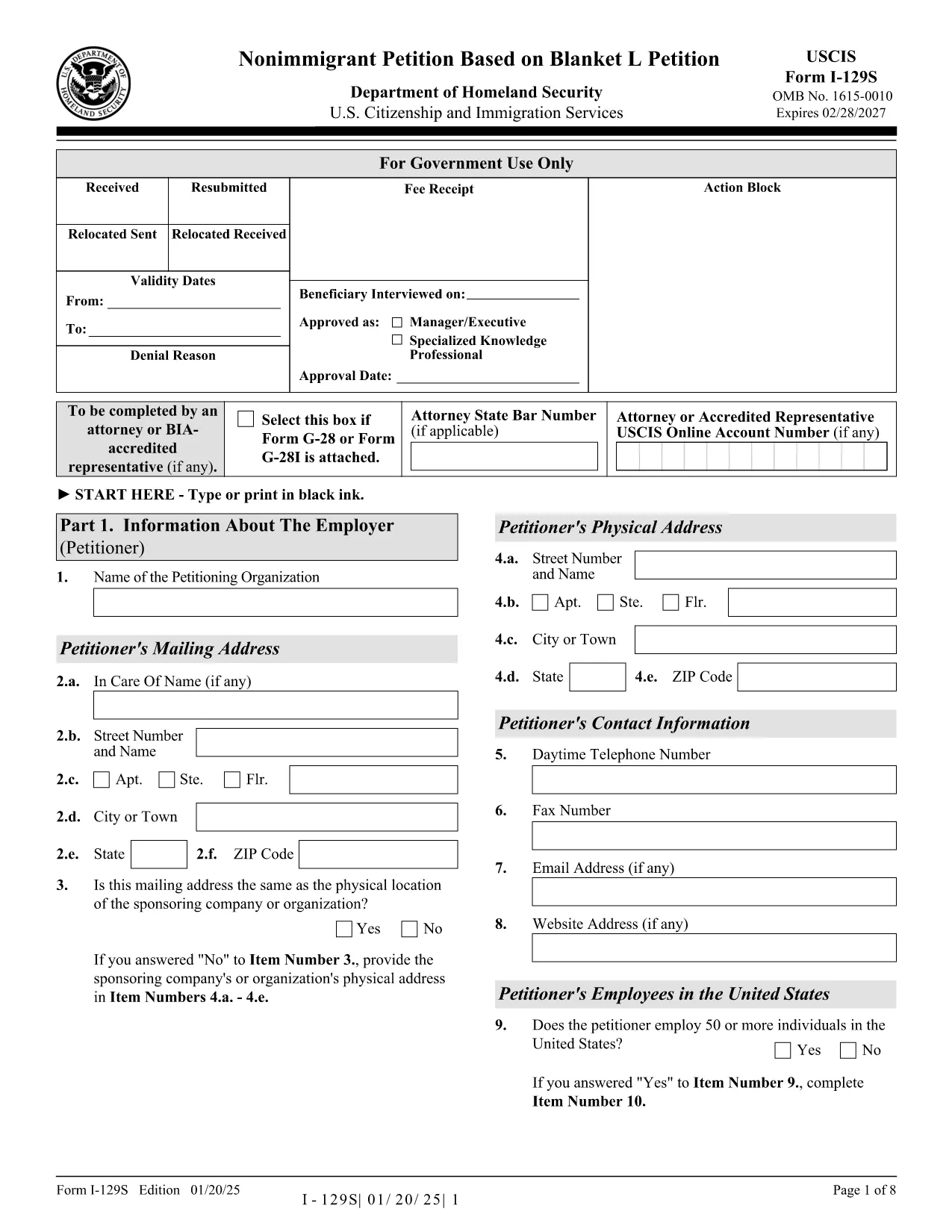
Form I-129S – Nonimmigrant Petition Based on Blanket L

  1. Land VS
  2. Taal Engels
  3. Afdeling Amerikaans staatsburgerschap en immigratiediensten
Form I-129S – Nonimmigrant Petition Based on Blanket L

The Form I-129S is the USCIS‑approved petition used by employers to classify eligible alien employees as L‑1 intracompany transferees under a previously approved blanket L petition. This form is required for executives, managers, or professionals with specialized knowledge who have worked for the company abroad for at least one continuous year within the past three years.

On Formize.com you can access a fillable version of the official I‑129S PDF, complete it directly in your browser, and download a clean, printable copy ready for filing. No extra software or PDF editor is needed.

Why Use Form I-129S?

  • Official USCIS format – matches the exact layout and page numbers required by the agency.
  • Fillable fields speed up data entry and reduce errors.
  • All changes are saved automatically while you work.
  • Easy to print or export as a PDF for mailing or electronic submission.

How to Complete the Fillable PDF

Simply click the "Fill out this form" button on the page. The Formize PDF Filler app loads the I‑129S document, and you can start typing into each field. When you’re finished, save the file, download it, and attach it to your filing package.

Common Mistakes to Avoid

  • Leaving the form unsigned – an unsigned I‑129S will be rejected.
  • Using a different edition of the form – always use the latest version (01/20/25 edition).
  • Omitting the required supporting letter that details the employee’s job duties, salary, and prior qualifying employment.
  • Submitting original documents unless the instructions specifically request them.

Where to Submit Your Petition

If the beneficiary is outside the United States, present the completed I‑129S to a U.S. consular officer. Canadian citizens may file directly with U.S. Customs and Border Protection at designated ports of entry. If the employee is already in the U.S., file Form I‑129 together with the I‑129S at the appropriate USCIS lockbox.

Download the Official PDF

Click the button below to open the fillable version, or download the static PDF for offline use.

FAQ
  • What is Form I-129S used for?

    Form I-129S is the nonimmigrant petition for employees classified under a previously approved blanket L petition. It is used for L‑1 intracompany transferees who meet the executive, managerial, or specialized knowledge criteria.

  • Who can file Form I-129S?

    Only the petitioning employer who holds an approved blanket L petition may file Form I-129S on behalf of eligible employees.

  • Do I need to sign the form electronically?

    The form must be signed by an authorized representative of the employer. If you complete the form online, you can print it, sign it manually, and then submit the scanned copy.

  • Can Canadian citizens file I-129S directly with CBP?

    Yes. Canadian beneficiaries may present the completed I‑129S to U.S. Customs and Border Protection at designated ports of entry or pre‑flight inspection locations.

  • Is there a filing fee for Form I-129S?

    Form I‑129S itself does not have a separate fee, but it is filed together with Form I‑129, which carries the applicable filing fee as listed on the USCIS Fee Schedule.

  • What supporting documents are required?

    You must include a copy of the approved blanket L petition, a detailed employment letter for the beneficiary, and any required translations of foreign‑language documents.

  • Can I edit the form after I download it?

    Yes. Use the fillable PDF on Formize.com to make changes before printing. Once printed and signed, the document should not be altered.

  • How do I know I have the latest edition?

    The current edition (01/20/25) is linked on this page. Always verify the edition date at the bottom of the form before filing.

HOE

Zo vult u Form I-129S gratis online in in 4 eenvoudige stappen:

  1. 1
    Open the Fillable Form
    Click the "Fill out this form" button on the page. The Formize PDF Filler loads the I‑129S document in your browser.
  2. 2
    Enter Petition Details
    Type directly into each highlighted field. Use the tab key to move quickly between sections.
  3. 3
    Save and Download
    When all required fields are completed, click "Save" then "Download PDF" to get a printable copy.
  4. 4
    Submit to USCIS
    Attach the completed I‑129S to your filing package (Form I‑129, supporting documents, filing fee) and send it to the appropriate USCIS address or consular office.
Formize PDF Filler-app
WAT BETREFT

Form I-129S-sjabloon

Met de traditionele set functies voor het bekijken en invullen van een PDF-document, gecombineerd met de voordelen van een webapplicatie en responsieve lay-out, kunt u Form I-129S binnen enkele minuten voltooien.

FUNCTIES

PDF-vuller

De eenvoudigste manier om online PDF-formulieren in te vullen

  • Vul snel Form I-129S in
    Op zoek naar een manier om Form I-129S snel online in te vullen? Met onze online gratis PDF-formulierinvuller weet u hoe u dit pdf-document in minder dan een minuut kunt bewerken en invullen.
  • Gebruiksvriendelijke online PDF-editor
    Ben je het beu om PDF-bestanden uit te printen zodat je ze kunt bewerken, voordat je ze opnieuw scant en terugstuurt? Bewerk PDF-documenten gratis online. Gebruik onze online pdf-editor om tijd en papier te besparen.
  • Geweldige tools, alle platforms
    Vraagt ​​u zich af hoe u Form I-129S op een Mac moet invullen, of misschien hoe u gratis een PDF-filler kunt gebruiken? Onze online pdf-tools werken op alle platformen.
  • Veilige bestandsopslag
    Voltooide "Form I-129S"-bestanden worden opgeslagen in een beveiligde database die wordt beheerd door Amazon Cloud hosting. U kunt uw bestanden op elk moment uit ons systeem verwijderen. Deze bestanden worden in ieder geval na 24 uur automatisch verwijderd.
  • Chat met {trefwoord}
    Chat met "Form I-129S" op Chatize, een gratis PDF-lezerassistent. Stel vragen en krijg antwoorden van "Form I-129S". Klik gewoon op de knop Chatten met document hierboven.

De vulsessie verwijderen

De geselecteerde vulsessie verwijderen? In dat geval gaat uw voortgang bij het invullen van het formulier verloren.

Bewerkingssessie verwijderen

De geselecteerde bewerkingssessie verwijderen? In dit geval gaat uw voortgang bij het maken en bewerken van het formulier verloren.