Selecteer taal

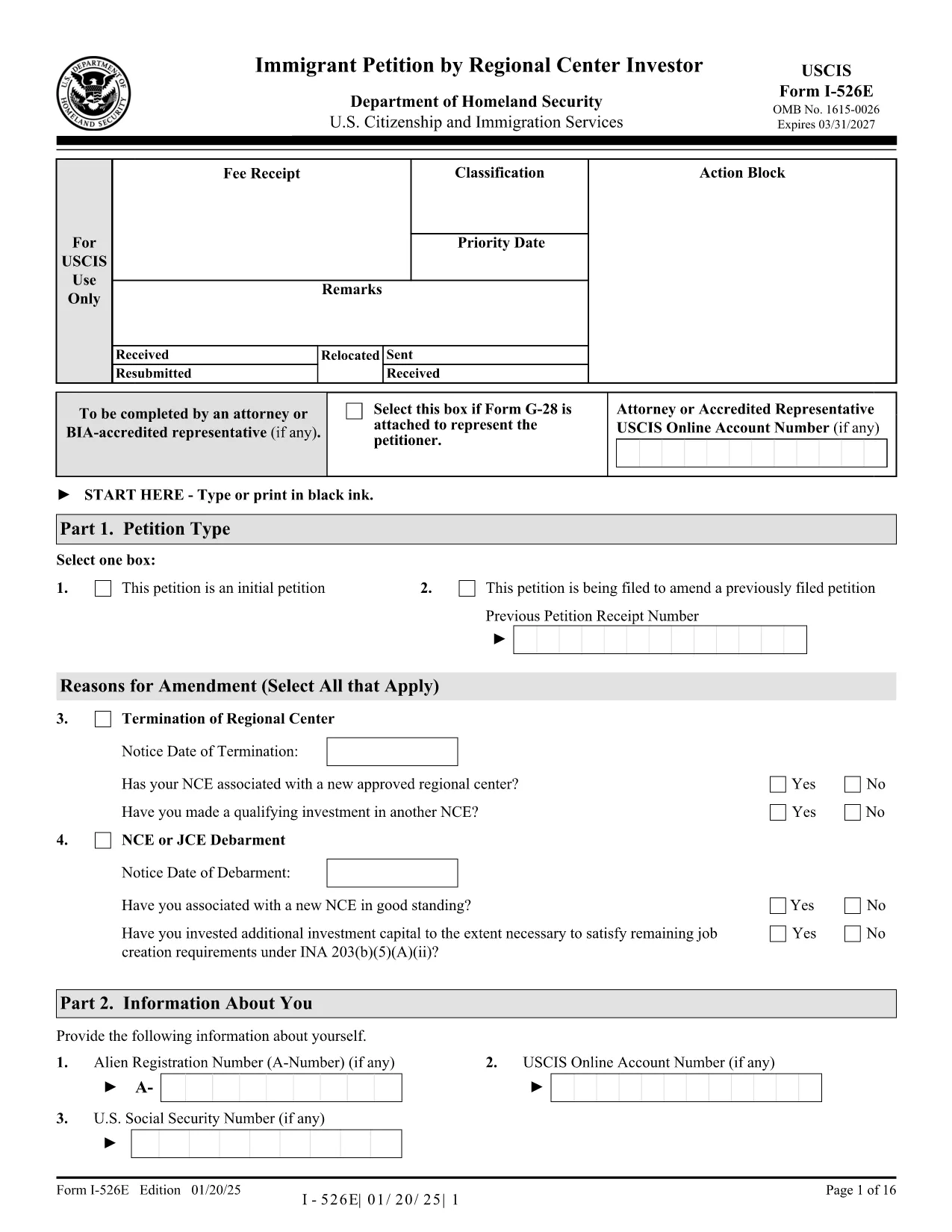
Form I-526E – Immigrant Petition by Regional Center Investor (Fillable PDF)

  1. Land VS
  2. Taal Engels
  3. Afdeling Amerikaans staatsburgerschap en immigratiediensten
Form I-526E – Immigrant Petition by Regional Center Investor (Fillable PDF)

The Form I-526E is the official USCIS petition used by investors who are participating in a Regional Center EB‑5 project. This fillable PDF lets you provide the required personal, investment, and project details so USCIS can evaluate your eligibility under INA 203(b)(5)(E).

What Is Form I-526E?

Form I-526E is distinct from the standalone I‑526 petition. It is specifically for:

  • Investors pooling capital with a USCIS‑approved Regional Center.
  • Petitioners reporting amendments when a Regional Center, enterprise, or job‑creating entity changes status.

Submitting the correct form helps prevent delays or rejections.

How to Fill the Form Online with Formize

Instead of downloading, printing, and scanning, use the Formize PDF Filler for a seamless experience:

  1. Click the "Fill out this form" button on this page.
  2. Wait a few seconds while the Formize PDF Filler app loads.
  3. Enter your information directly into the fillable fields.
  4. Save the completed PDF to your device or download a signed copy.

The filler automatically validates dates, numbers, and required fields, reducing the chance of errors.

Key Sections & Required Attachments

Pay special attention to these sections:

  • Part 1 – Information About the Investor: Full legal name, passport details, and address.
  • Part 2 – Investment Information: Amount invested, source of funds, and the Regional Center’s SEVIS ID.
  • Part 3 – Project Details: Name of the project, job‑creation estimates, and timeline.
  • Supporting Documents: Business plan, proof of lawful source of funds, and Regional Center approval letter.

Common Mistakes to Avoid

  • Leaving any required field blank – the form will be rejected.
  • Using an outdated PDF edition – always use the latest version (see download link).
  • Submitting a combined fee payment with other forms (USCIS now requires separate payments).
  • Signing the PDF with a scanned signature; use a digital signature tool or print‑sign‑scan.

Where to Submit Your Completed Petition

After completing the form, mail it to the appropriate USCIS lockbox address listed on the USCIS filing instructions. Include the separate filing fee and any required supplementary forms (e.g., G‑1450 for credit‑card payments).

Ready to start? Click the button below to open the fillable version of Form I-526E instantly.

FAQ
  • Who should use Form I-526E instead of Form I-526?

    Form I-526E is for investors who are pooling their capital with a USCIS‑approved Regional Center. Standalone investors use Form I-526.

  • Can I edit the PDF after I download it?

    Yes, but using the Formize PDF Filler is easier. It lets you edit, validate, and save the form without printing or scanning.

  • Do I need to sign the form digitally?

    USCIS accepts a digital signature if it meets their guidelines, but many applicants print, sign, and then scan the final document.

  • What happens if I submit an outdated version of Form I-526E?

    USCIS may reject the petition. Always use the latest PDF version – the link on this page points to the current edition.

  • Is there a filing fee for Form I-526E?

    Yes. The fee is listed on the USCIS Fee Schedule page and must be paid separately from any other forms.

  • Can I submit Form I-526E online?

    No, Form I-526E must be mailed as a paper petition. However, you can fill it out online with Formize before printing.

  • What supporting documents are required?

    Typical attachments include a business plan, proof of lawful source of funds, Regional Center approval notice, and any amendment notices if applicable.

  • How long does USCIS take to process a Form I-526E?

    Processing times vary; check the USCIS processing times page for the most current estimates.

HOE

Zo vult u Form I-526E gratis online in in 5 eenvoudige stappen:

  1. 1
    Open the Fillable Form
    Click the "Fill out this form" button on the page. The Formize PDF Filler will open in a new tab.
  2. 2
    Load the Form
    Wait a few seconds while the fillable PDF loads. All fields become editable automatically.
  3. 3
    Enter Your Information
    Type your answers directly into each section. The app validates dates, numbers, and required fields in real time.
  4. 4
    Save or Download
    When finished, click "Save" to store the completed file in your account or "Download" to get a signed PDF on your device.
  5. 5
    Print & Submit
    Print the completed form (if required) and mail it with the appropriate filing fee to the USCIS lockbox address.
Formize PDF Filler-app
WAT BETREFT

Form I-526E-sjabloon

Met de traditionele set functies voor het bekijken en invullen van een PDF-document, gecombineerd met de voordelen van een webapplicatie en responsieve lay-out, kunt u Form I-526E binnen enkele minuten voltooien.

FUNCTIES

PDF-vuller

De eenvoudigste manier om online PDF-formulieren in te vullen

  • Vul snel Form I-526E in
    Op zoek naar een manier om Form I-526E snel online in te vullen? Met onze online gratis PDF-formulierinvuller weet u hoe u dit pdf-document in minder dan een minuut kunt bewerken en invullen.
  • Gebruiksvriendelijke online PDF-editor
    Ben je het beu om PDF-bestanden uit te printen zodat je ze kunt bewerken, voordat je ze opnieuw scant en terugstuurt? Bewerk PDF-documenten gratis online. Gebruik onze online pdf-editor om tijd en papier te besparen.
  • Geweldige tools, alle platforms
    Vraagt ​​u zich af hoe u Form I-526E op een Mac moet invullen, of misschien hoe u gratis een PDF-filler kunt gebruiken? Onze online pdf-tools werken op alle platformen.
  • Veilige bestandsopslag
    Voltooide "Form I-526E"-bestanden worden opgeslagen in een beveiligde database die wordt beheerd door Amazon Cloud hosting. U kunt uw bestanden op elk moment uit ons systeem verwijderen. Deze bestanden worden in ieder geval na 24 uur automatisch verwijderd.
  • Chat met {trefwoord}
    Chat met "Form I-526E" op Chatize, een gratis PDF-lezerassistent. Stel vragen en krijg antwoorden van "Form I-526E". Klik gewoon op de knop Chatten met document hierboven.

De vulsessie verwijderen

De geselecteerde vulsessie verwijderen? In dat geval gaat uw voortgang bij het invullen van het formulier verloren.

Bewerkingssessie verwijderen

De geselecteerde bewerkingssessie verwijderen? In dit geval gaat uw voortgang bij het maken en bewerken van het formulier verloren.