
Selecteer taal

Connecticut Cert-106 Vehicle Use Tax Refund Form (Fillable PDF)

  1. Taal Engels
  2. Land VS
  3. Activiteit Voertuig registratie
  4. Staat Connecticut
Connecticut Cert-106 Vehicle Use Tax Refund Form (Fillable PDF)

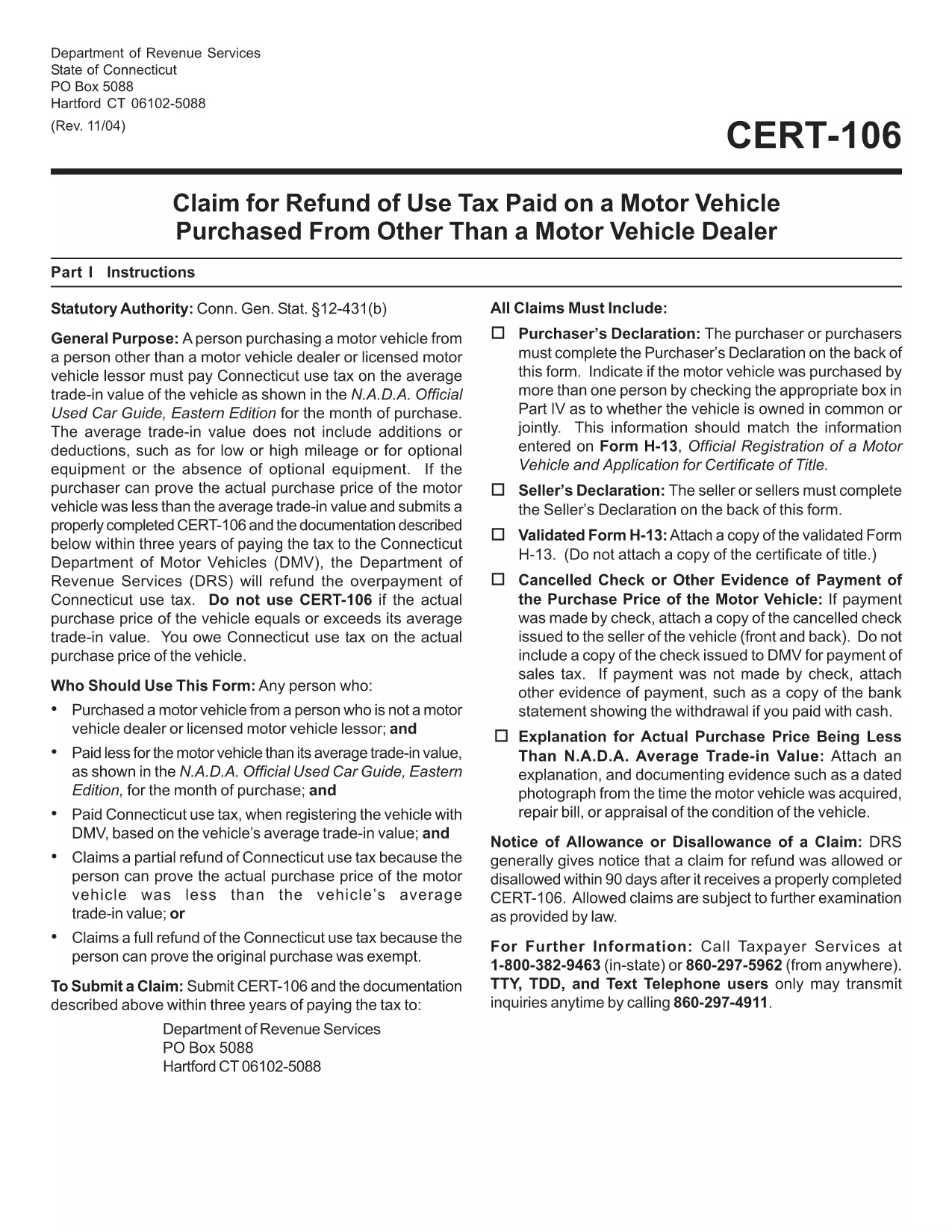
The Connecticut Cert-106 is the official claim form used to request a refund of use tax paid on a motor vehicle purchase. Whether you bought a car, truck, or motorcycle and believe you over‑paid tax, this fillable PDF lets you submit a proper request to the Connecticut Department of Revenue Services (DRS) quickly and accurately.

What is the Cert-106 Form?

Cert-106, officially titled “Claim for Refund of Use Tax Paid on Motor Vehicle Purchased,” collects essential details about the buyer, the vehicle, and the tax paid. The DRS reviews the information and, if eligible, issues a refund.

Who Needs to File Cert-106?

  • Individuals who purchased a vehicle and paid Connecticut use tax but qualify for a refund (e.g., out‑of‑state purchase, trade‑in adjustments).
  • Dealers or businesses that acted as the purchaser on behalf of a client.
  • Anyone who can provide proof of tax payment and supporting documentation within three years of the payment date.

How to Fill Out Cert-106 Online

Instead of printing, scanning, or manually typing, use Formize’s built‑in PDF filler:

  1. Click the "Fill out this form" button on this page.
  2. Wait a few seconds while the Formize PDF Filler app loads the Cert‑106 template.
  3. Enter your information directly into the fields (name, address, vehicle details, tax amount, etc.).
  4. Upload any required documents (receipt, proof of payment, vehicle title) using the attachment icons.
  5. Review the completed form, then click Save & Download or Submit according to your preferred filing method.

Common Mistakes to Avoid

  • Missing signatures: The purchaser’s declaration on the back of the form must be signed.
  • Incorrect dates: Use the exact date the tax was paid, not the purchase date.
  • Incomplete documentation: Attach the original receipt and any trade‑in paperwork; otherwise the claim will be rejected.
  • Submitting after three years: The DRS only accepts claims within three years of the tax payment.

Where to Submit Your Completed Form

After you’ve filled and saved the PDF, you can:

  • Mail it to Department of Revenue Services, PO Box 5088, Hartford, CT 06102‑5088.
  • Upload it through the Connecticut DRS online portal (if you have an account).
  • Deliver it in person to a local DRS office for immediate assistance.

Using Formize’s fillable PDF eliminates the hassle of printing, scanning, or re‑typing. Get your refund faster and keep a digital copy for your records.

FAQ
  • What is the purpose of Cert‑106?

    Cert‑106 is used to claim a refund of Connecticut use tax paid on a motor vehicle when the taxpayer qualifies for a refund.

  • Can I file Cert‑106 electronically?

    Yes. Fill the form online with Formize’s fillable PDF, save the completed document, and then upload or mail it to the Department of Revenue Services.

  • How long do I have to submit a Cert‑106 claim?

    Claims must be submitted within three years of the date the tax was paid.

  • What supporting documents are required?

    You need the original tax receipt, vehicle purchase agreement or title, and any trade‑in documentation that affects the tax amount.

  • Do I need a signature on the form?

    Yes. The purchaser’s declaration on the back of Cert‑106 must be signed for the claim to be valid.

  • Is there a filing fee for Cert‑106?

    No. There is no fee to submit a Cert‑106 claim, but you must provide accurate information to avoid processing delays.

  • Can a business use Cert‑106?

    Businesses that purchased a vehicle and paid use tax can also file Cert‑106 to request a refund.

  • What if my claim is denied?

    The DRS will send a written explanation. You can correct any errors and resubmit, or appeal the decision according to the DRS guidelines.

HOE

Zo vult u cert-106 gratis online in in 5 eenvoudige stappen:

  1. 1
    Open the Fillable Form
    Click the "Fill out this form" button on the page. The Formize PDF Filler app will open automatically.
  2. 2
    Enter Your Information
    Type directly into each field – name, address, vehicle details, tax amount, and any other required data.
  3. 3
    Attach Supporting Documents
    Use the attachment icons to upload receipts, proof of tax payment, and the vehicle title.
  4. 4
    Review & Save
    Double‑check every entry, then click "Save & Download" to keep a copy or "Submit" to send it to the DRS.
  5. 5
    Send Your Claim
    Mail the saved PDF to the DRS address, upload it via the online portal, or deliver it in person.
Formize PDF Filler-app
WAT BETREFT

Voertuigregistratieformulieren

cert-106 is een van de DMV-formulieren, ook wel formulieren van het Department of Motor Vehicles genoemd. Dit zijn documenten die worden gebruikt bij verschillende transacties en processen met betrekking tot motorvoertuigen. De DMV is een overheidsinstantie die verantwoordelijk is voor rijbewijzen, voertuigregistratie en handhaving van de motorvoertuigwetten. De specifieke DMV-formulieren die beschikbaar zijn, kunnen per rechtsgebied verschillen, maar hier zijn enkele veelvoorkomende voorbeelden:

Rijbewijsformulieren: deze formulieren worden gebruikt voor het aanvragen van een rijbewijs of voor het aanvragen van wijzigingen of verlengingen. Ze vereisen doorgaans persoonlijke informatie en een identiteitsbewijs en kunnen secties bevatten voor medische informatie of rijgeschiedenis.

Voertuigregistratieformulieren: deze formulieren worden gebruikt om een ​​motorvoertuig bij de RDW te registreren. Ze vereisen voertuiginformatie, eigendomsgegevens en een verzekeringsbewijs.

Formulieren voor eigendomsoverdracht: bij het kopen of verkopen van een voertuig worden deze formulieren gebruikt om het eigendom van de ene partij naar de andere over te dragen. Ze vereisen informatie over de koper, verkoper, voertuiggegevens en kunnen een verkoopakte bevatten.

formulieren voor vrijgave van aansprakelijkheid voor voertuigen: bij de verkoop of overdracht van de eigendom van een voertuig melden deze formulieren de DMV dat de verkoper niet langer verantwoordelijk is voor het voertuig. Het helpt de verkoper te beschermen tegen aansprakelijkheid voor ongevallen of incidenten waarbij het voertuig betrokken is na de verkoop.

Formulieren voor kenteken- en registratieverlenging: deze formulieren worden gebruikt om de voertuigregistratie te vernieuwen of nieuwe kentekenplaten aan te vragen. Ze vereisen doorgaans informatie over de geregistreerde eigenaar, huidige registratiegegevens en betaling van toepasselijke kosten.

Aanvraagformulieren voor rijgegevens: met deze formulieren kunnen individuen hun rijgegevens opvragen bij de DMV, die informatie geven over rijovertredingen, licentiestatus en andere relevante details.

Speciale of gepersonaliseerde nummerplaatformulieren: deze formulieren worden gebruikt voor het aanvragen van gepersonaliseerde of speciale kentekenplaten, waarmee individuen hun kentekenplaat kunnen aanpassen met specifieke tekens of ontwerpen.

Dit zijn slechts enkele voorbeelden van de vele formulieren die via de RDW beschikbaar kunnen zijn. De specifieke formulieren en vereisten kunnen per rechtsgebied verschillen. Het is dus belangrijk om de lokale DMV-website te raadplegen of een DMV-kantoor te bezoeken om de juiste formulieren voor uw specifieke behoeften te verkrijgen.

FUNCTIES

PDF-vuller

De eenvoudigste manier om online PDF-formulieren in te vullen

  • Vul snel cert-106 in
    Op zoek naar een manier om cert-106 snel online in te vullen? Met onze online gratis PDF-formulierinvuller weet u hoe u dit pdf-document in minder dan een minuut kunt bewerken en invullen.
  • Gebruiksvriendelijke online PDF-editor
    Ben je het beu om PDF-bestanden uit te printen zodat je ze kunt bewerken, voordat je ze opnieuw scant en terugstuurt? Bewerk PDF-documenten gratis online. Gebruik onze online pdf-editor om tijd en papier te besparen.
  • Geweldige tools, alle platforms
    Vraagt ​​u zich af hoe u cert-106 op een Mac moet invullen, of misschien hoe u gratis een PDF-filler kunt gebruiken? Onze online pdf-tools werken op alle platformen.
  • Veilige bestandsopslag
    Voltooide "cert-106"-bestanden worden opgeslagen in een beveiligde database die wordt beheerd door Amazon Cloud hosting. U kunt uw bestanden op elk moment uit ons systeem verwijderen. Deze bestanden worden in ieder geval na 24 uur automatisch verwijderd.
  • Chat met {trefwoord}
    Chat met "cert-106" op Chatize, een gratis PDF-lezerassistent. Stel vragen en krijg antwoorden van "cert-106". Klik gewoon op de knop Chatten met document hierboven.

De vulsessie verwijderen

De geselecteerde vulsessie verwijderen? In dat geval gaat uw voortgang bij het invullen van het formulier verloren.

Bewerkingssessie verwijderen

De geselecteerde bewerkingssessie verwijderen? In dit geval gaat uw voortgang bij het maken en bewerken van het formulier verloren.