
Selecteer taal

MV70A Inspection Checklist – Fillable PDF

  1. Taal Engels
  2. Land VS
  3. Activiteit Voertuig registratie
  4. Staat Montana
MV70A Inspection Checklist – Fillable PDF

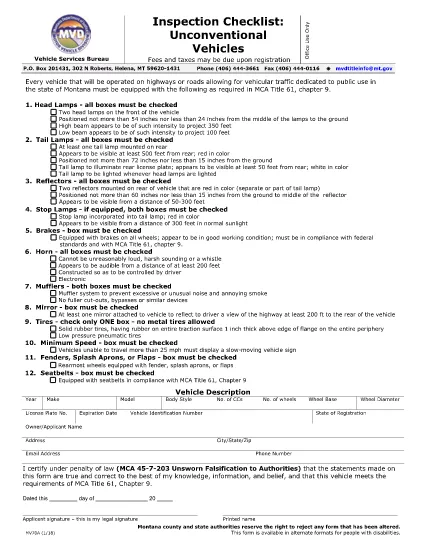
The MV70A Inspection Checklist is the official Montana Motor Vehicle Department (MVD) form used to certify that an unconventional vehicle—such as a custom‑built car, kit car, or modified motorcycle—meets safety standards before it can be titled and registered.

What Is the MV70A Form?

Form MV70A documents the visual and functional inspection of the vehicle. It includes sections for the inspector’s signature, the applicant’s printed name, and detailed check‑boxes covering brakes, lights, emissions, and chassis integrity. The form is required for any vehicle that does not fall under standard Montana registration categories.

How to Complete the MV70A Online

Instead of printing, signing, and scanning, you can fill out the MV70A directly in your browser using Formize’s secure PDF filler:

  1. Click the "Fill out this form" button on this page.
  2. Wait a few seconds while the Formize PDF Filler app loads.
  3. Enter the requested information in each fillable field. The interface guides you through required sections.
  4. When you finish, click Save to download a completed PDF or Print to submit a hard copy.

Common Mistakes to Avoid

  • Leaving required fields blank: The online filler highlights missing information before you can save.
  • Using altered or handwritten entries: The MVD rejects any form that appears altered; stick to typed text.
  • Skipping the inspector’s signature: Even if you are the owner, a certified inspector must sign the checklist.

Where to Submit the Completed Form

After saving the completed MV70A, you have two options:

  • In‑person: Bring the PDF (printed) to any Montana MVD office or authorized inspection station.
  • Mail: Send the printed form to the address listed on the MVD website along with any required fees.

Benefits of Using Formize PDF Filler

Formize provides a fast, secure, and accessible way to complete the MV70A. The fillable PDF is fully compatible with disability‑access tools, and your data is stored locally—no third‑party servers keep a copy of your personal information.

FAQ
  • Is the MV70A form available in a fillable format?

    Yes. Formize provides a fully fillable PDF version that works in any modern web browser without additional software.

  • Can I submit the MV70A electronically?

    The Montana MVD currently requires a printed, signed copy, but you can use the online filler to complete the form and then print it for submission.

  • What types of vehicles need the MV70A?

    Any non‑conforming or unconventional vehicle—such as kit cars, custom builds, and certain motorcycles—must be inspected with the MV70A before registration.

  • Do I need a certified inspector to sign the form?

    Yes. The inspector’s signature is mandatory. The form cannot be approved with only the owner’s signature.

  • How long is the MV70A valid after inspection?

    The checklist is valid for the specific inspection date listed on the form. If the vehicle fails, a new inspection and form are required.

  • Is there a fee to use Formize’s PDF filler?

    Formize offers a free basic filler for standard forms like MV70A. No payment is required to complete and download the document.

HOE

Zo vult u MV70A gratis online in in 4 eenvoudige stappen:

  1. 1
    Open the Fillable Form
    Click the “Fill out this form” button on the page. The Formize PDF Filler will open in a new tab.
  2. 2
    Load the MV70A Document
    The MV70A PDF loads automatically. All fields become interactive text boxes.
  3. 3
    Enter Your Information
    Type the required details—owner name, vehicle VIN, inspection results—into each highlighted field.
  4. 4
    Save or Print
    When every required field is completed, click “Save” to download the finished PDF or “Print” to produce a hard copy for submission.
Formize PDF Filler-app
WAT BETREFT

Voertuigregistratieformulieren

MV70A is een van de voertuigregistratieformulieren die documenten zijn die worden gebruikt om een ​​motorvoertuig te registreren bij de relevante overheidsinstantie, meestal het Department of Motor Vehicles (DMV) of een gelijkwaardige instantie. Deze formulieren zijn vereist wanneer iemand een nieuw of gebruikt voertuig koopt, de eigendom van een voertuig overdraagt ​​of met een voertuig naar een nieuw rechtsgebied verhuist.

De specifieke voertuigregistratieformulieren kunnen per rechtsgebied verschillen, maar vereisen doorgaans de volgende informatie:

Voertuiginformatie: dit omvat details over het voertuig, zoals het merk, model, bouwjaar, voertuigidentificatienummer (VIN) en kilometerstand.

Eigenaargegevens: het formulier vereist informatie over de eigenaar van het voertuig, inclusief naam, adres, contactgegevens en rijbewijsnummer.

Eigendomsbewijs: afhankelijk van de omstandigheden kan een eigendomsbewijs vereist zijn, zoals een eigendomscertificaat, een verkoopakte of een certificaat van oorsprong van de fabrikant (voor nieuwe voertuigen).

Verzekeringsinformatie: doorgaans is een bewijs van een geldige autoverzekeringsdekking vereist. Dit kan het verstrekken van het verzekeringspolisnummer, de dekkingsdata en de gegevens van de verzekeringsmaatschappij omvatten.

Betaling van kosten: Bij de registratie van een voertuig worden verschillende kosten betaald, zoals registratiekosten, belastingen en mogelijk andere kosten die specifiek zijn voor het rechtsgebied.

Naast deze basisvereisten kunnen in sommige rechtsgebieden aanvullende formulier- of documentatievereisten gelden. In bepaalde gebieden kunnen bijvoorbeeld de resultaten van emissietests, veiligheidsinspecties of een bewijs van ingezetenschap nodig zijn.

Zodra de voertuigregistratieformulieren zijn ingevuld en ingediend, zal de overheidsinstantie een kentekenbewijs, kentekenplaten en kentekenstickers afgeven. Deze documenten geven aan dat het voertuig wettelijk geregistreerd is en bevoegd is om op de openbare weg te rijden.

Het is belangrijk op te merken dat de vereisten voor voertuigregistratie per rechtsgebied aanzienlijk kunnen verschillen. Daarom wordt aanbevolen om de plaatselijke RDW of een gelijkwaardig bureau te raadplegen voor de specifieke formulieren en procedures die op uw locatie van toepassing zijn.

FUNCTIES

PDF-vuller

De eenvoudigste manier om online PDF-formulieren in te vullen

  • Vul snel MV70A in
    Op zoek naar een manier om MV70A snel online in te vullen? Met onze online gratis PDF-formulierinvuller weet u hoe u dit pdf-document in minder dan een minuut kunt bewerken en invullen.
  • Gebruiksvriendelijke online PDF-editor
    Ben je het beu om PDF-bestanden uit te printen zodat je ze kunt bewerken, voordat je ze opnieuw scant en terugstuurt? Bewerk PDF-documenten gratis online. Gebruik onze online pdf-editor om tijd en papier te besparen.
  • Geweldige tools, alle platforms
    Vraagt ​​u zich af hoe u MV70A op een Mac moet invullen, of misschien hoe u gratis een PDF-filler kunt gebruiken? Onze online pdf-tools werken op alle platformen.
  • Veilige bestandsopslag
    Voltooide "MV70A"-bestanden worden opgeslagen in een beveiligde database die wordt beheerd door Amazon Cloud hosting. U kunt uw bestanden op elk moment uit ons systeem verwijderen. Deze bestanden worden in ieder geval na 24 uur automatisch verwijderd.
  • Chat met {trefwoord}
    Chat met "MV70A" op Chatize, een gratis PDF-lezerassistent. Stel vragen en krijg antwoorden van "MV70A". Klik gewoon op de knop Chatten met document hierboven.

De vulsessie verwijderen

De geselecteerde vulsessie verwijderen? In dat geval gaat uw voortgang bij het invullen van het formulier verloren.

Bewerkingssessie verwijderen

De geselecteerde bewerkingssessie verwijderen? In dit geval gaat uw voortgang bij het maken en bewerken van het formulier verloren.