
Selecteer taal

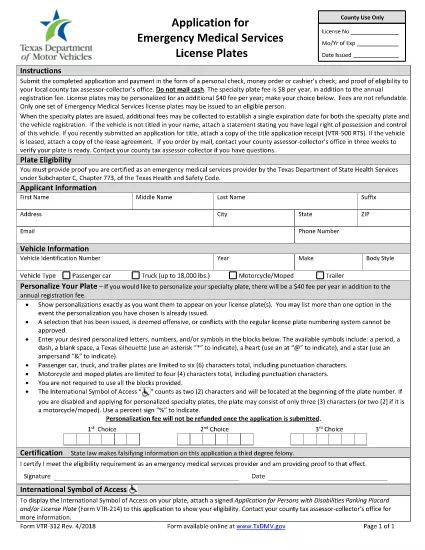
VTR-312 Emergency Medical Services License Plate Application

  1. Taal Engels
  2. Land VS
  3. Activiteit Voertuig registratie
  4. Staat Texas
VTR-312 Emergency Medical Services License Plate Application

The Texas VTR-312 is the official application for Emergency Medical Services (EMS) license plates. These special plates identify vehicles that are used for emergency medical response and provide certain privileges on state highways.

What Is the VTR-312 Form?

The VTR-312 is issued by the Texas Department of Motor Vehicles (TxDMV). It collects essential information about the vehicle, the EMS organization, and the authorized driver. Completing this form correctly is required before the TxDMV can issue the EMS plate.

How to Complete the VTR-312 Online

Instead of printing, signing, and scanning, you can fill the form directly on our site:

  1. Click the "Fill out this form" button below.
  2. Wait for the Formize PDF Filler app to load (usually a few seconds).
  3. Enter your information in each fillable field. The app saves your progress automatically.
  4. When you’re done, download the completed PDF or submit it directly to the TxDMV portal if you have an account.

Common Mistakes to Avoid

  • Missing signatures: Every required signature box must be completed; unsigned forms are rejected.
  • Incorrect VIN: Double‑check the Vehicle Identification Number; a typo will delay processing.
  • Out‑of‑date information: Ensure the EMS organization’s address and contact details are current.
  • Wrong vehicle type: Only vehicles used primarily for EMS purposes qualify for the special plate.

Eligibility Requirements

To qualify for an EMS license plate you must:

  • Be a certified EMS provider operating in Texas.
  • Own or lease a vehicle that is dedicated to emergency medical response.
  • Maintain proper insurance and registration for the vehicle.

Submit and Track Your Application

After filling out the form, you can either:

  • Print the completed PDF, sign it, and mail it to the TxDMV.
  • Upload the signed PDF through the TxDMV online portal for faster processing.

Keep a copy of the submitted form for your records. The TxDMV typically processes EMS plate requests within 7‑10 business days.

FAQ
  • Do I need to print the VTR-312 form?

    No. You can fill it entirely online using the Formize PDF Filler and then download or submit the completed file.

  • Can I sign the form electronically?

    The TxDMV still requires a handwritten signature on the final PDF. Print, sign, and scan or mail the signed copy.

  • How long does it take to process an EMS license plate?

    Processing usually takes 7‑10 business days after the TxDMV receives a complete, signed application.

  • What if I make a mistake after submitting?

    Contact the Texas Department of Motor Vehicles to request a correction. You may need to submit a new VTR-312 with the correct information.

  • Is there a fee for the VTR-312 application?

    Yes, the TxDMV charges a standard fee for EMS license plates. Check the latest fee schedule on the TxDMV website.

  • Can I use the same VTR-312 form for a different vehicle?

    Each vehicle requires its own VTR-312 application. Submit a separate form for each EMS vehicle you wish to register.

  • What documents should I attach with the VTR-312?

    Include proof of EMS certification, vehicle ownership, and current registration. The form’s instructions list all required attachments.

  • Is the Formize PDF Filler secure?

    Yes. All data is encrypted in transit, and no information is stored on our servers after you download the completed PDF.

HOE

Zo vult u VTR-312 gratis online in in 4 eenvoudige stappen:

  1. 1
    Click the Fill Button
    Press the "Fill out this form" button on the page to launch the Formize PDF Filler.
  2. 2
    Wait for the Filler to Load
    The web‑based PDF filler loads in a few seconds. No download or installation is required.
  3. 3
    Enter Your Information
    Complete each highlighted field with accurate data. The app autosaves as you type.
  4. 4
    Save or Submit
    When finished, download the filled PDF or submit it directly to the Texas DMV portal.
Formize PDF Filler-app
WAT BETREFT

Voertuigregistratieformulieren

Als u een motorvoertuig, aanhangwagen of boot bezit of leaset, moet u aan bepaalde verplichtingen voldoen om uw voertuig wettelijk geregistreerd en veilig te houden.

VTR-312 is een van de voertuigregistratieformulieren die documenten zijn die worden gebruikt om een ​​motorvoertuig te registreren bij de relevante staats- of provinciale autoriteit. Deze formulieren zijn meestal vereist wanneer een persoon een nieuw of gebruikt voertuig koopt of wanneer hij met een voertuig naar een nieuwe staat of provincie verhuist.

De exacte vereisten en formulieren die nodig zijn voor voertuigregistratie kunnen per locatie verschillen, maar over het algemeen omvat het proces het verstrekken van informatie over het voertuig, de eigenaar en eventuele pandrechten op het voertuig.

Zodra de registratieformulieren en vergoedingen zijn ingediend, zal de staat of provinciale autoriteit een kentekenbewijs of kentekenplaat afgeven aan de eigenaar van het voertuig. Met deze registratie mag het voertuig legaal worden gebruikt op de openbare weg en snelwegen.

FUNCTIES

PDF-vuller

De eenvoudigste manier om online PDF-formulieren in te vullen

  • Vul snel VTR-312 in
    Op zoek naar een manier om VTR-312 snel online in te vullen? Met onze online gratis PDF-formulierinvuller weet u hoe u dit pdf-document in minder dan een minuut kunt bewerken en invullen.
  • Gebruiksvriendelijke online PDF-editor
    Ben je het beu om PDF-bestanden uit te printen zodat je ze kunt bewerken, voordat je ze opnieuw scant en terugstuurt? Bewerk PDF-documenten gratis online. Gebruik onze online pdf-editor om tijd en papier te besparen.
  • Geweldige tools, alle platforms
    Vraagt ​​u zich af hoe u VTR-312 op een Mac moet invullen, of misschien hoe u gratis een PDF-filler kunt gebruiken? Onze online pdf-tools werken op alle platformen.
  • Veilige bestandsopslag
    Voltooide "VTR-312"-bestanden worden opgeslagen in een beveiligde database die wordt beheerd door Amazon Cloud hosting. U kunt uw bestanden op elk moment uit ons systeem verwijderen. Deze bestanden worden in ieder geval na 24 uur automatisch verwijderd.
  • Chat met {trefwoord}
    Chat met "VTR-312" op Chatize, een gratis PDF-lezerassistent. Stel vragen en krijg antwoorden van "VTR-312". Klik gewoon op de knop Chatten met document hierboven.

De vulsessie verwijderen

De geselecteerde vulsessie verwijderen? In dat geval gaat uw voortgang bij het invullen van het formulier verloren.

Bewerkingssessie verwijderen

De geselecteerde bewerkingssessie verwijderen? In dit geval gaat uw voortgang bij het maken en bewerken van het formulier verloren.