
Selecteer taal

Form VTR-53 – Mobile Amateur Radio Operator License Plate Application

  1. Taal Engels
  2. Land VS
  3. Activiteit Voertuig registratie
  4. Staat Texas
Form VTR-53 – Mobile Amateur Radio Operator License Plate Application

What Is Form VTR-53?

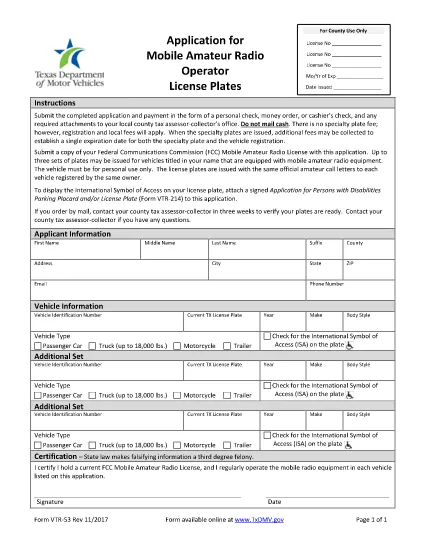
Form VTR-53 is the official application used by the Texas Department of Motor Vehicles (TxDMV) for issuing Mobile Amateur Radio Operator (M.A.R.O.) specialty license plates. The form collects vehicle information, radio‑operator details, and a certification that the applicant meets the eligibility requirements set by the Federal Communications Commission (FCC) and the TxDMV.

How to Complete the Fillable PDF Online

Instead of downloading the PDF and editing it with a separate editor, you can fill it out directly on our page using the Formize PDF Filler app. Follow the simple steps below.

  • Click the "Fill out this form" button below.
  • Wait a few seconds while the Formize PDF Filler loads the fillable VTR‑53 document.
  • Enter the requested information in each field – the form validates data in real time.
  • When you’re finished, click Save & Download to get a completed PDF ready for printing or electronic submission.

Common Mistakes to Avoid

Even a small error can delay processing. Keep these tips in mind:

  1. Vehicle VIN: Double‑check the 17‑character VIN for typos.
  2. Radio Call Sign: Use the exact call sign as issued by the FCC.
  3. Signature: The electronic signature must be clear; avoid scribbles.
  4. Eligibility Proof: Attach a copy of your FCC amateur radio license if the TxDMV requests it.

Where to Submit Your Application

After completing the form, you have two options:

  • In‑person: Bring the printed, signed form to any TxDMV regional office.
  • Mail: Send the completed PDF to:
    Texas Department of Motor Vehicles
    P.O. Box 12870
    Austin, TX 78711‑2870

Processing typically takes 7‑10 business days once the form is received.

FAQ
  • Is Form VTR-53 required for all amateur radio operators?

    Only operators who want the special Mobile Amateur Radio Operator license plate need to complete Form VTR‑53. Regular vehicle registration does not require it.

  • Can I submit the form electronically?

    TxDMV currently accepts only printed and signed copies. However, you can fill the PDF online, print it, sign it, and mail or drop it off.

  • What fee is associated with the VTR‑53 plate?

    The specialty plate fee varies by vehicle type and year. Check the TxDMV fee schedule for the most up‑to‑date amount.

  • Do I need to attach my FCC amateur radio license?

    A copy of your FCC license is not required with the initial application, but TxDMV may request it during verification.

  • How long does processing take after I submit the form?

    Processing usually takes 7‑10 business days once the completed, signed form is received by TxDMV.

  • Can I edit the form after I download it?

    Yes, the PDF is fully fillable. Use the Formize PDF Filler on our page to make changes before finalizing.

HOE

Zo vult u Form VTR-53 gratis online in in 4 eenvoudige stappen:

  1. 1
    Open the Fillable Form
    Click the "Fill out this form" button on the page. The Formize PDF Filler app will load the VTR‑53 PDF directly in your browser.
  2. 2
    Enter Your Information
    Complete each field—vehicle details, radio call sign, and personal data. The app validates entries as you type.
  3. 3
    Save and Download
    When all required fields are filled, click "Save & Download" to obtain a finished PDF ready for printing or electronic submission.
  4. 4
    Submit to TxDMV
    Print the signed form and submit it in person or by mail to the Texas Department of Motor Vehicles.
Formize PDF Filler-app
WAT BETREFT

Voertuigregistratieformulieren

Form VTR-53 is een van de voertuigregistratieformulieren die documenten zijn die worden gebruikt om een ​​motorvoertuig te registreren bij de relevante overheidsinstantie, meestal het Department of Motor Vehicles (DMV) of een gelijkwaardige instantie. Deze formulieren zijn vereist wanneer iemand een nieuw of gebruikt voertuig koopt, de eigendom van een voertuig overdraagt ​​of met een voertuig naar een nieuw rechtsgebied verhuist.

De specifieke voertuigregistratieformulieren kunnen per rechtsgebied verschillen, maar vereisen doorgaans de volgende informatie:

Voertuiginformatie: dit omvat details over het voertuig, zoals het merk, model, bouwjaar, voertuigidentificatienummer (VIN) en kilometerstand.

Eigenaargegevens: het formulier vereist informatie over de eigenaar van het voertuig, inclusief naam, adres, contactgegevens en rijbewijsnummer.

Eigendomsbewijs: afhankelijk van de omstandigheden kan een eigendomsbewijs vereist zijn, zoals een eigendomscertificaat, een verkoopakte of een certificaat van oorsprong van de fabrikant (voor nieuwe voertuigen).

Verzekeringsinformatie: doorgaans is een bewijs van een geldige autoverzekeringsdekking vereist. Dit kan het verstrekken van het verzekeringspolisnummer, de dekkingsdata en de gegevens van de verzekeringsmaatschappij omvatten.

Betaling van kosten: Bij de registratie van een voertuig worden verschillende kosten betaald, zoals registratiekosten, belastingen en mogelijk andere kosten die specifiek zijn voor het rechtsgebied.

Naast deze basisvereisten kunnen in sommige rechtsgebieden aanvullende formulier- of documentatievereisten gelden. In bepaalde gebieden kunnen bijvoorbeeld de resultaten van emissietests, veiligheidsinspecties of een bewijs van ingezetenschap nodig zijn.

Zodra de voertuigregistratieformulieren zijn ingevuld en ingediend, zal de overheidsinstantie een kentekenbewijs, kentekenplaten en kentekenstickers afgeven. Deze documenten geven aan dat het voertuig wettelijk geregistreerd is en bevoegd is om op de openbare weg te rijden.

Het is belangrijk op te merken dat de vereisten voor voertuigregistratie per rechtsgebied aanzienlijk kunnen verschillen. Daarom wordt aanbevolen om de plaatselijke RDW of een gelijkwaardig bureau te raadplegen voor de specifieke formulieren en procedures die op uw locatie van toepassing zijn.

FUNCTIES

PDF-vuller

De eenvoudigste manier om online PDF-formulieren in te vullen

  • Vul snel Form VTR-53 in
    Op zoek naar een manier om Form VTR-53 snel online in te vullen? Met onze online gratis PDF-formulierinvuller weet u hoe u dit pdf-document in minder dan een minuut kunt bewerken en invullen.
  • Gebruiksvriendelijke online PDF-editor
    Ben je het beu om PDF-bestanden uit te printen zodat je ze kunt bewerken, voordat je ze opnieuw scant en terugstuurt? Bewerk PDF-documenten gratis online. Gebruik onze online pdf-editor om tijd en papier te besparen.
  • Geweldige tools, alle platforms
    Vraagt ​​u zich af hoe u Form VTR-53 op een Mac moet invullen, of misschien hoe u gratis een PDF-filler kunt gebruiken? Onze online pdf-tools werken op alle platformen.
  • Veilige bestandsopslag
    Voltooide "Form VTR-53"-bestanden worden opgeslagen in een beveiligde database die wordt beheerd door Amazon Cloud hosting. U kunt uw bestanden op elk moment uit ons systeem verwijderen. Deze bestanden worden in ieder geval na 24 uur automatisch verwijderd.
  • Chat met {trefwoord}
    Chat met "Form VTR-53" op Chatize, een gratis PDF-lezerassistent. Stel vragen en krijg antwoorden van "Form VTR-53". Klik gewoon op de knop Chatten met document hierboven.

De vulsessie verwijderen

De geselecteerde vulsessie verwijderen? In dat geval gaat uw voortgang bij het invullen van het formulier verloren.

Bewerkingssessie verwijderen

De geselecteerde bewerkingssessie verwijderen? In dit geval gaat uw voortgang bij het maken en bewerken van het formulier verloren.