
Selecteer taal

VSA-24 Certification of Authority to Transfer Virginia Title (Fillable PDF)

  1. Taal Engels
  2. Land VS
  3. Activiteit Voertuig registratie
  4. Staat Virginia
VSA-24 Certification of Authority to Transfer Virginia Title (Fillable PDF)

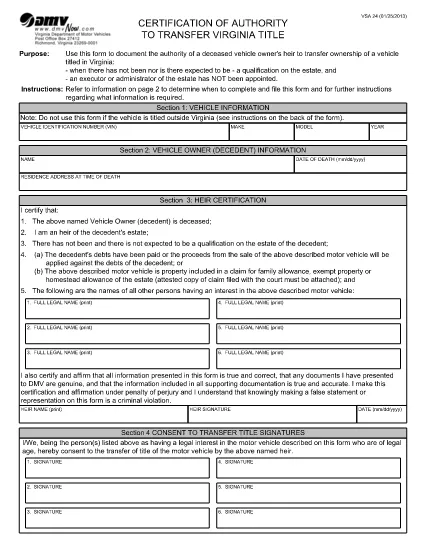
The VSA-24 – officially titled Certification of Authority to Transfer Virginia Title – is the legal document the Virginia Department of Motor Vehicles (DMV) requires when a vehicle owner has passed away and there is no executor or administrator appointed for the estate. This fillable PDF lets heirs complete the form quickly, securely, and without printing.

When Is the VSA-24 Form Required?

Use the VSA-24 when all of the following apply:

  • The vehicle is titled in Virginia.
  • The owner (decedent) is deceased.
  • There will be no formal estate qualification, and no executor or administrator has been appointed.
  • The heir(s) need to transfer the title to their name.

Key Sections of the VSA-24 Form

The form is divided into four main sections:

  1. Vehicle Information – VIN, make, model, year.
  2. Decedent Information – name, date of death, residence at time of death.
  3. Heir Certification – statements confirming the heir’s right to transfer the title and that debts are settled or the vehicle is part of a family allowance.
  4. Consent to Transfer Title – signatures of all parties with a legal interest in the vehicle.

How to Complete the VSA-24 Online with Formize

Instead of downloading, printing, and scanning, you can fill the form directly in your browser using Formize’s PDF Filler app. Follow the simple steps below.

Common Mistakes to Avoid

  • Leaving any required field blank – the form will be rejected.
  • Using an outdated version of the VSA-24 (always use the latest PDF provided by the VA DMV).
  • Failing to attach supporting documents such as a death certificate or court claim when required.
  • Signing with a printed name only – an electronic signature is accepted when using Formize.
FAQ
  • What does the VSA-24 form replace?

    It replaces a paper‑only certification when an estate is not being formally qualified and no executor or administrator is appointed.

  • Can I file the VSA-24 electronically with the DMV?

    Virginia DMV currently requires a printed copy with signatures, but you can fill it out electronically, print, sign, and mail it.

  • Do I need a death certificate attached?

    Yes. Attach a certified copy of the decedent’s death certificate with the completed VSA-24.

  • How long does it take to fill the VSA-24?

    Most users complete the form in under 5 minutes when using the fillable PDF.

  • What if there are multiple heirs?

    All heirs with a legal interest must be listed in Section 3 and sign the consent section.

  • Is the Formize PDF Filler free to use?

    Yes, the online filler is free for basic PDF completion and electronic signatures.

  • Where do I mail the completed VSA-24?

    Send the signed form and supporting documents to the Virginia DMV address listed on the form’s instructions page.

HOE

Zo vult u VSA-24 gratis online in in 4 eenvoudige stappen:

  1. 1
    Open the Fillable Form
    Click the “Fill out this form” button on the page. The Formize PDF Filler app will load the VSA-24 PDF directly in your browser.
  2. 2
    Enter All Required Information
    Complete each field – vehicle details, decedent information, and heir certification. The app highlights required fields in real‑time.
  3. 3
    Add Your Electronic Signature
    Use the built‑in signature tool to sign electronically. No printing or scanning is needed.
  4. 4
    Review and Save
    Double‑check every entry, then click “Save”. You can download a copy for your records or email it directly to the Virginia DMV.
Formize PDF Filler-app
WAT BETREFT

Voertuigregistratieformulieren

VSA-24 is een van de voertuigregistratieformulieren die documenten zijn die worden gebruikt om een ​​motorvoertuig te registreren bij de relevante overheidsinstantie, meestal het Department of Motor Vehicles (DMV) of een gelijkwaardige instantie. Deze formulieren zijn vereist wanneer iemand een nieuw of gebruikt voertuig koopt, de eigendom van een voertuig overdraagt ​​of met een voertuig naar een nieuw rechtsgebied verhuist.

De specifieke voertuigregistratieformulieren kunnen per rechtsgebied verschillen, maar vereisen doorgaans de volgende informatie:

Voertuiginformatie: dit omvat details over het voertuig, zoals het merk, model, bouwjaar, voertuigidentificatienummer (VIN) en kilometerstand.

Eigenaargegevens: het formulier vereist informatie over de eigenaar van het voertuig, inclusief naam, adres, contactgegevens en rijbewijsnummer.

Eigendomsbewijs: afhankelijk van de omstandigheden kan een eigendomsbewijs vereist zijn, zoals een eigendomscertificaat, een verkoopakte of een certificaat van oorsprong van de fabrikant (voor nieuwe voertuigen).

Verzekeringsinformatie: doorgaans is een bewijs van een geldige autoverzekeringsdekking vereist. Dit kan het verstrekken van het verzekeringspolisnummer, de dekkingsdata en de gegevens van de verzekeringsmaatschappij omvatten.

Betaling van kosten: Bij de registratie van een voertuig worden verschillende kosten betaald, zoals registratiekosten, belastingen en mogelijk andere kosten die specifiek zijn voor het rechtsgebied.

Naast deze basisvereisten kunnen in sommige rechtsgebieden aanvullende formulier- of documentatievereisten gelden. In bepaalde gebieden kunnen bijvoorbeeld de resultaten van emissietests, veiligheidsinspecties of een bewijs van ingezetenschap nodig zijn.

Zodra de voertuigregistratieformulieren zijn ingevuld en ingediend, zal de overheidsinstantie een kentekenbewijs, kentekenplaten en kentekenstickers afgeven. Deze documenten geven aan dat het voertuig wettelijk geregistreerd is en bevoegd is om op de openbare weg te rijden.

Het is belangrijk op te merken dat de vereisten voor voertuigregistratie per rechtsgebied aanzienlijk kunnen verschillen. Daarom wordt aanbevolen om de plaatselijke RDW of een gelijkwaardig bureau te raadplegen voor de specifieke formulieren en procedures die op uw locatie van toepassing zijn.

FUNCTIES

PDF-vuller

De eenvoudigste manier om online PDF-formulieren in te vullen

  • Vul snel VSA-24 in
    Op zoek naar een manier om VSA-24 snel online in te vullen? Met onze online gratis PDF-formulierinvuller weet u hoe u dit pdf-document in minder dan een minuut kunt bewerken en invullen.
  • Gebruiksvriendelijke online PDF-editor
    Ben je het beu om PDF-bestanden uit te printen zodat je ze kunt bewerken, voordat je ze opnieuw scant en terugstuurt? Bewerk PDF-documenten gratis online. Gebruik onze online pdf-editor om tijd en papier te besparen.
  • Geweldige tools, alle platforms
    Vraagt ​​u zich af hoe u VSA-24 op een Mac moet invullen, of misschien hoe u gratis een PDF-filler kunt gebruiken? Onze online pdf-tools werken op alle platformen.
  • Veilige bestandsopslag
    Voltooide "VSA-24"-bestanden worden opgeslagen in een beveiligde database die wordt beheerd door Amazon Cloud hosting. U kunt uw bestanden op elk moment uit ons systeem verwijderen. Deze bestanden worden in ieder geval na 24 uur automatisch verwijderd.
  • Chat met {trefwoord}
    Chat met "VSA-24" op Chatize, een gratis PDF-lezerassistent. Stel vragen en krijg antwoorden van "VSA-24". Klik gewoon op de knop Chatten met document hierboven.

De vulsessie verwijderen

De geselecteerde vulsessie verwijderen? In dat geval gaat uw voortgang bij het invullen van het formulier verloren.

Bewerkingssessie verwijderen

De geselecteerde bewerkingssessie verwijderen? In dit geval gaat uw voortgang bij het maken en bewerken van het formulier verloren.