
Selecteer taal

Virginia VSA 62 – Report of Levied and Seized Vehicle (Fillable PDF)

  1. Taal Engels
  2. Land VS
  3. Activiteit Voertuig registratie
  4. Staat Virginia
Virginia VSA 62 – Report of Levied and Seized Vehicle (Fillable PDF)

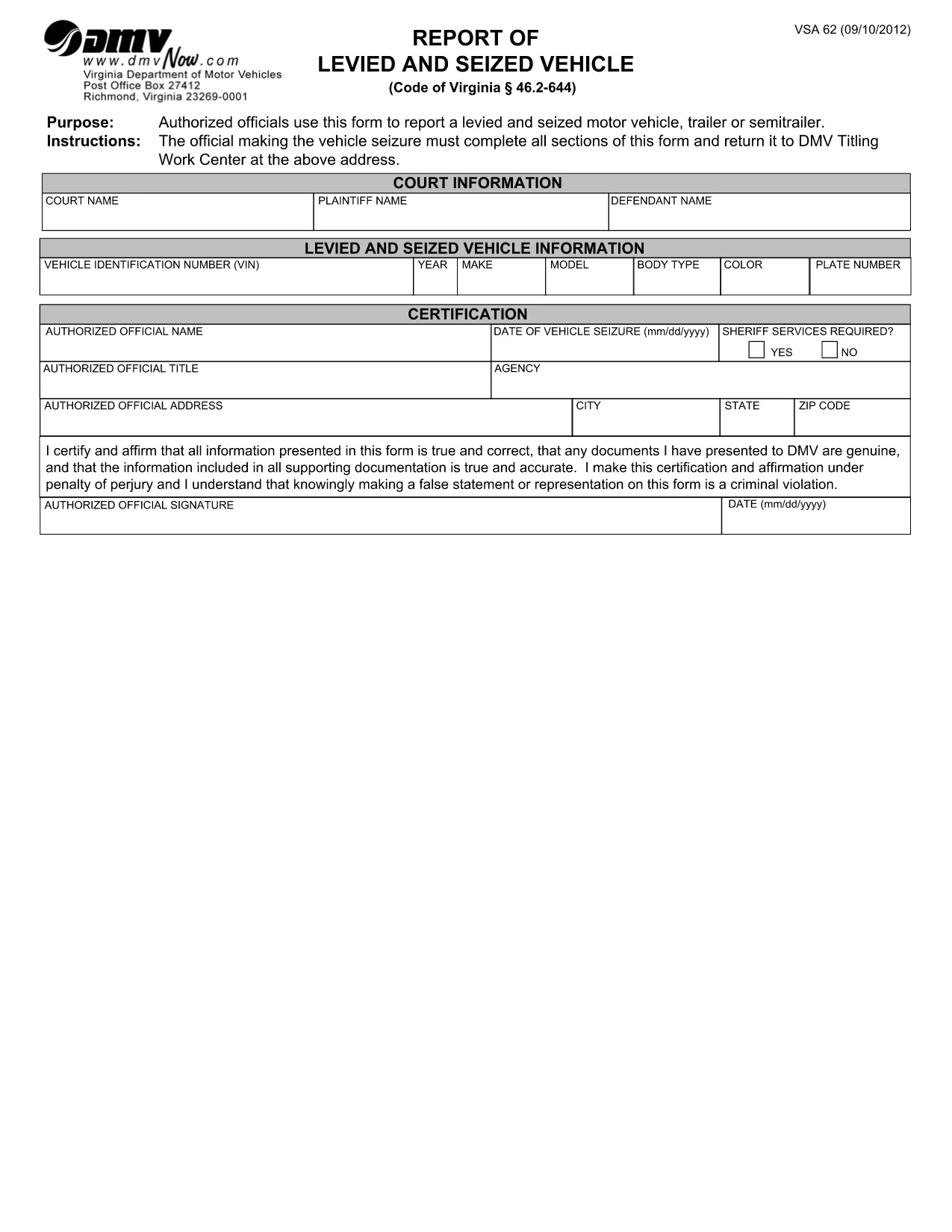
The VSA 62 is the official Virginia Department of Motor Vehicles (DMV) form used by authorized officials to report a levied and seized motor vehicle, trailer, or semitrailer (Code of Virginia § 46.2‑644). Whether you are a law‑enforcement officer, a court clerk, or a DMV employee, you need a quick, accurate way to fill out this report and send it to the DMV Titling Work Center.

What Is the VSA 62 Form?

The VSA 62 captures essential details about the seizure, including the court name, VIN, make, model, color, plate number, and whether sheriff services are required. The form also includes a certification statement that must be signed under penalty of perjury.

How to Complete the VSA 62 Online

Instead of downloading the PDF, clicking “Open in PDF editor,” and wrestling with form fields, simply click the "Fill out this form" button on this page. Formize’s PDF Filler app will load instantly, presenting a clean, fillable version of VSA 62 directly in your browser.

  • Step 1 – Open the filler: Click the button and wait a few seconds for the Formize PDF Filler to appear.
  • Step 2 – Enter data: Fill each field exactly as it appears on the original form. Use the drop‑down menus for Yes/No choices and the calendar picker for the seizure date.
  • Step 3 – Review & certify: Double‑check every entry, then type your name in the signature field and select today’s date.
  • Step 4 – Save or submit: Download the completed PDF for printing, or use the built‑in “Send” button to email it directly to the DMV Titling Work Center.

Common Mistakes to Avoid

  • Incorrect VIN format: Enter the 17‑character VIN exactly as it appears on the vehicle title.
  • Missing court information: The court name and case number are required for the DMV to link the seizure to the proper legal proceeding.
  • Wrong date format: Use the mm/dd/yyyy picker; manual typing can cause validation errors.
  • Skipping the certification statement: The form is not valid without the official’s signature and date.

Where to Submit the Completed Form

After you have saved or emailed the filled PDF, mail or fax it to the DMV Titling Work Center at the address listed on the form. For electronic submissions, follow the DMV’s secure upload instructions (usually provided in the email confirmation).

Download the Official PDF

If you prefer the original, static PDF, you can download it directly from the Virginia DMV website:

Download VSA 62 – Report of Levied and Seized Vehicle (PDF)

FAQ
  • Who is required to complete the VSA 62 form?

    Authorized officials such as law‑enforcement officers, court clerks, or DMV employees who are responsible for reporting a levied and seized vehicle must complete the form.

  • Can I edit the VSA 62 PDF on a mobile device?

    Yes. The Formize PDF Filler works on most smartphones and tablets, allowing you to fill out the form directly from a mobile browser.

  • What happens if I omit the certification signature?

    The DMV will reject the submission. The certification statement must be signed and dated for the form to be considered valid.

  • Is there a filing fee for submitting VSA 62?

    No filing fee is required for the VSA 62 itself, but any associated court or DMV fees for the seizure process still apply.

  • Where should I send the completed VSA 62?

    Send the completed form to the DMV Titling Work Center at the address printed on the form, or use the DMV’s secure electronic submission portal if available.

  • Can I save a partially completed VSA 62 and finish it later?

    Yes. The Formize filler lets you save the PDF locally and reopen it later to continue editing.

HOE

Zo vult u VSA 62 gratis online in in 4 eenvoudige stappen:

  1. 1
    Open the Fillable Form
    Click the "Fill out this form" button on the page. The Formize PDF Filler loads in your browser within seconds.
  2. 2
    Enter Required Information
    Complete each field—court name, VIN, vehicle details, seizure date, and sheriff services—using the on‑screen prompts.
  3. 3
    Sign and Certify
    Type your name in the signature field, select today’s date, and confirm the certification statement.
  4. 4
    Save or Send
    Download the finished PDF for printing, or click the built‑in "Send" button to email it directly to the DMV Titling Work Center.
Formize PDF Filler-app
WAT BETREFT

Voertuigregistratieformulieren

VSA 62 is een van de voertuigregistratieformulieren die documenten zijn die worden gebruikt om een ​​motorvoertuig te registreren bij de relevante overheidsinstantie, meestal het Department of Motor Vehicles (DMV) of een gelijkwaardige instantie. Deze formulieren zijn vereist wanneer iemand een nieuw of gebruikt voertuig koopt, de eigendom van een voertuig overdraagt ​​of met een voertuig naar een nieuw rechtsgebied verhuist.

De specifieke voertuigregistratieformulieren kunnen per rechtsgebied verschillen, maar vereisen doorgaans de volgende informatie:

Voertuiginformatie: dit omvat details over het voertuig, zoals het merk, model, bouwjaar, voertuigidentificatienummer (VIN) en kilometerstand.

Eigenaargegevens: het formulier vereist informatie over de eigenaar van het voertuig, inclusief naam, adres, contactgegevens en rijbewijsnummer.

Eigendomsbewijs: afhankelijk van de omstandigheden kan een eigendomsbewijs vereist zijn, zoals een eigendomscertificaat, een verkoopakte of een certificaat van oorsprong van de fabrikant (voor nieuwe voertuigen).

Verzekeringsinformatie: doorgaans is een bewijs van een geldige autoverzekeringsdekking vereist. Dit kan het verstrekken van het verzekeringspolisnummer, de dekkingsdata en de gegevens van de verzekeringsmaatschappij omvatten.

Betaling van kosten: Bij de registratie van een voertuig worden verschillende kosten betaald, zoals registratiekosten, belastingen en mogelijk andere kosten die specifiek zijn voor het rechtsgebied.

Naast deze basisvereisten kunnen in sommige rechtsgebieden aanvullende formulier- of documentatievereisten gelden. In bepaalde gebieden kunnen bijvoorbeeld de resultaten van emissietests, veiligheidsinspecties of een bewijs van ingezetenschap nodig zijn.

Zodra de voertuigregistratieformulieren zijn ingevuld en ingediend, zal de overheidsinstantie een kentekenbewijs, kentekenplaten en kentekenstickers afgeven. Deze documenten geven aan dat het voertuig wettelijk geregistreerd is en bevoegd is om op de openbare weg te rijden.

Het is belangrijk op te merken dat de vereisten voor voertuigregistratie per rechtsgebied aanzienlijk kunnen verschillen. Daarom wordt aanbevolen om de plaatselijke RDW of een gelijkwaardig bureau te raadplegen voor de specifieke formulieren en procedures die op uw locatie van toepassing zijn.

FUNCTIES

PDF-vuller

De eenvoudigste manier om online PDF-formulieren in te vullen

  • Vul snel VSA 62 in
    Op zoek naar een manier om VSA 62 snel online in te vullen? Met onze online gratis PDF-formulierinvuller weet u hoe u dit pdf-document in minder dan een minuut kunt bewerken en invullen.
  • Gebruiksvriendelijke online PDF-editor
    Ben je het beu om PDF-bestanden uit te printen zodat je ze kunt bewerken, voordat je ze opnieuw scant en terugstuurt? Bewerk PDF-documenten gratis online. Gebruik onze online pdf-editor om tijd en papier te besparen.
  • Geweldige tools, alle platforms
    Vraagt ​​u zich af hoe u VSA 62 op een Mac moet invullen, of misschien hoe u gratis een PDF-filler kunt gebruiken? Onze online pdf-tools werken op alle platformen.
  • Veilige bestandsopslag
    Voltooide "VSA 62"-bestanden worden opgeslagen in een beveiligde database die wordt beheerd door Amazon Cloud hosting. U kunt uw bestanden op elk moment uit ons systeem verwijderen. Deze bestanden worden in ieder geval na 24 uur automatisch verwijderd.
  • Chat met {trefwoord}
    Chat met "VSA 62" op Chatize, een gratis PDF-lezerassistent. Stel vragen en krijg antwoorden van "VSA 62". Klik gewoon op de knop Chatten met document hierboven.

De vulsessie verwijderen

De geselecteerde vulsessie verwijderen? In dat geval gaat uw voortgang bij het invullen van het formulier verloren.

Bewerkingssessie verwijderen

De geselecteerde bewerkingssessie verwijderen? In dit geval gaat uw voortgang bij het maken en bewerken van het formulier verloren.