
Selecteer taal

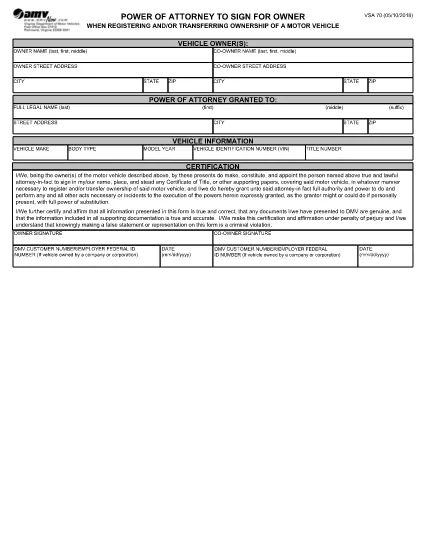
Virginia VSA 70 Power of Attorney – Fillable PDF Form

  1. Taal Engels
  2. Land VS
  3. Activiteit Voertuig registratie
  4. Staat Virginia
Virginia VSA 70 Power of Attorney – Fillable PDF Form

The VSA 70 Power of Attorney is the official Virginia Department of Motor Vehicles (DMV) form that authorizes another person to sign for the owner when registering or transferring ownership of a motor vehicle. Whether you’re selling a car, transferring a title, or need a trusted agent to handle DMV paperwork, the VSA 70 is required.

What is the VSA 70 Power of Attorney?

This form grants a designated attorney‑in‑fact the legal authority to act on behalf of the vehicle owner for DMV transactions. It is commonly used for:

  • Title transfers
  • Vehicle registration renewals
  • Obtaining new plates
  • Any other DMV process that requires the owner's signature

How to Fill Out the VSA 70 Online with Formize

Instead of downloading the PDF and editing it manually, you can fill the form instantly on our page. Follow these simple steps:

  1. Click the "Fill out this form" button below the description.
  2. Our Formize PDF Filler app will load in a secure window.
  3. Enter the required information – owner details, attorney‑in‑fact data, vehicle description, and signatures.
  4. Review the completed form for accuracy.
  5. Save a copy, print, or submit directly to the Virginia DMV as instructed.

Common Mistakes to Avoid on the VSA 70

  • Incorrect VIN or license plate number: Double‑check the vehicle identification number.
  • Missing signatures: Both the owner and the attorney‑in‑fact must sign.
  • Wrong date format: Use MM/DD/YYYY as required by the DMV.
  • Leaving blank fields: The form is considered incomplete if any required box is empty.

Where to Submit the Completed Form

After filling the VSA 70, you can:

  • Mail it to your local Virginia DMV office.
  • Take it in person to a DMV customer service center.
  • Include it with any other paperwork for a title transfer or registration renewal.

For the most up‑to‑date submission addresses, visit the Virginia DMV website.

FAQ
  • What is the purpose of Form VSA 70?

    Form VSA 70 grants another person the legal authority to sign DMV documents on behalf of the vehicle owner, such as title transfers or registration renewals.

  • Can I use the VSA 70 for out‑of‑state vehicle transfers?

    Yes, the VSA 70 is accepted by the Virginia DMV for any vehicle that will be titled or registered in Virginia, even if the vehicle was previously registered out of state.

  • Do both the owner and the attorney‑in‑fact need to sign?

    Both signatures are required. The owner signs to grant authority, and the attorney‑in‑fact signs to acknowledge the responsibility.

  • Is there a filing fee for submitting VSA 70?

    The VSA 70 itself does not have a separate fee, but any DMV transaction it accompanies (title transfer, registration, etc.) may have associated fees.

  • How long is a VSA 70 valid?

    The form remains valid until the vehicle is sold, the ownership changes, or the owner revokes the power of attorney in writing.

  • Can I submit the VSA 70 electronically?

    Virginia DMV currently requires a printed and signed original. However, you can fill it out online, print, and then mail or bring the paper copy to a DMV office.

  • What should I do if I make a mistake on the form?

    Cross out the error with a single line, initial the change, and fill in the correct information. For major errors, it’s best to start a new form.

  • Do minors need a VSA 70?

    If the vehicle owner is a minor, a parent or legal guardian must complete the form and sign on the minor’s behalf.

HOE

Zo vult u VSA 70 gratis online in in 5 eenvoudige stappen:

  1. 1
    Open the Fillable Form
    Click the "Fill out this form" button on the page. The Formize PDF Filler will launch in a new window.
  2. 2
    Enter Owner Information
    Type the vehicle owner's name, address, and driver's license number exactly as they appear on the ID.
  3. 3
    Add Attorney‑in‑Fact Details
    Provide the name, relationship, and contact information of the person you are authorizing.
  4. 4
    Complete Vehicle Data
    Enter the VIN, make, model, year, and license plate number of the vehicle.
  5. 5
    Sign and Submit
    Use the electronic signature fields for both the owner and the attorney‑in‑fact, then save or print the completed form for submission to the DMV.
Formize PDF Filler-app
WAT BETREFT

Voertuigregistratieformulieren

Als u een motorvoertuig, aanhangwagen of boot bezit of leaset, moet u aan bepaalde verplichtingen voldoen om uw voertuig wettelijk geregistreerd en veilig te houden.

VSA 70 is een van de voertuigregistratieformulieren die documenten zijn die worden gebruikt om een ​​motorvoertuig te registreren bij de relevante staats- of provinciale autoriteit. Deze formulieren zijn meestal vereist wanneer een persoon een nieuw of gebruikt voertuig koopt of wanneer hij met een voertuig naar een nieuwe staat of provincie verhuist.

De exacte vereisten en formulieren die nodig zijn voor voertuigregistratie kunnen per locatie verschillen, maar over het algemeen omvat het proces het verstrekken van informatie over het voertuig, de eigenaar en eventuele pandrechten op het voertuig.

Zodra de registratieformulieren en vergoedingen zijn ingediend, zal de staat of provinciale autoriteit een kentekenbewijs of kentekenplaat afgeven aan de eigenaar van het voertuig. Met deze registratie mag het voertuig legaal worden gebruikt op de openbare weg en snelwegen.

FUNCTIES

PDF-vuller

De eenvoudigste manier om online PDF-formulieren in te vullen

  • Vul snel VSA 70 in
    Op zoek naar een manier om VSA 70 snel online in te vullen? Met onze online gratis PDF-formulierinvuller weet u hoe u dit pdf-document in minder dan een minuut kunt bewerken en invullen.
  • Gebruiksvriendelijke online PDF-editor
    Ben je het beu om PDF-bestanden uit te printen zodat je ze kunt bewerken, voordat je ze opnieuw scant en terugstuurt? Bewerk PDF-documenten gratis online. Gebruik onze online pdf-editor om tijd en papier te besparen.
  • Geweldige tools, alle platforms
    Vraagt ​​u zich af hoe u VSA 70 op een Mac moet invullen, of misschien hoe u gratis een PDF-filler kunt gebruiken? Onze online pdf-tools werken op alle platformen.
  • Veilige bestandsopslag
    Voltooide "VSA 70"-bestanden worden opgeslagen in een beveiligde database die wordt beheerd door Amazon Cloud hosting. U kunt uw bestanden op elk moment uit ons systeem verwijderen. Deze bestanden worden in ieder geval na 24 uur automatisch verwijderd.
  • Chat met {trefwoord}
    Chat met "VSA 70" op Chatize, een gratis PDF-lezerassistent. Stel vragen en krijg antwoorden van "VSA 70". Klik gewoon op de knop Chatten met document hierboven.

De vulsessie verwijderen

De geselecteerde vulsessie verwijderen? In dat geval gaat uw voortgang bij het invullen van het formulier verloren.

Bewerkingssessie verwijderen

De geselecteerde bewerkingssessie verwijderen? In dit geval gaat uw voortgang bij het maken en bewerken van het formulier verloren.