
Selecteer taal

Wisconsin DOT Form MV2881 – Fillable PDF Download

  1. Taal Engels
  2. Land VS
  3. Activiteit Voertuig registratie
  4. Staat Wisconsin
Wisconsin DOT Form MV2881 – Fillable PDF Download

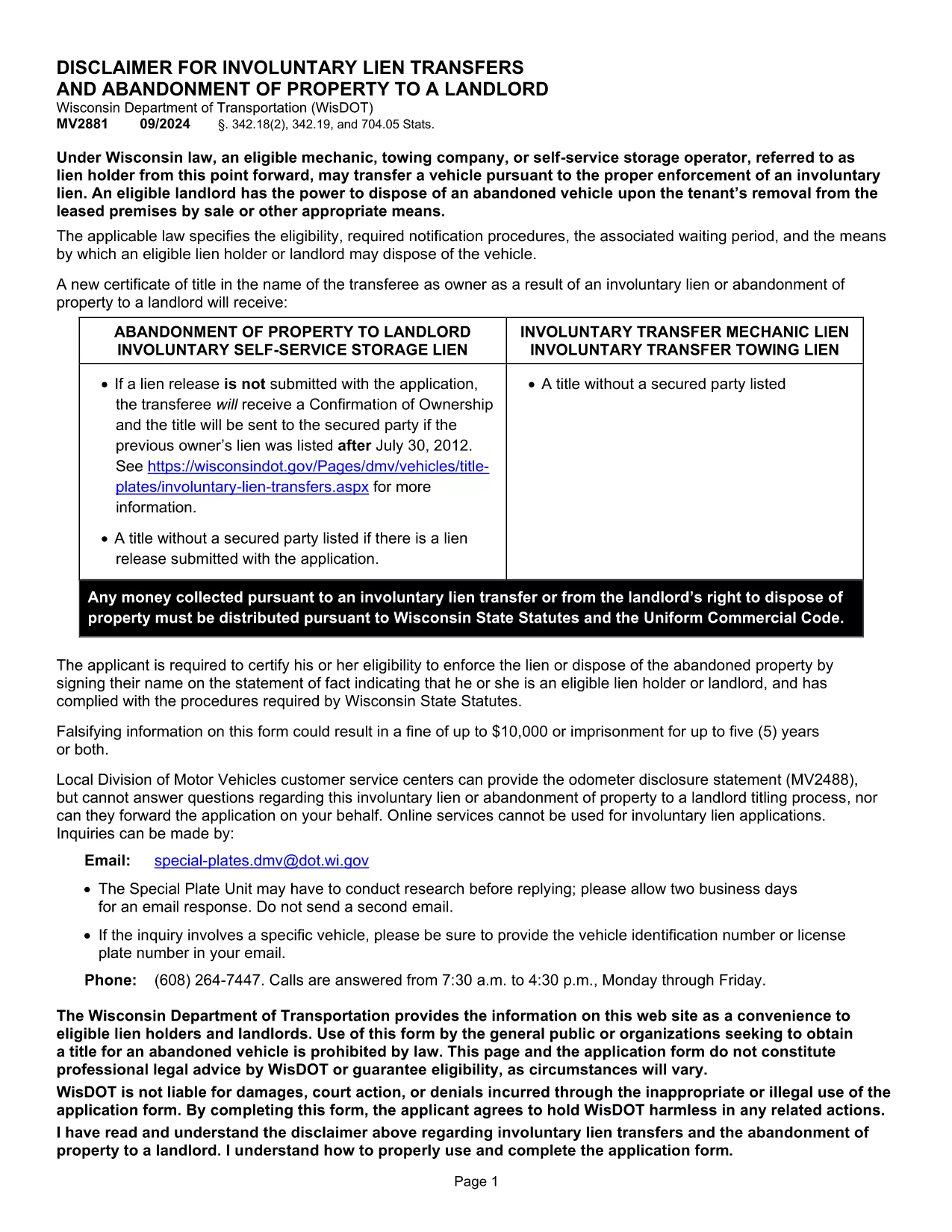
The Wisconsin Department of Transportation (WisDOT) Form MV2881 is used to certify an involuntary lien, transfer, or abandonment of a vehicle to a landlord. This official state form is required when a property owner needs to enforce a lien or dispose of a vehicle under Wisconsin statutes § 342.18(2), § 342.19, and § 704.05.

Our fillable PDF version lets you complete the form quickly from any device—no printing, scanning, or faxing required. Simply click the “Fill out this form” button, let the Formize PDF Filler load, and start entering your information.

  • Instant download of the official MV2881 PDF.
  • Editable fields for owner, vehicle, and lien details.
  • Electronic signature support for a fully digital submission.

After you finish, you can save the completed form as a PDF, print it for a hard‑copy signature if required, or submit it directly to WisDOT according to the instructions below.

FAQ
  • What is the purpose of Form MV2881?

    Form MV2881 authorizes the enforcement of an involuntary lien or the abandonment of a vehicle to a landlord, as required by Wisconsin statutes.

  • Can I submit the form electronically?

    Yes. After filling out the form with Formize, you can save the PDF and email or upload it to WisDOT’s online portal if electronic submission is accepted.

  • Do I need a wet signature?

    A wet signature is required only if WisDOT specifically requests a hard‑copy. The digital signature is acceptable for most internal processing.

  • What information is required on MV2881?

    You must provide the vehicle owner's name, address, VIN, make/model, lien holder details, and select the appropriate certification box confirming your authority.

  • Is there a filing fee for MV2881?

    No separate filing fee is listed for MV2881 itself; however, any associated lien or registration fees must be paid to WisDOT as directed.

  • Where do I send the completed form?

    Submit the completed form to the Wisconsin Department of Transportation office handling vehicle registrations in your region, or follow any specific mailing instructions on the form.

HOE

Zo vult u MV2881 gratis online in in 4 eenvoudige stappen:

  1. 1
    Open the Fillable Form
    Click the “Fill out this form” button on the page. The Formize PDF Filler app will load in your browser.
  2. 2
    Enter Your Information
    Complete each editable field—owner details, vehicle description, lien information, and the required certification box.
  3. 3
    Add Your Signature
    Use the digital signature tool in the filler to sign the form, or print later if a wet signature is required.
  4. 4
    Save and Download
    When finished, click “Save PDF”. Your completed MV2881 will be downloaded to your device, ready for submission.
Formize PDF Filler-app
WAT BETREFT

Voertuigregistratieformulieren

Als u een motorvoertuig, aanhangwagen of boot bezit of leaset, moet u aan bepaalde verplichtingen voldoen om uw voertuig wettelijk geregistreerd en veilig te houden.

MV2881 is een van de voertuigregistratieformulieren die documenten zijn die worden gebruikt om een ​​motorvoertuig te registreren bij de relevante staats- of provinciale autoriteit. Deze formulieren zijn meestal vereist wanneer een persoon een nieuw of gebruikt voertuig koopt of wanneer hij met een voertuig naar een nieuwe staat of provincie verhuist.

De exacte vereisten en formulieren die nodig zijn voor voertuigregistratie kunnen per locatie verschillen, maar over het algemeen omvat het proces het verstrekken van informatie over het voertuig, de eigenaar en eventuele pandrechten op het voertuig.

Zodra de registratieformulieren en vergoedingen zijn ingediend, zal de staat of provinciale autoriteit een kentekenbewijs of kentekenplaat afgeven aan de eigenaar van het voertuig. Met deze registratie mag het voertuig legaal worden gebruikt op de openbare weg en snelwegen.

FUNCTIES

PDF-vuller

De eenvoudigste manier om online PDF-formulieren in te vullen

  • Vul snel MV2881 in
    Op zoek naar een manier om MV2881 snel online in te vullen? Met onze online gratis PDF-formulierinvuller weet u hoe u dit pdf-document in minder dan een minuut kunt bewerken en invullen.
  • Gebruiksvriendelijke online PDF-editor
    Ben je het beu om PDF-bestanden uit te printen zodat je ze kunt bewerken, voordat je ze opnieuw scant en terugstuurt? Bewerk PDF-documenten gratis online. Gebruik onze online pdf-editor om tijd en papier te besparen.
  • Geweldige tools, alle platforms
    Vraagt ​​u zich af hoe u MV2881 op een Mac moet invullen, of misschien hoe u gratis een PDF-filler kunt gebruiken? Onze online pdf-tools werken op alle platformen.
  • Veilige bestandsopslag
    Voltooide "MV2881"-bestanden worden opgeslagen in een beveiligde database die wordt beheerd door Amazon Cloud hosting. U kunt uw bestanden op elk moment uit ons systeem verwijderen. Deze bestanden worden in ieder geval na 24 uur automatisch verwijderd.
  • Chat met {trefwoord}
    Chat met "MV2881" op Chatize, een gratis PDF-lezerassistent. Stel vragen en krijg antwoorden van "MV2881". Klik gewoon op de knop Chatten met document hierboven.

De vulsessie verwijderen

De geselecteerde vulsessie verwijderen? In dat geval gaat uw voortgang bij het invullen van het formulier verloren.

Bewerkingssessie verwijderen

De geselecteerde bewerkingssessie verwijderen? In dit geval gaat uw voortgang bij het maken en bewerken van het formulier verloren.