


Porezni obrasci
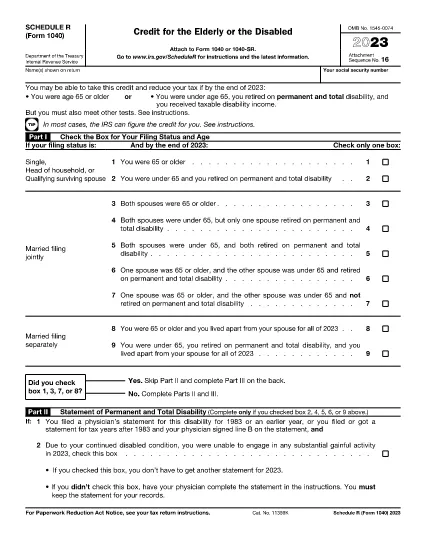
Obrazac 1040 Raspored R je jedan od poreznih obrazaca koji su dokumenti koji se koriste za prijavu prihoda, odbitaka i poreznih obveza relevantnom poreznom tijelu. Ovi su obrasci bitan dio procesa podnošenja poreznih prijava i koriste se kako bi se osiguralo da pojedinci i tvrtke poštuju porezne zakone i točno izračunaju svoje porezne obveze.
Posebni potrebni porezni obrasci mogu se razlikovati ovisno o čimbenicima kao što su status prijave pojedinca, izvori prihoda i porezni zakoni zemlje. Međutim, evo nekih uobičajenih vrsta poreznih obrazaca:
Obrasci za porez na dohodak pojedinaca: Ovi se obrasci, poput serije 1040 u Sjedinjenim Državama, koriste pojedincima da prijave svoje prihode, traže odbitke i kredite te izračunaju svoje porezne obveze.
Poslovni porezni obrasci: Tvrtke, uključujući samostalne poduzetnike, partnerstva, korporacije i samozaposlene pojedince, možda će morati podnijeti različite obrasce za prijavu svojih prihoda, troškova i dugovanih poreza. Primjeri uključuju Prilog C (Dobit ili gubitak od poslovanja) i Obrazac 1120 (Prijava poreza na dobit korporacija u SAD-u).
Porezni obrasci za zaposlenje: Poslodavci su dužni prijaviti plaće zaposlenika te zadržati i doznačiti poreze na plaće. U tu svrhu koriste se obrasci kao što su W-2 (Izjava o plaći i porezu) i 941 (Kvartalna prijava saveznog poreza poslodavca).
Obrasci za investicijske i mirovinske račune: Ovi se obrasci koriste za prijavu prihoda od ulaganja, kapitalnih dobitaka i gubitaka, kao i doprinosa i raspodjela s mirovinskih računa. Primjeri uključuju obrazac 1099-DIV (Dividende i raspodjele) i Obrazac 5498 (Informacije o doprinosu IRA-e).
Obrasci za porez na nekretnine i darove: kada osoba premine ili da značajne darove, posebni obrasci kao što je Obrazac 706 (Povrat poreza na imovinu Sjedinjenih Država (i Generation-Skipping Transfer)) i Obrazac 709 (United States Gift (and Generation- Skipping Transfer) Tax Return) koriste se za prijavu i izračun svih primjenjivih poreza na nekretnine ili darove.
Važno je napomenuti da se porezni zakoni i obrasci mogu mijenjati tijekom vremena, pa bi se pojedinci i tvrtke trebali posavjetovati s nadležnim poreznim tijelima ili potražiti profesionalni porezni savjet kako bi osigurali usklađenost s trenutačnim zahtjevima.