
Izaberi jezik

IRS Form 13748 – Fillable PDF Download

  1. Zemlja SAD
  2. Jezik Engleski
  3. Aktivnost Porezi
  4. Odjel IRS
IRS Form 13748 – Fillable PDF Download

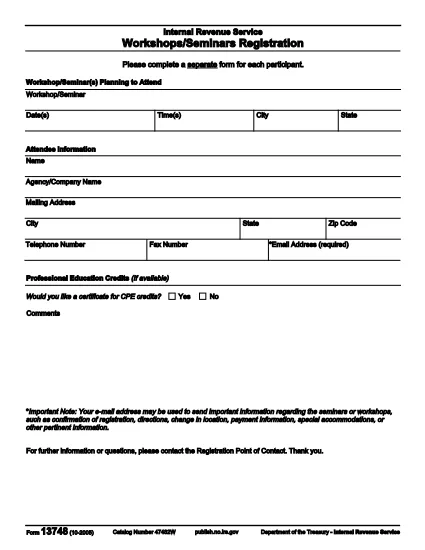
Form 13748 is an IRS tax form used for specific reporting requirements. Whether you need it for a business filing, a nonprofit disclosure, or a personal tax matter, the fillable PDF version lets you complete the form quickly without printing a paper copy.

What Is Form 13748?

Form 13748 (Revision 10‑2005) is published by the Internal Revenue Service. It collects detailed information that the IRS requires for certain tax‑exempt organizations and special tax situations. The form is often requested by tax professionals when preparing complex returns.

How to Fill Out Form 13748 Online

Instead of downloading the PDF and editing it with a separate program, you can use Formize’s built‑in PDF filler. Just click the “Fill out this form” button on this page, wait for the Formize PDF Filler app to load, and start entering your data directly in the browser.

Common Mistakes to Avoid

  • Leaving required fields blank: The form will highlight missing data before you can submit.
  • Using the wrong tax year: Verify the revision number (10‑2005) matches the year you are filing for.
  • Incorrect numeric formats: Use only numbers and decimal points where indicated; commas are not accepted.

Where to Submit the Completed Form

After you finish, you can either:

  1. Download the completed PDF and mail it to the address listed in the form’s instructions.
  2. Upload the file directly through the IRS e‑file portal if the form is accepted for electronic submission.

FAQs About Form 13748

Below are the most common questions we receive about this form.

PITANJA
  • Do I need to print Form 13748 after filling it online?

    No. If the IRS accepts electronic submissions for your situation, you can upload the completed PDF directly. Print only if you are required to mail a hard copy.

  • Is Formize’s PDF filler free to use?

    Yes. The fillable version of Form 13748 is available at no cost. You only need a modern web browser.

  • Can I edit the form after I’ve saved it?

    Absolutely. Open the saved PDF with Formize again or any standard PDF editor to make changes before final submission.

  • What if I make a mistake while filling the form?

    The Formize filler highlights errors in red. Simply correct the highlighted fields and re‑validate before saving.

  • Where can I find the official instructions for Form 13748?

    The official IRS instructions are included at the end of the PDF linked below. You can also view them on the IRS website.

  • Is there a deadline for submitting Form 13748?

    The deadline depends on the specific tax situation it supports. Refer to the instruction sheet or consult a tax professional for the exact date.

KAKO DA

Kako ispuniti Form 13748 besplatno, online u 4 jednostavnih koraka:

  1. 1
    Open the Fillable Form
    Click the “Fill out this form” button on this page. The Formize PDF Filler loads directly in your browser.
  2. 2
    Enter Your Information
    Type into each highlighted field. The filler validates required entries and numeric formats in real time.
  3. 3
    Validate & Save
    When all fields are complete, click “Validate” to ensure there are no errors, then save the PDF to your computer.
  4. 4
    Download or Submit
    Download the finished PDF for printing or upload it to the IRS e‑file system as instructed.
Aplikacija Formize PDF Filler
OKO

Savezni porezni obrasci

Form 13748 jedan je od saveznih poreznih obrazaca koji su dokumenti koji se koriste za prijavu i podnošenje saveznih poreza na dohodak Poreznoj upravi (IRS) u Sjedinjenim Državama. Ove obrasce koriste pojedinci, tvrtke i organizacije za prijavu svojih prihoda, odbitaka i drugih relevantnih informacija potrebnih za izračun saveznih poreznih obveza.

Najčešće korišten savezni porezni obrazac je obrazac 1040, koji koriste pojedinačni porezni obveznici za prijavu poreza na dohodak. Drugi često korišteni obrasci uključuju Obrazac 1065 za partnerstva, Obrazac 1120 za korporacije i Obrazac 990 za organizacije oslobođene plaćanja poreza.

Savezni porezni obrasci obično zahtijevaju od poreznih obveznika da prijave različite izvore prihoda, kao što su nadnice, plaće i napojnice, kao i prihod od ulaganja, iznajmljivanja nekretnina i drugih izvora. Obrasci također omogućuju poreznim obveznicima traženje odbitaka i kredita za razne troškove, kao što su dobrotvorni prilozi, kamate na hipotekarni kredit i troškovi zdravstvene zaštite.

Važno je podnijeti savezne porezne obrasce točno i na vrijeme, jer nepoštivanje toga može rezultirati kaznama i kamatama od Porezne uprave.

ZNAČAJKE

PDF punilo

Najlakši način da ispunite Form 13748 online

  • Brzo ispunite Form 13748
    Tražite način da brzo ispunite Form 13748 online? Uz naš online besplatni PDF obrazac za popunjavanje, znat ćete kako urediti i ispuniti ovaj pdf dokument za manje od minute.
  • Jednostavan za korištenje mrežni PDF uređivač
    Dosta vam je ispisivanja PDF datoteka kako biste ih mogli uređivati ​​prije ponovnog skeniranja i slanja natrag? Uređujte PDF dokumente besplatno na mreži. Upotrijebite naš online uređivač pdf-ova kako biste uštedjeli vrijeme i papir.
  • Sjajni alati, sve platforme
    Pitate se kako ispuniti Form 13748 na Macu ili možda kako koristiti PDF filer besplatno? Naši online PDF alati rade na svim platformama.
  • Sigurno skladištenje datoteka
    Dovršene datoteke "Form 13748" pohranjuju se u zaštićenu bazu podataka kojom upravlja Amazon Cloud hosting. Svoje datoteke možete izbrisati iz našeg sustava bilo kada. U svakom slučaju, te se datoteke automatski brišu nakon 24 sata.
  • Chat s Form 13748
    Razgovarajte s "Form 13748" na Chatize koji je besplatni pomoćnik za čitanje PDF-ova. Postavljajte pitanja i dobivajte odgovore od "Form 13748". Samo kliknite gornji gumb Chat with Document.

Izbriši sesiju punjenja

Izbrisati odabranu sesiju punjenja? U tom će slučaju vaš napredak u ispunjavanju obrasca biti izgubljen.

Izbriši sesiju uređivanja

Izbrisati odabranu sesiju uređivanja? U tom će slučaju vaš napredak u stvaranju i uređivanju obrasca biti izgubljen.