
Оберіть мову

Fillable IRS Form 4670 – Employee Statement for Paid Family & Medical Leave Credit

  1. Країна США
  2. Мова англійська
  3. діяльність податки
  4. відділ Служба внутрішніх доходів
Fillable IRS Form 4670 – Employee Statement for Paid Family & Medical Leave Credit

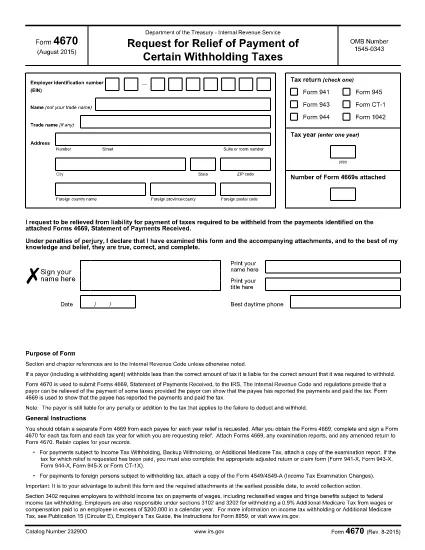
Form 4670, Employee’s Statement Regarding Eligibility for the Paid Family and Medical Leave Credit, is required when you claim the new credit on your federal tax return. Instead of printing, printing, and hand‑signing a paper copy, you can fill out the fillable PDF directly in your browser using the Formize PDF Filler app.

What Is IRS Form 4670?

This form is used by employees to certify that they meet the eligibility criteria for the Paid Family and Medical Leave (PFML) credit. The credit reduces the employer’s payroll tax liability and is claimed on Form 941 or the annual Form 944.

How to Complete Form 4670 Online

Follow the simple steps below to fill out the form without leaving the page:

  • Click the "Fill out this form" button below.
  • Wait a few seconds while the Formize PDF Filler app loads.
  • Enter your personal information, employer details, and answer the eligibility questions.
  • Use the built‑in e‑signature field to sign electronically.
  • When you’re done, download the completed PDF or print it for your records.

Common Mistakes & Tips

  • Incorrect SSN or EIN: Double‑check the numbers before submitting.
  • Leaving a required box blank: The PDF filler will highlight missing fields.
  • Using an outdated form version: Always use the latest PDF from the IRS (link provided below).
  • Signature errors: The e‑signature field must be completed; otherwise the form is considered incomplete.

Where to Submit the Completed Form

The employee’s signed Form 4670 is attached to the employer’s payroll‑tax filing (Form 941 or Form 944). Keep a copy for your records and provide the original to your employer.

Download the Official PDF

If you prefer a hard copy, you can download the official IRS PDF from the link below. The same file is used by the Formize filler, ensuring full compatibility.

Download IRS Form 4670 (PDF)

FAQ
  • Do I need a PDF editor to fill out Form 4670?

    No. The Formize PDF Filler works directly in your browser, so you don’t need any additional software.

  • Is the electronic signature on Formize accepted by the IRS?

    Yes. The IRS allows electronic signatures on Form 4670 when the form is submitted as part of the employer’s payroll‑tax filing.

  • Can I save my progress and return later?

    The Formize filler lets you download a partially completed PDF, which you can reopen later in the same tool to finish.

  • What if I make a mistake after submitting?

    Correct the error on a new copy of the form, sign again, and provide the updated version to your employer. The IRS does not accept handwritten corrections on the electronic version.

  • Is there a cost to use the Formize PDF Filler?

    No. Filling out Form 4670 with Formize is completely free.

  • Do I need to attach Form 4670 to my personal tax return?

    No. The employee’s statement is attached to the employer’s payroll‑tax return (Form 941 or 944), not to your individual 1040.

  • Where can I find the latest version of Form 4670?

    The most recent version is always available on the official IRS website: IRS Form 4670 PDF.

ЯК

Як безкоштовно заповнити Form 4670 онлайн за 5 простих кроків:

  1. 1
    Click the Fill Out Button
    Locate the "Fill out this form" button on this page and click it to launch the Formize PDF Filler.
  2. 2
    Wait for the Filler to Load
    A short loading screen appears while the secure Formize app prepares the fillable PDF. This only takes a few seconds.
  3. 3
    Enter Your Information
    Complete each field—personal details, employer information, and eligibility questions—using your keyboard or mobile device.
  4. 4
    Add Your Electronic Signature
    Use the built‑in e‑signature box to sign the form. The signature is legally binding for IRS purposes.
  5. 5
    Save or Print the Completed Form
    When all fields are filled, click "Download" to save a copy or "Print" to produce a hard copy for your employer.
Програма Formize PDF Filler
ПРО

Податкові форми

Form 4670 – це одна з податкових форм, які є документами, які використовуються для подання відомостей про податки до відповідного податкового органу. Існують різні типи податкових форм, у тому числі федеральні, штатні та місцеві податкові форми, які можуть відрізнятися залежно від обставин і місцезнаходження платника податків.

ОСОБЛИВОСТІ

Наповнювач PDF

Найпростіший спосіб заповнювати PDF-форми онлайн

  • Швидко заповніть Form 4670
    Шукаєте спосіб швидко заповнити Form 4670 онлайн? За допомогою нашого безкоштовного онлайн-заповнювача PDF-форм ви знатимете, як редагувати та заповнювати цей PDF-документ менш ніж за хвилину.
  • Простий у використанні онлайн-редактор PDF
    Набридло роздруковувати PDF-файли, щоб ви могли їх редагувати, перш ніж сканувати повторно та надсилати назад? Безкоштовно редагуйте PDF-документи онлайн. Використовуйте наш онлайн-редактор PDF, щоб заощадити час і папір.
  • Чудові інструменти, усі платформи
    Хочете знати, як заповнити Form 4670 на комп’ютері Mac або, можливо, як використовувати PDF-заповнювач безкоштовно? Наші онлайн-інструменти PDF працюють на всіх платформах.
  • Безпечне зберігання файлів
    Завершені файли "Form 4670" зберігаються в захищеній базі даних, якою керує хостинг Amazon Cloud. Ви можете будь-коли видалити свої файли з нашої системи. У будь-якому випадку ці файли автоматично видаляються через 24 години.
  • Чат із Form 4670
    Спілкуйтеся з "Form 4670" у Chatize, який є безкоштовним помічником для читання PDF. Ставте запитання та отримуйте відповіді від "Form 4670". Просто натисніть кнопку Chat With Document вище.

Видалити сеанс заповнення

Видалити вибраний сеанс заповнення? В цьому випадку ваш прогрес у заповненні форми буде втрачений.

Видалити сеанс редагування

Видалити вибраний сеанс редагування? У цьому випадку ваш прогрес у створенні та редагуванні форми буде втрачено.