
选择语言

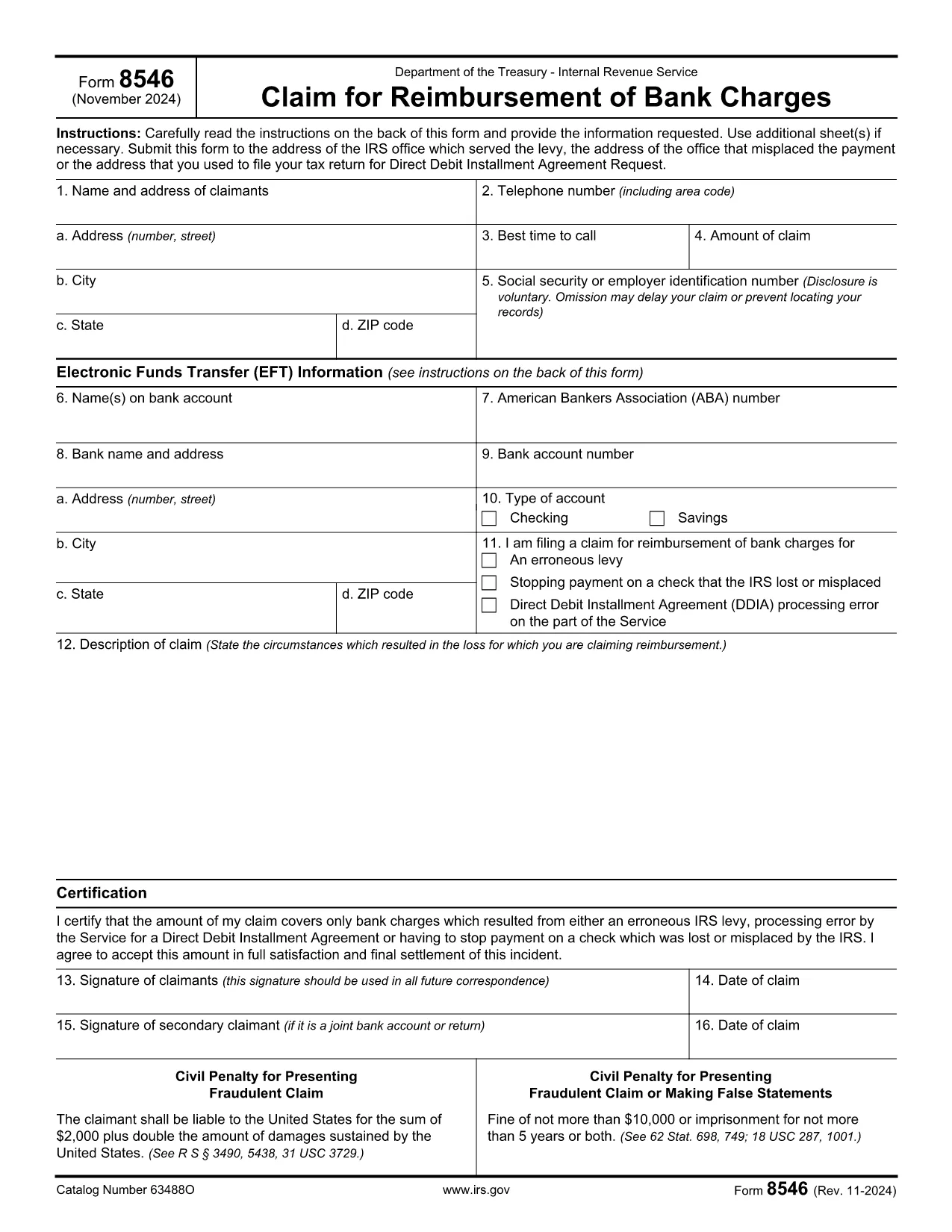
Fillable Form 8546 – Download, Complete & Submit Online

  1. 国家 美国
  2. 语言 英语
  3. 活动 税收
  4. 部门 IRS
Fillable Form 8546 – Download, Complete & Submit Online

Form 8546 is the IRS Application for Exemption from Federal Income Tax used by qualified organizations seeking tax‑exempt status. Whether you’re a nonprofit, religious group, or other eligible entity, the form must be completed accurately and submitted to the Internal Revenue Service.

What Is Form 8546?

This form collects essential information about the organization’s structure, purpose, and financial activities. It is a key part of the IRS’s review process for granting tax‑exempt status under Section 501(c)(3) and related provisions.

How to Fill Form 8546 Online

Instead of downloading the PDF and opening it in a desktop editor, simply click the "Fill out this form" button on this page. The Formize PDF Filler app will load in your browser, allowing you to complete every field directly online.

Common Mistakes to Avoid

  • Leaving required fields blank: The IRS will reject the application if any mandatory box is empty.
  • Mismatched EIN numbers: Ensure the Employer Identification Number matches the one on file with the IRS.
  • Incorrect organization type: Choose the exact classification that reflects your activities.
  • Signature errors: Use the electronic signature feature in Formize; a handwritten signature on a printed copy will not be accepted.

Where to Submit the Completed Form

After you finish filling out Form 8546, download the completed PDF and mail it to the address listed in the form’s instructions, or submit it electronically through the IRS e‑file system if your organization is eligible.

FAQs About Form 8546

Answers to the most common questions are provided below. If you need additional guidance, refer to the IRS instructions that accompany the PDF.

常问问题
  • Who needs to file Form 8546?

    Any organization applying for exemption from federal income tax under the IRS code, such as charities, religious groups, and certain educational entities.

  • Is Form 8546 free to download?

    Yes, the IRS provides the PDF at no cost. Formize offers a free online filler to complete it without installing software.

  • Can I submit Form 8546 electronically?

    If your organization is eligible for e‑file, you can upload the completed PDF through the IRS e‑file portal after saving it from Formize.

  • What is the filing deadline for Form 8546?

    There is no fixed calendar deadline; the form must be filed when you apply for tax‑exempt status or when the IRS requests an update.

  • Do I need a professional to help me fill out Form 8546?

    While professional advice can be helpful, the fillable PDF and the step‑by‑step guidance on this page make it straightforward for most applicants.

  • What should I do if I make a mistake after submitting?

    Contact the IRS immediately and submit an amended Form 8546 with corrected information, clearly marking it as an amendment.

如何

如何通过 5 个简单步骤在线免费填写 Form 8546:

  1. 1
    Click the Fill‑out Button
    On this page, locate the "Fill out this form" button and click it. The Formize PDF Filler will open in a new browser tab.
  2. 2
    Wait for the Filler to Load
    The online filler loads in seconds. Once the interface appears, all fields of Form 8546 are ready for input.
  3. 3
    Complete the Form
    Enter your organization’s information, answer each question, and use the built‑in electronic signature tool to sign.
  4. 4
    Save or Download
    When you’re finished, click "Save" to store a copy in your Formize account, or "Download" to obtain the completed PDF for mailing.
  5. 5
    Submit to the IRS
    Follow the submission instructions in the PDF (mail or e‑file) to send your completed Form 8546 to the IRS.
Formize PDF Filler 应用程序
关于

税务表格

Form 8546 是一种税务表格,用于向相关税务机关报告有关个人或企业的收入、扣除额和纳税义务的信息。这些表格对于遵守税法和履行纳税义务是必要的。税表因国家/地区和具体税收要求而异。以下是一些常见的税表类型:

个人纳税表:个人纳税人使用这些表格报告其个人收入并申请扣除、抵免和免税。例如,美国的 1040 表格或英国的自我评估纳税申报表。

营业税表:公司、合伙企业或个体经营者使用营业税表来报告其营业收入、费用和其他税务相关信息。示例包括美国的附表 C 表格(业务利润或亏损)或英国的 CT600 表格(公司纳税申报表)。

工资税表:雇主使用这些表格来报告工资、薪水和从雇员的工资中预扣的税款。示例包括美国的 W-2 表格或英国的 P60 表格。

销售税表:企业使用销售税表来报告和汇缴应税商品或服务征收的销售税。具体的销售税形式因司法管辖区而异。

增值税 (VAT) 表格:增值税表格用于征收增值税的国家/地区,用于报告和汇出销售中收取的增值税以及申请购买时的增值税抵免。示例包括许多国家/地区使用的增值税申报表。

预估税表:预估税表用于报告和缴纳无需预扣税的收入(例如自营职业收入或投资收入)的预估税款。

这些只是可能存在的众多税收形式的几个例子。所需的具体表格取决于您所在国家或司法管辖区的税务法律和法规。请务必咨询税务机关的指南或寻求专业建议,以确定哪些表格适用于您的情况。

特征

PDF 填充器

在线填写 PDF 表单的最简单方法

  • 快速填写Form 8546
    正在寻找一种在线快速填写 Form 8546 的方法?使用我们的在线免费 PDF 填表工具,您将在不到一分钟的时间内了解如何编辑和填写此 pdf 文档。
  • 易于使用的在线 PDF 编辑器
    是否厌倦了打印 PDF 文件以便在重新扫描并发回之前对其进行编辑?免费在线编辑 PDF 文档。使用我们的在线 pdf 编辑器可以节省时间和纸张。
  • 伟大的工具,所有平台
    想知道如何在 Mac 上填写 Form 8546,或者如何免费使用 PDF 填充程序?我们的在线 PDF 工具适用于所有平台。
  • 安全文件存储
    完成的“Form 8546”文件存储在由亚马逊云托管管理的安全数据库中。您可以随时从我们的系统中删除您的文件。在任何情况下,这些文件都会在 24 小时后自动删除。
  • 与 Form 8546 聊天
    Chatize 上与“Form 8546”聊天,这是一个免费的 PDF 阅读器助手。提出问题并从“Form 8546”获得答案。只需点击上面的与文档聊天按钮即可。

删除填充会话

删除选定的填充会话?在这种情况下,您填写表格的进度将丢失。

删除编辑会话

删除选定的编辑会话?在这种情况下,您创建和编辑表单的进度将会丢失。