Zvolte jazyk

IRS Form 8586 – Low‑Income Housing Credit Fillable PDF

  1. Země USA
  2. Jazyk Angličtina
  3. Aktivita Daně
  4. oddělení Internal Revenue Service
IRS Form 8586 – Low‑Income Housing Credit Fillable PDF

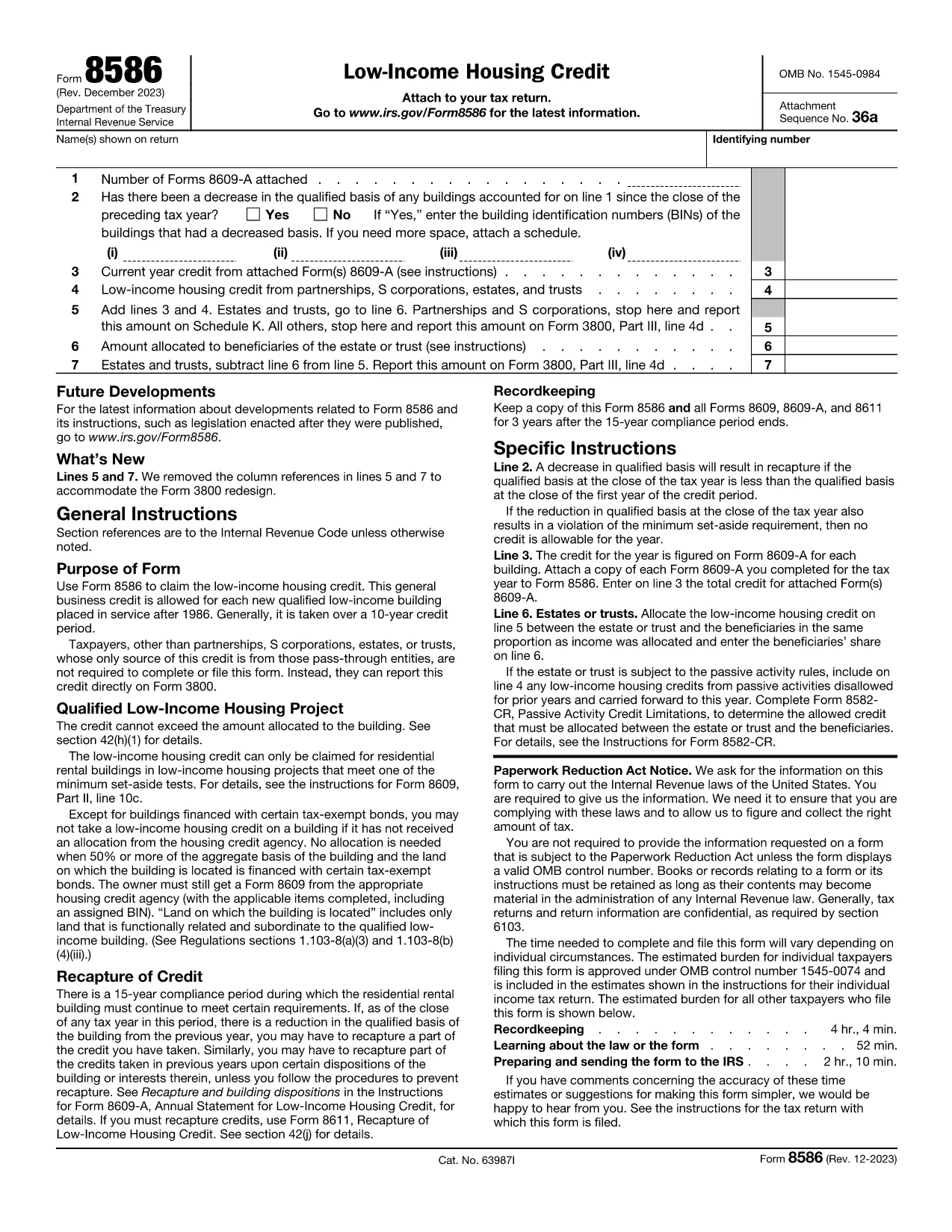
Form 8586 is the official IRS worksheet used to claim the Low‑Income Housing Credit. Whether you are an individual, partnership, S‑corporation, trust, or estate, this one‑page form aggregates the credit amounts calculated on Form 8609‑A and reports them on your tax return.

On Formize you can open the fillable PDF instantly, fill each field directly in the browser, and download a completed version ready for submission. No extra PDF editor is required.

What Is IRS Form 8586?

Form 8586 summarizes the low‑income housing credit for the tax year. It collects:

  • The number of attached Forms 8609‑A.
  • Any decrease in qualified basis that may trigger recapture.
  • The credit calculated for each building.
  • Credits passed through from partnerships, S‑corporations, estates, and trusts.
  • Allocation of the credit to beneficiaries, if applicable.

The total from Form 8586 is then entered on Form 3800, Line 4d as part of the general business credit.

How to Fill Out Form 8586 Online with Formize

Follow the simple steps below to complete the form without downloading any software.

Common Mistakes to Avoid on Form 8586

Even a small error can delay your credit. Watch out for:

  • Entering the wrong number of attached Forms 8609‑A.
  • Missing a decrease in qualified basis, which can cause recapture.
  • Incorrectly allocating the credit between the entity and its beneficiaries.
  • Failing to transfer the final amount to Form 3800.

Double‑check each line against your supporting schedules before saving.

Where to Download the Fillable PDF

The official, fillable version of Form 8586 is available from trusted sources. Click the button below to launch the Formize PDF Filler with the correct document pre‑loaded.

Frequently Asked Questions About Form 8586

Below are answers to the most common queries from taxpayers and tax professionals.

FAQ
  • Who needs to file IRS Form 8586?

    Any taxpayer who claims the Low‑Income Housing Credit—individuals, partnerships, S‑corporations, estates, and trusts—must file Form 8586 to report the credit amount.

  • Do I have to attach Form 8609‑A with Form 8586?

    Yes. For each qualified building you must attach a completed Form 8609‑A. The number of attached forms is reported on Line 1 of Form 8586.

  • Can I file Form 8586 electronically?

    Form 8586 itself is not filed electronically, but you can complete the fillable PDF online, save it, and then attach the scanned copy to your electronic tax return (e‑file) as part of the supporting documents.

  • What happens if my qualified basis decreases?

    A decrease in qualified basis may trigger a recapture of the credit. You must answer “Yes” on Line 2 and list the affected building identification numbers.

  • Where should the final credit amount be reported?

    The total credit from Form 8586 is entered on Form 3800, Line 4d, as part of the general business credit.

  • Is there a cost to use the Formize PDF Filler?

    Formize offers a free basic filler for most IRS forms, including Form 8586. Advanced features may require a paid plan, but the core filling and download functions are free.

JAK

Jak zdarma vyplnit Form 8586 online v 4 jednoduchých krocích:

  1. 1
    Click the Fillable Form Button
    On this page, click the “Fill out this form” button. Formize will open the IRS Form 8586 PDF directly in your browser.
  2. 2
    Wait for the Formize PDF Filler to Load
    The PDF Filler app loads in a few seconds. All form fields become interactive, allowing you to type, select dates, and upload supporting numbers.
  3. 3
    Complete Each Section
    Enter the required information for taxpayer details, attached Form 8609‑A count, credit calculations, and any beneficiary allocations. Use the on‑screen help icons for quick guidance.
  4. 4
    Save and Download
    When every field is filled, click “Save & Download”. The completed PDF is saved to your device and ready to be attached to your tax return.
Aplikace Formize PDF Filler
O

Daňové formuláře

Form 8586 je jedním z daňových formulářů, které jsou dokumenty používané k nahlášení informací souvisejících s daněmi příslušnému daňovému úřadu. Existují různé typy daňových formulářů, včetně federálních, státních a místních daňových formulářů, které se mohou lišit v závislosti na okolnostech a umístění poplatníka.

FUNKCE

PDF Filler

Nejjednodušší způsob, jak vyplnit Form 8586 online

  • Rychle vyplňte Form 8586
    Hledáte způsob, jak rychle vyplnit Form 8586 online? S naším online bezplatným vyplňováním formulářů PDF budete vědět, jak upravit a vyplnit tento dokument PDF za méně než minutu.
  • Snadno použitelný online editor PDF
    Už vás nebaví tisknout soubory PDF, abyste je mohli upravovat, než je znovu naskenujete a odešlete zpět? Upravujte dokumenty PDF zdarma online. Použijte náš online editor PDF, abyste ušetřili čas a papír.
  • Skvělé nástroje, všechny platformy
    Zajímá vás, jak vyplnit Form 8586 na Macu, nebo možná jak používat PDF filler zdarma? Naše online nástroje PDF fungují na všech platformách.
  • Bezpečné ukládání souborů
    Dokončené soubory „Form 8586“ jsou uloženy v zabezpečené databázi spravované hostingem Amazon Cloud. Své soubory můžete z našeho systému kdykoli smazat. V každém případě jsou tyto soubory po 24 hodinách automaticky smazány.
  • Chat s Form 8586
    Chatujte s „Form 8586“ na Chatize, což je bezplatný pomocník pro čtení PDF. Ptejte se a získejte odpovědi z „Form 8586“. Stačí kliknout na tlačítko Chat with Document výše.

Smazat relaci plnění

Smazat vybranou relaci plnění? V takovém případě bude váš postup při vyplňování formuláře ztracen.

Smazat relaci úprav

Smazat vybranou relaci úprav? V tomto případě bude váš postup při vytváření a úpravách formuláře ztracen.