Vælg sprog

SF 1443 – Contractor's Request for Progress Payment (Fillable PDF)

  1. Land USA
  2. Sprog engelsk
  3. Afdeling General Services Administration
  4. Aktivitet Federal Procurement
SF 1443 – Contractor's Request for Progress Payment (Fillable PDF)

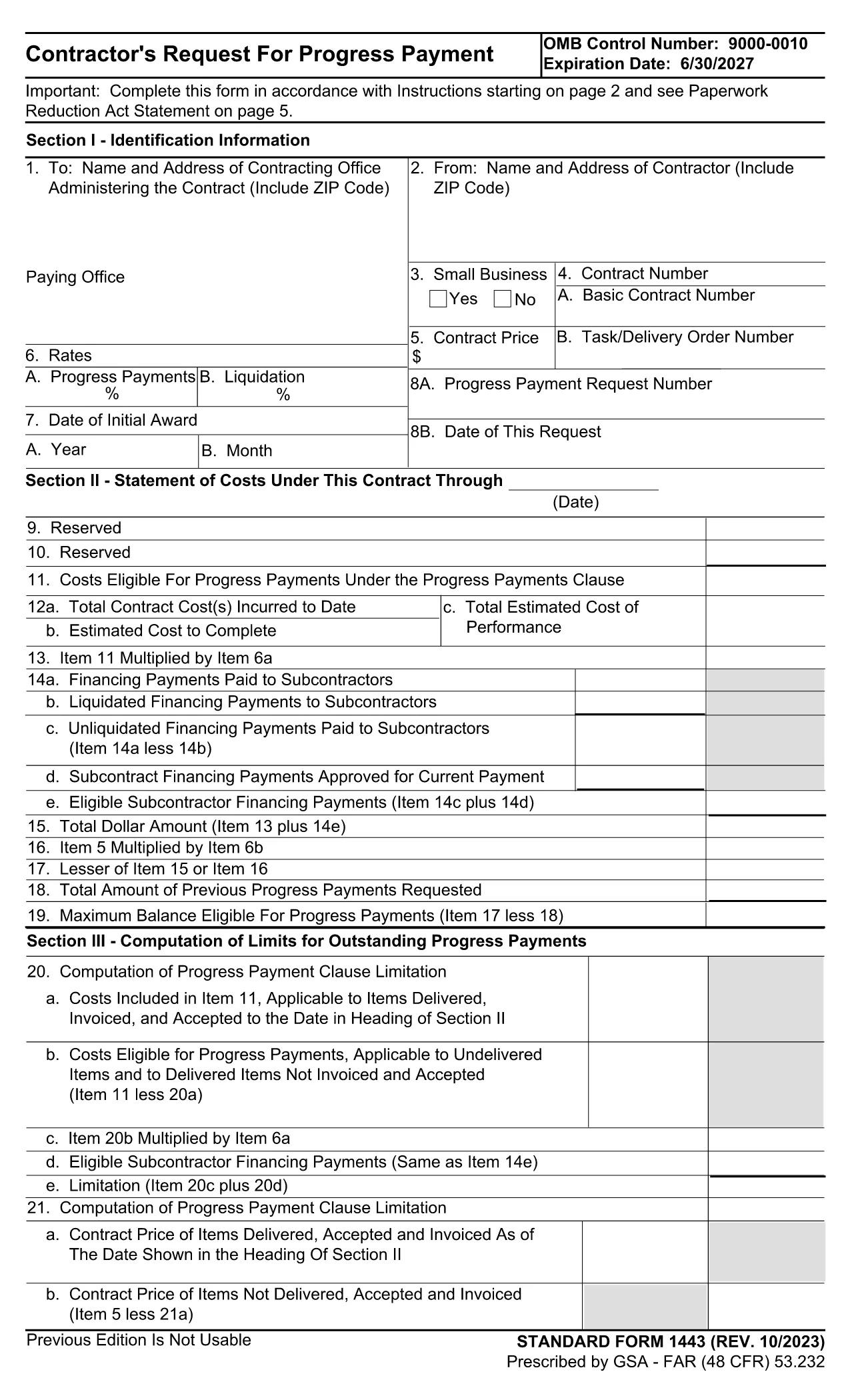
The Standard Form 1443 (SF 1443) is the government‑approved request used by contractors to claim progress payments under Federal Acquisition Regulation (FAR) clause 52.232‑16. This fillable PDF version lets you complete the form quickly, securely, and without any printing.

What Is SF 1443 and When Is It Used?

SF 1443, titled Contractor's Request for Progress Payment, is submitted when a contractor has performed a portion of a contract and needs partial payment before final completion. Federal agencies such as the General Services Administration (GSA), Department of Defense, and NASA require this form to verify work performed, certify that the amount is reasonable, and process the payment.

How to Complete the Fillable SF 1443 Online

Instead of downloading the PDF and opening a separate editor, simply click the "Fill out this form" button on this page. The Formize PDF Filler app will load the official SF 1443 template and guide you through each field.

  1. Click "Fill out this form" – the Formize editor opens in your browser.
  2. Enter contract details – contract number, period of performance, and total contract value.
  3. Specify the payment request – amount requested, work completed, and supporting certifications.
  4. Review and sign – use the built‑in e‑signature tool to certify the information.
  5. Submit or download – send the completed form directly to your contracting officer or save a copy for your records.

Common Mistakes to Avoid on SF 1443

  • Leaving the Certification boxes unchecked – the form is invalid without them.
  • Entering an amount that exceeds the allowable progress payment limit.
  • Omitting the required supporting documentation reference numbers.
  • Using an outdated version of the form (always use the latest PDF provided below).

Official PDF Download

If you prefer to keep a local copy, you can download the official, up‑to‑date SF 1443 PDF directly from the GSA website.

Download SF 1443 – Contractor's Request for Progress Payment (PDF)

FAQ
  • What is the purpose of SF 1443?

    SF 1443 is used by contractors to request interim (progress) payments for work performed under a federal contract before final completion.

  • Do I need a digital signature to submit SF 1443?

    Yes. The form requires the contractor’s authorized representative to certify the request with a signature, which can be entered electronically using Formize.

  • Can I edit the PDF after I’ve filled it out?

    Once you submit the form through Formize, it is locked for editing. If you need changes, reopen the form in Formize, make edits, and resubmit.

  • Is the version on Formize the most recent SF 1443?

    Formize always hosts the latest version released by GSA. The current version is the 2024‑08 edition (SF1443‑23b).

  • What happens if I submit an incorrect amount?

    Submitting an amount that exceeds the allowable progress payment can delay processing. Double‑check the contract’s payment schedule before entering the amount.

  • Do I need to attach supporting documents to the PDF?

    Yes. The form includes fields for referencing invoices, work logs, or other documentation that supports your payment request.

  • Is there a filing fee for using SF 1443?

    No. There is no fee to download or fill out SF 1443; it is a standard government form provided free of charge.

HVORDAN

Sådan udfylder du SF 1443 gratis online i 5 nemme trin:

  1. 1
    Open the Fillable Form
    Click the "Fill out this form" button on the page. The Formize PDF Filler will launch in a new tab.
  2. 2
    Enter Contract Information
    Fill in the contract number, period of performance, and total contract value as requested on the form.
  3. 3
    Specify the Payment Amount
    Enter the amount you are requesting, describe the work completed, and attach any required supporting documentation.
  4. 4
    Certify and Sign
    Check all certification boxes and use the built‑in e‑signature field to sign the form electronically.
  5. 5
    Submit or Save
    Send the completed form to your contracting officer directly from Formize, or download a PDF copy for your records.
Formize PDF Filler app
OM

SF 1443 skabelon

Med det traditionelle sæt funktioner til at se og udfylde et PDF-dokument, kombineret med fordelene ved en webapplikation og responsivt layout, kan du fuldføre SF 1443 på få minutter.

FUNKTIONER

PDF Filler

Den nemmeste måde at udfylde SF 1443 online

  • Udfyld hurtigt SF 1443
    Leder du efter en måde, hvorpå du hurtigt kan fylde SF 1443 online? Med vores online gratis PDF-formularudfylder ved du, hvordan du redigerer og udfylder dette pdf-dokument på mindre end et minut.
  • Let at bruge online PDF-editor
    Træt af at udskrive PDF-filer, så du kan redigere dem, før du scanner igen og sender dem tilbage? Rediger PDF-dokumenter gratis online. Brug vores online pdf-editor for at spare tid og papir.
  • Fantastiske værktøjer, alle platforme
    Er du i tvivl om, hvordan du udfylder SF 1443 på en Mac, eller måske hvordan du bruger en PDF-filler gratis? Vores online PDF-værktøjer fungerer på alle platforme.
  • Sikker fillagring
    Fuldførte "SF 1443"-filer gemmes i en sikret database, der administreres af Amazon Cloud-hosting. Du kan til enhver tid slette dine filer fra vores system. Under alle omstændigheder slettes disse filer automatisk efter 24 timer.
  • Chat med SF 1443
    Chat med "SF 1443" på Chatize, som er en gratis PDF-læserassistent. Stil spørgsmål og få svar fra "SF 1443". Bare klik på knappen Chat med dokument ovenfor.

Slet udfyldningssession

Vil du slette den valgte påfyldningssession? I dette tilfælde vil dine fremskridt med at udfylde formularen gå tabt.

Slet redigeringssession

Vil du slette den valgte redigeringssession? I dette tilfælde vil dine fremskridt med at oprette og redigere formularen gå tabt.