Ընտրել լեզուն

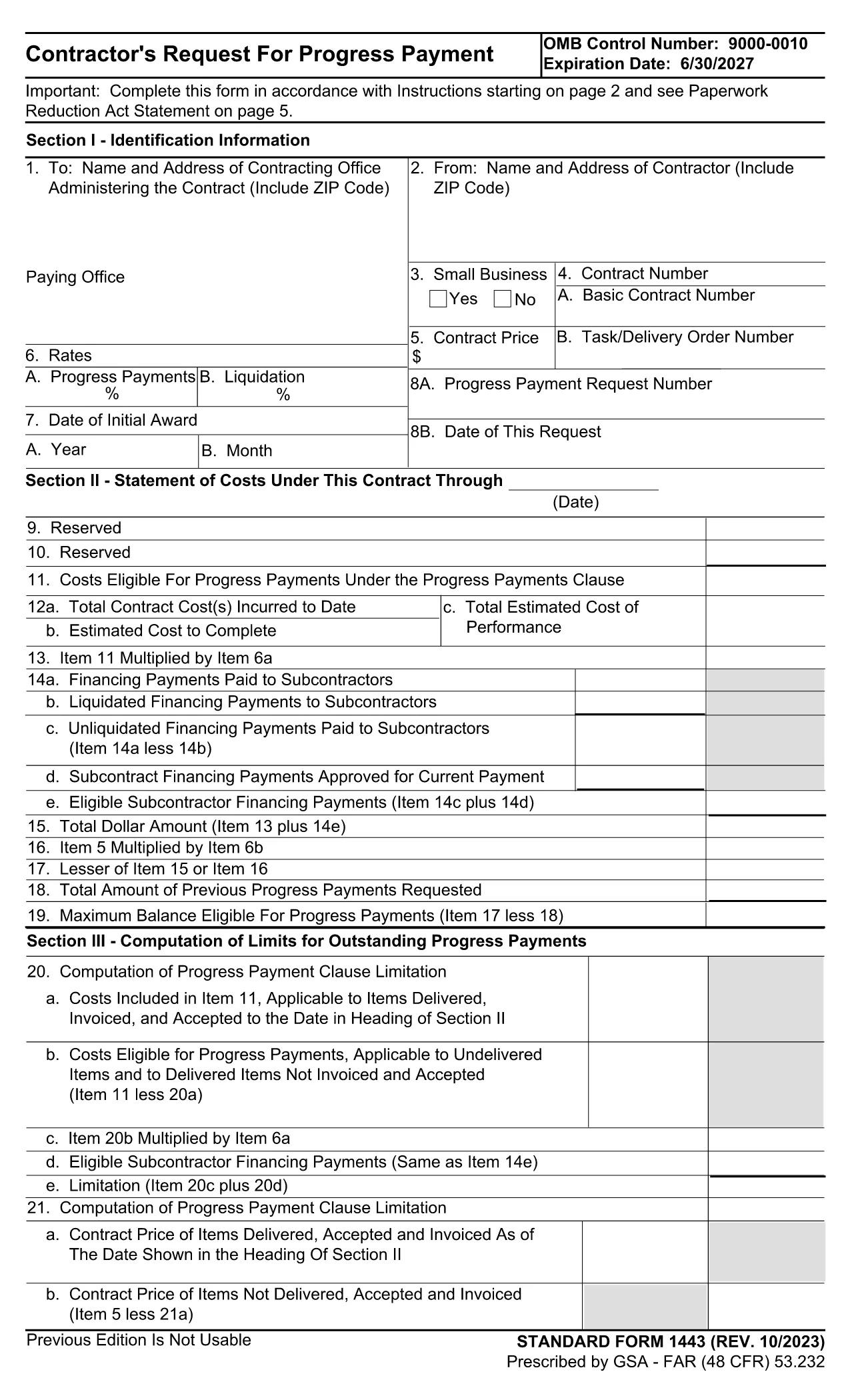
SF 1443 – Contractor's Request for Progress Payment (Fillable PDF)

  1. Երկիր ԱՄՆ
  2. Լեզու Անգլերեն
  3. բաժին General Services Administration
  4. Գործունեություն Federal Procurement
SF 1443 – Contractor's Request for Progress Payment (Fillable PDF)

The Standard Form 1443 (SF 1443) is the government‑approved request used by contractors to claim progress payments under Federal Acquisition Regulation (FAR) clause 52.232‑16. This fillable PDF version lets you complete the form quickly, securely, and without any printing.

What Is SF 1443 and When Is It Used?

SF 1443, titled Contractor's Request for Progress Payment, is submitted when a contractor has performed a portion of a contract and needs partial payment before final completion. Federal agencies such as the General Services Administration (GSA), Department of Defense, and NASA require this form to verify work performed, certify that the amount is reasonable, and process the payment.

How to Complete the Fillable SF 1443 Online

Instead of downloading the PDF and opening a separate editor, simply click the "Fill out this form" button on this page. The Formize PDF Filler app will load the official SF 1443 template and guide you through each field.

  1. Click "Fill out this form" – the Formize editor opens in your browser.
  2. Enter contract details – contract number, period of performance, and total contract value.
  3. Specify the payment request – amount requested, work completed, and supporting certifications.
  4. Review and sign – use the built‑in e‑signature tool to certify the information.
  5. Submit or download – send the completed form directly to your contracting officer or save a copy for your records.

Common Mistakes to Avoid on SF 1443

  • Leaving the Certification boxes unchecked – the form is invalid without them.
  • Entering an amount that exceeds the allowable progress payment limit.
  • Omitting the required supporting documentation reference numbers.
  • Using an outdated version of the form (always use the latest PDF provided below).

Official PDF Download

If you prefer to keep a local copy, you can download the official, up‑to‑date SF 1443 PDF directly from the GSA website.

Download SF 1443 – Contractor's Request for Progress Payment (PDF)

ՀՏՀ
  • What is the purpose of SF 1443?

    SF 1443 is used by contractors to request interim (progress) payments for work performed under a federal contract before final completion.

  • Do I need a digital signature to submit SF 1443?

    Yes. The form requires the contractor’s authorized representative to certify the request with a signature, which can be entered electronically using Formize.

  • Can I edit the PDF after I’ve filled it out?

    Once you submit the form through Formize, it is locked for editing. If you need changes, reopen the form in Formize, make edits, and resubmit.

  • Is the version on Formize the most recent SF 1443?

    Formize always hosts the latest version released by GSA. The current version is the 2024‑08 edition (SF1443‑23b).

  • What happens if I submit an incorrect amount?

    Submitting an amount that exceeds the allowable progress payment can delay processing. Double‑check the contract’s payment schedule before entering the amount.

  • Do I need to attach supporting documents to the PDF?

    Yes. The form includes fields for referencing invoices, work logs, or other documentation that supports your payment request.

  • Is there a filing fee for using SF 1443?

    No. There is no fee to download or fill out SF 1443; it is a standard government form provided free of charge.

ԻՆՉՊԵՍ

Ինչպես լրացնել SF 1443-ն անվճար, առցանց՝ 5 հեշտ քայլերով.

  1. 1
    Open the Fillable Form
    Click the "Fill out this form" button on the page. The Formize PDF Filler will launch in a new tab.
  2. 2
    Enter Contract Information
    Fill in the contract number, period of performance, and total contract value as requested on the form.
  3. 3
    Specify the Payment Amount
    Enter the amount you are requesting, describe the work completed, and attach any required supporting documentation.
  4. 4
    Certify and Sign
    Check all certification boxes and use the built‑in e‑signature field to sign the form electronically.
  5. 5
    Submit or Save
    Send the completed form to your contracting officer directly from Formize, or download a PDF copy for your records.
Ձևավորել PDF Filler հավելվածը
ՄԱՍԻՆ

SF 1443 ձևանմուշ

PDF փաստաթուղթը դիտելու և լրացնելու գործառույթների ավանդական փաթեթով, որը զուգորդվում է վեբ հավելվածի առավելությունների և արձագանքող դասավորության հետ, դուք կարող եք լրացնել SF 1443-ը րոպեների ընթացքում:

ՀԱՏԿՈՒԹՅՈՒՆՆԵՐ

PDF լցոնիչ

Առցանց SF 1443-ը լրացնելու ամենահեշտ ձևը

  • Արագ լրացրեք SF 1443
    Փնտրու՞մ եք միջոց՝ արագորեն լրացնելու SF 1443 առցանց: Մեր առցանց անվճար PDF ձևաթուղթ լրացնողի միջոցով դուք կիմանաք, թե ինչպես խմբագրել և լրացնել այս pdf փաստաթուղթը մեկ րոպեից պակաս ժամանակում:
  • Հեշտ օգտագործման առցանց PDF խմբագիր
    Հոգնե՞լ եք PDF ֆայլեր տպելուց, որպեսզի կարողանաք դրանք խմբագրել, նախքան նորից սկանավորելը և հետ ուղարկելը: Խմբագրել PDF փաստաթղթերը անվճար առցանց: Օգտագործեք մեր առցանց pdf խմբագրիչը ժամանակ և թուղթ խնայելու համար:
  • Հիանալի գործիքներ, բոլոր հարթակներ
    Զարմանում եք, թե ինչպես լրացնել SF 1443-ը Mac-ում, կամ գուցե ինչպես անվճար օգտագործել PDF լցոնիչը: Մեր առցանց PDF գործիքներն աշխատում են բոլոր հարթակներում:
  • Անվտանգ ֆայլերի պահպանում
    Ավարտված «SF 1443» ֆայլերը պահվում են պաշտպանված տվյալների բազայում, որը կառավարվում է Amazon Cloud հոսթինգի կողմից: Ցանկացած ժամանակ կարող եք ջնջել ձեր ֆայլերը մեր համակարգից: Ամեն դեպքում, այս ֆայլերը ավտոմատ կերպով ջնջվում են 24 ժամ հետո:
  • Զրուցեք SF 1443-ի հետ
    Զրուցեք «SF 1443»-ի հետ Chatize-ում, որը PDF ընթերցողի անվճար օգնական է: Հարցեր տվեք և ստացեք պատասխաններ «SF 1443»-ից։ Պարզապես սեղմեք վերևում գտնվող Զրույց փաստաթղթի հետ կոճակը:

Ջնջել լրացման նիստը

Ջնջե՞լ ընտրված լրացման աշխատաշրջանը: Այս դեպքում ձևը լրացնելու ձեր առաջընթացը կկորչի:

Ջնջել խմբագրման նիստը

Ջնջե՞լ ընտրված խմբագրման աշխատաշրջանը: Այս դեպքում ձևը ստեղծելու և խմբագրելու ձեր առաջընթացը կկորչի: