Choisir la langue

SF 1443 – Contractor's Request for Progress Payment (Fillable PDF)

  1. De campagne Etats-Unis
  2. Langue Anglais
  3. département General Services Administration
  4. Activité Federal Procurement
SF 1443 – Contractor's Request for Progress Payment (Fillable PDF)

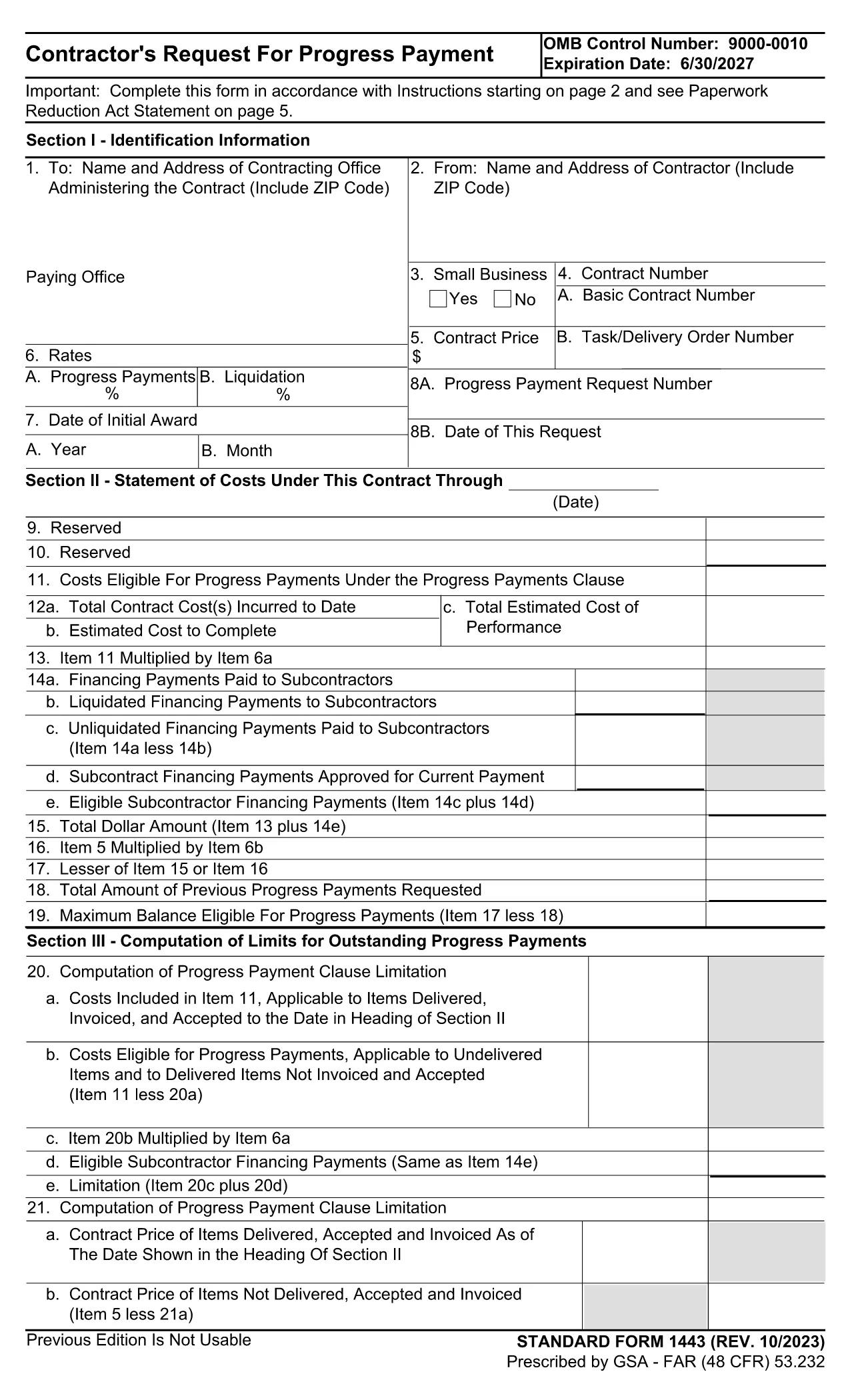
The Standard Form 1443 (SF 1443) is the government‑approved request used by contractors to claim progress payments under Federal Acquisition Regulation (FAR) clause 52.232‑16. This fillable PDF version lets you complete the form quickly, securely, and without any printing.

What Is SF 1443 and When Is It Used?

SF 1443, titled Contractor's Request for Progress Payment, is submitted when a contractor has performed a portion of a contract and needs partial payment before final completion. Federal agencies such as the General Services Administration (GSA), Department of Defense, and NASA require this form to verify work performed, certify that the amount is reasonable, and process the payment.

How to Complete the Fillable SF 1443 Online

Instead of downloading the PDF and opening a separate editor, simply click the "Fill out this form" button on this page. The Formize PDF Filler app will load the official SF 1443 template and guide you through each field.

  1. Click "Fill out this form" – the Formize editor opens in your browser.
  2. Enter contract details – contract number, period of performance, and total contract value.
  3. Specify the payment request – amount requested, work completed, and supporting certifications.
  4. Review and sign – use the built‑in e‑signature tool to certify the information.
  5. Submit or download – send the completed form directly to your contracting officer or save a copy for your records.

Common Mistakes to Avoid on SF 1443

  • Leaving the Certification boxes unchecked – the form is invalid without them.
  • Entering an amount that exceeds the allowable progress payment limit.
  • Omitting the required supporting documentation reference numbers.
  • Using an outdated version of the form (always use the latest PDF provided below).

Official PDF Download

If you prefer to keep a local copy, you can download the official, up‑to‑date SF 1443 PDF directly from the GSA website.

Download SF 1443 – Contractor's Request for Progress Payment (PDF)

FAQ
  • What is the purpose of SF 1443?

    SF 1443 is used by contractors to request interim (progress) payments for work performed under a federal contract before final completion.

  • Do I need a digital signature to submit SF 1443?

    Yes. The form requires the contractor’s authorized representative to certify the request with a signature, which can be entered electronically using Formize.

  • Can I edit the PDF after I’ve filled it out?

    Once you submit the form through Formize, it is locked for editing. If you need changes, reopen the form in Formize, make edits, and resubmit.

  • Is the version on Formize the most recent SF 1443?

    Formize always hosts the latest version released by GSA. The current version is the 2024‑08 edition (SF1443‑23b).

  • What happens if I submit an incorrect amount?

    Submitting an amount that exceeds the allowable progress payment can delay processing. Double‑check the contract’s payment schedule before entering the amount.

  • Do I need to attach supporting documents to the PDF?

    Yes. The form includes fields for referencing invoices, work logs, or other documentation that supports your payment request.

  • Is there a filing fee for using SF 1443?

    No. There is no fee to download or fill out SF 1443; it is a standard government form provided free of charge.

COMMENT

Comment remplir SF 1443 gratuitement, en ligne en 5 étapes simples :

  1. 1
    Open the Fillable Form
    Click the "Fill out this form" button on the page. The Formize PDF Filler will launch in a new tab.
  2. 2
    Enter Contract Information
    Fill in the contract number, period of performance, and total contract value as requested on the form.
  3. 3
    Specify the Payment Amount
    Enter the amount you are requesting, describe the work completed, and attach any required supporting documentation.
  4. 4
    Certify and Sign
    Check all certification boxes and use the built‑in e‑signature field to sign the form electronically.
  5. 5
    Submit or Save
    Send the completed form to your contracting officer directly from Formize, or download a PDF copy for your records.
Formize l'application PDF Filler
À PROPOS

modèle SF 1443

Avec l'ensemble traditionnel de fonctionnalités pour afficher et remplir un document PDF, combiné aux avantages d'une application Web et d'une mise en page réactive, vous pouvez compléter SF 1443 en quelques minutes.

CARACTÉRISTIQUES

Remplisseur de PDF

Le moyen le plus simple de remplir des formulaires PDF en ligne

  • Remplissez rapidement SF 1443
    Vous cherchez un moyen de remplir rapidement SF 1443 en ligne ? Avec notre remplisseur de formulaire PDF gratuit en ligne, vous saurez comment éditer et remplir ce document pdf en moins d'une minute.
  • Éditeur PDF en ligne facile à utiliser
    Vous en avez assez d'imprimer des fichiers PDF pour pouvoir les modifier avant de les renumériser et de les renvoyer ? Modifiez des documents PDF gratuitement en ligne. Utilisez notre éditeur de pdf en ligne pour gagner du temps et du papier.
  • Excellents outils, toutes plateformes
    Vous vous demandez comment remplir SF 1443 sur un Mac, ou peut-être comment utiliser un remplisseur PDF gratuit ? Nos outils PDF en ligne fonctionnent sur toutes les plateformes.
  • Stockage de fichiers sécurisé
    Les fichiers "SF 1443" terminés sont stockés dans une base de données sécurisée gérée par l'hébergement Amazon Cloud. Vous pouvez supprimer vos fichiers de notre système à tout moment. Dans tous les cas, ces fichiers sont automatiquement supprimés après 24 heures.
  • Discutez avec SF 1443
    Discutez avec "SF 1443" sur Chatize qui est un assistant de lecture PDF gratuit. Posez des questions et obtenez des réponses de "SF 1443". Cliquez simplement sur le bouton Discuter avec un document ci-dessus.

Supprimer la session de remplissage

Supprimer la session de remplissage sélectionnée ? Dans ce cas, votre progression dans le remplissage du formulaire sera perdue.

Supprimer la session d'édition

Supprimer la session de modification sélectionnée ? Dans ce cas, votre progression dans la création et la modification du formulaire sera perdue.