
Seleccione el idioma

Pennsylvania DL-31 Non‑Commercial Learner's Permit Form (Fillable PDF)

  1. Idioma Inglés
  2. País EE.UU
  3. Actividad Licencia de conducir
  4. Expresar Pensilvania
Pennsylvania DL-31 Non‑Commercial Learner's Permit Form (Fillable PDF)

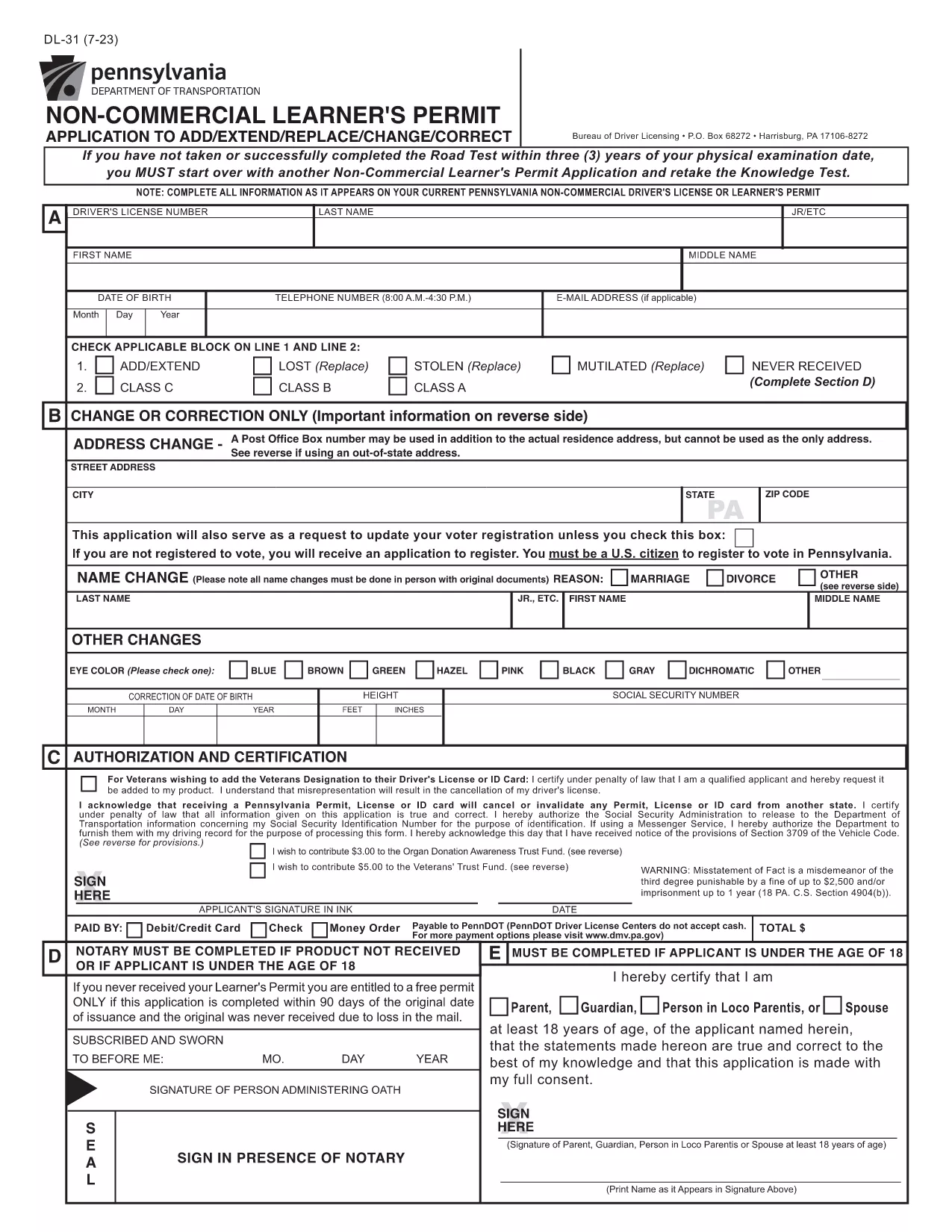
The DL-31 is Pennsylvania's official application for a non‑commercial learner's permit. Whether you’re a new driver or need to add/extend a permit, this fillable PDF lets you complete the form quickly and accurately.

What Is the DL-31 Form?

The DL-31 is issued by the Pennsylvania Department of Transportation (PennDOT). It captures personal details, residency, and eligibility information required before you can take the knowledge test.

How to Fill Out the DL-31 Online with Formize

Instead of downloading, printing, and scanning, simply click the "Fill out this form" button on our page. The Formize PDF Filler app will load in your browser, allowing you to type directly into each field.

Key Sections & Required Information

  • Applicant Information – Full name, date of birth, Social Security Number.
  • Residency – Current Pennsylvania address and out‑of‑state address exceptions.
  • Eligibility – Confirmation of age, vision test, and any prior permits.
  • Signature – Electronic signature field for applicant and parent/guardian (if under 18).

Common Mistakes to Avoid

  • Leaving the "Out‑of‑State Address" box unchecked when it applies.
  • Using an outdated address that does not match your driver’s license.
  • Forgetting to attach a copy of your birth certificate or passport if required.
  • Skipping the electronic signature – the form will be rejected.

Where to Submit Your Completed Form

After you finish, download the completed PDF and bring it to any PennDOT Driver License Center along with the required identification documents and payment.

Need the official PDF? Click the button below to open the fillable version instantly.

PREGUNTAS MÁS FRECUENTES
  • Do I need to print the DL-31 form after filling it online?

    No. The Formize PDF Filler lets you complete, sign, and download the PDF digitally. Print only if your local PennDOT office specifically requires a hard copy.

  • Can I submit the DL-31 form electronically?

    PennDOT currently requires a printed copy with supporting documents. Use the filled PDF to print and bring it to a Driver License Center.

  • What identification documents do I need with the DL-31?

    A valid photo ID (e.g., passport or PA driver’s license), proof of Social Security number, and two proofs of Pennsylvania residency.

  • Is the DL-31 form free to download?

    Yes. The official PDF is provided by the Commonwealth of Pennsylvania at no cost.

  • How long is a learner’s permit valid in Pennsylvania?

    A non‑commercial learner’s permit is valid for 6 months from the date of issuance, provided you meet all renewal requirements.

  • Can a parent or guardian sign the DL-31 for a minor?

    Yes. If the applicant is under 18, a parent or legal guardian must sign the designated section.

  • What if I make a mistake after downloading the completed form?

    You can reopen the PDF in the Formize filler, edit the fields, and download a corrected version before printing.

CÓMO

Cómo completar DL-31 gratis, en línea en 4 sencillos pasos:

  1. 1
    Click the Fill‑out Button
    On the page, press the "Fill out this form" button. The Formize PDF Filler will open in a new tab.
  2. 2
    Wait for the Filler to Load
    The app loads the DL-31 PDF and makes every field editable. No extra software is needed.
  3. 3
    Enter Your Information
    Complete each section—personal data, address, eligibility, and signature—using your keyboard.
  4. 4
    Review, Sign & Download
    Double‑check the entries, add your electronic signature, then click "Download" to save the finished form.
Aplicación Formize PDF Filler
SOBRE

Formularios de solicitud de licencia de conducir

En la mayoría de los países, es obligatorio tener una licencia de conducir antes de poder salir a la carretera. Obtener una licencia de conducir es un hito importante para cualquier persona que quiera conducir un automóvil.

DL-31 es uno de los formularios de solicitud de licencia de conducir que son documentos que se utilizan para recopilar información de las personas que desean solicitar una licencia de conducir. Por lo general, contiene campos para el nombre del solicitante, fecha de nacimiento, número de identificación, información de contacto, así como su historial y experiencia en la licencia de conducir.

CARACTERÍSTICAS

Relleno de PDF

La forma más fácil de llenar formularios PDF en línea

  • Rellene rápidamente DL-31
    ¿Está buscando una manera de llenar rápidamente DL-31 en línea? Con nuestro rellenador de formularios PDF gratuito en línea, sabrá cómo editar y rellenar este documento PDF en menos de un minuto.
  • Editor de PDF en línea fácil de usar
    ¿Cansado de imprimir archivos PDF para poder editarlos antes de volver a escanearlos y enviarlos de vuelta? Edite documentos PDF gratis en línea. Utilice nuestro editor de pdf en línea para ahorrar tiempo y papel.
  • Excelentes herramientas, todas las plataformas.
    ¿Se pregunta cómo completar DL-31 en una Mac, o tal vez cómo usar un relleno de PDF gratis? Nuestras herramientas de PDF en línea funcionan en todas las plataformas.
  • Almacenamiento seguro de archivos
    Los archivos "DL-31" completados se almacenan en una base de datos segura administrada por Amazon Cloud hosting. Puede eliminar sus archivos de nuestro sistema en cualquier momento. En cualquier caso, estos archivos se eliminan automáticamente después de 24 horas.
  • Chatea con {palabra clave}
    Chatea con "DL-31" en Chatize, que es un asistente de lectura de PDF gratuito. Haga preguntas y obtenga respuestas de "DL-31". Simplemente haga clic en el botón Chatear con documento de arriba.

Eliminar sesión de llenado

¿Eliminar la sesión de llenado seleccionada? En este caso, se perderá su progreso al completar el formulario.

Eliminar sesión de edición

¿Eliminar la sesión de edición seleccionada? En este caso, se perderá su progreso en la creación y edición del formulario.