
בחר שפה

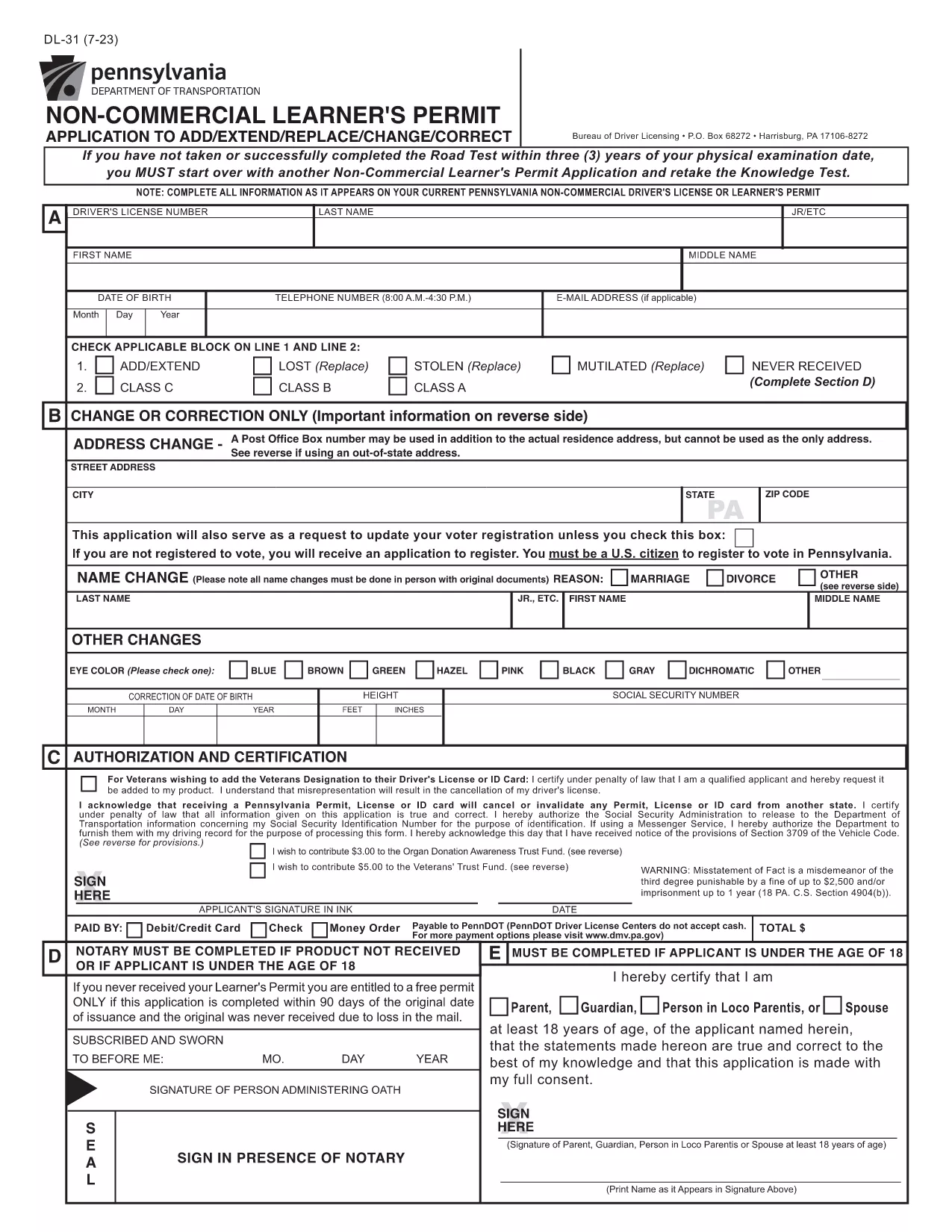
Pennsylvania DL-31 Non‑Commercial Learner's Permit Form (Fillable PDF)

  1. שפה אנגלית
  2. מדינה ארה"ב
  3. פעילות רשיון נהיגה
  4. מדינה פנסילבניה
Pennsylvania DL-31 Non‑Commercial Learner's Permit Form (Fillable PDF)

The DL-31 is Pennsylvania's official application for a non‑commercial learner's permit. Whether you’re a new driver or need to add/extend a permit, this fillable PDF lets you complete the form quickly and accurately.

What Is the DL-31 Form?

The DL-31 is issued by the Pennsylvania Department of Transportation (PennDOT). It captures personal details, residency, and eligibility information required before you can take the knowledge test.

How to Fill Out the DL-31 Online with Formize

Instead of downloading, printing, and scanning, simply click the "Fill out this form" button on our page. The Formize PDF Filler app will load in your browser, allowing you to type directly into each field.

Key Sections & Required Information

  • Applicant Information – Full name, date of birth, Social Security Number.
  • Residency – Current Pennsylvania address and out‑of‑state address exceptions.
  • Eligibility – Confirmation of age, vision test, and any prior permits.
  • Signature – Electronic signature field for applicant and parent/guardian (if under 18).

Common Mistakes to Avoid

  • Leaving the "Out‑of‑State Address" box unchecked when it applies.
  • Using an outdated address that does not match your driver’s license.
  • Forgetting to attach a copy of your birth certificate or passport if required.
  • Skipping the electronic signature – the form will be rejected.

Where to Submit Your Completed Form

After you finish, download the completed PDF and bring it to any PennDOT Driver License Center along with the required identification documents and payment.

Need the official PDF? Click the button below to open the fillable version instantly.

שאלות נפוצות
  • Do I need to print the DL-31 form after filling it online?

    No. The Formize PDF Filler lets you complete, sign, and download the PDF digitally. Print only if your local PennDOT office specifically requires a hard copy.

  • Can I submit the DL-31 form electronically?

    PennDOT currently requires a printed copy with supporting documents. Use the filled PDF to print and bring it to a Driver License Center.

  • What identification documents do I need with the DL-31?

    A valid photo ID (e.g., passport or PA driver’s license), proof of Social Security number, and two proofs of Pennsylvania residency.

  • Is the DL-31 form free to download?

    Yes. The official PDF is provided by the Commonwealth of Pennsylvania at no cost.

  • How long is a learner’s permit valid in Pennsylvania?

    A non‑commercial learner’s permit is valid for 6 months from the date of issuance, provided you meet all renewal requirements.

  • Can a parent or guardian sign the DL-31 for a minor?

    Yes. If the applicant is under 18, a parent or legal guardian must sign the designated section.

  • What if I make a mistake after downloading the completed form?

    You can reopen the PDF in the Formize filler, edit the fields, and download a corrected version before printing.

איך ל

כיצד למלא את DL-31 בחינם, באינטרנט ב-4 שלבים פשוטים:

  1. 1
    Click the Fill‑out Button
    On the page, press the "Fill out this form" button. The Formize PDF Filler will open in a new tab.
  2. 2
    Wait for the Filler to Load
    The app loads the DL-31 PDF and makes every field editable. No extra software is needed.
  3. 3
    Enter Your Information
    Complete each section—personal data, address, eligibility, and signature—using your keyboard.
  4. 4
    Review, Sign & Download
    Double‑check the entries, add your electronic signature, then click "Download" to save the finished form.
Formize אפליקציית מילוי PDF
על אודות

טפסי בקשה לרישיון נהיגה

DL-31 הוא אחד מטפסי רישיון נהיגה שהם מסמכים המשמשים להגשת בקשה לרישיון נהיגה או לבקשת שירותים שונים הקשורים לרישיון נהיגה. טפסים אלה מסופקים בדרך כלל על ידי המחלקה או הסוכנות האחראית להנפקת רישיונות נהיגה באזור שיפוט ספציפי, כגון המחלקה לכלי רכב (DMV) בארצות הברית.

טפסי רישיון נהיגה נפוצים כוללים:

בקשת רישיון נהיגה: טופס זה משמש להגשת בקשה לרישיון נהיגה חדש או לחידוש רישיון נהיגה קיים. זה בדרך כלל דורש מידע אישי כגון שם, כתובת, תאריך לידה ומספר תעודת זהות.

מסמכי זיהוי: תחומי שיפוט מסוימים דורשים מסמכי זיהוי ספציפיים כדי לאמת את זהות המבקש ותושבותו. אלה עשויים לכלול טפסים כגון תעודת לידה, דרכון או תעודת ביטוח לאומי.

בדיקת ראייה: בקשות רבות לרישיון נהיגה דורשות טופס בדיקת ראייה, שבו איש מקצוע רפואי מורשה או מומחה לטיפולי עיניים מאשר שהמבקש עומד בדרישות הראייה המינימליות לנהיגה.

טפסי השכלת נהג: במקרים מסוימים, ייתכן שאנשים יצטרכו לספק הוכחה על סיום קורס חינוך נהג, כגון תעודת השלמת השכלת נהג או טופס חתום על ידי מדריך.

הערכה רפואית: מצבים רפואיים מסוימים עשויים לדרוש מילוי טפסים נוספים על ידי איש מקצוע בתחום הבריאות. טפסים אלו מאמתים את כשירותו הגופני והנפשי של הפונה לנהוג.

טופס שינוי כתובת: אם בעל רישיון נהיגה עובר לכתובת חדשה, ייתכן שיהיה עליו למלא טופס שינוי כתובת כדי לעדכן את פרטי רישיון הנהיגה שלו.

ניתן לקבל טפסי רישיון נהיגה ממשרד DMV המקומי או להוריד מאתר האינטרנט שלהם. חשוב למלא בקפידה ולהגיש את הטפסים הנדרשים יחד עם כל המסמכים התומכים על מנת להבטיח תהליך של בקשה או שירות חלק.

תכונות

מילוי PDF

הדרך הקלה ביותר למלא טפסי PDF באינטרנט

  • מלא במהירות את DL-31
    מחפש דרך למלא במהירות את DL-31 באינטרנט? עם מילוי טופס ה-PDF המקוון שלנו בחינם, תדע כיצד לערוך ולמלא את מסמך ה-PDF הזה תוך פחות מדקה.
  • עורך PDF מקוון קל לשימוש
    נמאס לך להדפיס קבצי PDF כדי שתוכל לערוך אותם, לפני סריקה מחדש ושליחה חזרה? ערוך מסמכי PDF בחינם באינטרנט. השתמש בעורך ה-PDF המקוון שלנו כדי לחסוך בזמן ובנייר.
  • כלים מעולים, כל הפלטפורמות
    תוהה כיצד למלא את DL-31 ב-Mac, או אולי איך להשתמש בחומר מילוי PDF בחינם? כלי ה-PDF המקוונים שלנו פועלים בכל הפלטפורמות.
  • אחסון קבצים מאובטח
    קבצי "DL-31" שהושלמו מאוחסנים במסד נתונים מאובטח המנוהל על ידי אירוח Amazon Cloud. אתה יכול למחוק את הקבצים שלך מהמערכת שלנו בכל עת. בכל מקרה, קבצים אלו נמחקים אוטומטית לאחר 24 שעות.
  • צ'אט עם DL-31
    צ'אט עם "DL-31" ב-Chatize שהוא עוזר לקורא PDF בחינם. שאל שאלות וקבל תשובות מ-"DL-31". פשוט לחץ על הלחצן צ'אט עם מסמך למעלה.

מחק הפעלת מילוי

למחוק את הפעלת המילוי שנבחרה? במקרה זה, ההתקדמות שלך במילוי הטופס תאבד.

מחק סשן עריכה

למחוק את סשן העריכה שנבחר? במקרה זה, ההתקדמות שלך ביצירה ועריכה של הטופס תאבד.