
언어 선택

Pennsylvania DL-31 Non‑Commercial Learner's Permit Form (Fillable PDF)

  1. 언어 영어
  2. 국가 미국
  3. 활동 운전 면허증
  4. 상태 펜실베니아
Pennsylvania DL-31 Non‑Commercial Learner's Permit Form (Fillable PDF)

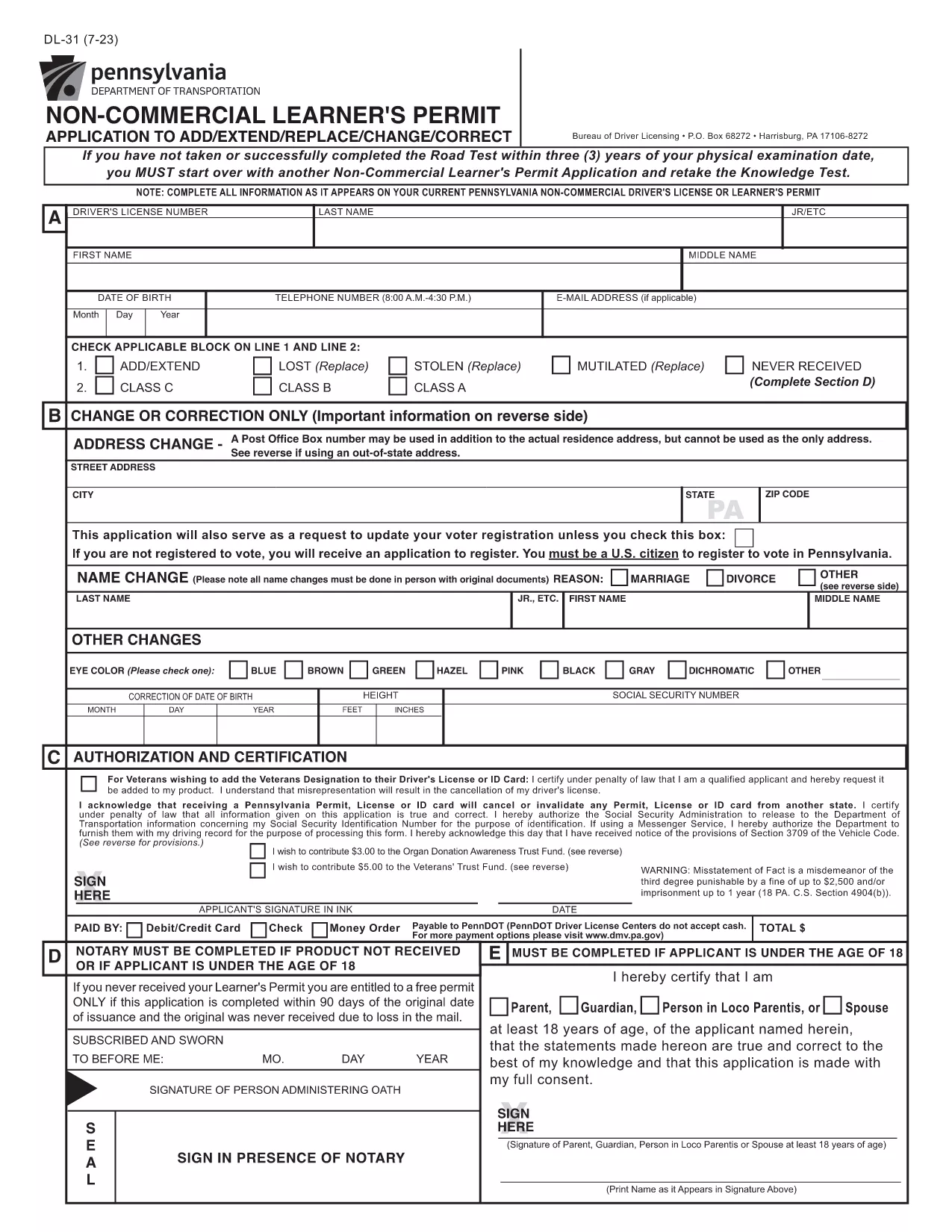
The DL-31 is Pennsylvania's official application for a non‑commercial learner's permit. Whether you’re a new driver or need to add/extend a permit, this fillable PDF lets you complete the form quickly and accurately.

What Is the DL-31 Form?

The DL-31 is issued by the Pennsylvania Department of Transportation (PennDOT). It captures personal details, residency, and eligibility information required before you can take the knowledge test.

How to Fill Out the DL-31 Online with Formize

Instead of downloading, printing, and scanning, simply click the "Fill out this form" button on our page. The Formize PDF Filler app will load in your browser, allowing you to type directly into each field.

Key Sections & Required Information

  • Applicant Information – Full name, date of birth, Social Security Number.
  • Residency – Current Pennsylvania address and out‑of‑state address exceptions.
  • Eligibility – Confirmation of age, vision test, and any prior permits.
  • Signature – Electronic signature field for applicant and parent/guardian (if under 18).

Common Mistakes to Avoid

  • Leaving the "Out‑of‑State Address" box unchecked when it applies.
  • Using an outdated address that does not match your driver’s license.
  • Forgetting to attach a copy of your birth certificate or passport if required.
  • Skipping the electronic signature – the form will be rejected.

Where to Submit Your Completed Form

After you finish, download the completed PDF and bring it to any PennDOT Driver License Center along with the required identification documents and payment.

Need the official PDF? Click the button below to open the fillable version instantly.

자주하는 질문
  • Do I need to print the DL-31 form after filling it online?

    No. The Formize PDF Filler lets you complete, sign, and download the PDF digitally. Print only if your local PennDOT office specifically requires a hard copy.

  • Can I submit the DL-31 form electronically?

    PennDOT currently requires a printed copy with supporting documents. Use the filled PDF to print and bring it to a Driver License Center.

  • What identification documents do I need with the DL-31?

    A valid photo ID (e.g., passport or PA driver’s license), proof of Social Security number, and two proofs of Pennsylvania residency.

  • Is the DL-31 form free to download?

    Yes. The official PDF is provided by the Commonwealth of Pennsylvania at no cost.

  • How long is a learner’s permit valid in Pennsylvania?

    A non‑commercial learner’s permit is valid for 6 months from the date of issuance, provided you meet all renewal requirements.

  • Can a parent or guardian sign the DL-31 for a minor?

    Yes. If the applicant is under 18, a parent or legal guardian must sign the designated section.

  • What if I make a mistake after downloading the completed form?

    You can reopen the PDF in the Formize filler, edit the fields, and download a corrected version before printing.

어떻게

4개의 간단한 단계를 통해 온라인으로 DL-31를 무료로 작성하는 방법:

  1. 1
    Click the Fill‑out Button
    On the page, press the "Fill out this form" button. The Formize PDF Filler will open in a new tab.
  2. 2
    Wait for the Filler to Load
    The app loads the DL-31 PDF and makes every field editable. No extra software is needed.
  3. 3
    Enter Your Information
    Complete each section—personal data, address, eligibility, and signature—using your keyboard.
  4. 4
    Review, Sign & Download
    Double‑check the entries, add your electronic signature, then click "Download" to save the finished form.
Formize PDF 필러 앱
에 대한

운전 면허증 신청서

DL-31은(는) 개인이 공공 도로에서 자동차를 운전할 수 있도록 허용하는 공식 정부 발급 문서인 운전 면허증을 취득하거나 갱신하는 과정에서 사용되는 문서인 운전 면허증 양식 중 하나입니다. 이러한 양식은 관할권에 따라 다를 수 있지만 일반적으로 다음이 포함됩니다.

신청 양식: 이 양식은 운전 면허증을 신청하는 데 사용되며 일반적으로 이름, 주소, 생년월일, 사회 보장 번호와 같은 개인 정보를 요구합니다.

신분증 서류: 개인은 일반적으로 신청서와 함께 자신의 신원, 거주지 및 국가 내 법적 존재를 증명하는 특정 신분증을 제공해야 합니다. 여기에는 유효한 여권, 출생 증명서, 사회 보장 카드 또는 기타 정부 발행 신분증이 포함될 수 있습니다.

거주 증명서: 많은 관할권에서는 신청자에게 주소 확인을 위해 공과금 청구서, 임대 계약서, 은행 명세서 등 거주 증명서를 제출하도록 요구합니다.

건강 검진 양식: 일부 관할권에서는 신청자가 안전 운전에 필요한 신체적, 정신적 요구 사항을 충족하는지 확인하기 위해 건강 검진을 요구할 수 있습니다. 일반적으로 의료 전문가가 이 양식을 작성합니다.

운전자 교육 이수 양식: 초보 운전자의 경우 운전자 교육 프로그램을 이수해야 할 수도 있습니다. 운전 면허증을 신청하려면 성공적인 이수를 나타내는 양식이나 증명서가 필요한 경우가 많습니다.

시력 테스트 양식: 시력 테스트는 일반적으로 운전면허 신청 과정에서 실시됩니다. 안과 전문의 또는 승인된 직원이 신청자의 시력을 평가하고 필수 양식을 작성합니다.

이러한 양식은 일반적으로 지역 자동차 관리국(DMV) 또는 운전 면허를 담당하는 동등한 정부 기관에서 구할 수 있습니다. 귀하의 관할권에 적용되는 특정 요구 사항과 양식은 다를 수 있으므로 확인하는 것이 중요합니다.

특징

PDF 필러

온라인에서 PDF 양식을 채우는 가장 쉬운 방법

  • DL-31를 빠르게 작성하세요.
    온라인에서 DL-31을(를) 빠르게 채우는 방법을 찾고 계십니까? 온라인 무료 PDF 양식 필러를 사용하면 1분 이내에 이 PDF 문서를 편집하고 채우는 방법을 알 수 있습니다.
  • 사용하기 쉬운 온라인 PDF 편집기
    다시 스캔하여 다시 보내기 전에 편집할 수 있도록 PDF 파일을 인쇄하는 데 지쳤습니까? 온라인에서 무료로 PDF 문서를 편집하세요. 온라인 PDF 편집기를 사용하여 시간과 종이를 절약하십시오.
  • 훌륭한 도구, 모든 플랫폼
    Mac에서 DL-31를 채우는 방법이나 PDF 필러를 무료로 사용하는 방법이 궁금하십니까? 당사의 온라인 PDF 도구는 모든 플랫폼에서 작동합니다.
  • 안전한 파일 저장
    완료된 "DL-31" 파일은 Amazon 클라우드 호스팅에서 관리하는 보안 데이터베이스에 저장됩니다. 언제든지 시스템에서 파일을 삭제할 수 있습니다. 어쨌든 이러한 파일은 24시간 후에 자동으로 삭제됩니다.
  • DL-31님과 채팅
    무료 PDF 리더 도우미인 Chatize에서 "DL-31"와 채팅하세요. "DL-31"에서 질문하고 답변을 받으세요. 위의 문서와 채팅 버튼을 클릭하세요.

필링 세션 삭제

선택한 필링 세션을 삭제하시겠습니까?이 경우 양식 작성 진행 상황이 손실됩니다.

편집 세션 삭제

선택한 편집 세션을 삭제하시겠습니까? 이 경우 양식 작성 및 편집 진행 상황이 손실됩니다.