
Ընտրել լեզուն

Form 1040 Schedule F (SP) – Fillable PDF Download

  1. Երկիր ԱՄՆ
  2. Լեզու Անգլերեն
  3. Գործունեություն Հարկեր
  4. բաժին IRS
Form 1040 Schedule F (SP) – Fillable PDF Download

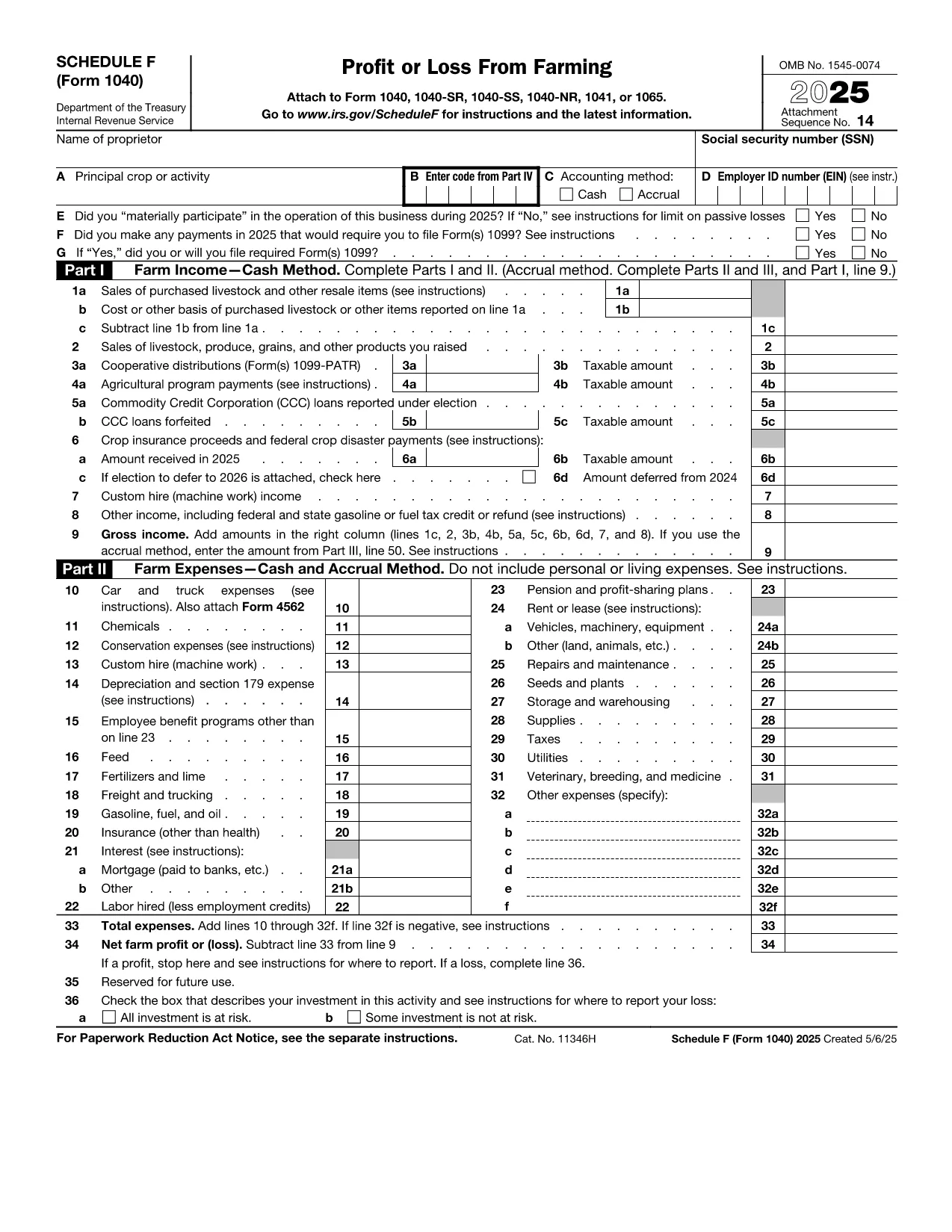
Schedule F (Form 1040) is the IRS worksheet used to report farm income and expenses. Whether you’re a sole‑proprietor farmer, a spouse filing jointly, or a farm partnership reporting on a personal return, the fillable PDF lets you complete the form quickly and accurately.

What Is Schedule F (Form 1040)?

Schedule F captures the profit or loss from farming activities. It includes sections for cash receipts, cost of goods sold, farm expenses, and depreciation. The totals flow to line 13 of your Form 1040, affecting your adjusted gross income.

Who Must File Schedule F?

  • Individuals who operate a farm as a sole proprietorship.
  • Spouses filing jointly where one or both run a farm.
  • Farmers who receive income from livestock, crops, dairy, or agricultural services.
  • Anyone who wants to claim farm‑related deductions such as feed, seed, fertilizer, and equipment.

How to Fill Out Schedule F Online with Formize

Instead of downloading the PDF and opening a desktop editor, simply click the “Fill out this form” button on the page. The Formize PDF Filler app loads in your browser, turning the PDF into an interactive, fillable document.

Common Mistakes to Avoid on Schedule F

  • Mixing personal and farm expenses: Keep receipts separate and only claim expenses directly related to farming.
  • Incorrect cost of goods sold (COGS) calculations: Use the unit‑livestock‑price or farm‑price method as instructed on lines 47‑49.
  • Omitting depreciation: Depreciate machinery, buildings, and livestock according to IRS tables.
  • Failing to sign: The form requires your signature (and your spouse’s, if filing jointly) before submission.

Download the Fillable Schedule F PDF

Click the button below to open the fillable Schedule F (Form 1040) directly in Formize. No software download needed – just a secure, browser‑based editor.

Fill out this form

ՀՏՀ
  • Do I need a separate PDF for Schedule F if I already have Form 1040?

    Yes. Schedule F is a separate attachment to Form 1040. The fillable PDF includes all required fields and can be saved together with your completed Form 1040.

  • Can I file Schedule F electronically?

    Most tax software accepts the electronic version of Schedule F. After filling it out with Formize, you can upload the PDF to your e‑file provider.

  • What is the “unit‑livestock‑price” method?

    It’s a method for valuing inventory on lines 47‑49. You multiply the number of units (e.g., head of cattle) by the market price per unit, then compare to the previous year’s value.

  • Is the fillable PDF free to use?

    Yes. Formize provides a free, secure online editor for this IRS PDF. No subscription or download is required.

  • What if I make a mistake after saving?

    You can reopen the saved PDF in Formize, edit the fields, and re‑save. The PDF remains fully editable until you submit it to the IRS.

  • Do I need to attach Schedule F if I have a loss?

    Yes. Even a loss must be reported on Schedule F; the loss will offset other income on your Form 1040.

ԻՆՉՊԵՍ

Ինչպես լրացնել Form 1040 Schedule F-ն անվճար, առցանց՝ 4 հեշտ քայլերով.

  1. 1
    Open the Fillable Form
    Click the “Fill out this form” button above. The Formize PDF Filler loads in a new browser tab.
  2. 2
    Enter Your Farm Information
    Start with the top of the form – name, SSN, and filing status – then fill in cash receipts, COGS, and each expense line.
  3. 3
    Review Calculations
    The filler automatically adds totals for you. Double‑check lines 44‑50 for correct cost‑of‑goods‑sold calculations.
  4. 4
    Sign and Save
    Use the built‑in signature field to sign electronically, then download the completed PDF or save it to your device.
Ձևավորել PDF Filler հավելվածը
ՄԱՍԻՆ

Հարկային ձևեր

Form 1040 Schedule F-ը հարկային ձևերից մեկն է, որն օգտագործվում է համապատասխան հարկային մարմնին հարկերի հետ կապված տեղեկատվությունը զեկուցելու համար: Կան տարբեր տեսակի հարկային ձևեր, ներառյալ դաշնային, նահանգային և տեղական հարկային ձևերը, որոնք կարող են տարբեր լինել՝ կախված հարկ վճարողի հանգամանքներից և գտնվելու վայրից:

ՀԱՏԿՈՒԹՅՈՒՆՆԵՐ

PDF լցոնիչ

Առցանց Form 1040 Schedule F-ը լրացնելու ամենահեշտ ձևը

  • Արագ լրացրեք Form 1040 Schedule F
    Փնտրու՞մ եք միջոց՝ արագորեն լրացնելու Form 1040 Schedule F առցանց: Մեր առցանց անվճար PDF ձևաթուղթ լրացնողի միջոցով դուք կիմանաք, թե ինչպես խմբագրել և լրացնել այս pdf փաստաթուղթը մեկ րոպեից պակաս ժամանակում:
  • Հեշտ օգտագործման առցանց PDF խմբագիր
    Հոգնե՞լ եք PDF ֆայլեր տպելուց, որպեսզի կարողանաք դրանք խմբագրել, նախքան նորից սկանավորելը և հետ ուղարկելը: Խմբագրել PDF փաստաթղթերը անվճար առցանց: Օգտագործեք մեր առցանց pdf խմբագրիչը ժամանակ և թուղթ խնայելու համար:
  • Հիանալի գործիքներ, բոլոր հարթակներ
    Զարմանում եք, թե ինչպես լրացնել Form 1040 Schedule F-ը Mac-ում, կամ գուցե ինչպես անվճար օգտագործել PDF լցոնիչը: Մեր առցանց PDF գործիքներն աշխատում են բոլոր հարթակներում:
  • Անվտանգ ֆայլերի պահպանում
    Ավարտված «Form 1040 Schedule F» ֆայլերը պահվում են պաշտպանված տվյալների բազայում, որը կառավարվում է Amazon Cloud հոսթինգի կողմից: Ցանկացած ժամանակ կարող եք ջնջել ձեր ֆայլերը մեր համակարգից: Ամեն դեպքում, այս ֆայլերը ավտոմատ կերպով ջնջվում են 24 ժամ հետո:
  • Զրուցեք Form 1040 Schedule F-ի հետ
    Զրուցեք «Form 1040 Schedule F»-ի հետ Chatize-ում, որը PDF ընթերցողի անվճար օգնական է: Հարցեր տվեք և ստացեք պատասխաններ «Form 1040 Schedule F»-ից։ Պարզապես սեղմեք վերևում գտնվող Զրույց փաստաթղթի հետ կոճակը:

Ջնջել լրացման նիստը

Ջնջե՞լ ընտրված լրացման աշխատաշրջանը: Այս դեպքում ձևը լրացնելու ձեր առաջընթացը կկորչի:

Ջնջել խմբագրման նիստը

Ջնջե՞լ ընտրված խմբագրման աշխատաշրջանը: Այս դեպքում ձևը ստեղծելու և խմբագրելու ձեր առաջընթացը կկորչի: