Pilih bahasa

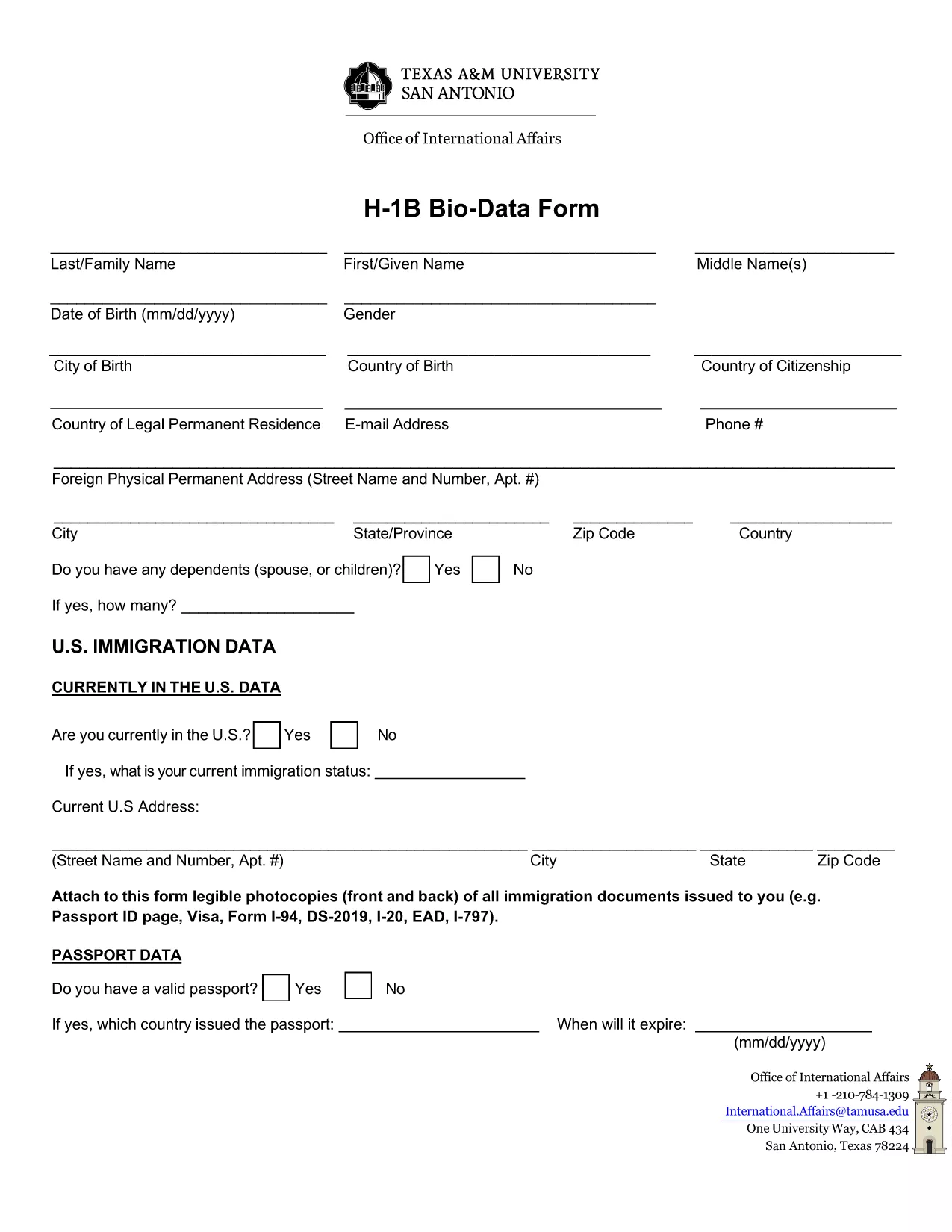
H‑1B Bio‑Data Application Form – Fillable PDF Online

  1. Bahasa Bahasa inggris
  2. Negara Amerika Serikat
  3. Aktivitas Imigrasi
  4. Departemen International Affairs
H‑1B Bio‑Data Application Form – Fillable PDF Online

The H‑1B Bio‑Data Application Form is required by Texas A&M University‑San Antonio’s International Affairs office for students and professionals applying for a work‑based visa. The form collects personal details, travel history, and residency information that U.S. immigration officials need to process your request.

What Is the H‑1B Bio‑Data Form?

This fillable PDF captures:

  • Full name, address, and contact information
  • Passport and visa details
  • Travel dates outside the United States
  • Purpose of travel and residency status

All fields are mandatory unless marked optional, ensuring a complete submission the first time.

Why Use the Formize Online PDF Filler?

Formize lets you complete the PDF directly in your browser—no Adobe Acrobat or other editor required. Benefits include:

  • Instant loading: Click "Fill out this form" and the Formize PDF Filler app appears within seconds.
  • Auto‑save: Your entries are saved locally as you type, preventing data loss.
  • Secure: All data stays on your device; Formize does not store personal information.
  • Printable output: Download a fully‑filled PDF ready for submission.

Step‑by‑Step Guide to Complete the Form

Follow these simple steps to submit a flawless bio‑data application:

  1. Click the Fill out this form button below.
  2. Wait for the Formize PDF Filler to load (usually < 5 seconds).
  3. Enter your information in each field. Use the tab key to move quickly.
  4. Review the form for completeness—required fields are highlighted in red if left empty.
  5. When finished, click Save & Download to get a PDF copy you can email or print.

Common Mistakes to Avoid

  • Leaving required fields blank: The form will not submit if any required field is empty.
  • Using outdated passport numbers: Verify the number matches your current passport.
  • Incorrect date formats: Use MM/DD/YYYY as shown in the placeholder.
  • Skipping the travel‑history section: Even short trips must be listed.

Where to Find Help and Additional Resources

If you have questions about the H‑1B Bio‑Data Form, contact the International Affairs office at Texas A&M‑San Antonio. Their staff can clarify visa categories, document requirements, and submission deadlines.

Ready to start? Click the button below and fill the form instantly.

FAQ
  • Do I need Adobe Acrobat to fill this form?

    No. The Formize PDF Filler works in any modern browser—no additional software is required.

  • Can I save my progress and finish later?

    Yes. Use the browser’s "Save As" feature to download a partially‑filled PDF and reopen it later in Formize.

  • Is the information I enter stored on Formize servers?

    No. All data stays on your device; Formize only provides the editing interface.

  • What file format will I receive after completing the form?

    You will download a fully‑filled PDF that looks exactly like the original form.

  • What should I do if a field is not accepting my input?

    Make sure you are using the correct format (e.g., dates as MM/DD/YYYY) and that the field is not marked as read‑only.

  • Can I print the completed form directly from the browser?

    Yes. After saving the PDF, open it in any PDF viewer and print using the standard print dialog.

  • Is there a fee to use the Formize PDF Filler?

    No. Formize provides a free online filler for this public PDF form.

BAGAIMANA CARANYA

Cara mengisi H-1B bio data form gratis secara online dalam 4 langkah mudah:

  1. 1
    Open the Fillable Form
    Click the "Fill out this form" button on the page. The Formize PDF Filler loads instantly in your browser.
  2. 2
    Enter Your Information
    Type directly into each field. Use the tab key to move quickly between sections.
  3. 3
    Review and Save
    Check that all required fields are completed, then click "Save & Download" to get a finished PDF.
  4. 4
    Submit Your Application
    Email or print the downloaded PDF and send it to the Texas A&M International Affairs office as instructed.
Bentuk aplikasi Pengisi PDF
TENTANG

kerangka H-1B bio data form

Dengan serangkaian fitur tradisional untuk melihat dan mengisi dokumen PDF, dipadukan dengan manfaat aplikasi web dan tata letak responsif, Anda dapat menyelesaikan H-1B bio data form dalam hitungan menit.

FITUR

Pengisi PDF

Cara termudah untuk mengisi formulir PDF secara online

  • Isi H-1B bio data form dengan cepat
    Mencari cara mengisi H-1B bio data form dengan cepat secara online? Dengan pengisi formulir PDF online gratis kami, Anda akan tahu cara mengedit dan mengisi dokumen pdf ini dalam waktu kurang dari satu menit.
  • Editor PDF online yang mudah digunakan
    Muak dengan mencetak file PDF sehingga Anda dapat mengeditnya, sebelum memindai ulang dan mengirimnya kembali? Edit dokumen PDF secara online gratis. Gunakan editor pdf online kami untuk menghemat waktu dan kertas.
  • Alat hebat, semua platform
    Ingin tahu cara mengisi H-1B bio data form di Mac, atau mungkin cara menggunakan pengisi PDF gratis? Alat PDF online kami berfungsi di semua platform.
  • Penyimpanan file yang aman
    File "H-1B bio data form" yang telah selesai disimpan dalam database aman yang dikelola oleh hosting Amazon Cloud. Anda dapat menghapus file Anda dari sistem kami kapan saja. Bagaimanapun, file-file ini secara otomatis dihapus setelah 24 jam.
  • Ngobrol dengan H-1B bio data form
    Ngobrol dengan "H-1B bio data form" di Chatize yang merupakan asisten pembaca PDF gratis. Ajukan pertanyaan dan dapatkan jawaban dari "H-1B bio data form". Cukup klik tombol Chat Dengan Dokumen di atas.

Hapus sesi pengisian

Hapus sesi pengisian yang dipilih? Dalam hal ini, kemajuan Anda dalam menyelesaikan formulir akan hilang.

Hapus sesi pengeditan

Hapus sesi pengeditan yang dipilih? Dalam hal ini, kemajuan Anda dalam membuat dan mengedit formulir akan hilang.