زبان را انتخاب کنید

H‑1B Bio‑Data Application Form – Fillable PDF Online

  1. زبان انگلیسی
  2. کشور ایالات متحده آمریکا
  3. فعالیت مهاجرت
  4. بخش International Affairs
این فرم را پر کنید
H‑1B Bio‑Data Application Form – Fillable PDF Online

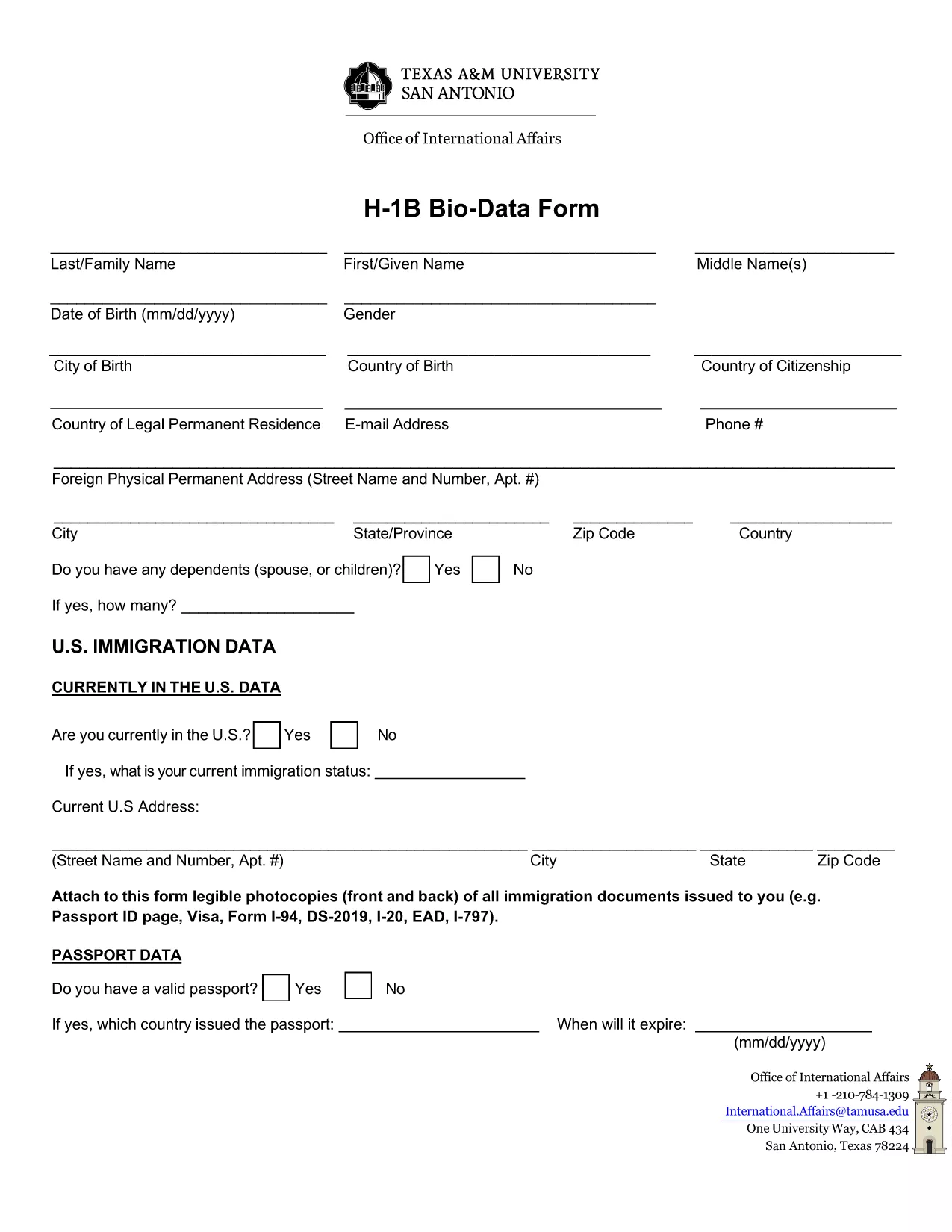
The H‑1B Bio‑Data Application Form is required by Texas A&M University‑San Antonio’s International Affairs office for students and professionals applying for a work‑based visa. The form collects personal details, travel history, and residency information that U.S. immigration officials need to process your request.

What Is the H‑1B Bio‑Data Form?

This fillable PDF captures:

  • Full name, address, and contact information
  • Passport and visa details
  • Travel dates outside the United States
  • Purpose of travel and residency status

All fields are mandatory unless marked optional, ensuring a complete submission the first time.

Why Use the Formize Online PDF Filler?

Formize lets you complete the PDF directly in your browser—no Adobe Acrobat or other editor required. Benefits include:

  • Instant loading: Click "Fill out this form" and the Formize PDF Filler app appears within seconds.
  • Auto‑save: Your entries are saved locally as you type, preventing data loss.
  • Secure: All data stays on your device; Formize does not store personal information.
  • Printable output: Download a fully‑filled PDF ready for submission.

Step‑by‑Step Guide to Complete the Form

Follow these simple steps to submit a flawless bio‑data application:

  1. Click the Fill out this form button below.
  2. Wait for the Formize PDF Filler to load (usually < 5 seconds).
  3. Enter your information in each field. Use the tab key to move quickly.
  4. Review the form for completeness—required fields are highlighted in red if left empty.
  5. When finished, click Save & Download to get a PDF copy you can email or print.

Common Mistakes to Avoid

  • Leaving required fields blank: The form will not submit if any required field is empty.
  • Using outdated passport numbers: Verify the number matches your current passport.
  • Incorrect date formats: Use MM/DD/YYYY as shown in the placeholder.
  • Skipping the travel‑history section: Even short trips must be listed.

Where to Find Help and Additional Resources

If you have questions about the H‑1B Bio‑Data Form, contact the International Affairs office at Texas A&M‑San Antonio. Their staff can clarify visa categories, document requirements, and submission deadlines.

Ready to start? Click the button below and fill the form instantly.

سوالات متداول
  • Do I need Adobe Acrobat to fill this form?

    No. The Formize PDF Filler works in any modern browser—no additional software is required.

  • Can I save my progress and finish later?

    Yes. Use the browser’s "Save As" feature to download a partially‑filled PDF and reopen it later in Formize.

  • Is the information I enter stored on Formize servers?

    No. All data stays on your device; Formize only provides the editing interface.

  • What file format will I receive after completing the form?

    You will download a fully‑filled PDF that looks exactly like the original form.

  • What should I do if a field is not accepting my input?

    Make sure you are using the correct format (e.g., dates as MM/DD/YYYY) and that the field is not marked as read‑only.

  • Can I print the completed form directly from the browser?

    Yes. After saving the PDF, open it in any PDF viewer and print using the standard print dialog.

  • Is there a fee to use the Formize PDF Filler?

    No. Formize provides a free online filler for this public PDF form.

چگونه

نحوه پر کردن H-1B bio data form به صورت رایگان و آنلاین در 4 با مراحل آسان:

  1. 1
    Open the Fillable Form
    Click the "Fill out this form" button on the page. The Formize PDF Filler loads instantly in your browser.
  2. 2
    Enter Your Information
    Type directly into each field. Use the tab key to move quickly between sections.
  3. 3
    Review and Save
    Check that all required fields are completed, then click "Save & Download" to get a finished PDF.
  4. 4
    Submit Your Application
    Email or print the downloaded PDF and send it to the Texas A&M International Affairs office as instructed.
برنامه PDF Filler را فرم‌بندی کنید
در باره

قالب H-1B bio data form

با مجموعه‌ای از ویژگی‌های سنتی برای مشاهده و پر کردن یک سند PDF، همراه با مزایای یک برنامه وب و طرح‌بندی واکنش‌گرا، می‌توانید H-1B bio data form را در چند دقیقه تکمیل کنید.

امکانات

پرکننده PDF

ساده ترین راه برای پر کردن فرم های PDF به صورت آنلاین

  • به سرعت H-1B bio data form را پر کنید
    به دنبال راهی برای پر کردن سریع H-1B bio data form آنلاین هستید؟ با پرکننده فرم PDF رایگان آنلاین ما، می‌دانید چگونه این سند pdf را در کمتر از یک دقیقه ویرایش و پر کنید.
  • آسان برای استفاده از ویرایشگر PDF آنلاین
    آیا از چاپ فایل‌های پی‌دی‌اف خسته شده‌اید تا بتوانید آن‌ها را قبل از اسکن مجدد و ارسال مجدد، ویرایش کنید؟ اسناد PDF را به صورت آنلاین به صورت رایگان ویرایش کنید. از ویرایشگر pdf آنلاین ما برای صرفه جویی در زمان و کاغذ استفاده کنید.
  • ابزارهای عالی، همه پلتفرم ها
    آیا نمی دانید که چگونه H-1B bio data form را در مک پر کنید، یا شاید چگونه از پرکننده PDF به صورت رایگان استفاده کنید؟ ابزارهای PDF آنلاین ما روی همه پلتفرم ها کار می کنند.
  • ذخیره سازی امن فایل
    فایل‌های تکمیل‌شده «H-1B bio data form» در یک پایگاه داده ایمن که توسط میزبانی ابری آمازون مدیریت می‌شود، ذخیره می‌شوند. شما می توانید فایل های خود را در هر زمان از سیستم ما حذف کنید. در هر صورت این فایل ها پس از 24 ساعت به صورت خودکار پاک می شوند.
  • چت با H-1B bio data form
    با «H-1B bio data form» در Chatize که یک دستیار PDF خوان رایگان است، گپ بزنید. سوال بپرسید و از "H-1B bio data form" پاسخ بگیرید. فقط روی دکمه Chat With Document در بالا کلیک کنید.

حذف جلسه پر کردن

جلسه پر کردن انتخاب شده را حذف کنید؟ در این صورت پیشرفت شما در تکمیل فرم از بین خواهد رفت.

حذف جلسه ویرایش

جلسه ویرایش انتخابی حذف شود؟ در این صورت پیشرفت شما در ایجاد و ویرایش فرم از بین خواهد رفت.