

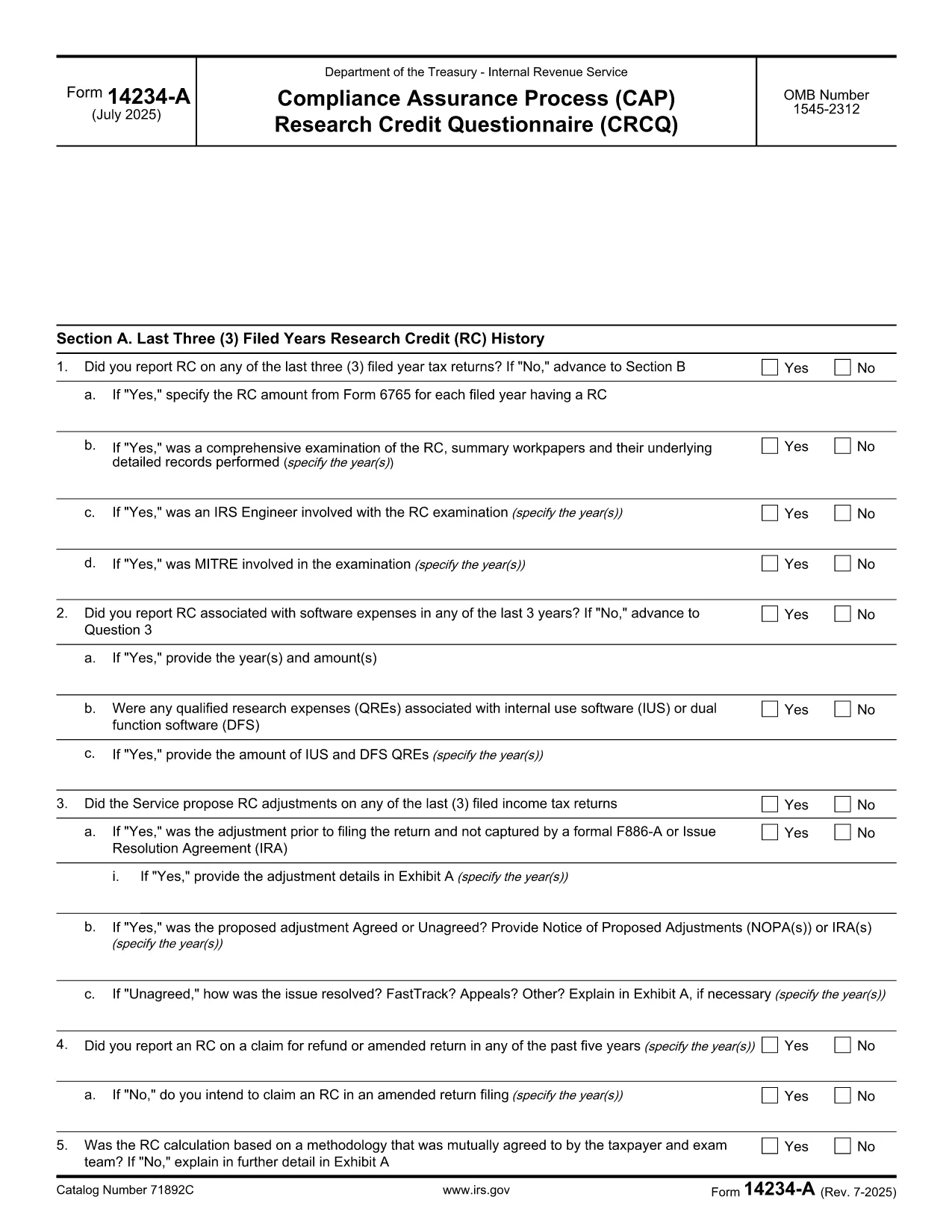

საგადასახადო ფორმები
Form 14234-A არის ერთ-ერთი საგადასახადო ფორმა, რომელიც წარმოადგენს დოკუმენტებს, რომლებიც გამოიყენება შემოსავლის, გამოქვითვისა და საგადასახადო ვალდებულების შესატყობინებლად შესაბამის საგადასახადო ორგანოში. ეს ფორმები წარმოადგენს საგადასახადო შეტანის პროცესის არსებით ნაწილს და გამოიყენება იმისთვის, რომ უზრუნველყონ ფიზიკური პირები და ბიზნესი შეასრულონ საგადასახადო კანონმდებლობა და ზუსტად გამოთვალონ თავიანთი საგადასახადო ვალდებულებები.
საჭირო კონკრეტული საგადასახადო ფორმები შეიძლება განსხვავდებოდეს ისეთი ფაქტორების მიხედვით, როგორიცაა პიროვნების განაცხადის სტატუსი, შემოსავლის წყარო და ქვეყნის საგადასახადო კანონმდებლობა. თუმცა, აქ მოცემულია საგადასახადო ფორმების რამდენიმე გავრცელებული ტიპი:
ინდივიდუალური საშემოსავლო გადასახადის ფორმები: ეს ფორმები, როგორიცაა 1040 სერია შეერთებულ შტატებში გამოიყენება ფიზიკური პირების მიერ თავიანთი შემოსავალის შესახებ, გამოქვითვებისა და კრედიტების მოთხოვნით და მათი საგადასახადო ვალდებულების გამოთვლა.
ბიზნესის საგადასახადო ფორმები: ბიზნესებს, მათ შორის ინდივიდუალურ მეწარმეებს, ამხანაგობებს, კორპორაციებს და თვითდასაქმებულ პირებს, შეიძლება მოუწიონ სხვადასხვა ფორმის წარდგენა თავიანთი შემოსავლის, ხარჯებისა და გადასახადების შესახებ. მაგალითებია განრიგი C (მოგება ან ზარალი ბიზნესიდან) და ფორმა 1120 (აშშ კორპორაციის საშემოსავლო გადასახადის დეკლარაცია).
დასაქმების საგადასახადო ფორმები: დამსაქმებლებს მოეთხოვებათ შეატყობინონ თანამშრომელთა ხელფასები და დააკავონ და გადაიხადონ სახელფასო გადასახადები. ამ მიზნით გამოიყენება ისეთი ფორმები, როგორიცაა W-2 (ხელფასი და საგადასახადო განცხადება) და 941 (დამსაქმებლის კვარტალური ფედერალური საგადასახადო დეკლარაცია).
ინვესტიციისა და საპენსიო ანგარიშის ფორმები: ეს ფორმები გამოიყენება საინვესტიციო შემოსავლების, კაპიტალის მოგებისა და ზარალის, აგრეთვე საპენსიო ანგარიშებიდან შენატანებისა და განაწილების შესახებ. მაგალითებია ფორმა 1099-DIV (დივიდენდები და დისტრიბუციები) და ფორმა 5498 (IRA კონტრიბუციის ინფორმაცია).
ქონებისა და საჩუქრების გადასახადის ფორმები: როდესაც ადამიანი გარდაიცვალა ან აკეთებს მნიშვნელოვან საჩუქრებს, კონკრეტული ფორმები, როგორიცაა ფორმა 706 (შეერთებული შტატების ქონების (და თაობის გამოტოვების) საგადასახადო დეკლარაცია) და ფორმა 709 (შეერთებული შტატების საჩუქარი (და თაობა- გადარიცხვის გამოტოვება) საგადასახადო დეკლარაცია) გამოიყენება ნებისმიერი მოქმედი ქონების ან საჩუქრის გადასახადის დასაანგარიშებლად და გამოსათვლელად.
მნიშვნელოვანია აღინიშნოს, რომ საგადასახადო კანონები და ფორმები შეიძლება შეიცვალოს დროთა განმავლობაში, ამიტომ ფიზიკურმა და ბიზნესმა უნდა მიმართონ შესაბამის საგადასახადო ორგანოს ან მოიძიონ პროფესიული საგადასახადო რჩევა მიმდინარე მოთხოვნებთან შესაბამისობის უზრუნველსაყოფად.