
언어 선택

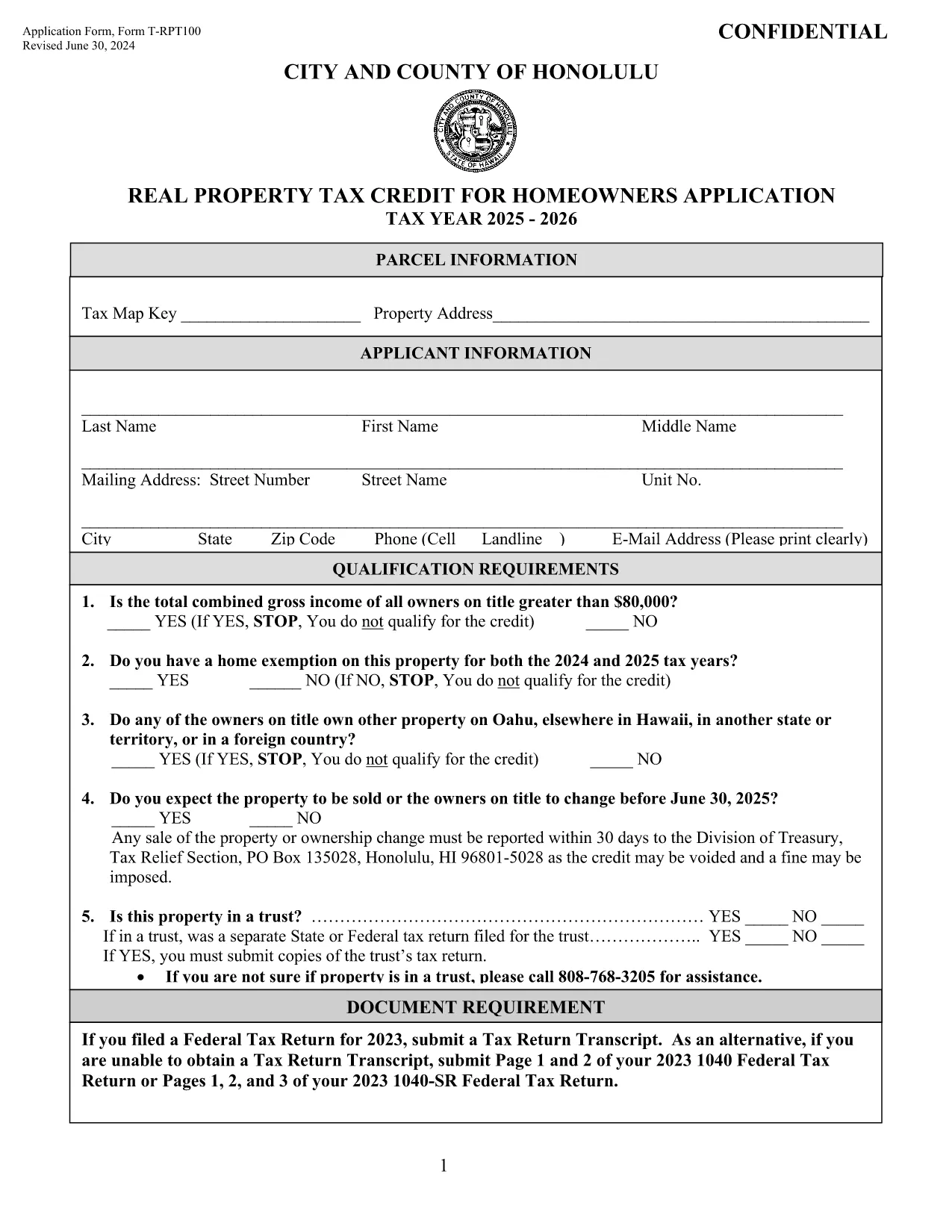
T‑RPT100 Application Form – Honolulu Real Property Tax Credit

  1. 국가 미국
  2. 언어 영어
  3. 활동 구실
  4. 부서 City and County of Honolulu
T‑RPT100 Application Form – Honolulu Real Property Tax Credit

The Application Form T‑RPT100 is the official request used by homeowners in the City and County of Honolulu to claim the Real Property Tax Credit. This credit reduces the amount of property tax you owe based on household income and residency status.

What Is the T‑RPT100 Tax Credit?

The T‑RPT100 credit is administered by the Department of Budget and Fiscal Services in Honolulu. Eligible homeowners can receive up to $1,500 in tax relief per year. The credit is recalculated each tax year, so a new application must be filed for every cycle.

How to Complete the Fillable PDF Online

Instead of downloading the PDF and editing it with a separate editor, simply click the "Fill out this form" button on this page. The Formize PDF Filler app will load the fillable version directly in your browser:

  • Step 1: Click the button to launch the Formize PDF Filler.
  • Step 2: Wait a few seconds while the fillable PDF loads.
  • Step 3: Enter your personal information, income details, and household composition.
  • Step 4: Use your mouse or finger to add a digital signature.
  • Step 5: Click Save or Download and print the completed form for submission.

Common Mistakes to Avoid

  • Leaving any required field blank – the form will be rejected.
  • Entering income figures that don’t match your tax return.
  • Forgetting to sign the form digitally or on paper.
  • Submitting an outdated version of the T‑RPT100 (always use the latest PDF).

Download the Form and Submit

If you prefer a manual download, you can access the most recent fillable PDF below. After completing the form, mail it to the address listed on the last page or submit it in person at any Honolulu City Hall office.

Need Help?

For additional guidance, review the instructions section at the top of the PDF or contact the Honolulu Budget & Fiscal Services office during regular business hours. The Formize platform also provides on‑screen tips for each field.

자주하는 질문
  • Who is eligible for the T‑RPT100 tax credit?

    Homeowners who reside in the City and County of Honolulu, meet income thresholds, and own their primary residence are eligible.

  • Can I submit the form electronically?

    The Formize platform lets you fill the PDF online, but the final submission must be printed and mailed or delivered in person.

  • How often do I need to reapply?

    A new T‑RPT100 application is required each tax year (typically annual). Use the most recent PDF for each filing period.

  • What supporting documents are required?

    Attach a copy of your most recent federal tax return, proof of residency, and any other documents listed in the instructions section.

  • What if I make a mistake after submitting?

    Contact the Honolulu Budget & Fiscal Services office immediately. You may need to submit a corrected form with a brief explanation.

  • Is there a fee to use Formize PDF Filler?

    No. Formize provides the fillable PDF for free; you only pay any mailing or printing costs.

  • Can I save my progress and finish later?

    Yes. The Formize app allows you to save a draft in your browser’s local storage before finalizing.

어떻게

5개의 간단한 단계를 통해 온라인으로 T‑RPT100를 무료로 작성하는 방법:

  1. 1
    Click the Fill‑out Button
    Press the “Fill out this form” button on this page to launch the Formize PDF Filler.
  2. 2
    Wait for the Form to Load
    The fillable PDF loads in seconds; a loading spinner will appear while the app prepares the document.
  3. 3
    Enter Your Information
    Complete every highlighted field with accurate personal, income, and household data.
  4. 4
    Add Your Digital Signature
    Use your mouse, trackpad, or finger to sign the form directly in the browser.
  5. 5
    Save or Download
    When finished, click “Save” to keep a copy in the cloud or “Download” to print and mail the form.
Formize PDF 필러 앱
에 대한

연방 세금 양식

T‑RPT100는 미국 국세청(IRS)에 연방 소득세를 보고하고 제출하는 데 사용되는 문서인 연방 세금 양식 중 하나입니다. 이 양식은 개인, 기업 및 조직이 소득, 공제 및 연방 세금 납부액 계산에 필요한 기타 관련 정보를 보고하는 데 사용됩니다.

가장 일반적으로 사용되는 연방 세금 양식은 개인 납세자가 개인 소득세를 신고하는 데 사용하는 양식 1040입니다. 일반적으로 사용되는 기타 양식으로는 파트너십을 위한 양식 1065, 양식 1120, 면세 조직의 경우 양식 990.

연방 세금 양식에서는 일반적으로 납세자가 임금, 급여, 팁 등 다양한 소득원은 물론 투자 소득, 임대 부동산 및 기타 소득원을 보고하도록 요구합니다. 또한 이 양식을 통해 납세자는 자선 기부금, 모기지 이자, 의료비 등 다양한 비용에 대해 공제 및 세액공제를 청구할 수 있습니다.

연방 세금 양식을 정확하고 제때에 제출하는 것이 중요합니다. 그렇게 하지 않으면 IRS로부터 벌금과 이자가 부과될 수 있습니다.

특징

PDF 필러

온라인에서 PDF 양식을 채우는 가장 쉬운 방법

  • T‑RPT100를 빠르게 작성하세요.
    온라인에서 T‑RPT100을(를) 빠르게 채우는 방법을 찾고 계십니까? 온라인 무료 PDF 양식 필러를 사용하면 1분 이내에 이 PDF 문서를 편집하고 채우는 방법을 알 수 있습니다.
  • 사용하기 쉬운 온라인 PDF 편집기
    다시 스캔하여 다시 보내기 전에 편집할 수 있도록 PDF 파일을 인쇄하는 데 지쳤습니까? 온라인에서 무료로 PDF 문서를 편집하세요. 온라인 PDF 편집기를 사용하여 시간과 종이를 절약하십시오.
  • 훌륭한 도구, 모든 플랫폼
    Mac에서 T‑RPT100를 채우는 방법이나 PDF 필러를 무료로 사용하는 방법이 궁금하십니까? 당사의 온라인 PDF 도구는 모든 플랫폼에서 작동합니다.
  • 안전한 파일 저장
    완료된 "T‑RPT100" 파일은 Amazon 클라우드 호스팅에서 관리하는 보안 데이터베이스에 저장됩니다. 언제든지 시스템에서 파일을 삭제할 수 있습니다. 어쨌든 이러한 파일은 24시간 후에 자동으로 삭제됩니다.
  • T‑RPT100님과 채팅
    무료 PDF 리더 도우미인 Chatize에서 "T‑RPT100"와 채팅하세요. "T‑RPT100"에서 질문하고 답변을 받으세요. 위의 문서와 채팅 버튼을 클릭하세요.

필링 세션 삭제

선택한 필링 세션을 삭제하시겠습니까?이 경우 양식 작성 진행 상황이 손실됩니다.

편집 세션 삭제

선택한 편집 세션을 삭제하시겠습니까? 이 경우 양식 작성 및 편집 진행 상황이 손실됩니다.