
Ընտրել լեզուն

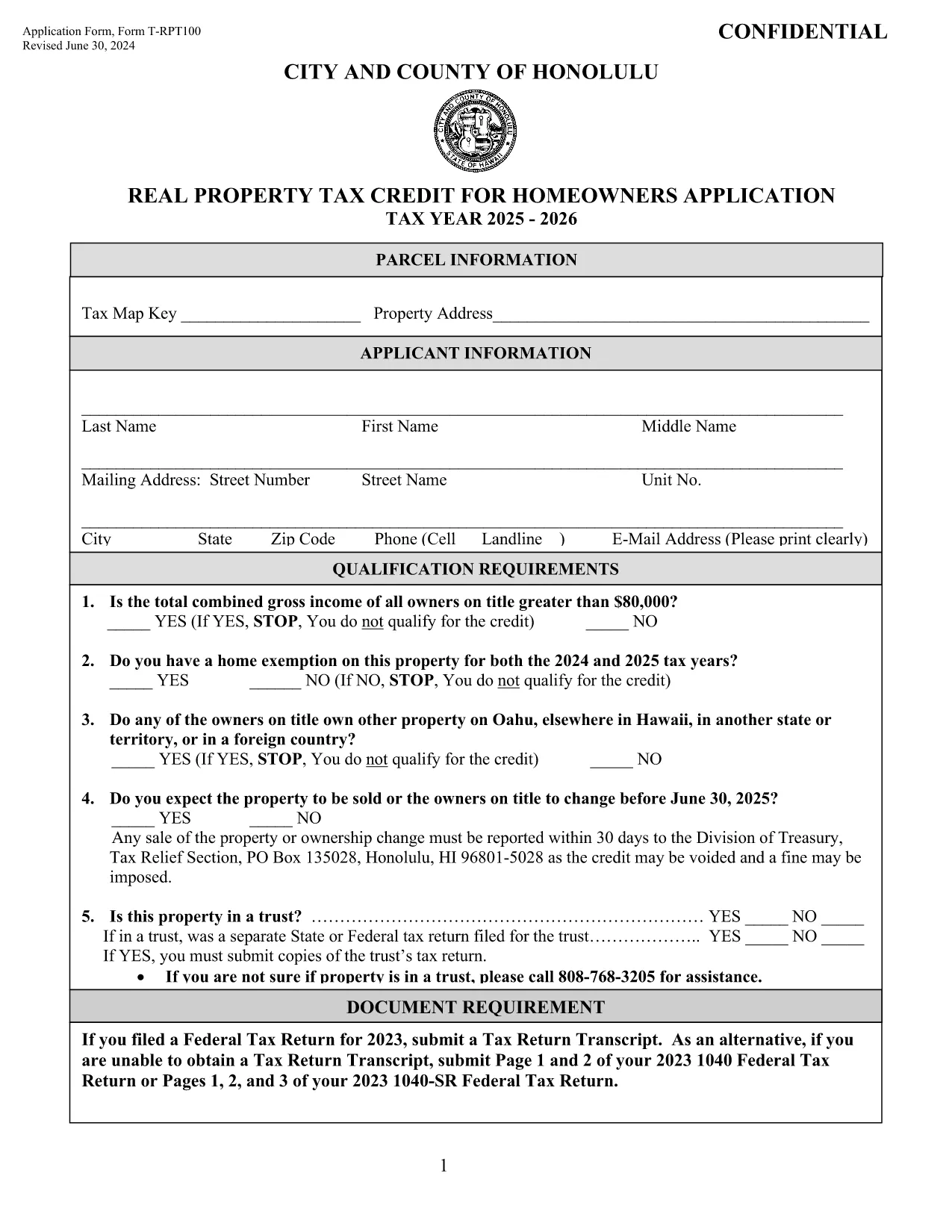
T‑RPT100 Application Form – Honolulu Real Property Tax Credit

  1. Երկիր ԱՄՆ
  2. Լեզու Անգլերեն
  3. Գործունեություն Հարկեր
  4. բաժին City and County of Honolulu
T‑RPT100 Application Form – Honolulu Real Property Tax Credit

The Application Form T‑RPT100 is the official request used by homeowners in the City and County of Honolulu to claim the Real Property Tax Credit. This credit reduces the amount of property tax you owe based on household income and residency status.

What Is the T‑RPT100 Tax Credit?

The T‑RPT100 credit is administered by the Department of Budget and Fiscal Services in Honolulu. Eligible homeowners can receive up to $1,500 in tax relief per year. The credit is recalculated each tax year, so a new application must be filed for every cycle.

How to Complete the Fillable PDF Online

Instead of downloading the PDF and editing it with a separate editor, simply click the "Fill out this form" button on this page. The Formize PDF Filler app will load the fillable version directly in your browser:

  • Step 1: Click the button to launch the Formize PDF Filler.
  • Step 2: Wait a few seconds while the fillable PDF loads.
  • Step 3: Enter your personal information, income details, and household composition.
  • Step 4: Use your mouse or finger to add a digital signature.
  • Step 5: Click Save or Download and print the completed form for submission.

Common Mistakes to Avoid

  • Leaving any required field blank – the form will be rejected.
  • Entering income figures that don’t match your tax return.
  • Forgetting to sign the form digitally or on paper.
  • Submitting an outdated version of the T‑RPT100 (always use the latest PDF).

Download the Form and Submit

If you prefer a manual download, you can access the most recent fillable PDF below. After completing the form, mail it to the address listed on the last page or submit it in person at any Honolulu City Hall office.

Need Help?

For additional guidance, review the instructions section at the top of the PDF or contact the Honolulu Budget & Fiscal Services office during regular business hours. The Formize platform also provides on‑screen tips for each field.

ՀՏՀ
  • Who is eligible for the T‑RPT100 tax credit?

    Homeowners who reside in the City and County of Honolulu, meet income thresholds, and own their primary residence are eligible.

  • Can I submit the form electronically?

    The Formize platform lets you fill the PDF online, but the final submission must be printed and mailed or delivered in person.

  • How often do I need to reapply?

    A new T‑RPT100 application is required each tax year (typically annual). Use the most recent PDF for each filing period.

  • What supporting documents are required?

    Attach a copy of your most recent federal tax return, proof of residency, and any other documents listed in the instructions section.

  • What if I make a mistake after submitting?

    Contact the Honolulu Budget & Fiscal Services office immediately. You may need to submit a corrected form with a brief explanation.

  • Is there a fee to use Formize PDF Filler?

    No. Formize provides the fillable PDF for free; you only pay any mailing or printing costs.

  • Can I save my progress and finish later?

    Yes. The Formize app allows you to save a draft in your browser’s local storage before finalizing.

ԻՆՉՊԵՍ

Ինչպես լրացնել T‑RPT100-ն անվճար, առցանց՝ 5 հեշտ քայլերով.

  1. 1
    Click the Fill‑out Button
    Press the “Fill out this form” button on this page to launch the Formize PDF Filler.
  2. 2
    Wait for the Form to Load
    The fillable PDF loads in seconds; a loading spinner will appear while the app prepares the document.
  3. 3
    Enter Your Information
    Complete every highlighted field with accurate personal, income, and household data.
  4. 4
    Add Your Digital Signature
    Use your mouse, trackpad, or finger to sign the form directly in the browser.
  5. 5
    Save or Download
    When finished, click “Save” to keep a copy in the cloud or “Download” to print and mail the form.
Ձևավորել PDF Filler հավելվածը
ՄԱՍԻՆ

Հարկային ձևեր

T‑RPT100-ը հարկային ձևերից մեկն է, որն օգտագործվում է համապատասխան հարկային մարմնին հարկերի հետ կապված տեղեկատվությունը զեկուցելու համար: Կան տարբեր տեսակի հարկային ձևեր, ներառյալ դաշնային, նահանգային և տեղական հարկային ձևերը, որոնք կարող են տարբեր լինել՝ կախված հարկ վճարողի հանգամանքներից և գտնվելու վայրից:

ՀԱՏԿՈՒԹՅՈՒՆՆԵՐ

PDF լցոնիչ

Առցանց T‑RPT100-ը լրացնելու ամենահեշտ ձևը

  • Արագ լրացրեք T‑RPT100
    Փնտրու՞մ եք միջոց՝ արագորեն լրացնելու T‑RPT100 առցանց: Մեր առցանց անվճար PDF ձևաթուղթ լրացնողի միջոցով դուք կիմանաք, թե ինչպես խմբագրել և լրացնել այս pdf փաստաթուղթը մեկ րոպեից պակաս ժամանակում:
  • Հեշտ օգտագործման առցանց PDF խմբագիր
    Հոգնե՞լ եք PDF ֆայլեր տպելուց, որպեսզի կարողանաք դրանք խմբագրել, նախքան նորից սկանավորելը և հետ ուղարկելը: Խմբագրել PDF փաստաթղթերը անվճար առցանց: Օգտագործեք մեր առցանց pdf խմբագրիչը ժամանակ և թուղթ խնայելու համար:
  • Հիանալի գործիքներ, բոլոր հարթակներ
    Զարմանում եք, թե ինչպես լրացնել T‑RPT100-ը Mac-ում, կամ գուցե ինչպես անվճար օգտագործել PDF լցոնիչը: Մեր առցանց PDF գործիքներն աշխատում են բոլոր հարթակներում:
  • Անվտանգ ֆայլերի պահպանում
    Ավարտված «T‑RPT100» ֆայլերը պահվում են պաշտպանված տվյալների բազայում, որը կառավարվում է Amazon Cloud հոսթինգի կողմից: Ցանկացած ժամանակ կարող եք ջնջել ձեր ֆայլերը մեր համակարգից: Ամեն դեպքում, այս ֆայլերը ավտոմատ կերպով ջնջվում են 24 ժամ հետո:
  • Զրուցեք T‑RPT100-ի հետ
    Զրուցեք «T‑RPT100»-ի հետ Chatize-ում, որը PDF ընթերցողի անվճար օգնական է: Հարցեր տվեք և ստացեք պատասխաններ «T‑RPT100»-ից։ Պարզապես սեղմեք վերևում գտնվող Զրույց փաստաթղթի հետ կոճակը:

Ջնջել լրացման նիստը

Ջնջե՞լ ընտրված լրացման աշխատաշրջանը: Այս դեպքում ձևը լրացնելու ձեր առաջընթացը կկորչի:

Ջնջել խմբագրման նիստը

Ջնջե՞լ ընտրված խմբագրման աշխատաշրջանը: Այս դեպքում ձևը ստեղծելու և խմբագրելու ձեր առաջընթացը կկորչի: